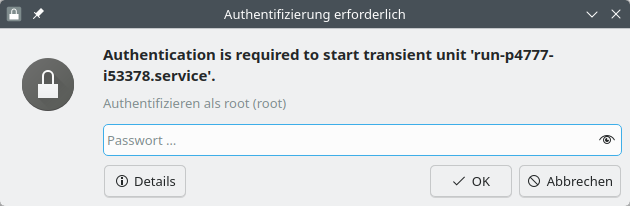
I use Linux for over 25 years, but I’ve never experienced this: When I enter the su command to get root rights for doing some operation while logged in as normal user I always had to enter the password into the console prompt, what is easy and convenient. But now I had to reinstall the computer because of lack of space in the efi partition. And now I will always be prompter by this annoying popup to enter the root passwort. On my laptop I don’t have this problem.
Thank you, that avoid this popup, but I have installed two Computers from new with Tumbleweed and I’ve never experienced such a mess. This thing with the popup (only one computer concerned) ist not the biggest problem. I was not able on both computers to install the printer using the Yast printer tool. After selecting the driver (last step) Yast just kept hanging and could only be closed forcefully.
Just one more question: what makes the difference between su and /bin/su?
Thank you for your answer. On this computer which su shows /usr/local/bin/, this a symlink to /usr/bin/run0-su.
The package that contains this is run0-wrappers. No idea what this ■■■■ is good for? To bother users?
First, you better show what you do. Post always command and all output. Thus nobody has to geuss what you did, nor if you draw conclusions that might be wrong. E.g. (on a Leap 16.0)
henk@boven:~> ls -l /usr/local/bin
total 0
henk@boven:~>
Then, in /usr/local/ should in fact be nothing installed from the official openSUSE software repos. It is a place for software that is purely “local” to that particular system and most often comes from “elsewhere”.
You may better try to find out how this file (and maybe other files) were put there. I have no idea.
That is good for using run0 in place of sudo, su etc., please see man run0
See also the README at https://github.com/thkukuk/run0-wrappers
After uninstalling the wrapper you should still be able to run e.g. run0 <command> which should show the dreaded popup, but not changing the “regular” su.