Yesterday, I updated the BIOS (ASUS Zenbook UX3405MA to version V311).
Today, I deleted some packages and then restore everything with a snapper-rollback.
I think, I don’t saw this messages after BIOS-Upgrade, but I am not sure.
Secure Boot is off. When I switch SecureBoot on, the message is gone.
The system works within normal parameters (except this message).
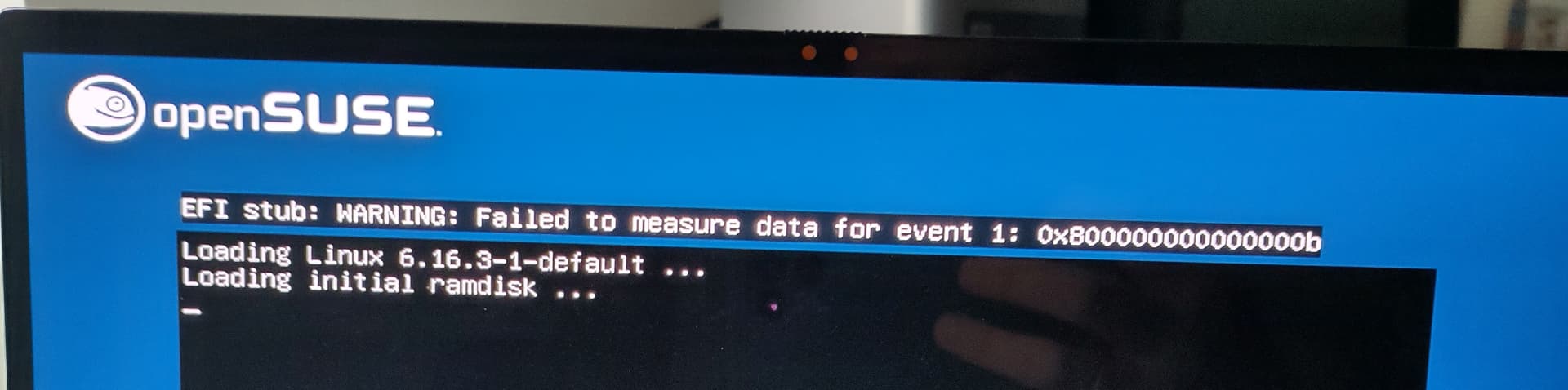
The event log is incomplete - there are no events related to kernel loading. The status 0x800000000000000b is EFI_VOLUME_FULL which according to the TCG2 specification means “The extend operation occurred, but the event could not be
written to one or more event logs.”. This matches the previous observation. Apparently there are too many events and firmware fails to store them. You are using grub which logs every command in the grub.cfg.
i was having the same issue, the fix i found was going into the BIOS and turning on secure boot then in the key managent setting of secure boot clicking the reset to setup mode option then turning secure boot off and then save and exit, if this does not work try restore to default key option.
I too have just started getting this message after recently updating my BIOS & also changing my PSU, although I don’t think that should be causing this. You seem to be on the right lines in terms of Secure Boot potentially being the issue. I think my Opensuse is set to secure boot, and the BIOS secure boot setting is set to Other OS as I have a dual boot set up with windows on a separate SSD.
I alos noticed when booting into Windows that that was complaining about some EFI file being missing or some such.
So I’m wondering if I need to change the Secure boot to the EFI setting which is for windows, although I’m not sure if Opensuse can handle windows / EFI secure boot? Although I seem to think there are some Windows Key things that get periodically updated.
Not sure this advances us towards a solution but searching this issue - seems to throw up BIOS & Secure boot as issues / solutions.
Do any more experienced user or admins know the correct setting with Windows & Opensuse together is EFI Secure boot OK to use - can Opensuse handle it?
Sorry more questions than answers.
(v2.0.14)

HSI-1
✔ SMM locked down:               Locked
✔ BIOS firmware updates:         Enabled
✔ Fused platform:                Locked
✔ Supported CPU:                 Valid
✔ TPM empty PCRs:                Valid
✔ TPM v2.0:                      Found
✔ UEFI bootservice variables:    Locked
✔ UEFI platform key:             Valid

HSI-2
✔ IOMMU:                         Enabled
✔ Platform debugging:            Locked
✔ TPM PCR0 reconstruction:       Valid
✘ SPI write protection:          Disabled

HSI-3
✔ CET Platform:                  Supported
✘ SPI replay protection:         Not supported
✘ Pre-boot DMA protection:       Disabled
✘ Suspend-to-idle:               Disabled
✘ Suspend-to-ram:                Enabled

HSI-4
✔ SMAP:                          Enabled
✘ Processor rollback protection: Disabled
✘ Encrypted RAM:                 Not supported

Runtime Suffix -!
✔ CET OS Support:                Supported
✔ fwupd plugins:                 Untainted
✔ UEFI db:                       Valid
✘ Linux kernel lockdown:         Disabled
✘ Linux swap:                    Unencrypted
✘ Linux kernel:                  Tainted
✘ UEFI secure boot:              Disabled

This system has HSI runtime issues.
 » https://fwupd.github.io/hsi.html#hsi-runtime-suffix

Host Security Events
  2025-08-27 17:27:20:  ✔ TPM v2.0 changed: Not found → Found
  2025-05-11 10:33:48:  ✔ The UEFI certificate store is now up to date
  2024-12-24 06:57:33:  ✔ CET OS Support changed: Not supported → Supported
  2024-11-17 19:21:05:  ✘ CET OS Support changed: Supported → Not supported
  2024-10-01 05:30:51:  ✔ CET OS Support changed: Not supported → Supported

Upload these anonymous results to the Linux Vendor Firmware Service to help other users? [y|N]: y
Yes I have Nvidia & it is working with Prime & switcheroo etc. not sure that makes a difference. The link in the output suggested various things wrong etc. But my system didn’t complain about this before, although it was acting weird when my PSU was playing up just before I changed it.
@jjis the only thing I would suggest is checking the system BIOS for SPI items, maybe switch to using zram for swap that will change the runtime suffix to encrypted. Else it looks fine to me…
SPI ? And I would need to reformat the swap then to do that presumably rather than just changing the suffix / file type? Would it be ok to use UEFI secure boot - would Opensuse still work with that ?- although you didn’t suggest that.
 I haven’t changed anything, at least not consciously.