No not saying you should do that as I’m not an admin / expert. Jjust saying what’s on my system after switch to opensuse repos & that it seems to be OK today - finger crossed. Maybe try another DUP as apparently there has been an update now or just wait it out further if that doesn’t work. Guess it depends what you are using the codecs for like fancy modern videos perhaps? Just doing a DUP openSUSE Tumbleweed 20260318-0 → 20260324-0 & Zypper is not complaining.
Command line is
zypper dup --no-allow-vendor-change
I have removed some packages from SuSE, which reduced the number of problems:
zypper rm libavdevice62-8.0.1-3.2.x86_64 libavfilter11-8.0.1-3.2.x86_64 libswresample6-8.0.1-3.2.x86_64 libswscale9-8.0.1-3.2.x86_64 libavutil60-8.0.1-3.2.x86_64
I don’t have vlc installed from home_plater. The only package from this repository is spotify-client:
~ # zypper pa -ir home_plater | grep "^i"
i+ | plater's Home Project (Tumbleweed) | spotify-client            | 1.2.82.428.g0ac8be2b-2.1          | x86_64
After removing the above packages the list of problems looks like this:
~ # zypper dup --no-allow-vendor-change
Loading repository data...
Reading installed packages...
Warning: You are about to do a distribution upgrade with all enabled repositories. Make sure these repositories are compatible before you continue. See 'man zypper' for more information about this command.
Computing distribution upgrade...
7 Problems:
Problem: 1: the installed x264-20250608.b35605ac-1699.1.pm.4.x86_64 requires 'libavcodec.so.62(LIBAVCODEC_62.11_SUSE)(64bit)', but this requirement cannot be provided
deleted providers: libavcodec62-8.0-1699.3.pm.9.x86_64

Problem: 2: the installed vlc-3.0.23-1699.9.pm.1.x86_64 requires 'libavformat.so.62(LIBAVFORMAT_62.3_SUSE)(64bit)', but this requirement cannot be provided
deleted providers: libavformat62-8.0-1699.3.pm.9.x86_64

Problem: 3: the installed vlc-noX-3.0.23-1699.9.pm.1.x86_64 requires 'libavutil.so.60(LIBAVUTIL_60.8_SUSE)(64bit)', but this requirement cannot be provided
deleted providers: libavutil60-8.0-1699.3.pm.9.x86_64

Problem: 4: the installed python313-libxml2-2.14.5-4.2.x86_64 requires 'libxml2-16 = 2.14.5', but this requirement cannot be provided
deleted providers: libxml2-16-2.14.5-4.1.x86_64

Problem: 5: the installed vlc-noX-3.0.23-1699.9.pm.1.x86_64 requires 'libavutil.so.60(LIBAVUTIL_60.8_SUSE)(64bit)', but this requirement cannot be provided
deleted providers: libavutil60-8.0-1699.3.pm.9.x86_64

Problem: 6: the to be installed vlc-noX-3.0.23-6.2.x86_64 requires 'libvlc5 = 3.0.23-6.2', but this requirement cannot be provided
not installable providers: libvlc5-3.0.23-6.2.x86_64[download.opensuse.org-oss]

Problem: 7: the to be installed vlc-noX-3.0.23-6.2.x86_64 requires 'libvlccore9 = 3.0.23-6.2', but this requirement cannot be provided
not installable providers: libvlccore9-3.0.23-6.2.x86_64[download.opensuse.org-oss]
At least it doesn’t try to install ffmpeg-8-mini-libsanymore… Maybe I mixed up the configuration a bit last week as I need ffmpeg8 frequently and ffmpeg didn’t work anymore after last update.
I keep a cache of the last 5 versions of all installed packages, so I can install missing packages from SuSE or packman repositories.
1 Like
I started out with the same issues as the first post. I decided to wait a couple of days and now problems have been reduced from 7 to 3…
sudo zypper dup
Looking for gpg keys in repository Main Repository (NON-OSS).
  gpgkey=http://download.opensuse.org/tumbleweed/repo/non-oss/repodata/repomd.xml.key
Retrieving repository 'Main Repository (NON-OSS)' metadata .................................................................................................................................................................................................[done]
Building repository 'Main Repository (NON-OSS)' cache ......................................................................................................................................................................................................[done]
Looking for gpg keys in repository Main Repository (OSS).
  gpgkey=http://download.opensuse.org/tumbleweed/repo/oss/repodata/repomd.xml.key
Retrieving repository 'Main Repository (OSS)' metadata .....................................................................................................................................................................................................[done]
Building repository 'Main Repository (OSS)' cache ..........................................................................................................................................................................................................[done]
Looking for gpg keys in repository google-chrome.
  gpgkey=https://dl.google.com/linux/linux_signing_key.pub
Retrieving repository 'google-chrome' metadata .............................................................................................................................................................................................................[done]
Building repository 'google-chrome' cache ..................................................................................................................................................................................................................[done]
Loading repository data...
Reading installed packages...
Warning: You are about to do a distribution upgrade with all enabled repositories. Make sure these repositories are compatible before you continue. See 'man zypper' for more information about this command.
Computing distribution upgrade...
5 Problems:
Problem: 1: the installed vlc-3.0.23-1699.9.pm.1.x86_64 requires 'libavcodec.so.62(LIBAVCODEC_62.11_SUSE)(64bit)', but this requirement cannot be provided
deleted providers: libavcodec62-8.0.1-1699.4.pm.93.x86_64

Problem: 2: the installed vlc-noX-3.0.23-1699.9.pm.1.x86_64 requires 'libavutil.so.60(LIBAVUTIL_60.8_SUSE)(64bit)', but this requirement cannot be provided
deleted providers: libavutil60-8.0.1-1699.4.pm.93.x86_64

Problem: 3: the installed vlc-noX-3.0.23-1699.9.pm.1.x86_64 requires 'libavutil.so.60(LIBAVUTIL_60.8_SUSE)(64bit)', but this requirement cannot be provided
deleted providers: libavutil60-8.0.1-1699.4.pm.93.x86_64

Problem: 4: the to be installed vlc-noX-3.0.23-6.2.x86_64 requires 'libvlc5 = 3.0.23-6.2', but this requirement cannot be provided
not installable providers: libvlc5-3.0.23-6.2.x86_64[download.opensuse.org-oss]

Problem: 5: the to be installed vlc-noX-3.0.23-6.2.x86_64 requires 'libvlccore9 = 3.0.23-6.2', but this requirement cannot be provided
not installable providers: libvlccore9-3.0.23-6.2.x86_64[download.opensuse.org-oss]


Problem: 1: the installed vlc-3.0.23-1699.9.pm.1.x86_64 requires 'libavcodec.so.62(LIBAVCODEC_62.11_SUSE)(64bit)', but this requirement cannot be provided
deleted providers: libavcodec62-8.0.1-1699.4.pm.93.x86_64

 Solution 1: Following actions will be done:
  keep obsolete libavcodec62-8.0.1-1699.4.pm.93.x86_64
  keep obsolete libswscale9-8.0.1-1699.4.pm.93.x86_64
 Solution 2: install vlc-3.0.23-6.2.x86_64 from vendor openSUSE
  replacing vlc-3.0.23-1699.9.pm.1.x86_64 from vendor http://packman.links2linux.de
 Solution 3: break vlc-3.0.23-1699.9.pm.1.x86_64 by ignoring some of its dependencies

Choose from above solutions by number or skip, retry or cancel [1/2/3/s/r/c/d/?] (c):
I have VLC installed and do play x264, x265 at times and I use Chrome + Firefox.
Temped to choose option 2 or should I just disable the packman repo and roll the dice again?
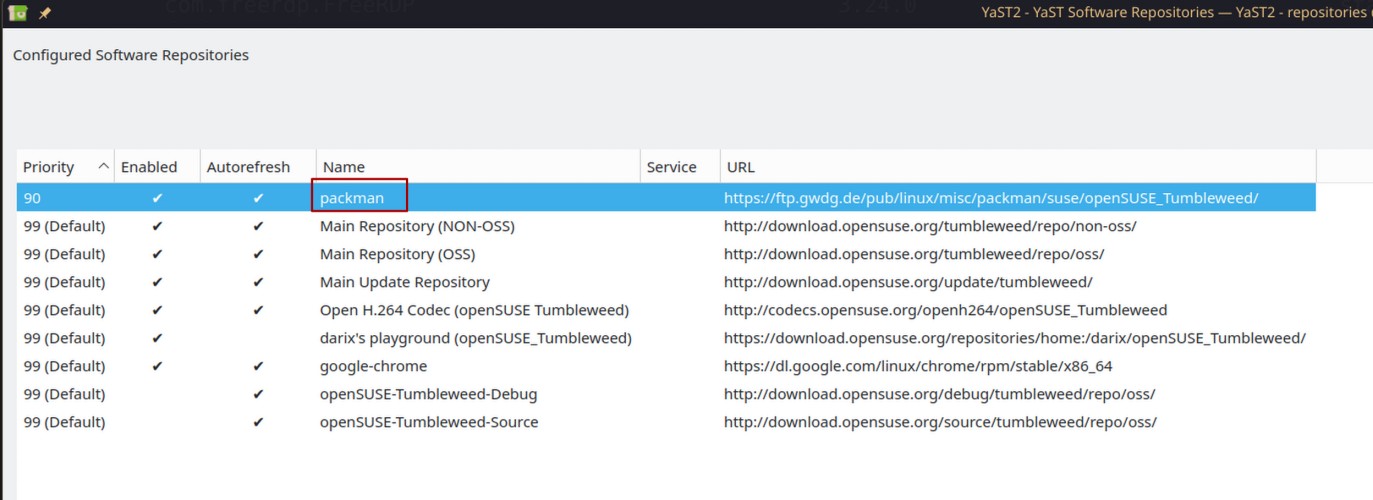
Trying to figure out how to proceed here as a mere mortal…
1 Like
You need to install all ffmpeg* libav* (and possibly libswscale* and other dependencies) all from one vendor, so either all from OSS or all from Packman (depending on the codec that you really need).
Use Myrlyn or YaST Software on the “version” tab to easily check that.
Afterwards install the version of VLC that works with the ffmpeg you have.
Option 2 looks like the way to go; you can easily reverse that if you miss something.
1 Like
I have experienced the same issue with the update to TW20260324 and vlc from packman. Moving all vlc-related packages back to TW repo solves it, for the time being.
Hallo guys, I confirm that TW20260324 release solve the problem! Many thanks to all guys envolved to solve the updating’s problems 
I have uninstalled vlc, vlx-noX and x264, as these caused all problems. After that I was able to install the latest snapshot and all updates from packman.
However, no I can’t install vlc anymore:
~ # zypper in vlc
Loading repository data...
Reading installed packages...
Resolving package dependencies...

Problem: 1: nothing provides 'libavutil.so.60(LIBAVUTIL_60.8_SUSE)(64bit)' needed by the to be installed vlc-3.0.23-1699.9.pm.1.x86_64
 Solution 1: do not install vlc-3.0.23-1699.9.pm.1.x86_64
 Solution 2: break vlc-3.0.23-1699.9.pm.1.x86_64 by ignoring some of its dependencies

Choose from above solutions by number or cancel [1/2/c/d/?] (c):
However, libavutil60 is installed is from packman:
~ # rpm -qa|grep libavutil
libavutil55-3.4.14-1699.2.pm.26.x86_64
libavutil56_70-4.4.6-1699.21.pm.5.x86_64
libavutil60-8.1-1699.2.pm.1.x86_64
libavutil59-7.1.3-1699.3.pm.12.x86_64
libavutil58-6.1.3-1699.2.pm.19.x86_64
All from Packman, nothing from SuSE.
Also the other packages:
~ # rpm -qa|grep libswscale
libswscale7-6.1.3-1699.2.pm.19.x86_64
libswscale5_9-4.4.6-1699.21.pm.5.x86_64
libswscale9-8.1-1699.2.pm.1.x86_64
libswscale4-3.4.14-1699.2.pm.26.x86_64
libswscale8-7.1.3-1699.3.pm.12.x86_64

~ # rpm -qa|grep libavdevice
libavdevice61-7.1.3-1699.3.pm.12.x86_64
libavdevice62-8.1-1699.2.pm.1.x86_64
libavdevice60-6.1.3-1699.2.pm.19.x86_64
libavdevice57-3.4.14-1699.2.pm.26.x86_64
libavdevice58_13-4.4.6-1699.21.pm.5.x86_64

~ # rpm -qa|grep libavfilter
libavfilter11-8.1-1699.2.pm.1.x86_64
libavfilter9-6.1.3-1699.2.pm.19.x86_64
libavfilter10-7.1.3-1699.3.pm.12.x86_64
libavfilter6-3.4.14-1699.2.pm.26.x86_64
libavfilter7_110-4.4.6-1699.21.pm.5.x86_64

~ # rpm -qa|grep libswresample
libswresample5-7.1.3-1699.3.pm.12.x86_64
libswresample2-3.4.14-1699.2.pm.26.x86_64
libswresample4-6.1.3-1699.2.pm.19.x86_64
libswresample3_9-4.4.6-1699.21.pm.5.x86_64
libswresample6-8.1-1699.2.pm.1.x86_64
So nothing from SuSE, but vlc and x264 refuse to install:
~ # zypper in vlc x264
Loading repository data...
Reading installed packages...
Resolving package dependencies...
2 Problems:
Problem: 1: nothing provides 'libavutil.so.60(LIBAVUTIL_60.8_SUSE)(64bit)' needed by the to be installed vlc-3.0.23-1699.9.pm.1.x86_64
Problem: 2: nothing provides 'libavutil.so.60(LIBAVUTIL_60.8_SUSE)(64bit)' needed by the to be installed x264-20250608.b35605ac-1699.1.pm.4.x86_64

Problem: 1: nothing provides 'libavutil.so.60(LIBAVUTIL_60.8_SUSE)(64bit)' needed by the to be installed vlc-3.0.23-1699.9.pm.1.x86_64
 Solution 1: do not install vlc-3.0.23-1699.9.pm.1.x86_64
 Solution 2: break vlc-3.0.23-1699.9.pm.1.x86_64 by ignoring some of its dependencies

Choose from above solutions by number or skip, retry or cancel [1/2/s/r/c/d/?] (c):
I can install the packages when selecting solution 2. vlc starts, but I can’t play any x265 encoded videos anymore. Most of my videos are x265 encoded…
Packages are installed form Packman:
~ # rpm -qa|grep 265
libde265-0-1.0.17-1699.1.pm.1.x86_64
x265-4.1-1699.4.pm.8.x86_64
libx265-215-4.1-1699.4.pm.8.x86_64
vlc reports Codec not supported: VLC could not decode the format "hevc" (MPEG-H Part2/HEVC (H.265))
vlc from OSS installs fine with libavutil from OSS (and of course does not play HEVC videos). It is odd that the Packman vlc requires libavutil from OSS, defeating the whole logic of enabling Packman, but since I don’t use vlc nor Packman I must stop here.
Try another player (mpv, smplayer)?
mpv works fine (also plays x265 videos, so x265 support seems ok). No idea why vlc doesn’t install from packman anymore 
Looks like a packaging bug in the Packman version, but I cannot tell for sure.
This is OT here (this thread has been solved by TW20260324), please open a new thread if you need further help on that.
1 Like
The Packman repo has been updated too 1 hour ago, to sync with TW release 20260324, and this finally resolved the issue with vlc and its codecs.
6 Likes
Yes, I did a zypper dup this morning which updated several packages from packman. After this I was able to install vlc, vlc-codecs and x264 again. vlc works and also plays x265 videos again. Seems all issues are resolved now.
2 Likes
Thanks @OrsoBruno !
I did upgrade yesterday and selected the option to move to OSS at every package that came up rebooted after updating and everything still seems to work (x264, firefox yt, x265)
I have been following this thread from the beginning. The issues actually first occurred a few days before this thread started. I waited until now for things to sort themselves out, but they haven’t. So I’m hoping for some support. Unless waiting it out is still the advisable option.
I’m on Tumbleweed and using it for some audio/video work. I need hardware encoding on my Nvidia GPU via OBS Studio, both h.264 and h.265/HVENC. I use Ardour for audio. I regularly convert WAV files to M4A/AAC using ffmpeg.
ungoogled-chromium, harvid, and xjadeo are causing problems:
3 Problems:
Problem: 1: the to be installed ungoogled-chromium-146.0.7680.153-1.1.x86_64 requires 'libavcodec.so.62(LIBAVCODEC_62.11_SUSE)(64bit)', but this requirement cannot be provided
deleted providers: libavcodec62-8.0.1-1699.4.pm.72.x86_64

Problem: 2: the to be installed xjadeo-0.8.15-28.7.x86_64 requires 'libavformat.so.62(LIBAVFORMAT_62.3_SUSE)(64bit)', but this requirement cannot be provided
deleted providers: libavformat62-8.0.1-1699.4.pm.72.x86_64

Problem: 3: the installed harvid-0.9.1-1.87.x86_64 requires 'libavutil.so.60(LIBAVUTIL_60.8_SUSE)(64bit)', but this requirement cannot be provided
deleted providers: libavutil60-8.0.1-1699.4.pm.72.x86_64
I thought I could solve this by choosing keep obsolete, but then I get 16 more problems. When I choose keep obsolete for each, I get 42 new problems. At this point I stopped.
I would really like to switch away from Packman. Please tell me it’s possible with my mentioned work requirements.
Provided I still require Packman, how can I get to a clean zypper dup again?
These are my repos:
zypper repos
Repository priorities in effect:                                                                                                                                                                            (See 'zypper lr -P' for details)
      90 (raised priority)  :  2 repositories
      99 (default priority) :  8 repositories

#  | Alias                      | Name                                 | Enabled | GPG Check | Refresh
---+----------------------------+--------------------------------------+---------+-----------+--------
 1 | NVIDIA:repo-non-free       | repo-non-free                        | Yes     | (r ) Yes  | Yes
 2 | multimedia-proaudio        | multimedia-proaudio                  | Yes     | (r ) Yes  | No
 3 | network_chromium           | Chromium (openSUSE_Tumbleweed)       | Yes     | (r ) Yes  | No
 4 | openSUSE:repo-non-oss      | repo-non-oss                         | Yes     | (r ) Yes  | Yes
 5 | openSUSE:repo-openh264     | repo-openh264                        | Yes     | (r ) Yes  | Yes
 6 | openSUSE:repo-oss          | repo-oss                             | Yes     | (r ) Yes  | Yes
 7 | openSUSE:repo-oss-debug    | repo-oss-debug                       | No      | ----      | ----
 8 | openSUSE:repo-oss-source   | repo-oss-source                      | No      | ----      | ----
 9 | openSUSE:update-tumbleweed | update-tumbleweed                    | Yes     | (r ) Yes  | Yes
10 | packman-essentials         | packman-essentials                   | Yes     | (r ) Yes  | Yes
11 | packman-extra              | packman-extra                        | Yes     | (r ) Yes  | Yes
12 | security                   | Security tools (openSUSE_Tumbleweed) | Yes     | (r ) Yes  | Yes
Is it still advisable to just wait it out (I’m happy to) or is my system causing this? Reading the forums, this problem seems to have been solved for everybody except me. 
Change the refresh to yes…
1 Like
Oh. My. Brain.
Dammit.
How did I miss that? Ridiculous. Thank you so much!
(I feel like hiding now…  )
)
Now zypper is trying to downgrade nvidia drivers. But I guess that’s a separate issue…
That might happen if you are using the G07 - 595 drivers, possibly because there is still no 595.58.xx nvidia-open-driver-G07-signed-kmp-meta.
Maybe better check with Myrlyn and find a matching set that works.
Generally speaking Nvidia HW decoding and encoding is provided by the Nvidia driver and has nothing to do with Packman. Maybe you need the proprietary Nvidia driver or at least the nvidia-compute-Gxx part.
Whether or not the applications you use must come from Packman remains to be seen, but it is relatively easy to test: just disable Packman (without removing it), do a zypper dup --allow-vendor change and test. If you are not happy you can enable Packman again and zypper dup --from packman-eesentials --allow-vendor change again.