Create a new per user directory: ‘$HOME/.local/share/wallpapers’
Normally, each wallpaper should have a subdirectory with subdirectory and file content as in the ‘/usr/share/’ Wallpaper directories but, a quick per user solution is to simply drop your favourite Wallpaper image into the per user ‘.local/share/’ Wallpaper directory.
For the case of KDE Plasma, restart the Plasma Shell: > systemctl --user restart plasma-plasmashell.service
And, if SELinux has been enabled, execute “restorecon” on the newly created per user Wallpaper directory.
If you want a “proper” private per user KDE Plasma Wallpaper then, you’ll have to follow the KDE Developer instructions: <Wallpapers>
And, use the distribution provided wallpapers in ‘/usr/share/’ as templates for the additional per Wallpaper directory structure.
A further point: for KDE Plasma users, an inspection of ‘$HOME/.config/plasmarc’ is needed.
This file is created first when, from the KDE Plasma System Settings a Wallpaper is selected and the “Apply” button has been pressed.
If you have (ever) selected a private Wallpaper image via the “Add…” button, then you’ll have the path to that file in the list pointed to by the “usersWallpapers” parameter in the above file.
With the method mentioned above, the parameter is empty – provided that, it was empty before the above procedure was executed …
That sounds very complicated. Hitherto all I have done is placed my wallpapers in .local/share/wallpapers/ and then right clicked on the Desktop to install the one I wanted. Is KDE Plasma becoming unnecessarily complicated?
Hi, I have one tumbleweed with a fully functioning KDE Plasma Desktop and up to date with zypper dup. Though I am not using it, I prefer to use my own wallpaper. What I do is just use the add function and select my wallpaper.
Hmmmm. My method takes about 30 seconds and no low-level mods - all point-n-click. This is using KDE.
Find an image you want (download from Internet using browser, copy from your photo collection, etc) … save image in your user’s “Pictures” sub-directory. (or other user sub-dir - take your pick).
Right-click on your Desktop background, then select “Desktop and Wallpaper”
In “Wallpaper” tab, click “Wallpaper type” drop-down, select “Image”.
Select “+ Add image” button.
Navigate to your user’s “Pictures” sub-directory (or wherever image is), then select the image desired.
Now click “OK” (or “Apply” to see what it will look like).
All done. 30 to 60 seconds to change the Wallpaper to what you want. No need to “restart” a process, etc. Point and click, instantly applied
I don’t really get why this is even here. There is no news, no issue, no mistery for users, nothing to be discussed or debated. What’s next? Which button we press to turn on our computers?
Did you have to create the ‘$HOME/.local/share/wallpapers’ directory or, was it present when the user’s howm directory was originally created?
It seems that, it’s fairly common knowledge that, the user’s private Wallpaper directory is needed but, where’s that documented? I couldn’t find anything in the KDE documentation.
It should be clear by now that your over complicated story does not impress other people.
I, like them, already years and years ago simply use the right-click on free space on the desktop (like explained above) and then use an image anywhere in my home directory. Rather intuitive in my opinion.
In fact this is the image that is now in use
henk@boven:~/Documents> ls -l PA120042.JPG
-rw-r--r-- 1 henk wij 2932107 Oct 17  2020 PA120042.JPG
henk@boven:~/Documents>
And I find there others I used earlier. And one that is used for the locked session.
Maybe it does not really look organized (neatly in a directory like ~/Pictures/wallpapers/) but it illustrates that no humbug is needed.
That sub-dir does NOT exist in my user’s sub-dir tree … see command line output below
That is absolutely INCORRECT - again, see below
You will note that I first used the ‘find’ command to search for any file | sub-dir name that contains ‘allp’. in its name. No file found in ‘share’ or ‘state’ or ‘local’.
Then I change to the ‘.local/share’ sub-dir and execute a directory listing all files (I snipped names with ‘b’ to ‘r’ to reduce the output shown). If “wallpaper” exists, it would be shown after ‘vlc’ sub-directory.
Hopefully, you’ll understand that sub-dir is NOT required. Your user-specific wallpaper image file can be stored ANYWHERE within the user’s sub-dir tree.
user@machine:~> cd ./.local/
user@machine:~/.local> ll
total 0
drwxr-xr-x 1  1000 Feb 26 22:06 share
drwx------ 1    22 Jun 14  2024 state
user@machine:~/.local>
user@machine:~/.local> find . -name *allp* -ls
user@machine:~/.local>
user@machine:~/.local> cd share/
user@machine:~/.local/share> ll
total 680
drwxr-xr-x 1      18 May 14  2024 akonadi
drwxr-xr-x 1     754 Dec 30 08:42 applications
drwxr-xr-x 1      72 Feb 11 09:36 ark

[ ... snipped names beginning 'b' thru 'r' ]

drwxr-xr-x 1      70 Feb  4  2025 sddm
drwxr-xr-x 1      16 Apr 25  2025 stalefiles
drwxr-xr-x 1      42 Apr  8  2024 systemsettings
drwxr-xr-x 1      18 Jan 24 22:16 Trash
-rw-r--r-- 1    5909 Jan 14 16:39 user-places.xbel
-rw-r--r-- 1    5909 Jan 14 16:39 user-places.xbel.bak
-rw-r--r-- 1       0 Jan 14 16:39 user-places.xbel.tbcache
drwx------ 1      14 Nov 21  2024 vlc
user@machine:~/.local/share>
BTW. the URL you point to for “Wallpapers” … did you read the beginning sentence? It is:
Wallpapers <==== Title of webpage
Set a custom accent color for wallpapers in Plasma
( the description ^^^^ sentence )
It can in fact be stored on any drive connected to your system, even external drives with different file systems. My current wallpaper and wallpaper slideshow links to an external NTFS SSD.
My memory is that wallpapers used to be stored in a .kde folder - a check on the properties of these [now redundant] folders suggests they were last accessed on my computer in 2019, which might in fact be when I copied them from my previous device to this device.
I vaguely remember finding that they were ‘missing’ after an upgrade and downloading one which I liked which I then found had been saved in .local/share/wallpapers. So I copied the rest from their previous location and they have always been accessible since.
I never looked for any documentation as it appeared that downloading any KDE provided image created .local/share/wallpapers.
When you say “download”, do you mean through a web browser or through some other KDE-specific means, like Discover, KDE’s Wallpaper Settings Manager, etc?
The point pretty much everyone else is making is that the location of your wallpapers does not matter, and is not hard-coded into KDE. Especially, not to the point where if it’s not in a specific location, the wallpapers cannot be used.
It’s quite simple to find where the default wallpaper images are stored.
I’m referring to the default storage for images provided by openSUSE.
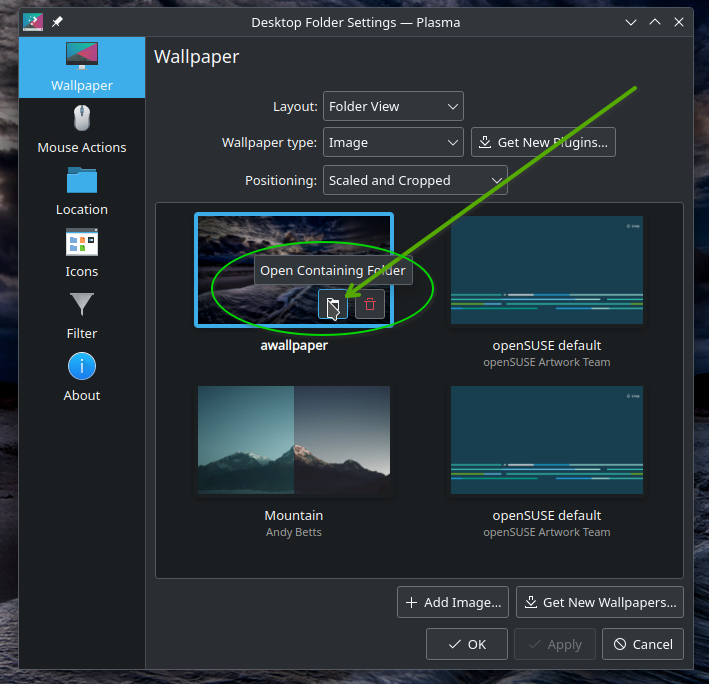
Check out the screenshot. Move your mouse over a wallpaper image.
Move the mouse to the “Open Containing Folder” box and click it. (arrow pointing to it).
It will pop up the default file manager and it will display the sub-dir contents.
I have a total of four wallpapers - the image I’m hovering over (mine), plus 3 openSUSE defaults.
Now check my command-line output after screenshot. The first listing is for an openSUSE wallpaper image.
Notice that the filenames relate to screen sizes, so each of those PNG’s in the first listing are the same image, but sized for typical screen sizes.
Then I show the “base” wallpaper sub-dir - and you can see, some are links.
The last output is where my personal wallpaper is stored - in my user’s “Pictures” sub-dir.
So, that’s a quick method (point-n-click) to find where the wallpaper images are stored.
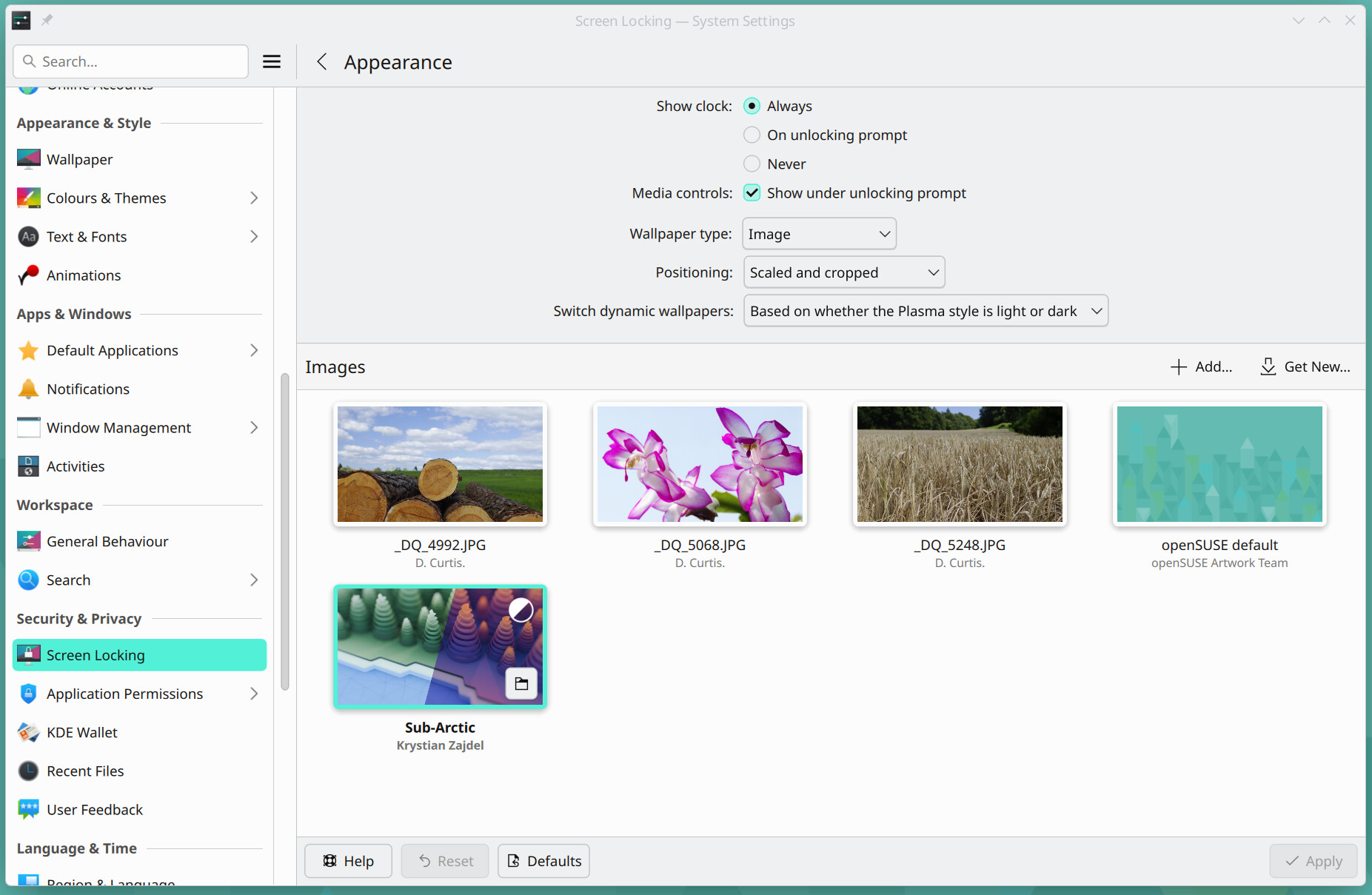
If, the user’s directory ‘$HOME/.local/share/wallpapers’ is present, and there are files in that directory then, when the user opens either the KDE System Settings section “Wallpaper” or, the KDE System Settings section “Screen Locking” → “Appearance”, the private, personal Wallpaper choices will be automagically presented, in addition to the system wide Wallpapers located in ‘/usr/share/wallpapers’.
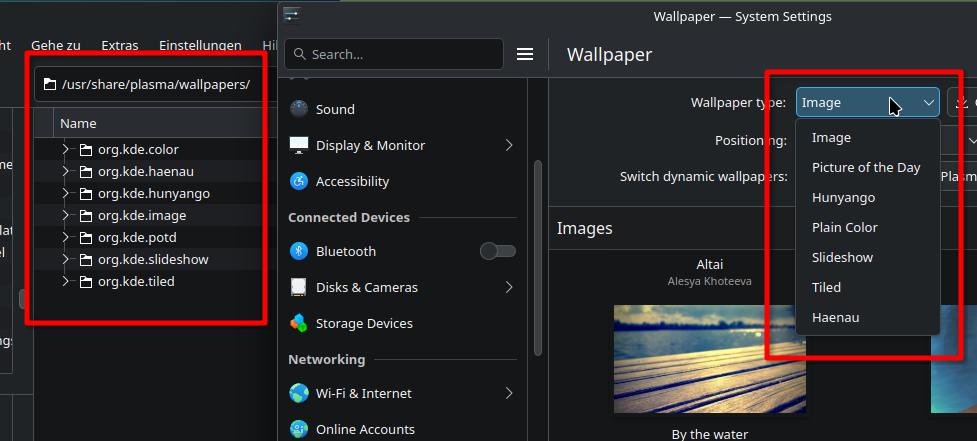
I haven’t yet worked out why, the system wide KDE Plasma Wallpapers located in ‘/user/share/plasma/wallpapers’ are not automagically presented in the KDE System Settings – I suspect that something is missing in the current system configuration …
Have a look at the other files…you are most likely missing the necessary file structure…
To have the Wallpaper show up in systemsettings you need to follow the given structure. As example from the Altai wallpaper:
ich@laptopneu:/usr/share/wallpapers> ls -Rl Altai
Altai:
insgesamt 8
drwxr-xr-x 3 root root 4096 12. Feb 20:43 contents
-rw-r--r-- 1 root root 3791 12. Feb 11:10 metadata.json

Altai/contents:
insgesamt 76
drwxr-xr-x 2 root root  4096 12. Feb 20:43 images
-rw-r--r-- 1 root root 71853 12. Feb 11:10 screenshot.png

Altai/contents/images:
insgesamt 4732
-rw-r--r-- 1 root root 1118561 12. Feb 11:10 1080x1920.png
-rw-r--r-- 1 root root 3723155 12. Feb 11:10 5120x2880.png
ich@laptopneu:/usr/share/wallpapers>
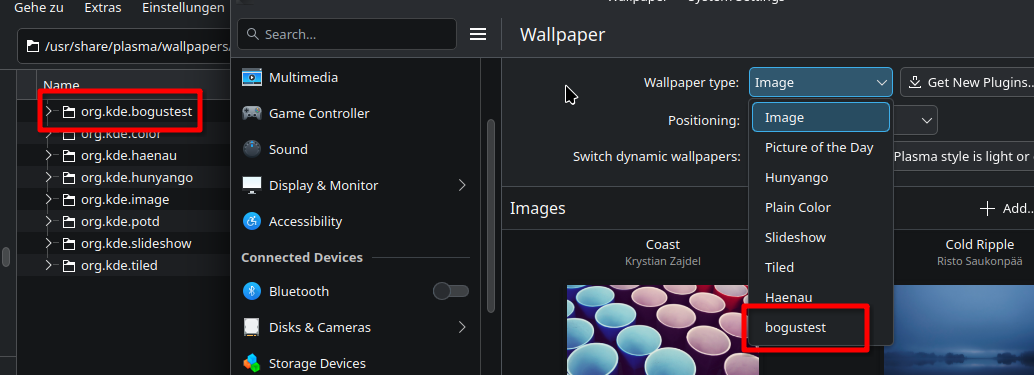
To show you how it works, i created a wallpaper style (copied from the Tiled style and adapted content) and named it bogustest. It shows automatically up in systemsettings:


 )
)