I have a Dell 5770 which has had Ubuntu, Mangaro, KDE Neon, Fedora Kinoite all installed and working well over the last year or so.
I wanted to try Tumbleweed and so far I have no sound from laptop
I am suspecting due to a driver issue but can’t figure out how to resolve. Sound works when I plug into a dock and use headphones.
I want to persevere with Tumblweed as I like the idea of rolling back updates. I want to move away from Neon as updates frequently break things I need to work.
How do I fix this?
Please share the output from the following commands
inxi -Aapactl list sinks
1 Like
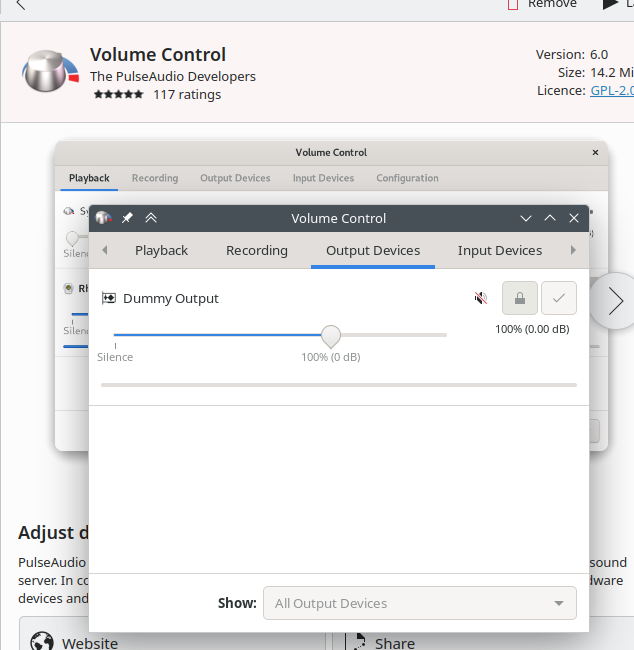
You simply tried from Pavucontrol
1 Like
ian@192:~$ inxi -Aa
ian@192:~$ pactl list sinks#60
I installed via Discover and it shows no output devices
Please show the output of
dmesg | egrep -i "snd|audio|firmware"Use the pre-formatted text (</>) button to post this output.
Thanks again for help deano, apologies for not formatting correctly beforehand.
ian@192:~$ dmesg | egrep -i "snd|audio|firmware"
[    1.857980] [    T507] wmi_bus wmi_bus-PNP0C14:02: [Firmware Bug]: WQBC data block query control method not found
[    2.211414] [    T179] i915 0000:00:02.0: [drm] Finished loading DMC firmware i915/adlp_dmc.bin (v2.20)
[    2.638442] [    T497] i915 0000:00:02.0: [drm] GT0: GuC firmware i915/adlp_guc_70.bin version 70.20.0
[    2.638445] [    T497] i915 0000:00:02.0: [drm] GT0: HuC firmware i915/tgl_huc.bin version 7.9.3
[    5.984213] [    T217] Bluetooth: hci0: Minimum firmware build 1 week 10 2014
[    5.985155] [    T835] snd_hda_intel 0000:00:1f.3: DSP detected with PCI class/subclass/prog-if info 0x040100
[    5.985497] [    T835] snd_hda_intel 0000:00:1f.3: SoundWire enabled on CannonLake+ platform, using SOF driver
[    6.008129] [    T781] snd_soc_avs 0000:00:1f.3: DSP detected with PCI class/subclass/prog-if info 0x040100
[    6.008623] [    T781] snd_soc_avs 0000:00:1f.3: SoundWire enabled on CannonLake+ platform, using SOF driver
[    6.019764] [    T217] Bluetooth: hci0: Found device firmware: intel/ibt-0040-0041.sfi
[    6.019778] [    T217] Bluetooth: hci0: Firmware Version: 120-18.24
[    6.029115] [    T216] iwlwifi 0000:00:14.3: loaded firmware version 89.202a2f7b.0 so-a0-gf-a0-89.ucode op_mode iwlmvm
[    6.035086] [    T781] sof-audio-pci-intel-tgl 0000:00:1f.3: DSP detected with PCI class/subclass/prog-if info 0x040100
[    6.035201] [    T781] sof-audio-pci-intel-tgl 0000:00:1f.3: SoundWire enabled on CannonLake+ platform, using SOF driver
[    6.035207] [    T781] sof-audio-pci-intel-tgl 0000:00:1f.3: enabling device (0000 -> 0002)
[    6.035287] [    T781] sof-audio-pci-intel-tgl 0000:00:1f.3: DSP detected with PCI class/subclass/prog-if 0x040100
[    6.035323] [    T781] sof-audio-pci-intel-tgl 0000:00:1f.3: bound 0000:00:02.0 (ops i915_audio_component_bind_ops [i915])
[    6.041830] [    T202] sof-audio-pci-intel-tgl 0000:00:1f.3: use msi interrupt mode
[    6.049757] [    T202] debugfs: File '\_SB.PC00.HDAS.SNDW' in directory 'domains' already present!
[    6.049817] [    T202] debugfs: File '\_SB.PC00.HDAS.SNDW' in directory 'domains' already present!
[    6.049870] [    T202] debugfs: File '\_SB.PC00.HDAS.SNDW' in directory 'domains' already present!
[    6.064440] [    T202] sof-audio-pci-intel-tgl 0000:00:1f.3: hda codecs found, mask 4
[    6.064466] [    T202] sof-audio-pci-intel-tgl 0000:00:1f.3: SOF firmware and/or topology file not found.
[    6.064469] [    T202] sof-audio-pci-intel-tgl 0000:00:1f.3: Supported default profiles
[    6.064470] [    T202] sof-audio-pci-intel-tgl 0000:00:1f.3: - ipc type 0 (Requested):
[    6.064470] [    T202] sof-audio-pci-intel-tgl 0000:00:1f.3:  Firmware file: intel/sof/sof-adl.ri
[    6.064471] [    T202] sof-audio-pci-intel-tgl 0000:00:1f.3:  Topology file: intel/sof-tplg/sof-adl-rt711-l0-rt1316-l12-rt714-l3.tplg
[    6.064472] [    T202] sof-audio-pci-intel-tgl 0000:00:1f.3: Check if you have 'sof-firmware' package installed.
[    6.064472] [    T202] sof-audio-pci-intel-tgl 0000:00:1f.3: Optionally it can be manually downloaded from:
[    6.064473] [    T202] sof-audio-pci-intel-tgl 0000:00:1f.3:    https://github.com/thesofproject/sof-bin/
[    6.065809] [    T202] sof-audio-pci-intel-tgl 0000:00:1f.3: error: sof_probe_work failed err: -2
[    7.482324] [    T217] Bluetooth: hci0: Waiting for firmware download to complete
[    7.482333] [    T217] Bluetooth: hci0: Firmware loaded in 1428286 usecs
[    7.503254] [    T217] Bluetooth: hci0: Firmware timestamp 2024.18 buildtype 1 build 81528
[    7.503256] [    T217] Bluetooth: hci0: Firmware SHA1: 0xa8bb3f39
Install the ‘sof-firmware’ package as the dmesg output reports that it is missing. Reboot when done. See how that goes.
2 Likes
Thanks @deano_ferrari that worked.
I used sudo zypper install sof-firmware to install, is that the correct “tumbleweed” way?
I don’t think I picked a minimal install when installing so am surprised sound didn’t work straight away. Are there other common things I should install?
Now need to resolve the overheating issue.
Thanks again @deano_ferrari , I really appreciate your quick help.
Show
lspci -nnk -s 0000:00:1f.3
1 Like
OK, I found PCI ID buried in your earlier post.
8086:51c8
It should be installed automatically as long as recommends are not disabled:
bor@tw:~> zypper --no-refresh info --supplements sof-firmware
...
    namespace:modalias(pci:v00008086d000051C8sv*sd*bc*sc*i*)
Sounds is working now, but for completeness
ian@192:~$ lspci -nnk -s 0000:00:1f.3
00:1f.3 Multimedia audio controller [0401]: Intel Corporation Alder Lake PCH-P High Definition Audio Controller [8086:51c8] (rev 01)
        Subsystem: Dell Device [1028:0b01]
        Kernel driver in use: sof-audio-pci-intel-tgl
        Kernel modules: snd_hda_intel, snd_soc_avs, snd_sof_pci_intel_tgl
ian@192:~$
Glad to have been of guidance.
1 Like
Maybe you installed in legacy/MBR in which case you don’t have an efi directory??? can you boot to Windows from the grub menu??
What has that got to do with this issue?
oops posted to wrong thread
system
July 10, 2024, 11:09pm
17
This topic was automatically closed 7 days after the last reply. New replies are no longer allowed.