Good day, I am new to Tumbleweed. I am installing a program called AlbumEasy because it is not in Discovery. I have extracted all the files to a directory called AlbumEasy then ran a config script which put an icon on my desktop. When I select the program nothing happens so I used command line to see why. The correct file to run is AlbumEasy.sh which is there but it says command not found. I believe I have followed all the instructions correctly but maybe I did something wrong?? Any idea why it cannot find the command when it is there?
Here is the command line output
ronc@localhost:~> cd AlbumEasy
ronc@localhost:~/AlbumEasy> AlbumEasy.sh
AlbumEasy.sh: command not found
ronc@localhost:~/AlbumEasy> ls
AlbumEasy AlbumEasyIcon48x48.png CONFIG licence.txt readme-linux.txt wizard.template
AlbumEasy45.0.qch AlbumEasy.sh examples qt tips.txt
AlbumEasy45.0.qhc borders fonts readme-console.txt VERSION
ronc@localhost:~/AlbumEasy>
This is fairly difficult to follow because you didn’t use preformatted text tags - in future, please put terminal output (and commands) in preformatted tags so it’s more readable. That’s the </> button in the editor.
From what it looks like, you’re trying to run a script in a directory - the current path is not part of the PATH variable in Linux - that’s by design. To run it, you need to first ensure the script is executable (chmod u+x AlbumEasy.sh if it isn’t), and then launch it with an explicit path, such as ./AlbumEasy.sh.
thank you for the response. I am not an experienced user so please bear with me, I know just enough to cause lots of my own problems. I did check the permissions in the properties using Dolphin and it says AlbumEasy.sh is owner rwx so I think thats ok?
Sorry about the text as I just did a cut and paste. I have rerun and did a screenshot which I am attempting to upload, never done this before. Let me know of anything else I need to do. Is it possible there is something in the script that is causing this??
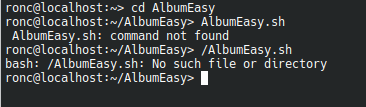
@oldcrstyfrt Hi, you forgot to prefix the / with a period “.” as in ./


ok, put period in this time
Install the missing package…
sudo zypper in libgthread-2_0-0
And please do not use screenshots! Simply mark the terminal output with your left mouse button. Then right click->copy. Paste the output here in the preformatted text tags (</> button in the forum editor).
IT WORKED!! thank you, I will test it out but so far looks good.
after some more testing everything is running great.
THANKs for the assistance…