Creating the dirs manually with correct permissions and even installing as root user didn’t work for me either.
Long story short, i got it working and figured it’s a SELinux issue.
SELinux needs to know that docker is allowed to mount a host directory into the container.
There are 3 options to do this:
- disabling SELinux temporarily (not recommended for production environment!)
su -c "setenforce 0"
- add a SELinux rule by running…
chcon -Rt svirt_sandbox_file_t /path/to/volume
or
chcon -Rt container_file_t /path/to/volume
…which is used to label volumes and directories that containers are allowed to write to.
The path/to/volume is basically what you have defined in docker-compose.yml as prefix before the colon.
(see more information about Docker SELinux Security Policy)
- Configure SELinux Label using bind-mounts
You can add either :z or :Z suffix next to volume bindings to modify the SELinux label to allow being mounted into the container.
In my case it will look like that in the .yml file:
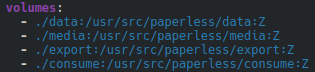
(See more information configuring SELinux Label in Docker docs)
All three options were tested in a VM and worked well for me.