Can't setup paperless-ngx via docker

I’m trying to setup paperless-ngx on local PC with Tumbleweed via recommended install method docker, but some docker containers keep restarting or fail to start.
Same issues happens with podman, as the podman containers keeps restarting after few seconds.
What i have done:

  1. installed docker via opensuse wiki
  2. started docker daemon and checked if its running:
sudo systemctl status docker
● docker.service - Docker Application Container Engine
     Loaded: loaded (/usr/lib/systemd/system/docker.service; enabled; preset: disabled)
     Active: active (running) since Tue 2025-11-04 10:14:22 CET; 3s ago
 Invocation: 29ba1ebd6ab24051acb370671b7d0e7a
TriggeredBy: ● docker.socket
       Docs: http://docs.docker.com
   Main PID: 7203 (dockerd)
      Tasks: 36
        CPU: 226ms
     CGroup: /system.slice/docker.service
             ├─7203 /usr/bin/dockerd --add-runtime oci=/usr/sbin/runc
             └─7219 containerd --config /var/run/docker/containerd/containerd.toml

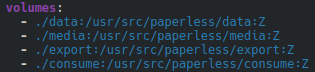
  1. configured “docker-compose.env” and “docker-compose.yml” files for paperless-ngx.
    (I’m using so called ‘bind mounts’ to change directorys for paperless to /home)

  2. installed paperless-ngx with docker compose pull and docker compose up -d
    So far no errors and all containers started.

docker compose up -d
[+] Running 5/5
 ✔ Container paperless-tika-1       Started                                                                                     3.4s 
 ✔ Container paperless-broker-1     Started                                                                                     3.4s 
 ✔ Container paperless-gotenberg-1  Started                                                                                     3.5s 
 ✔ Container paperless-db-1         Started                                                                                     3.4s 
 ✔ Container paperless-webserver-1  Started                                                                                     0.6s 
  1. check if docker containers are really running:
docker ps
CONTAINER ID   IMAGE                                        COMMAND                  CREATED         STATUS                             PORTS                                         NAMES
dbc5e65850b3   ghcr.io/paperless-ngx/paperless-ngx:latest   "/init"                  5 minutes ago   Up 12 seconds (health: starting)   0.0.0.0:8000->8000/tcp, [::]:8000->8000/tcp   paperless-webserver-1
8cc6e89a624c   gotenberg/gotenberg:8.24                     "/usr/bin/tini -- go…"   5 minutes ago   Up 5 minutes                       3000/tcp                                      paperless-gotenberg-1
5c7e5b71cb3e   redis:8                                      "docker-entrypoint.s…"   5 minutes ago   Restarting (1) 17 seconds ago                                                    paperless-broker-1
ca1aaa28ca24   postgres:18                                  "docker-entrypoint.s…"   5 minutes ago   Restarting (1) 17 seconds ago                                                    paperless-db-1
d78dfde05da6   apache/tika:latest                           "/bin/sh -c 'exec ja…"   5 minutes ago   Up 5 minutes                       9998/tcp                                      paperless-tika-1

And here we see in column “STATUS” that some containers are up but some doesn’t start or fail and keep restarting after few seconds. That’s why i can’t access paperless-ngx and start using it.

My user has already assigned group “docker” if this is relevant.

id thomas
uid=1000(thomas) gid=100(users) Gruppen=100(users),36(kvm),460(vboxusers),108(libvirt),454(docker)

Same issue with podman, as the containers keeps restarting or fail to come up.

How do i fix this?
Do i might need to configure SELinux first for using docker/podman?

The default unmodified files docker-compose.env and docker-compose.postgres-tika.yml work fine here. All five containers up and running. My guess is you changed something in the files, the data volumes maybe? Just a few hints to track down problems

  • start with unmodified files unless entries in those files are placeholders and required, then add/modify stuff one at a time
  • run docker compose without the “-d” detach flag to see message output from the containers
  • if a docker compose up failed, clear the dead objects with “docker compose down -v” which will remove the containers and the volumes so that you can try again clean
  • failing postgres is usually because of permission problems on local disk data or failed initdb because of bad envs/parameters to the entrypoint

Finally, if you want to use this in production, meaning with actual important data, then never use floating image tags like “latest” but actual version tags like in all the support images’ tags, also think about persistence on disk and backups as relying on ephemeral storage docker volumes is really only for testing things. But that is for later :innocent:

I tried it again in a VM with both default files and just renamed docker-compose.postgres-tika.yml to docker-compose.yml as stated in paperless documentation.

Then running docker compose up seems to work well until the webserver starts failing and trying to restart multiple times for few minutes:
This is the part of terminal output which repeats a few minutes:

webserver-1  | [init-start] paperless-ngx docker container starting...
webserver-1  | [init-start] paperless-ngx docker container starting init as root
webserver-1  | [env-init] Checking for environment from files
webserver-1  | [env-init] No *_FILE environment found
webserver-1  | [init-redis-wait] Waiting for Redis to report ready
webserver-1  | [init-tesseract-langs] Checking if additional teseract languages needed
webserver-1  | [init-tesseract-langs] No additional installs requested
webserver-1  | [init-db-wait] Waiting for postgresql to report ready
webserver-1  | [init-db-wait] Waiting for PostgreSQL to start...
webserver-1  | [init-user] No UID changes for paperless
webserver-1  | [init-user] No GID changes for paperless
webserver-1  | [init-folders] Running with root privileges, adjusting directories and permissions
webserver-1  | find: ‘/usr/src/paperless/export’: Permission denied
webserver-1  | chown: changing ownership of '/usr/src/paperless/export': Permission denied
webserver-1  | find: ‘/usr/src/paperless/consume’: Permission denied
webserver-1  | chown: changing ownership of '/usr/src/paperless/consume': Permission denied
webserver-1  | Waiting for Redis...
webserver-1  | Connected to Redis broker.
webserver-1  | [init-redis-wait] Redis ready
webserver-1  | Connected to PostgreSQL
webserver-1  | [init-db-wait] Database is ready
webserver-1  | [init-migrations] Apply database migrations...
webserver-1  | Operations to perform:
webserver-1  |   Apply all migrations: account, admin, auditlog, auth, authtoken, contenttypes, django_celery_results, documents, guardian, mfa, paperless, paperless_mail, sessions, socialaccount
webserver-1  | Running migrations:
webserver-1  |   No migrations to apply.
webserver-1  | [init-superuser] Not creating superuser
webserver-1  | [init-checks] Running Django checks
webserver-1  | SystemCheckError: System check identified some issues:
webserver-1  | 
webserver-1  | ERRORS:
webserver-1  | ?: PAPERLESS_CONSUMPTION_DIR is not writeable
webserver-1  |  HINT: Set the permissions of 
webserver-1  | drwxr-xr-x root root /usr/src/paperless/consume
webserver-1  |  to be writeable by the user running the Paperless services
webserver-1  | 
webserver-1  | System check identified 1 issue (0 silenced).
webserver-1  | s6-rc: warning: unable to start service init-system-checks: command exited 1
webserver-1  | /run/s6/basedir/scripts/rc.init: warning: s6-rc failed to properly bring all the services up! Check your logs (in /run/uncaught-logs/current if you have in-container logging) for more information.
webserver-1  | /run/s6/basedir/scripts/rc.init: fatal: stopping the container.
webserver-1 exited with code 1 (restarting)

and regarding this error…

*PAPERLESS_CONSUMPTION_DIR is not writeable*
*HINT: Set the permissions of drwxr-xr-x root root /usr/src/paperless/consume to be writeable by the user running the Paperless services*

I’m not able to grant the permission with:

chmod 777 /usr/src/paperless/consume
chmod: cannot access '/usr/src/paperless/consume': No such file or directory

Creating the missing directory manually is also not possible:

mkdir /usr/src/paperless/consume
mkdir: cannot create directory '/usr/src/paperless/consume': No such file or directory

How do i solve this permission issue?
Do i have to install this as root?

Beside the webserver, all other containers seems to keep running stable so far:

docker ps
CONTAINER ID   IMAGE                                        COMMAND                  CREATED          STATUS                            PORTS                                         NAMES
5580fb4efd60   ghcr.io/paperless-ngx/paperless-ngx:latest   "/init"                  19 minutes ago   Up 4 seconds (health: starting)   0.0.0.0:8000->8000/tcp, [::]:8000->8000/tcp   paperless-ngx-webserver-1
87397ca6639e   redis:8                                      "docker-entrypoint.s…"   19 minutes ago   Up 19 minutes                     6379/tcp                                      paperless-ngx-broker-1
20044d7e4da4   gotenberg/gotenberg:8.24                     "/usr/bin/tini -- go…"   19 minutes ago   Up 19 minutes                     3000/tcp                                      paperless-ngx-gotenberg-1
88c1d19b654b   postgres:18                                  "docker-entrypoint.s…"   19 minutes ago   Up 19 minutes                     5432/tcp                                      paperless-ngx-db-1
a319e2d8b0e4   apache/tika:latest                           "/bin/sh -c 'exec ja…"   19 minutes ago   Up 19 minutes                     9998/tcp                                      paperless-ngx-tika-1

you are getting there. Alright, have a look at the docker-compose.yml, specifically these lines

  webserver:
    ...
    volumes:
      - data:/usr/src/paperless/data
      - media:/usr/src/paperless/media
      - ./export:/usr/src/paperless/export
      - ./consume:/usr/src/paperless/consume
    env_file: docker-compose.env

the third line in volumes section says “mount local disk dir (current_working_directory)/export to (container_filesystem)/usr/src/paperless/export”, fourth line the same for consume dir. Or in other words, the path before the colon is on your host local filesystem, the path after the colon is the container filesystem.

I did not even know that docker will create non existing local dirs. It did here and the two dirs popped up right beside the env and yml files. As I run this with my non-root user, the dirs get hooked into the container with my perms and container root user did change them to be owned by uid 1000. Which is not my uid. So I now have to remove them with sudo. Anyway, check current working direcctory or the directory where the env and yml files are and look for the two new dirs there. If they don’t exist, check perms on the parent directory. Or just create them with 777.