I have installed the Packman essentials repository and did the vendor change as described here https://en.opensuse.org/SDB:Installing_codecs_from_Packman_repositories but I VLC still can’t play MKV files. What did I do wrong? This used to work on Leap 15.6
I’m currently on Tumbleweed.
I assume you’re using the version that is installed from a standard openSUSE repo, i.e. a package type.
I was having an issue or two on occassion, related to video types and audio.
So, I uninstalled the VLC low-level packages … then I opened up the Discover app and installed the VLC Flatpak type. I have had zero issues ever since that installation. (and yea, I have quite a few MKV files I edit and play).
For me, for some apps, I don’t mind using Flatpak … it’s way easier than struggling with “what other packages and repos do I need to install” 
1 Like
No problems here, is vlc-codecs installed? If so, please post zypper se -si vlc gstreamer libav.
S  | Name                        | Type    | Version             | Arch   | Repository
---+-----------------------------+---------+---------------------+--------+----------------------
i  | gstreamer                   | package | 1.28.3-1.1          | x86_64 | Main Repository (OSS)
i  | gstreamer-lang              | package | 1.28.3-1.1          | noarch | Main Repository (OSS)
i  | gstreamer-libnice           | package | 0.1.23-2.2          | x86_64 | Main Repository (OSS)
i  | gstreamer-plugin-pipewire   | package | 1.6.6-1.1           | x86_64 | Main Repository (OSS)
i+ | gstreamer-plugins-bad       | package | 1.28.3-1.1          | x86_64 | Main Repository (OSS)
i  | gstreamer-plugins-bad-lang  | package | 1.28.3-1.1          | noarch | Main Repository (OSS)
i  | gstreamer-plugins-base      | package | 1.28.3-1.1          | x86_64 | Main Repository (OSS)
i  | gstreamer-plugins-base-lang | package | 1.28.3-1.1          | noarch | Main Repository (OSS)
i  | gstreamer-plugins-good      | package | 1.28.3-1.3          | x86_64 | Main Repository (OSS)
i  | gstreamer-plugins-good-gtk  | package | 1.28.3-1.3          | x86_64 | Main Repository (OSS)
i  | gstreamer-plugins-good-lang | package | 1.28.3-1.3          | noarch | Main Repository (OSS)
i+ | gstreamer-plugins-libav     | package | 1.28.2-1.3          | x86_64 | Main Repository (OSS)
i+ | gstreamer-plugins-ugly      | package | 1.28.2-1.2          | x86_64 | Main Repository (OSS)
i  | gstreamer-plugins-ugly-lang | package | 1.28.2-1.2          | noarch | Main Repository (OSS)
i  | libavahi-client3            | package | 0.8-44.1            | x86_64 | Main Repository (OSS)
i  | libavahi-common3            | package | 0.8-44.1            | x86_64 | Main Repository (OSS)
i  | libavahi-core7              | package | 0.8-44.1            | x86_64 | Main Repository (OSS)
i  | libavahi-glib1              | package | 0.8-44.1            | x86_64 | Main Repository (OSS)
i  | libavc1394-0                | package | 0.5.4-20.6          | x86_64 | Main Repository (OSS)
i  | libavcodec62                | package | 8.1.1-1699.4.pm.10  | x86_64 | (System Packages)
i  | libavdevice62               | package | 8.1.1-1699.4.pm.10  | x86_64 | (System Packages)
i  | libavfilter11               | package | 8.1.1-1699.4.pm.10  | x86_64 | (System Packages)
i  | libavformat62               | package | 8.1.1-1699.4.pm.10  | x86_64 | (System Packages)
i  | libavif16                   | package | 1.4.1-1.2           | x86_64 | Main Repository (OSS)
i  | libavtp0                    | package | 0.2.0-2.8           | x86_64 | Main Repository (OSS)
i  | libavutil60                 | package | 8.1.1-1699.4.pm.10  | x86_64 | (System Packages)
i  | libgstreamer-1_0-0          | package | 1.28.3-1.1          | x86_64 | Main Repository (OSS)
i  | libvlc5                     | package | 3.0.23-1699.10.pm.9 | x86_64 | (System Packages)
i  | libvlccore9                 | package | 3.0.23-1699.10.pm.9 | x86_64 | (System Packages)
i  | PackageKit-gstreamer-plugin | package | 1.3.5-2.1           | x86_64 | Main Repository (OSS)
i  | phonon-vlc-lang             | package | 0.12.0-2.10         | noarch | Main Repository (OSS)
i  | phonon-vlc-qt5              | package | 0.12.0-2.10         | x86_64 | Main Repository (OSS)
i  | phonon-vlc-qt6              | package | 0.12.0-2.11         | x86_64 | Main Repository (OSS)
i  | vlc                         | package | 3.0.23-1699.10.pm.9 | x86_64 | (System Packages)
i  | vlc-codec-gstreamer         | package | 3.0.23-1699.10.pm.9 | x86_64 | (System Packages)
i+ | vlc-codecs                  | package | 3.0.23-1699.10.pm.9 | x86_64 | (System Packages)
i  | vlc-lang                    | package | 3.0.23-1699.10.pm.9 | noarch | (System Packages)
i  | vlc-noX                     | package | 3.0.23-1699.10.pm.9 | x86_64 | (System Packages)
i  | vlc-qt                      | package | 3.0.23-1699.10.pm.9 | x86_64 | (System Packages)
I might have to do that. Previously I was told by someone that if I want to play movies from Bluray disks that I need to install VLC from Flathub because MakeMKV bridge is designed to work only with the flatpak version of VLC.
I was still using the native version back then but I did manage to play some Bluray disks on VLC. Which is almost unheard of.
I mentioned I un-installed the low-level version, then installed the Flatpak version. However, it’s been my experience that the Flatpak version of some app can be installed alongside the packaged version.
That’s because they each store their configuration files and such in a separate directory structure. For Flatpak apps, their config files are stored down under the user’s “.var” sub-directory path . For package versions, configs are stored under the user’s “.config” and “.cache” sub-dir structure.
The Flatpak app contains everything needed in it’s “container” , so does all running and writes (etc) within it’s container. So, sometimes I will install the Flatpak to see if it solves issues for an app that I also have installed as a package. If the Flatpak doesn’t solve things, I simply go back into Discover and remove it.
I see nothing obvious here. Moreover Matroska (.mkv) is only a container and most videos play just fine with the OSS vlc, no packman etc.; for instance many MPEG4 encoded .mkv files should play with just libopenh264 installed.
So the problem likely is with the encoding of your troubled files: can you share a link, or paste here what VLC reads on the Codec: line (CTRL+i and go to the “Codec” tab) or what mediainfo your_file.mkv reports (you may have to install the mediainfopackage)?
The file is completely fine. It was working on Leap 15.6
It’s happening with all files not just one.
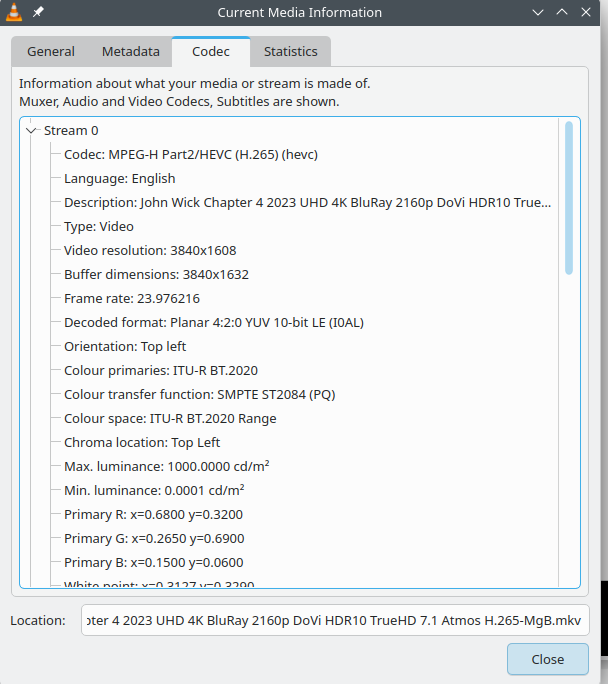
I have tried installing the codecs through something called OPI, now VLC plays the files but it takes 2min to open them. And I seem to have package duplication because now I have 3 packman repositories installed.
As hinted above, the problem is not MKV but the coding of the problem file you posted.
That file has HEVC coding (aka h265) with 10 bit High Dynamic Range at 4K definition.
The codec needed is in package libx265-215 from Packman essentials, which is a dependency of vlc-codecs.
Apparently opi codecs installed that package, among many others that quite possibly are not needed and redundant.
In the output you posted in post #4 the Packman Essentials repo is not enabled and packman packages installed might not be up to date; I don’t know if that might prevent some files from being played correctly.
Try to install the:
mkvtoolnix and mkvtoolnix-gui
It might pull some needed packages.
I have rolled back using a snapshot to a point where no packman repos are installed. I then installed flatpak version of VLC and that plays all video files perfectly. Thank you for trying to help.
1 Like
Yep … as I mentioned previously, sometimes spending two minutes installing a Flatpak and testing is worth it … why I have a few apps as Flatpak installed - quick solution