ratzi
October 21, 2025, 1:39pm
1
KDE Desktop,
In the task manager I open “Discover”.
I get “Search: KFind - 1 item”.
I click on the button to download/install KFind.
A small window opens with the Message:
There is button
Zypper doesn’t seem to be present anymore under Leap 16.0.
hui
October 21, 2025, 1:50pm
2
What makes you think that?sudo zypper in kfind
1 Like
hcvv
October 21, 2025, 1:52pm
3
That is nonsense you could have tested yourself. Just type zypper or which zypper.
1 Like
@ratzi wrote:
In the task manager I open “Discover”.
Zypper doesn’t seem to be present anymore under Leap 16.0.
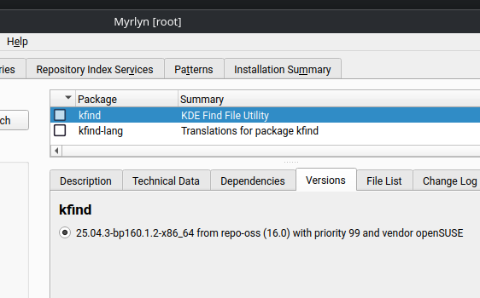
Yea, okay, some folks (like me) will [only] use Discover for Flatpak apps.Myrlyn (see screenshot) - it’s the “new YaST Software” tool.
Correct: “Zypper” does not exist … it’s “zypper”:
user :~ # zypper in kfind
Refreshing service 'openSUSE'.
Loading repository data...
Reading installed packages...
Resolving package dependencies...

The following NEW package is going to be installed:
  kfind

1 new package to install.

Package download size:   214.9 KiB

Package install size change:
              |     405.2 KiB  required by packages that will be installed
   405.2 KiB  |  -      0 B    released by packages that will be removed

Backend:  classic_rpmtrans
Continue? [y/n/v/...? shows all options] (y): n
user :~ #
1 Like
ratzi
October 21, 2025, 3:15pm
5
@hui @hcvv
Uups … I think in the terminal I typed “Zypper” with an uppercase ‘Z’ which of cause didn’t work.Zypper: command not found.
sudo zypper in kfindsudo zypper in gparted
Thanks!
ratzi
October 21, 2025, 3:20pm
6
@ myswtest
Ah great, I’ll have a look at Myrlyn!
ratzi
October 21, 2025, 3:29pm
7
However, why “Discover” (being installed in Leap 16.0 by default) after installation isn’t configured in a way that it would work?
Discover works here , to include using it on 15.6 … must be a mis-configuartion issue on your system.
ratzi
October 21, 2025, 5:03pm
9
Hi again, I was writing about a freshly installed Leap 16.0 without any modifications after install, not about Leap 15.6.
I never used “Discover” under Leap 15.6, because there I didn’t have a need for that.
@ratzi wrote:
Hi again, I was writing about a freshly installed Leap 16.0 without any modifications after install, not about Leap 15.6.
I never used “Discover” under Leap 15.6, because there I didn’t have a need for that.
I was merely stating that Discover also exists on 15.6, as well as Leap 16 … I absolutely understand you’re referring to Leap 16.
And again, Discover works as expected here on Leap 16.
If you’re having an issue with Discover on your fresh install, there’s probably a configuration issue
ratzi
October 22, 2025, 3:08pm
11
“some folks …” - I surely am among those - but YaST and its section software is gone, so I was looking if there would be any kind of replacement.
And oh yes, it feels really familiar working with Myrlyn !
I wish that one could have access to Myrlyn during the installation of Leap 16 !
Great! Thank you very much!
system
November 21, 2025, 3:09pm
12
This topic was automatically closed 30 days after the last reply. New replies are no longer allowed.