@Tail I suggest com.usebottles.bottles (it’s also verified) instead of org.winehq.Wine it’s similar to what is available in Codeweavers version… It also pulls all the files needed for the application into a ‘bottle’.
Thank you for your help. I miss basic concepts probably. I migrated to flatpak to be able to use Wine 32-bit (dotnet can’t be install on 64-bit version):
$ export WINEPREFIX=~/.wine
$ export WINEARCH=win32
$ flatpak run org.winehq.Wine winecfg
wine: WINEARCH set to win32 but '/var/data/wine' is a 64-bit installation.
How to install Wine 32-bit version?
$ flatpak list
Name                                                Application ID                                          Version                              Branch                    Installation
Bottles                                             com.usebottles.bottles                                  52.1                                 stable                    user
Freedesktop Platform                                org.freedesktop.Platform                                freedesktop-sdk-25.08.3              25.08                     user
i386                                                org.freedesktop.Platform.Compat.i386                                                         25.08                     user
Mesa                                                org.freedesktop.Platform.GL.default                     25.2.6                               25.08                     user
Mesa (Extra)                                        org.freedesktop.Platform.GL.default                     25.2.6                               25.08-extra               user
Mesa                                                org.freedesktop.Platform.GL32.default                   25.2.6                               25.08                     user
Mesa (Extra)                                        org.freedesktop.Platform.GL32.default                   25.2.6                               25.08-extra               user
Intel VAAPI driver                                  org.freedesktop.Platform.VAAPI.Intel                                                         25.08                     user
i386                                                org.freedesktop.Platform.VAAPI.Intel.i386                                                    25.08                     user
Codecs Extra Extension                              org.freedesktop.Platform.codecs-extra                                                        25.08-extra               user
i386                                                org.freedesktop.Platform.codecs_extra.i386                                                   25.08-extra               user
GNOME Application Platform version 49               org.gnome.Platform                                                                           49                        user
Wine                                                org.winehq.Wine                                         10.0                                 stable-25.08              user
gecko                                               org.winehq.Wine.gecko                                                                        stable-25.08              user
mono                                                org.winehq.Wine.mono                                                                         stable-25.08              user
If you can, give me simple answer: do this, try this or something similar. For example, I don’t understand previous answer. Does it mean to run this?
$ flatpak --user run --filesystem=~/applications com.usebottles.bottles applications/Studio+2.0_32.exe
If so I got:
16:06:37 (ERROR) Unable to load libGLX_nvidia.so.0
16:06:37 (WARNING) Unable to locate libGLX_nvidia
16:06:37 (INFO) Launching with executable: applications/Studio+2.0_32.exe
16:06:37 (INFO) Launching with URI: ['applications/Studio+2.0_32.exe']
16:06:37 (INFO) Forcing offline mode
Error while processing URI: [Errno 2] No such file or directory: '/home/user/.var/app/com.usebottles.bottles/data/bottles/bottles'
@Tail No just run bottles, it will be in the menu to select… Then can run the installer. No need to use the command line… Create an new bottle for the application, then run the installer, should be able to double click on it etc…
1 Like
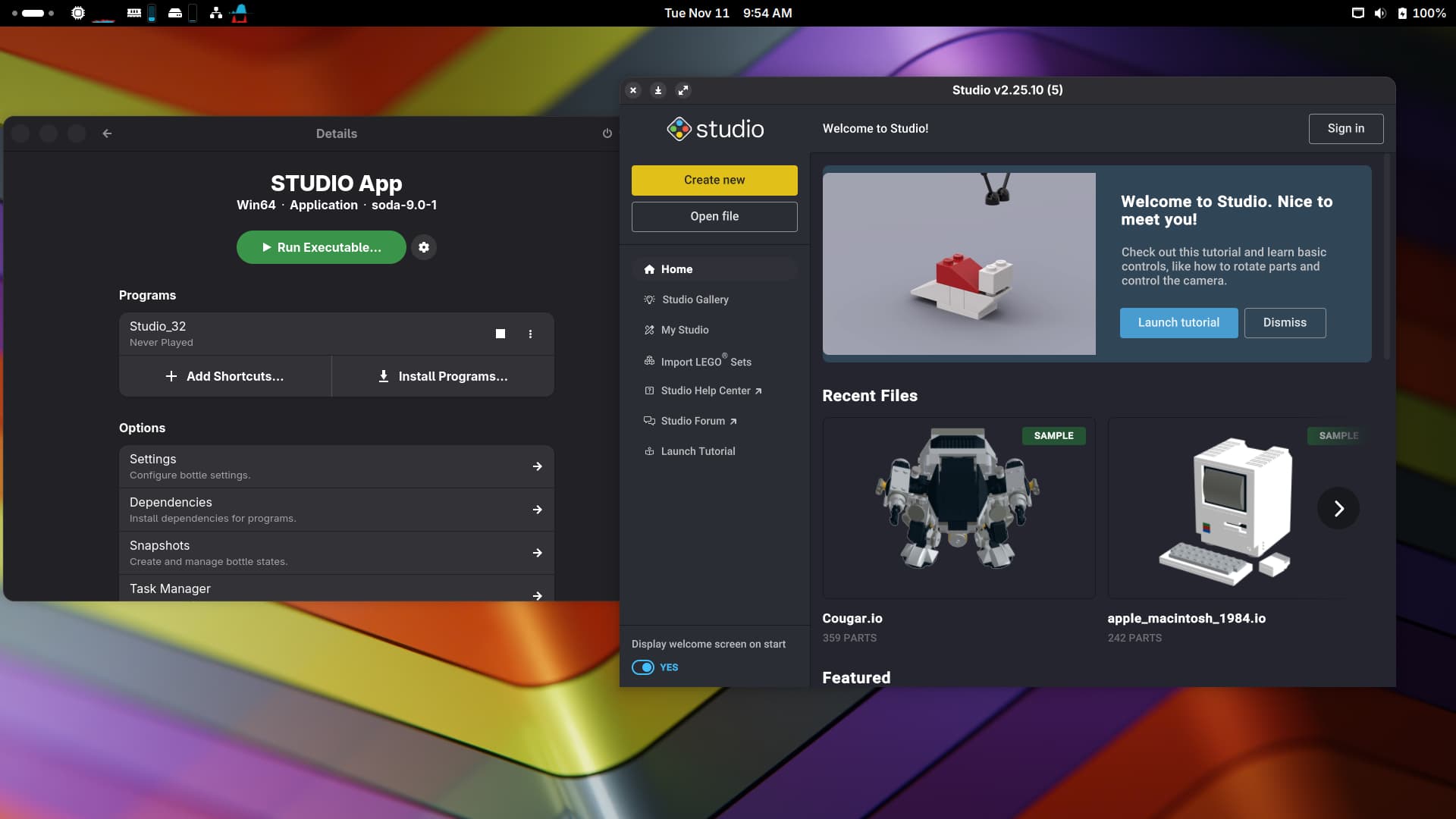
I installed within Bottle. I can run the app but without some dependencies it’s frozen and unusable:
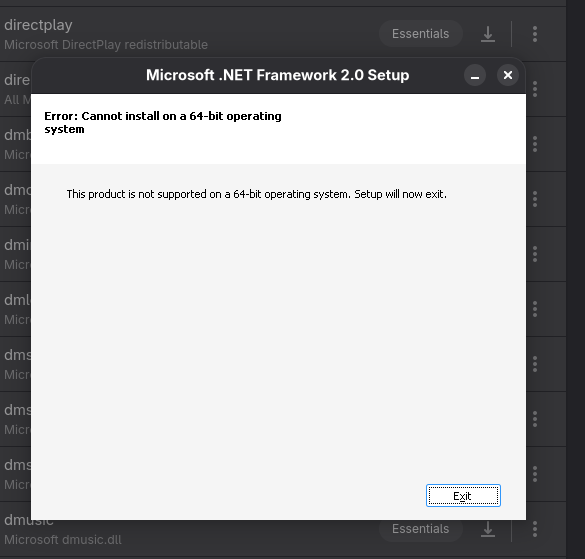
So is emulation set in boot options? Your installing the 32bit version?
$ sudo grep -i emulation /boot/grub2/grub.cfg
linux	/boot/vmlinuz-6.12.0-160000.6-default root=UUID=7aeb4c4e-c513-4658-8d2e-65d1aeab5b5d  ${extra_cmdline} mitigations=auto quiet security=selinux selinux=1 rd.driver.blacklist=nouveau ia32_emulation=1
		linux	/boot/vmlinuz-6.12.0-160000.6-default root=UUID=7aeb4c4e-c513-4658-8d2e-65d1aeab5b5d  ${extra_cmdline} mitigations=auto quiet security=selinux selinux=1 rd.driver.blacklist=nouveau ia32_emulation=1
		linux	/boot/vmlinuz-6.12.0-160000.5-default root=UUID=7aeb4c4e-c513-4658-8d2e-65d1aeab5b5d  ${extra_cmdline} mitigations=auto quiet security=selinux selinux=1 rd.driver.blacklist=nouveau ia32_emulation=1
$ sudo zypper se -i wine
S  | Name       | Summary                                       | Type
---+------------+-----------------------------------------------+--------
i+ | wine       | An MS Windows Emulator                        | package
i  | wine-gecko | The Wine specific Gecko HTML rendering engine | package
i  | wine-mono  | A .NET replacement for use by Wine            | package
i  | winetricks | A way to work around problems in WINE         | package
$ flatpak list
Name                                                Application ID                                          Version                              Branch                    Installation
Bottles                                             com.usebottles.bottles                                  52.1                                 stable                    user
Freedesktop Platform                                org.freedesktop.Platform                                freedesktop-sdk-25.08.3              25.08                     user
i386                                                org.freedesktop.Platform.Compat.i386                                                         25.08                     user
Mesa                                                org.freedesktop.Platform.GL.default                     25.2.6                               25.08                     user
Mesa (Extra)                                        org.freedesktop.Platform.GL.default                     25.2.6                               25.08-extra               user
Mesa                                                org.freedesktop.Platform.GL32.default                   25.2.6                               25.08                     user
Mesa (Extra)                                        org.freedesktop.Platform.GL32.default                   25.2.6                               25.08-extra               user
Intel VAAPI driver                                  org.freedesktop.Platform.VAAPI.Intel                                                         25.08                     user
i386                                                org.freedesktop.Platform.VAAPI.Intel.i386                                                    25.08                     user
Codecs Extra Extension                              org.freedesktop.Platform.codecs-extra                                                        25.08-extra               user
i386                                                org.freedesktop.Platform.codecs_extra.i386                                                   25.08-extra               user
GNOME Application Platform version 49               org.gnome.Platform                                                                           49                        user
Wine                                                org.winehq.Wine                                         10.0                                 stable-25.08              user
gecko                                               org.winehq.Wine.gecko                                                                        stable-25.08              user
mono                                                org.winehq.Wine.mono                                                                         stable-25.08              user
And I run Bottles by clicking on icon.
@Tail Well you don’t need wine installed on the system? And your running “Studio+2.0_32.exe”
Ok, using zypper I uninstall all things related to wine to avoid conflicts. I was able to install additional packages and now the app is working smoothly. Thank you for you help and patience.
1 Like
Did you manage to sign-in when it’s installed via bottles?
No, no sign-in/up needed.
stepping in this forum as on my laptop 1=ASUS vivobook pro N552VW-FY204T (2016) with freshly installed leap 16.0 with KDE I have the same problems:
I would like to install two windows programs
genopro
filemakerpro
summing up the solution steps should be:
enable 32bit support
sudo update-bootloader --add-option ia32_emulation=1
sudo update-bootloader --config
sudo zypper in selinux-policy-targeted-gaming
Reboot.
edit /etc/default/grub and add “ia32_emulation=1”
then run grub2-mkconfig -o /boot/grub2/grub.cfg or bootloader --config afterwards to update
run sudo zypper in -y grub2-compat-ia32
reboot
uninstall all things related to wine to avoid conflicts
and install com.usebottles.bottles by flatpack flatuhub
are these steps correct?
@pier_andreit you only need to do;
update-bootloader --add-option ia32_emulation=1
update-bootloader --config
zypper in selinux-policy-targeted-gaming
There are a few steps for configuration and adding the mfc42.dll (other is not needed).

manythanks,
and about this?
uninstall all things related to wine to avoid conflicts
and install com.usebottles.bottles by flatpack flatuhub
@pier_andreit you can do, but as long as com.usebottles.bottles is installed as your user it will be isolated from anything system related…
Once that’s installed, post back and will walk you through the steps to setup GenePro.
manythanks
uninstalled all things related to wine to avoid conflicts
update-bootloader --add-option ia32_emulation=1
update-bootloader --config
zypper in selinux-policy-targeted-gaming
rebooted
check /etc/default/grub
GRUB_CMDLINE_LINUX_DEFAULT="resume=/dev/disk/by-uuid/cc5c0a32-0eee-4e84-a330-59220c44a632 mitigations=auto quiet security=selinux selinux=0 ia32_emulation=1"
installed bottles version 61.1 by discover flatpack flatuhub
launched bottles it did some things and closed
rebooted
launched bottles
created new bottle called genopro type application
error unable to create bottle stopped on installing new times roman font
Is bottles installed as your user or system?
how can I check this?
from user desktop I clicked on discover, clicked on install bottles, discover asked me root password and stop
Use flatpak list command and check it’s all installed as “user”.
I suspect you need to run the command in #3 here https://security.opensuse.org/2025/06/06/selinux-gaming.html I suggest you read the complete article as there is likely a need for a bug report to tweak the policy for bottles.
all system installed
eros@localhost:~> flatpack list
 flatpack: command not found
eros@localhost:~> flatpak list
Name                              Application ID                          Version                  Branch       Installation
Brave                             com.brave.Browser                       1.86.148                 stable       system
ZapZap                            com.rtosta.zapzap                       6.2.10                   stable       system
Caprine                           com.sindresorhus.Caprine                2.61.0                   stable       system
Bottles                           com.usebottles.bottles                  61.1                     stable       system
Vivaldi                           com.vivaldi.Vivaldi                     7.8.3925.62              stable       system
LibreWolf                         io.gitlab.librewolf-community           147.0.3-2                stable       system
Ferdium                           org.ferdium.Ferdium                     7.1.1                    stable       system
Freedesktop Platform              org.freedesktop.Platform                freedesktop-sdk-23.08.34 23.08        system
Freedesktop Platform              org.freedesktop.Platform                freedesktop-sdk-25.08.7  25.08        system
i386                              org.freedesktop.Platform.Compat.i386                             25.08        system
Mesa                              org.freedesktop.Platform.GL.default     25.0.7                   23.08        system
Mesa (Extra)                      org.freedesktop.Platform.GL.default     25.0.7                   23.08-extra  system
Mesa                              org.freedesktop.Platform.GL.default     25.3.3                   25.08        system
Mesa (Extra)                      org.freedesktop.Platform.GL.default     25.3.3                   25.08-extra  system
Mesa                              org.freedesktop.Platform.GL32.default   25.3.3                   25.08        system
Mesa (Extra)                      org.freedesktop.Platform.GL32.default   25.3.3                   25.08-extra  system
Intel VAAPI driver                org.freedesktop.Platform.VAAPI.Intel                             23.08        system
Intel VAAPI driver                org.freedesktop.Platform.VAAPI.Intel                             25.08        system
Codecs Extra Extension            org.freedesktop.Platform.codecs-extra                            25.08-extra  system
i386                              …freedesktop.Platform.codecs_extra.i386                          25.08-extra  system
GNOME Application Platform versi… org.gnome.Platform                                               49           system
Breeze GTK theme                  org.gtk.Gtk3theme.Breeze                6.5.5                    3.22         system
KDE Application Platform          org.kde.Platform                                                 6.10         system
gecko                             org.winehq.Wine.gecko                                            stable-25.08 system
mono                              org.winehq.Wine.mono                                             stable-25.08 system
eros@localhost:~>