Hi
suddently my opensuse does’nt boot.
the process stop avec this message
starting show plymooth boot screen and afetr in got a console screen with root loogin
can i repair thise ??
regards
the message which seem to explain is 
failed to get new runlevel , utmp update skipped
and i can’t try ti update or réinstall package, the runlevel is too low to start network when i try i hang up the session !
please helpme
Linux no longer uses the UNIX® System V-style initialisation.
- Linux uses systemd.
Once logged in to the system via the Virtual Terminal – tty1 … tty6 – please check the following system status indications –
 # systemctl is-system-running
 # systemctl log-target
 # systemctl status init.scope
 # systemctl status system.slice
Please check the amount of free disk space on your system –
# lsblk --fs
Then, please check the systemd Journal –
 # journalctl --disk-usage
 # journalctl --flush
 # journalctl --list-boots
 # journalctl -b 0 -output=short-monotonic --no-hostname
I suspect that, you well find that, your system doesn’t have enough free disk space.
- If, the systemd Journal is using too much disk space –
- Drop into the systemd Rescue mode –
# systemctl rescue
- Reduce the amount of systemd Journal on the system’s disk(s) –
Assuming that, you don’t need to keep the systemd Journal entries for system administration reasons –
# journalctl --vacuum-time=1months
HI
i sure you are right il got problemes since i update to 15.4 with btrf
i did what you said , but i can’t move to rescue mode the screen freeze
regards
I also have a syntax error in line
journalctl -b 0 -ouput=short-monotonic --no-hostname
Hi
i have found !!
in fstab i have an entry for my removable disk
i erase the line and i can boot
best regard
2 Likes
OK, so you have a Btrfs system partition – you should periodically check for enough free space with the following system administrator command:
# btrfs filesystem df /
Further, in YaST, check the number of Btrfs snapshots present and, remove older no longer needed system snapshots – to free up the available space on your system partition.
Oops – I had a syntax error in the journalctl line – the “–output=” option should have two hyphens –
# journalctl -b 0 --output=short-monotonic --no-hostname
Why an fstab entry for a removable disk?
- Currently, almost every sensible GUI desktop uses “Filesystem in Userspace” (FUSE) to mount removable media for a specific user.
Hi
I don’t kinow why and because the entry was added in fstab !
I use often removable USB/disk
i remember i mount one of my disk to format it , it as trooble
I look at fstab because you direct me to an error on disk and i have saw an error message in the log talking about missing removable disk …
so
once more thank’s
I will look at BTRF c ommand i am not very easy with this i prefer ext4 , i never have trooble with
btrfs filesystem df /
Data, single: total=297.01GiB, used=283.66GiB
System, DUP: total=32.00MiB, used=48.00KiB
Metadata, DUP: total=3.00GiB, used=2.11GiB
GlobalReserve, single: total=458.77MiB, used=0.00B
Blockquote
In which case you can’t use FUSE –
- With Linux only the system administrator can partition and format disks.
For your Use Case, I recommend that, you use YaST to safely partition and format disks.

But (I also prefer ext4), your Btrfs free space (Data) for the system partition (/) seems to be not really enough for reliable system operation.
- For the Desktop GUI you’re using – GNOME or KDE Plasma – there’s usually a filesystem tool available to view the system’s partitions and their free space –
For GNOME: “Disks”
For KDE Plasma: “KDiskFree”
With Linux only the system administrator can partition and format disks.
For your Use Case, I recommend that, you use YaST to safely partition and format disks.> Blockquote
I always use yast for these type of opération
I don’t know why yast write in fstab the usb removable disk ?
Thanks for information i will take a look to kdiskfree
best regards
Because you told it to “mount disk”, which it interprets as wanting it automatically mounted on boot. For a USB drive, I always tell it “do not mount”, and then I manually mount as desired.
1 Like
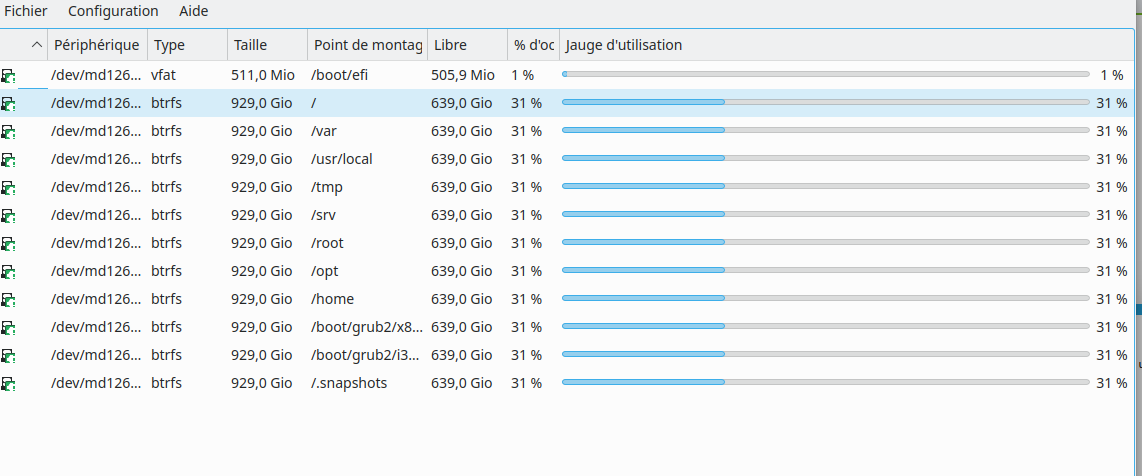
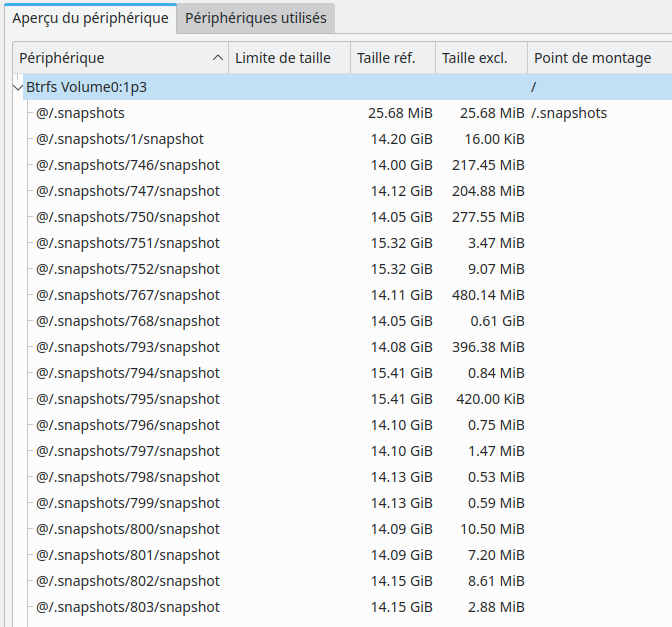
Then, use the YaST Snapshot management tool to remove the older snapshots.
Hi
I don’t know how to remove snapshot, i don"t see the free space in volume
before with ext4 i was easy, i have 3 volumes
/ for system
/home pour data
ans swap
and i can see for each the size and the free space.
now with BTRF i did’nt undestant and teh system and data ares not separated
I will take a look to documentation and see what i can do
Regards
bonjour
Merci mais franchement je ne vois pas comment m’en servir
je vois une liste de snap mais pourquoi les virer ? lesquels et quel est le taux d’occupation ?
dès que possible je repasse à ext4