The next step is to determine whether the crash also occurs with scanimage -L or scanimage --test, and to examine the coredump from coredumpctl info. That should help identify the library that is actually faulting instead of assuming the issue is the HP plugin itself.
I had never seen or used coredumpctl until you mentioned it. I did run the two dumps you suggested. I don’t see a cause but am not sure what I am looking at. I don’t see any real critical looking messages. I have enclosed them below if someone knows how to interpret them.
I may try uninstalling current hplip version and going back a few versions and reinstalling to see if my theory of hp problem is right.
tom@mydesktop: ~ $ coredumpctl info 1286436
           PID: 1286436 (scanimage)
           UID: 1000 (tom)
           GID: 100 (users)
        Signal: 11 (SEGV)
     Timestamp: Tue 2026-06-02 08:04:07 CDT (10min ago)
  **Command Line: scanimage -L**
    Executable: /usr/bin/scanimage
 Control Group: /user.slice/user-1000.slice/session-4.scope
          Unit: session-4.scope
         Slice: user-1000.slice
       Session: 4
     Owner UID: 1000 (tom)
       Boot ID: 7d7b3a9e21bb4332b3dcbd4e223d4bc9
    Machine ID: 128599b179684a9b94263a31be841993
      Hostname: mydesktop
       Storage: /var/lib/systemd/coredump/core.scanimage.1000.7d7b3a9e21bb4332b3dcbd4e223d4bc9.1286436.1780405447000000.zst (present)
  Size on Disk: 105.7K
       Message: Process 1286436 (scanimage) of user 1000 dumped core.

                Stack trace of thread 1286436:
                #0  0x00007fc8c2a84663 _IO_fgets (libc.so.6 + 0x84663)
                #1  0x00007fc8c240c2b6 fgets (libsane-hpgt2500.so.1 + 0xc2b6)
                #2  0x00007fc8c2dbaa91 n/a (libsane.so.1 + 0x9a91)
                #3  0x00007fc8c2dbb5a5 sane_dll_get_devices (libsane.so.1 + 0xa5a5)
                #4  0x000055fc4f0c5d37 n/a (/usr/bin/scanimage + 0x3d37)
                #5  0x00007fc8c2a2b33e __libc_start_call_main (libc.so.6 + 0x2b33e)
                #6  0x00007fc8c2a2b46b __libc_start_main@@GLIBC_2.34 (libc.so.6 + 0x2b46b)
                #7  0x000055fc4f0c9065 n/a (/usr/bin/scanimage + 0x7065)

                Stack trace of thread 1286437:
                #0  0x00007fc8c2aa4252 __syscall_cancel_arch (libc.so.6 + 0xa4252)
                #1  0x00007fc8c2a97dd8 __internal_syscall_cancel (libc.so.6 + 0x97dd8)
                #2  0x00007fc8c2a97e31 __syscall_cancel (libc.so.6 + 0x97e31)
                #3  0x00007fc8c2b1192a __poll (libc.so.6 + 0x11192a)
                #4  0x00007fc8c2c6880a n/a (libusb-1.0.so.0 + 0x1580a)
                #5  0x00007fc8c2a9b8f0 start_thread (libc.so.6 + 0x9b8f0)
                #6  0x00007fc8c2b1fc2c __clone3 (libc.so.6 + 0x11fc2c)
                ELF object binary architecture: AMD x86-64


tom@mydesktop: ~ $ coredumpctl info 1286590
           PID: 1286590 (scanimage)
           UID: 1000 (tom)
           GID: 100 (users)
        Signal: 11 (SEGV)
     Timestamp: Tue 2026-06-02 08:04:32 CDT (11min ago)
  **Command Line: scanimage --test**
    Executable: /usr/bin/scanimage
 Control Group: /user.slice/user-1000.slice/session-4.scope
          Unit: session-4.scope
         Slice: user-1000.slice
       Session: 4
     Owner UID: 1000 (tom)
       Boot ID: 7d7b3a9e21bb4332b3dcbd4e223d4bc9
    Machine ID: 128599b179684a9b94263a31be841993
      Hostname: mydesktop
       Storage: /var/lib/systemd/coredump/core.scanimage.1000.7d7b3a9e21bb4332b3dcbd4e223d4bc9.1286590.1780405472000000.zst (present)
  Size on Disk: 105.3K
       Message: Process 1286590 (scanimage) of user 1000 dumped core.

                Stack trace of thread 1286590:
                #0  0x00007fa543a84663 _IO_fgets (libc.so.6 + 0x84663)
                #1  0x00007fa54340c2b6 fgets (libsane-hpgt2500.so.1 + 0xc2b6)
                #2  0x00007fa543ee6a91 n/a (libsane.so.1 + 0x9a91)
                #3  0x00007fa543ee75a5 sane_dll_get_devices (libsane.so.1 + 0xa5a5)
                #4  0x00005635c4719111 n/a (/usr/bin/scanimage + 0x6111)
                #5  0x00007fa543a2b33e __libc_start_call_main (libc.so.6 + 0x2b33e)
                #6  0x00007fa543a2b46b __libc_start_main@@GLIBC_2.34 (libc.so.6 + 0x2b46b)
                #7  0x00005635c471a065 n/a (/usr/bin/scanimage + 0x7065)

                Stack trace of thread 1286591:
                #0  0x00007fa543aa4252 __syscall_cancel_arch (libc.so.6 + 0xa4252)
                #1  0x00007fa543a97dd8 __internal_syscall_cancel (libc.so.6 + 0x97dd8)
                #2  0x00007fa543a97e31 __syscall_cancel (libc.so.6 + 0x97e31)
                #3  0x00007fa543b1192a __poll (libc.so.6 + 0x11192a)
                #4  0x00007fa543d9480a n/a (libusb-1.0.so.0 + 0x1580a)
                #5  0x00007fa543a9b8f0 start_thread (libc.so.6 + 0x9b8f0)
                #6  0x00007fa543b1fc2c __clone3 (libc.so.6 + 0x11fc2c)
                ELF object binary architecture: AMD x86-64
tom@mydesktop: ~
The coredump output is quite revealing. I’ve seen this before. It is due to a specific backend (libsane-hpgt2500.so.1) crashing. There was also a bug report for this.
Anyway, examine /etc/sane.d/dll.conf, and remove it if it is listed there.
sudo cp /etc/sane.d/dll.conf /etc/sane.d/dll.conf.bak
sudo sed -i 's/^hpgt2500/#hpgt2500/' /etc/sane.d/dll.conf
then try scanimage -L again.
The two bugreports for this issue were already mentioned in the third comment.
xsane now finds device and opens fully w/o seg fault after your prescribed commands.
tom@mydesktop: ~ $ sudo cp -v /etc/sane.d/dll.conf /etc/sane.d/dll.conf.bak
'/etc/sane.d/dll.conf' -> '/etc/sane.d/dll.conf.bak'


tom@mydesktop: ~ $ sudo sed -i 's/^hpgt2500/#hpgt2500/' /etc/sane.d/dll.conf

tom@mydesktop: ~ $ scanimage -L
device `hpaio:/usb/HP_ColorLaserJet_MFP_M278-M281?serial=VNBNM8H15S' is a Hewlett-Packard HP_ColorLaserJet_MFP_M278-M281 all-in-one

tom@mydesktop: ~ $ xsane
tom@mydesktop: ~ $
xsane opens properly. Not tried a scan yet but looks fine.
solved for me
thanks for sticking with this, tom kosvic
1 Like
How can I download this? i suppose it I have to download .run-file, asc fike and the ./run…
What after downloading?
When I type hp-info -i, a got:
.
drugi@localhost:~> hp-info -i

HP Linux Imaging and Printing System (ver. 3.26.4)
Device Information Utility ver. 5.2

Copyright (c) 2001-18 HP Development Company, LP
This software comes with ABSOLUTELY NO WARRANTY.
This is free software, and you are welcome to distribute it
under certain conditions. See COPYING file for more details.


-----------------
| SELECT DEVICE |
-----------------

  Num       Device URI                                                          CUPS Printer(s)
  --------  ------------------------------------------------------------------  --------------------------------
  0*        hp:/usb/HP_LaserJet_Professional_P1102?serial=000000000QN070XHPR1a  HP-LaserJet-Professional-P1102
  1         hp:/usb/HP_LaserJet_Professional_P1102?serial=000000000QN070XHSI1c  HP-LaserJet-Professional-P1102-2

Enter number 0...1 for device (q=quit, <enter>=default: 0*) ?0

hp:/usb/HP_LaserJet_Professional_P1102?serial=000000000QN070XHPR1a

Device Parameters (dynamic data):
  Parameter                     Value(s)
  ----------------------------  ----------------------------------------------------------
  agent1-ack                    False
  agent1-desc                   Black toner cartridge
  agent1-dvc                    0
  agent1-health                 0
  agent1-health-desc            Good/OK
  agent1-hp-ink                 False
  agent1-id                     0
  agent1-kind                   4
  agent1-known                  False
  agent1-level                  100
  agent1-level-trigger          0
  agent1-sku                    85A
  agent1-type                   1
  agent1-virgin                 False
  back-end                      hp
  cups-printers                 ['HP-LaserJet-Professional-P1102']
  cups-uri                      hp:/usb/HP_LaserJet_Professional_P1102?serial=000000000QN0
                                70XHPR1a
  dev-file
  device-state                  1
  device-uri                    hp:/usb/HP_LaserJet_Professional_P1102?serial=000000000QN0
                                70XHPR1a
  deviceid                      MFG:Hewlett-Packard;MDL:HP LaserJet Professional
                                P1102;CMD:ZJS,PJL,ACL,HTTP;CLS:PRINTER;DES:HP LaserJet
                                Professional P1102;FWVER0100223;3;
  duplexer                      0
  error-state                   0
  host
  in-tray1                      1
  in-tray2                      1
  is-hp                         True
  media-path                    1
  panel                         0
  panel-line1
  panel-line2
  photo-tray                    0
  port                          1
  r                             0
  revision                      254
  rg                            000
  rr                            000000
  rs                            000000000
  serial                        000000000QN070XHPR1a
  status-code                   1000
  status-desc                   Idle
  supply-door                   1
  top-door                      1

Model Parameters (static data):
  Parameter                     Value(s)
  ----------------------------  ----------------------------------------------------------
  align-type                    0
  clean-type                    0
  color-cal-type                0
  copy-type                     0
  embedded-server-type          0
  family-class                  ['LJ-Class4']
  fax-type                      0
  fw-download                   False
  icon                          HP_LaserJet_1012.png
  io-mfp-mode                   6
  io-mode                       1
  io-support                    2
  job-storage                   0
  linefeed-cal-type             0
  model                         HP_LaserJet_Professional_P1102
  model-ui                      HP LaserJet Professional p1102
  model1                        HP Laserjet Professional P1102 Printer
  model2                        HP Laserjet Professional P1102s Printer
  monitor-type                  0
  panel-check-type              0
  pcard-type                    0
  plugin                        1
  plugin-reason                 1
  power-settings                0
  pq-diag-type                  0
  r-type                        0
  r0-agent1-kind                4
  r0-agent1-sku                 85A
  r0-agent1-type                1
  scan-src                      0
  scan-type                     0
  status-battery-check          0
  status-dynamic-counters       0
  status-type                   8
  support-released              True
  support-subtype               2202411
  support-type                  2
  support-ver                   3.10.4
  tech-class                    ['LJZjsMono']
  tech-subclass                 ['NoAutoDuplex']
  tech-type                     3
  usb-pid                       42
  usb-vid                       1008
  wifi-config                   0

Status History (most recent first):
  Date/Time             Code   Status Description                        User      Job ID
  --------------------  -----  ----------------------------------------  --------  --------
  06/03/26 07:44:43     1000   Idle                                      drugi     0
  06/03/26 07:40:53     501    Print job has completed                   drugi     221
  06/03/26 07:40:33     502    Print job failed - required plug-in not   drugi     221
                               found
  06/03/26 07:40:33     500    Started a print job                       drugi     221
  06/03/26 07:40:01     501    Print job has completed                   drugi     220
  06/03/26 07:40:01     1018   Unknown error                             drugi     0
  06/03/26 07:39:41     502    Print job failed - required plug-in not   drugi     220
                               found
  06/03/26 07:39:41     500    Started a print job                       drugi     220
  06/03/26 07:39:41     1000   Idle                                      drugi     0
  06/03/26 07:39:17     501    Print job has completed                   drugi     219
  06/03/26 07:38:57     502    Print job failed - required plug-in not   drugi     219
                               found
  06/03/26 07:38:56     500    Started a print job                       drugi     219
  06/03/26 07:38:56     1000   Idle                                      drugi     0


Done.
drugi@localhost:~>
See #4 and #7.
In #4 right click on the link—save as.
I have an HP Deskjet printer that used to scan but hasn’t for a while now so was interested in this thread, so got the suggested file download as above. When I ran it as a programme it went through lots of stuff but eventually failed with the following errors, which apologies I was only able to get as a screenshot - in case this helps with the debate. Simple scan just crashed when I tried to launch it today.
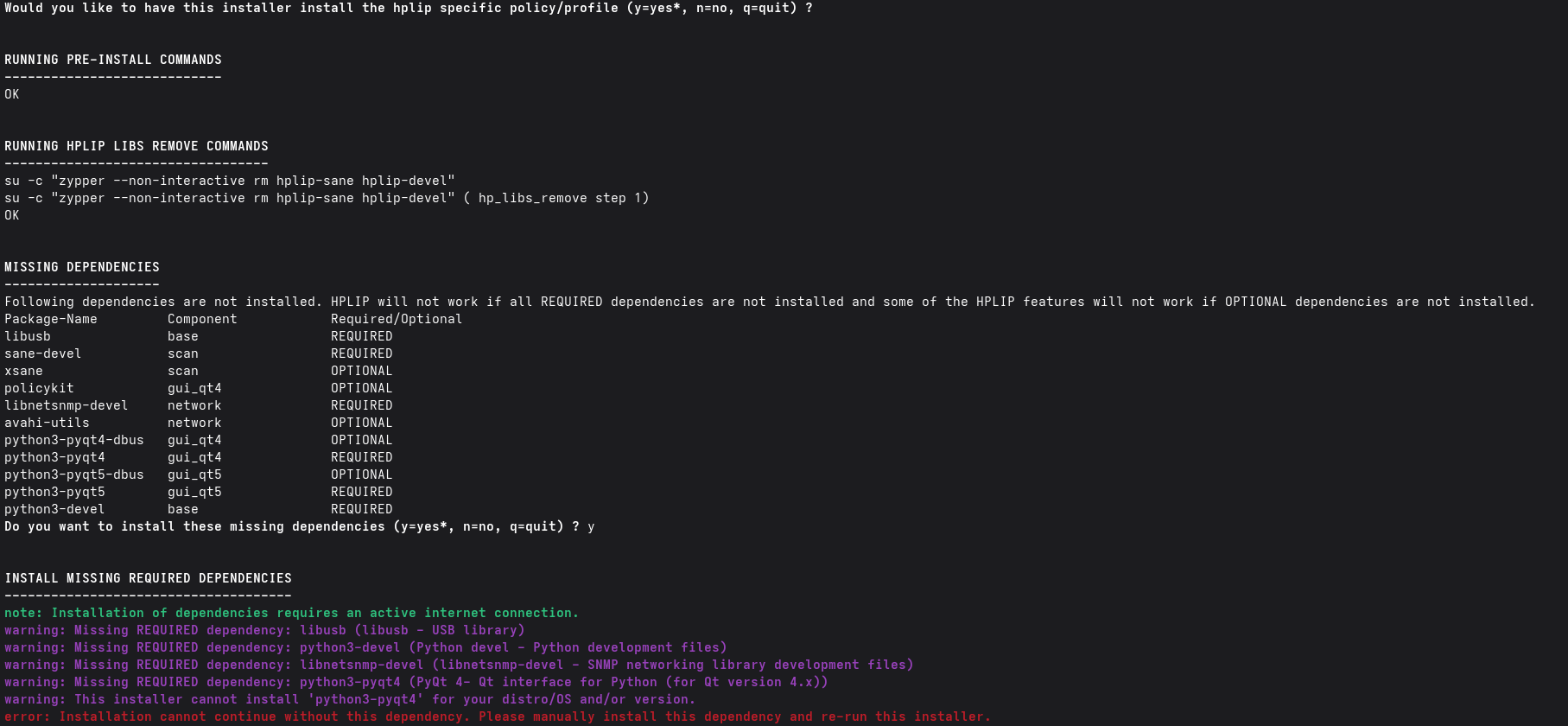
Which one?
Maybe use sane-airscan if Wifi Scanner?
Yep, downloading hplip-3.26.4-plugin.run from the given hp site and installing it via hp-plugin -i -p <path_to_file> worked out for me.
@malcolmlewis: Thanks a lot 
It’s HP Deskjet 4130e which is not that old & wi-fi enabled, although I turned that off after stopping my instant ink subscription to stop HP spying on me. I guess I could turn it back on if it would get the scanner part working again. It was discoverable as a network printer when the wi-fi was on so maybe an air scan thing could work for me. How exactly do set up / use sane - airscan please if that’s not too much to ask?
Thank you.
FYI,
When xsane was making coredumps prior to the solution supplied by @deano_ferrari , I installed and ran airscan and that also threw a coredump.
Please don’t confuse this topic. Ideally, people should be raising new topics, as often the underlying issues are unrelated.
I saw several references as to how to use airscan and I mentioned that I had tried it and it didn’t provide a solution to the posted problem. Hope that didn’t confuse anyone.
tom kosvic
A fix is on it’s way:
https://build.opensuse.org/requests/1357040
Here on Leap 16.0, hp-plugin is working as before after this fix:
hp-plugin

HP Linux Imaging and Printing System (ver. 3.26.4)
Plugin Download and Install Utility ver. 2.1

Copyright (c) 2001-18 HP Development Company, LP
This software comes with ABSOLUTELY NO WARRANTY.
This is free software, and you are welcome to distribute it
under certain conditions. See COPYING file for more details.


HP Linux Imaging and Printing System (ver. 3.26.4)
Plugin Download and Install Utility ver. 2.1

Copyright (c) 2001-18 HP Development Company, LP
This software comes with ABSOLUTELY NO WARRANTY.
This is free software, and you are welcome to distribute it
under certain conditions. See COPYING file for more details.

Checking for network connection...
Downloading plug-in from:
Receiving digital keys: /usr/bin/gpg --homedir /home/stephan/.hplip/.gnupg --no-permission-warning --keyserver hkp://keyserver.ubuntu.com:80 --recv-keys 0x82FFA7C6AA7411D934BDE173AC69536A2CF3A243
 Plug-in installation successful

Done.
1 Like
This topic was automatically closed 7 days after the last reply. New replies are no longer allowed.