Can not install leap 16 rc

I had leap 16 beta running on my test machine for a month . i saw that the 16-RC was released yesterday and downloaded it immediately . the image passed the sha256 test . the processor i’m useing handles the instruction set . i tried installing on a usb stick but it would not work . then i tried a dvd install and the installation hangs at this point in the photo :

at this point the screen refreshes and then says :

started session 2 of user root
started session 3 of user root
started session 4 of user root
started session 5 of user root

then it keeps blinking .

Yep - here too … been running “Leap 16” since Alpha.
I will say, it (RC) installed … but afterwards, it’s VERY buggy (KDE Plasma DE)

First comment … I’m surprised there is NO official announcement of the RC release. (same happened when Beta was released).

Second comment. Nope, this is not an RC release. It is lacking in many ways - should still be in Beta. And the Agama installer, which I (and others in comments) consider still in an Alpha stage, is very lacking.

And I discovered the “RC” purely by accident … so downloaded the:
“Leap-16.0-offline-installer-x86_64-Build148.4.install.iso” …
yesterday and installed.

Many issues … so removed it … and removed the 16 Beta install.

@reid_barrett … good luck gettting your install resolved :+1:

RC gives me a better experience than beta, but I agree Agama is simply disappointing, difficult to change the default settings and software deselection is not honoured, unwanted software still gets installed. At least an issue with non-us keyboards has been fixed. SDDM uses now the selected keyboard layout. I used the offline installer in Qemu/KVM
There is an announcement: Try Xfce on Wayland with openSUSE Leap 16.0 RC - openSUSE News

Actually, it was announced here:

I’m also unenthusiastic about the agama installer. However, Leap 16.0RC seems to be running fine here, though I have not tested it very thoroughly.

@myswtest Dump Plasma then :scream: All good here on GNOME :wink:

i found a new version of the release candidate this morning , Build148.6 .
i tried it out and it still crashes when i install .

Something I just noticed. There’s these tags:

  • leap-16-alpha
  • leap-16-beta
  • leap-160 (recently added, obviously for GA)

… but there’s no “leap-16-rc” tag. Should be one :+1:

(not for you, reid_barrett, to worry about :slight_smile: )

These tags are not helpful in any way. Better have a general tag for releases under development like leap-16-dev. Or leap-17-dev or…
Saves the admins a lot of time and doesn’t clutter the forum with tags which can only be used for 2 months…

Is the leap 16 beta that I’ve been maintaining and testing things on the same as the newly announced leap 16-rc? Or is this a new entity that needs separate install?

thanks, tom kosvic

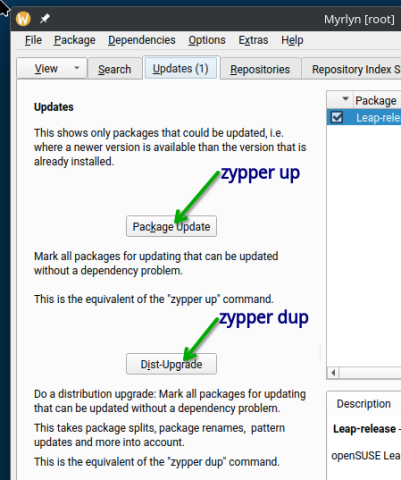
You need to run sudo zypper dup or use Myrlyn’s Upgrade feature. Until final release, then sudo zypper ref && sudo zypper up should be used or Myrlyn’s Update feature.

  1. An Alpha, Beta, and RC (Release Candidate) are considered “pre-release” versions of an upcoming (major) release of a software product.
  2. No, you don’t need to do a fresh install, but that’s a personal choice - some folks do, some don’t.

Think of pre-release versions as a “this is what Leap 16 is going to be, but we are working to make it generally usable /acceptable”. :+1:

The final release is named “GA” - General Availability.

To provide a visual perspective of @knurpht 's explanation, please see the screenshot below.

For #1, it’s the lower Button the arrow is pointing to.
For #2, it’s the top Button the other arrow is pointing to.

.

1 Like

I tried a clean install with build 151.4 and i still get the same problems as before .

Okay, back in your first post, we see:

  1. What did you use to burn to a USB stick?
  2. Does your machine (desktop or laptop) really have a DVD drive that you’re attempting installation?
  3. What is the main OS that is running on this machine?
  4. Are you hoping to install to an empty partition of some drive on the machine?

At this point, my wild guess is there is some oddball setting in the BIOS that’s causing the lockup.

  1. i used suse studio imagewriter to burn to a 16g corsair usb 3.0 stick .

  2. specs of machine :

    mobo : biostar b350gt5 vers 5
    processor : ryzen 5 1600 hex core summit ridge
    memory : 2 x 8 gig corsair dominator platinum ddr4 2666
    video : evga GeForce 1030 gt
    disk : seagate st1000dm010
    blu ray : lite-on hbs112
    power : corsair rm850x

  3. i am currently running leap 15.6

  4. i plan on wiping the drive and doing a fresh install .

now i am going to take a look at the bios settings .

Dual graphics, and Ryzen + Nvidia, looks like a recipe for trouble.
Try to boot the installer with nomodeset added to the boot command line:
at the boot screen click “E” for edit, look for the line beginning with “linux” and append nomodeset. Then hit F10 to boot.
You should be able to install even if with a reduced video resolution etc.
After the first reboot you should be able to remove the nomodeset, install drivers if needed etc.

1 Like

This got it to work . Thanks

1 Like

This topic was automatically closed 7 days after the last reply. New replies are no longer allowed.