Hello!
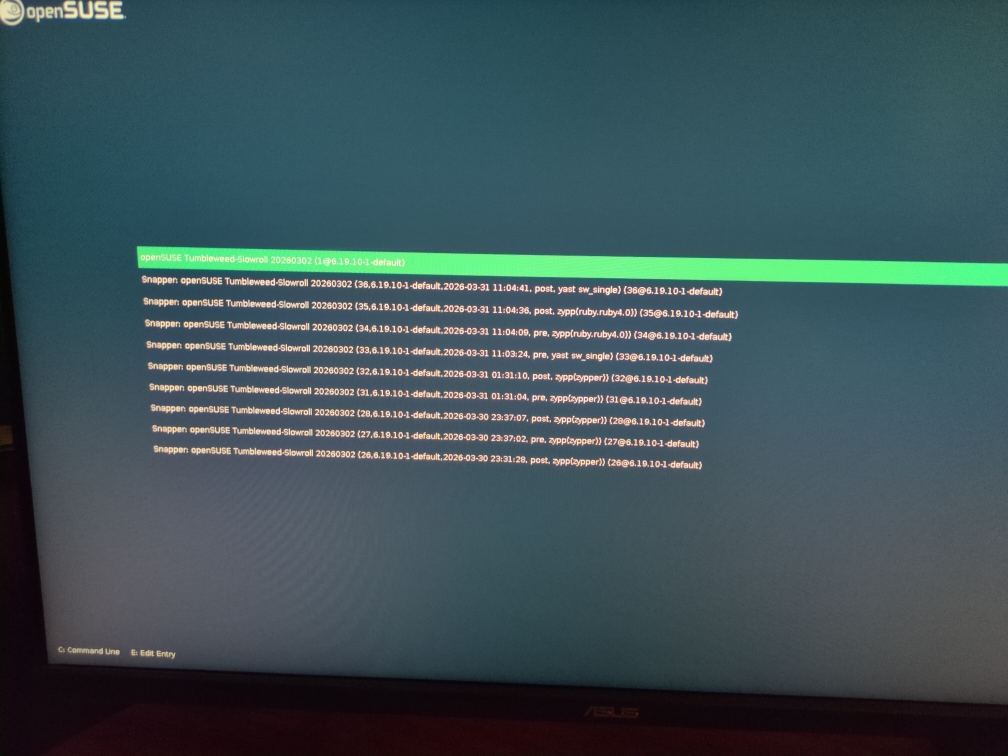
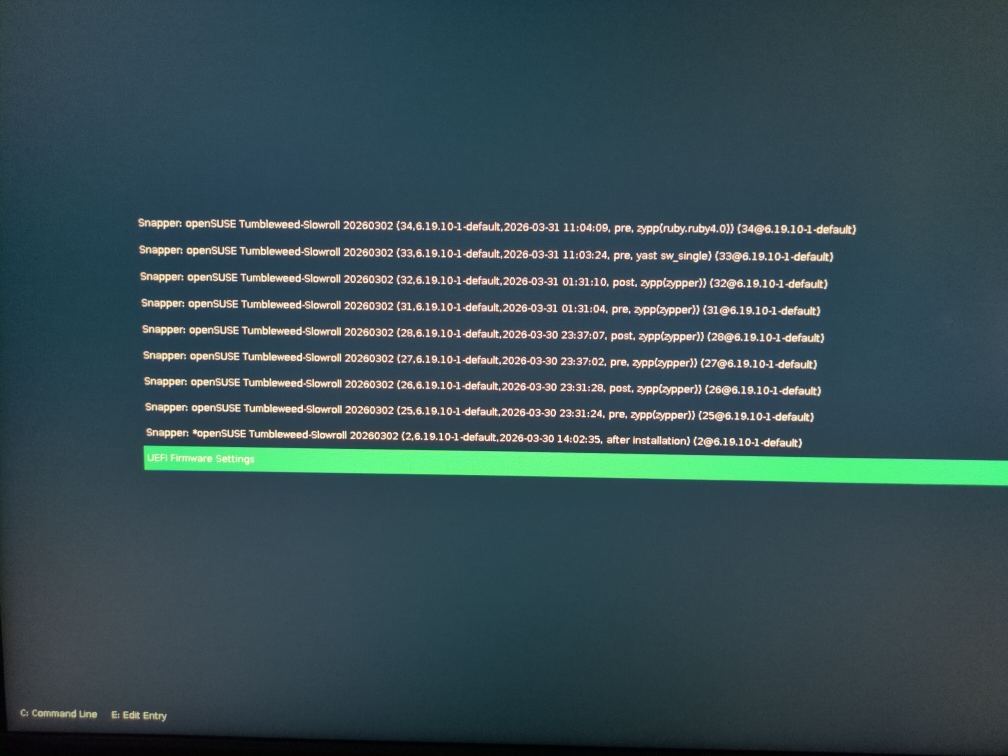
I recently took the first real plunge into daily driving OpenSUSE by going with Slowroll. I have a bit of experience in running Slowroll on several older laptops. I even first practiced installing it on a laptop before using the same USB installer to set it up on my main PC, but then I ran into a new bootloader issue that wasn’t there on a laptop. The bootloader menu looks like this:
It displays all of the snapshots on it’s main menu instead of elegantly hiding it behind a submenu.
I can not get it to detect a Linux Mint dual boot that I am trying to gradually transition away from.
In Yast Boot Loader settings the boot loader is set to GRUB2 with BLS and in the Yast Software Manager the only GRUB2 package that is installed is grub2-x86_64-efi-bls. However, the system does not have a /etc/default/grub file or /boot/grub directory.
That is new to me, so now I feel really out of my depth and I don’t want to lock myself out in case there is risk from trying to just install other Grub2 packages and trying to switch to them via Yast. I consulted LLMs about this, but their inconsistencies in solutions depending on how I approach the issue make me distrustful. So I would be very grateful to hear from someone with real human experience on how to best try to solve this issue.
I thought I’d stop back in and provide a couple of links to posts with same issue … one post is fairly recent, and the other is pretty old … these are responses showing the issues and best to not use BLS
Thank you for the added context about the BLS situation!
I’ve been looking around and I have noticed some of these too. On my spare laptop I even purposely messed up my GRUB to see how I can boot into if it comes to worst. And I have to commend OpenSUSE for having a pretty user friendly usb installer that allows to boot into the disk even without any working GRUB at all to fix it.
Next time, I have the time to deal with this problem I’m gonna first install the grub2-x86-64-efi package on the main PC and then switch the bootloader setting to the EFI bootloader. Hopefully nothing nerve-wracking happens. I think the main pre-requisite is that you have to have a /boot/efi mount point on your install and switching shouldn’t be an issue?
If it works out I’ll make sure to pin this thread as “Solved”.
@Dewwit Hi, the new default for Tumbleweed (and Slowroll) is systemd-boot, seems there were TPM2 and FDE issues, I don’t use FDE etc.
Both grub2-bls and systemd-boot will show the list of snapshots, AFAIK that won’t change. Likewise grub2-bls is single boot, if wanting dual/multiboot then one needs to use the BIOS boot menu to select the alternative OS to boot…
As an aside, the /boot/efi partiton size is different for the newer boot loaders, whilst switching the grub2-efi may resolve, going forward that may not be the case.
@malcolmlewis
Sorry for my confusion, I’m not very literate in system boot mechanics. It usually has been something that I set up once and don’t dare to try to mess with again.
So before I try doing anything, may you plz clearify what you mean by…
Both grub2-bls and systemd-boot will show the list of snapshots, AFAIK that won’t change. Likewise grub2-bls is single boot, if wanting dual/multiboot then one needs to use the BIOS boot menu to select the alternative OS to boot…
So the way I have it in the OP screenshots is not a bug? It’s going to be the default for OpenSuse going forward on newer systems? And ideally the expectation going forward would be for people to use built in BIOS boot menu for dual boothing purpouses?
Well, I hope not, it’s a bit of a hassle trying to catch the timing to enter Motherboard’s boot menu. Maybe I’ll find a way to set it up to allways pop up like grub in BIOS settings…
As an aside, the /boot/efi partiton size is different for the newer boot loaders, whilst switching the grub2-efi may resolve, going forward that may not be the case.
So you are advising against switching to grub2-efi? I think my current Slowroll boot partition is 1gb big if that’s relavant(?).
Again, sorry for my illiteracy about this aspect of linux.
@deano_ferrari
Going down your suggested rabbit hole, I found this reddit post that you linked - which seems to contain the explenation I might be looking for, and I don’t think I like it
It’s a very complex and stressfull process it seems. I am considering just to reinstall my slowroll and but this time make sure to pick the EFI boot manually.
I guess for now I’ll treat this install as a test run, I’ll allow myself to be more experimental with the expectation that I will start over again soon.
@Dewwit grub2-bls was only ever intended to boot a single operating system, systemd-boot will add additional operating systems to boot from. Neither of these two have an option to hide snapshots AFAIK. I think systemd-boot (I use with AEON) does, but by default it hides the list so never see it unless press the spacebar at boot.
Both grub2-bls and systemd-boot recommend greater than 2GB of partition space, I use 4GB these days (well for a number of years).
Check your system BIOS, there should be an option to display the BIOS boot menu when powering the system on?
Either way, Windows and other distributions will happily reside on the 4GB /boot/efi partition, grub2-efi, grub2-bls or systemd-boot. The default for Tumbleweed/Slowroll is systemd-boot, I still use grub2-efi and grub2-bls.
I would suggest a fresh install with the latest Slowroll snapshot and select systemd-boot as well as increasing the size of /boot/efi partition.
Thank you a lot!
This greatly helps to paint a wholistic picture of the whole situation for me. I’m mainly glad to have a confirmation that I didn’t get a buggy bootloader. I might stick with the current BLS booter (but I do like the elegance of how EFI sorts it’s entries).
I would suggest a fresh install with the latest Slowroll snapshot and select systemd-boot as well as increasing the size of /boot/efi partition.
I will see what I can do about making the boot partition bigger.
For now I will sit on the thought of reinstalling the whole thing. I might stick with what I have if I figure out how to make that BIOS boot menu work. I’ll keep this thread open for a while until I settle on a solution, since I might bump into more bootloader issues and confusions relevant to the initial problem.