Boot and Nvidia install problems

Hello

I have a new laptop with the following specifications:

lorraine@llinux:~> inxi -Ga
Graphics:
  Device-1: NVIDIA GB206M [GeForce RTX 5070 Max-Q / Mobile] vendor: ASUSTeK
    driver: nouveau v: kernel non-free: 550-6xx.xx+
    status: current (as of 2026-07) arch: Lovelace code: AD1xx
    process: TSMC n4 (5nm) built: 2022+ pcie: gen: 4 speed: 16 GT/s lanes: 8
    link-max: gen: 5 speed: 32 GT/s lanes: 16 ports: active: none
    empty: DP-9,HDMI-A-1,eDP-2 bus-ID: 01:00.0 chip-ID: 10de:2d58
    class-ID: 0300
  Device-2: Advanced Micro Devices [AMD/ATI] HawkPoint1 vendor: ASUSTeK
    driver: amdgpu v: kernel arch: RDNA-3 code: Phoenix process: TSMC n4 (4nm)
    built: 2023+ pcie: gen: 4 speed: 16 GT/s lanes: 16 ports: active: eDP-1
    empty: DP-1, DP-2, DP-3, DP-4, DP-5, DP-6, DP-7, DP-8, Writeback-1
    bus-ID: 65:00.0 chip-ID: 1002:1900 class-ID: 0300 temp: 28.0 C
  Device-3: Shinetech ASUS FHD webcam driver: uvcvideo type: USB rev: 2.0
    speed: 480 Mb/s lanes: 1 mode: 2.0 bus-ID: 3-1:2 chip-ID: 3277:0096
    class-ID: fe01 serial: 200901010001
  Display: wayland server: X.org v: 1.21.1.24 with: Xwayland v: 24.1.13
    compositor: kwin_wayland driver: X: loaded: modesetting unloaded: vesa
    alternate: fbdev,nouveau,nv,nvidia dri: radeonsi gpu: amdgpu display-ID: 0
  Monitor-1: eDP-1 model: AU Optronics B180UAN01.2 built: 2024 res:
    mode: 1920x1200 hz: 144 scale: 100% (1) dpi: 126 gamma: 1.2
    size: 387x242mm (15.24x9.53") diag: 456mm (18") ratio: 16:10 modes:
    max: 1920x1200 min: 640x480
  API: EGL v: 1.5 hw: drv: amd radeonsi platforms: device: 1 drv: radeonsi
    device: 2 drv: swrast gbm: drv: kms_swrast surfaceless: drv: radeonsi
    wayland: drv: radeonsi x11: drv: radeonsi inactive: device-0
  API: OpenGL v: 4.6 vendor: amd mesa v: 26.2.1 glx-v: 1.4
    direct-render: yes renderer: AMD Radeon 780M Graphics (radeonsi phoenix ACO
    DRM 3.64 7.2.2-1-default) device-ID: 1002:1900 memory: 500 MiB
    unified: yes display-ID: :1.0
  API: Vulkan v: 1.4.357 layers: 2 device: 0 type: integrated-gpu name: AMD
    Radeon 780M Graphics (RADV PHOENIX) driver: mesa radv v: 26.2.1
    device-ID: 1002:1900 surfaces: N/A device: 1 type: cpu name: llvmpipe
    (LLVM 22.1.8 256 bits) driver: mesa llvmpipe v: 26.2.1 (LLVM 22.1.8)
    device-ID: 10005:0000 surfaces: N/A
  Info: Tools: api: eglinfo, glxinfo, vulkaninfo
    de: kscreen-console,kscreen-doctor wl: wayland-info
    x11: xdpyinfo, xprop, xrandr
lorraine@llinux:~>

The installation was carried out using a USB stick with Balena Etcher, with UEFI enabled and went without a hitch when I rebooted at the end of the installation.

I then shut down the machine properly before going to bed.

Three problems then arose:

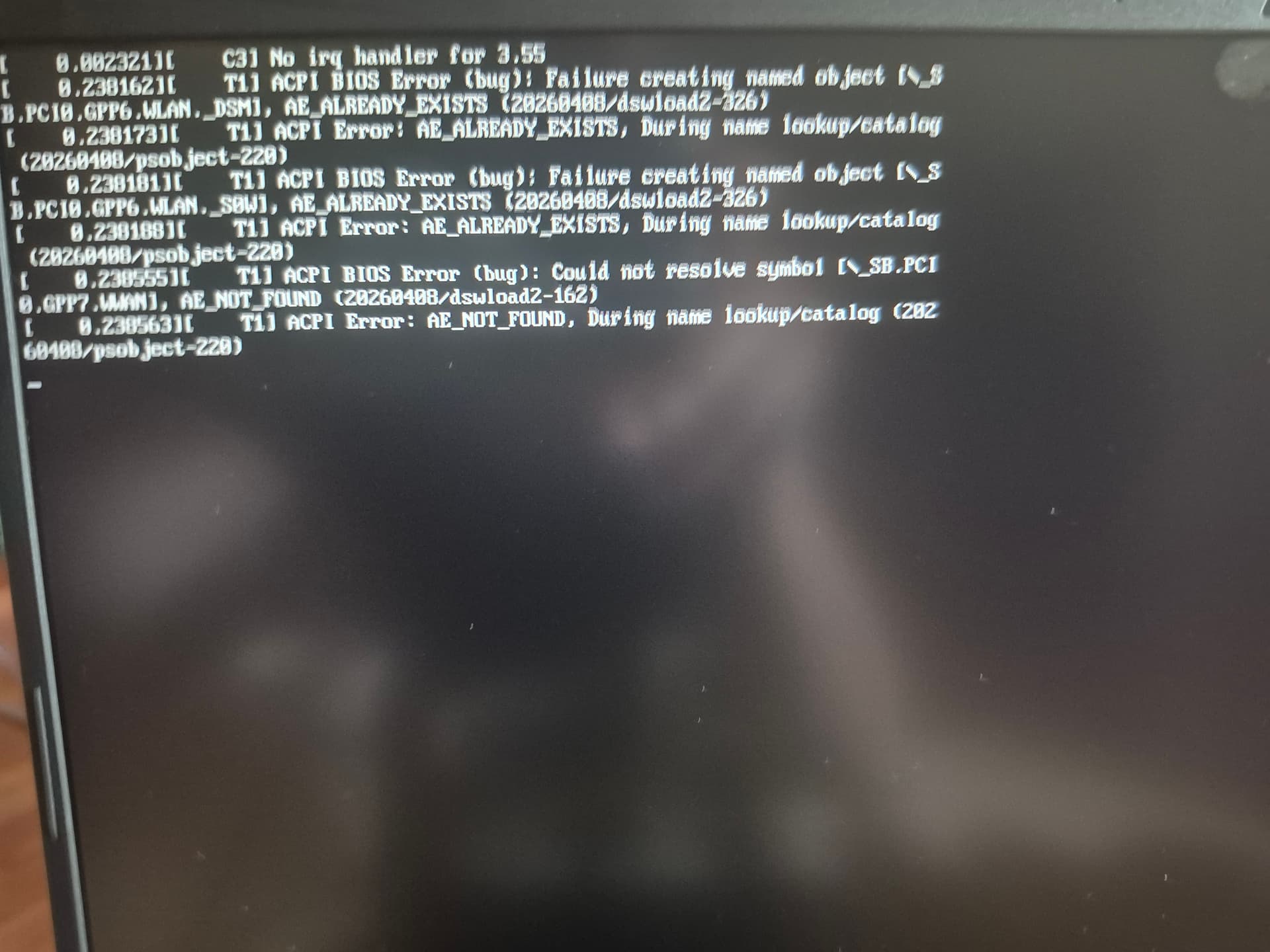
  1. When Tumbleweed starts up, I get the following message before the login screen:

  2. I cannot carry out any updates because Myrlyn tells me:
“Refreshing repositories ‘openSUSE-20260830-0’ failed
This repository is now disabled for this programme run”

  1. As you can see from my hardware configuration, I have two graphics devices:

the first is NVIDIA GB206 [GeForce RTX 5070 Max-Q / Mobile]

the second is Advanced Micro Devices [AMD/ATI]

When I install the NVIDIA G07 driver, I have no issues following the instructions on this page: https://en.opensuse.org/SDB:NVIDIA_drivers

But when I restart the machine:

  • the restart is problematic

  • I get a black screen instead of the login screen; I lose control of the machine and have to force a shutdown using the physical power button

I reinstalled Tumblewwed at least six times before posting, to see if I’d missed anything during the installation, but I couldn’t get it to work any better.

Do I also need to install a driver for the AMD device?
Where should I do this in conjunction with the Ndidia driver?
And are there any changes that need to be made anywhere?
What do I need to do to finally get it to work properly?

That is probably because you have still your installation medium active as a repo (and it is not connected to the system anymore). Remove that repo.

@hcvv

The USB installation drive is not connected.
So what should I do?
Because I don’t know the command I need to use.

  1. look like BIOS bugs, possibly a firmware not completely following ACPI specifications; normally nothing to worry about unless there is something definitely not working.
  2. That repository is the installer media which is likely not connected anymore to the system and can be disabled or deleted via Myrlyn. Upgrades via the other repos should work though.
  3. Is more tricky and depends on your specific HW configuration.
    You may be able to switch to a VT (CTRL+ALT+F4 for instance), login as root and see what is going on.
    Check if switcheroo-controlis installed by zypper se -si switcheroo and if not so, install it: zypper in switcheroo-control.
    Then check that the service is enabled and running: systemctl status switcheroo-control
    If not so, enable it: systemctl enable switcheroo-control and reboot.

If the login screen doesn’t show up you may need more specific help, feel free to ask here.

As said by @OrsoBruno , use Myrlyn > Extras > Repository Management.

And I think this is not true. Myrlyn tells you that that repo is will not be used for that run/session, but the other repos still will work and you can do what you want to do with them. Or am I wrong?

@hcvv

I have maked it.
But after a nex open of Myrlyn + refresh, i have only 1 package in the update list.
As the install was maked 20260830, i suppose there are more than 1 package to be updated.
So, i can’t say that work

There has been only one snapshot since 20260830, see New Tumbleweed snapshot 20260901 released!

@OrsoBruno

Systemctl says switcheroo is running. No need to install it.

lorraine@llinux:~> sudo systemctl status switcheroo-control
● switcheroo-control.service - Switcheroo Control Proxy service
     Loaded: loaded (/usr/lib/systemd/system/switcheroo-control.service; enabled; preset: enabled)
     Active: active (running) since Fri 2026-09-04 10:44:53 CEST; 1h 54min ago
 Invocation: 8d2a65ab2a4c4bec92b38acbe0081ce5
   Main PID: 951 (switcheroo-cont)
      Tasks: 4 (limit: 37415)
        CPU: 202ms
     CGroup: /system.slice/switcheroo-control.service
             └─951 /usr/libexec/switcheroo-control

sept. 04 10:44:53 localhost systemd[1]: Starting Switcheroo Control Proxy service...
sept. 04 10:44:53 localhost systemd[1]: Started Switcheroo Control Proxy service.
lorraine@llinux:~> 


The problem is that I’m afraid to reinstall the Nvidia driver because, as I said earlier, I end up with a black screen and a working mouse.

Ctrl+Alt+Del doesn’t work.

Ctrl+Alt+F4 doesn’t work either.

So, I’m happy to reinstall it, but once I’m faced with the black screen, what do I do?
A new install with the same problem ?

So are you using the AMD GPU now? What does switcherooctl list show?

Output from lspci -nnk | grep -EA3 "VGA|3D|Display" might also help.

@OrsoBruno

switcherooctl list says :

lorraine@llinux:~> sudo switcherooctl list
[sudo] Mot de passe de root : 
Device: 0
  Name:        Advanced Micro Devices, Inc. [AMD/ATI] HawkPoint1
  Default:     yes
  Discrete:    no
  Environment: DRI_PRIME=pci-0000_65_00_0 VK_LOADER_DRIVERS_SELECT=*radeon*

Device: 1
  Name:        NVIDIA Corporation GB206M [GeForce RTXℱ 5070 Max-Q / Mobile]
  Default:     no
  Discrete:    yes
  Environment: DRI_PRIME=pci-0000_01_00_0
lorraine@llinux:~> 

But no idea to know how to switch to Nvidia or to AMD !

And your next command, give :

lorraine@llinux:~> lspci -nnk | grep -EA3 "VGA|3D|Display"
pcilib: Error reading /sys/bus/pci/devices/0000:00:08.3/label: Operation not permitted
01:00.0 VGA compatible controller [0300]: NVIDIA Corporation GB206M [GeForce RTX 5070 Max-Q / Mobile] [10de:2d58] (rev a1)
        Subsystem: ASUSTeK Computer Inc. Device [1043:31f9]
        Kernel driver in use: nouveau
        Kernel modules: nouveau
--
65:00.0 VGA compatible controller [0300]: Advanced Micro Devices, Inc. [AMD/ATI] HawkPoint1 [1002:1900] (rev b6)
        Subsystem: ASUSTeK Computer Inc. Device [1043:31f9]
        Kernel driver in use: amdgpu
        Kernel modules: amdgpu
lorraine@llinux:~>

@OrsoBruno

I suppose i have to change NVIDIA to defaut but no idea to make this

Switching to Nvidia with the nouveau driver is not a good idea and at the time of writing this the nvidia-open-driver-G07-signed-kmp-default is only available for kernel 7.2.0 while you are likely running kernel 7.2.2 and that might be the cause of your black screen.
Wait for a new G07 driver (should be a matter of days) or wait for others to chime in and advise about alternative ways to deal with your setup; I have no such hardware, sorry.

That is not necessary. The kmp and kernel work flawlessly together on several systems.

:~> uname -r
7.2.2-1-default
:~> zypper se -si nvidia
Repository-Daten werden geladen...
Installierte Pakete werden gelesen...

S  | Name                                      | Type  | Version                | Arch   | Repository
---+-------------------------------------------+-------+------------------------+--------+--------------
i+ | kernel-firmware-nvidia                    | Paket | 20260610-2.1           | noarch | repo-oss
i  | libnvidia-cfg                             | Paket | 595.99.02-10.1         | x86_64 | repo-non-free
i+ | libnvidia-egl-gbm1                        | Paket | 1.1.3-11.11            | x86_64 | repo-non-free
i+ | libnvidia-egl-gbm1-32bit                  | Paket | 1.1.3-11.6             | x86_64 | repo-non-free
i+ | libnvidia-egl-wayland1                    | Paket | 1.1.22-57.15           | x86_64 | repo-non-free
i+ | libnvidia-egl-wayland1-32bit              | Paket | 1.1.22-57.8            | x86_64 | repo-non-free
i+ | libnvidia-egl-x111                        | Paket | 1.0.5-26.11            | x86_64 | repo-non-free
i+ | libnvidia-egl-x111-32bit                  | Paket | 1.0.5-26.6             | x86_64 | repo-non-free
i+ | libnvidia-gpucomp                         | Paket | 595.99.02-10.1         | x86_64 | repo-non-free
i+ | libnvidia-gpucomp-32bit                   | Paket | 595.99.02-10.1         | x86_64 | repo-non-free
i  | libnvidia-ml                              | Paket | 595.99.02-10.1         | x86_64 | repo-non-free
i  | libnvidia-ml-32bit                        | Paket | 595.99.02-10.1         | x86_64 | repo-non-free
i+ | nvidia-common-G07                         | Paket | 595.99.02-10.1         | x86_64 | repo-non-free
i+ | nvidia-compute-G07                        | Paket | 595.99.02-10.1         | x86_64 | repo-non-free
i+ | nvidia-compute-G07-32bit                  | Paket | 595.99.02-10.1         | x86_64 | repo-non-free
i+ | nvidia-compute-utils-G07                  | Paket | 595.99.02-10.1         | x86_64 | repo-non-free
i+ | nvidia-gl-G07                             | Paket | 595.99.02-10.1         | x86_64 | repo-non-free
i+ | nvidia-gl-G07-32bit                       | Paket | 595.99.02-10.1         | x86_64 | repo-non-free
i+ | nvidia-libXNVCtrl                         | Paket | 595.99.02-2.1          | x86_64 | repo-non-free
i+ | nvidia-modprobe                           | Paket | 595.99.02-2.1          | x86_64 | repo-non-free
i+ | nvidia-open-driver-G07-signed-kmp-default | Paket | 595.99.02_k7.2.0_1-1.1 | x86_64 | repo-oss
i+ | nvidia-open-driver-G07-signed-kmp-meta    | Paket | 595.99.02-33.1         | x86_64 | repo-non-free
i+ | nvidia-persistenced                       | Paket | 595.99.02-2.1          | x86_64 | repo-non-free
i+ | nvidia-settings                           | Paket | 595.99.02-2.1          | x86_64 | repo-non-free
i+ | nvidia-userspace-meta-G07                 | Paket | 595.99.02-32.1         | x86_64 | repo-non-free
i+ | nvidia-video-G07                          | Paket | 595.99.02-10.1         | x86_64 | repo-non-free
i+ | nvidia-video-G07-32bit                    | Paket | 595.99.02-10.1         | x86_64 | repo-non-free
i+ | openSUSE-repos-Tumbleweed-NVIDIA          | Paket | 20260423.1a6a0f3-2.2   | x86_64 | repo-oss

So the problem is how to deal with this “Dual VGA” configuration.
Maybe there is something in the BIOS to enable only one GPU permanently?
But, as written, I have no such HW so I stop here.

@OrsoBruno

I have read yours posts here https://forums.opensuse.org/t/how-to-switch-to-the-nvidia-dgpu-in-tumbleweed/175576/10

And in one post you say : add the kernel option nosimplefb=
Is it this helping ?

In the bios, my display is set to DYNAMIC (and not iGPU)
In the bios, i see the AMD GPU and clickin on it, i see the NVIDIA card but can’t select one of them to make NVIDIA to be first.
The order is AMDU in first and NVIDIA in second.

@Zlinux1 what is the output from lsgpu one can use the environment variable (KDE_DRM_DEVICE=
) to set which card to use.

An AMD/Nvidia gpu setup can be a pain
 You need to make a change in the BIOS to not be dynamic and it may set to Nvidia only


AMD gpu should really be primary device, then nvidia should be used as Prime Render Offload. Many applications do this automatically these days, or you use switcherooctl to launch on the Nvidia gpu.

Also make sure your user is in the video and render groups.

Edit: I see the Nvidia GPU can set “eDP-2” and the AMD is “eDP-1” so I would suspect a BIOS change will reconfigure.

1 Like

@malcolmlewis

It’s difficult : lsgpu is not installed.
A search in Myrlyn give “no result”.
After refresh, Zypper says

lorraine@llinux:~> sudo zypper refresh
Rafraichissement du service 'NVIDIA'.
Rafraichissement du service 'openSUSE'.
Le dépÎt 'DépÎt principal de mise à jour' est à jour.                                                         
Le dépÎt 'update-tumbleweed' est à jour.                                                                      
Le dépÎt 'repo-non-free' est à jour.                                                                          
Le dépÎt 'DépÎt principal (NON-OSS)' est à jour.                                                              
Le dépÎt 'DépÎt principal (OSS)' est à jour.                                                                  
Le dépÎt 'repo-non-oss' est à jour.                                                                           
Le dépÎt 'repo-openh264' est à jour.                                                                          
Le dépÎt 'repo-oss' est à jour.                                                                               
Le dépÎt 'Open H.264 Codec (openSUSE Tumbleweed)' est à jour.                                                 
Tous les dépÎts ont été rafraichis.
lorraine@llinux:~> sudo zypper install lsgpu
Rafraichissement du service 'NVIDIA'.
Rafraichissement du service 'openSUSE'.
Chargement des données du dépÎt...
Lecture des paquets installés...
'lsgpu' n'a pas été trouvé parmi les noms de paquets. Essai parmi les capacités.
Aucun fournisseur de 'lsgpu' trouvé.
Résolution des dépendances des paquets...
Rien Ă  faire.
lorraine@llinux:~> 

Also i can't give you an answer

Bios allows only DYNAMIC or iGPU

install intel-gpu-tools

@OrsoBruno

Yes now i can answer :
lorraine@llinux:~> lsgpu

lorraine@llinux:~> lsgpu
card2                    10de:2d58                         drm:/dev/dri/card2
└─renderD129                                               drm:/dev/dri/renderD129
card1                    1002:1900                         drm:/dev/dri/card1
└─renderD128                                               drm:/dev/dri/renderD128
lorraine@llinux:~> 

Whilst waiting for a reply, I carried on working on my own.

I successfully installed NVIDIA G07. I went back into the BIOS and was able to select the dGPU (i had not seen the third option)

Tumbleweed booted up without any problems and I can now access the login screen.

However, now that I’m logged in, I ran ‘nvidia-smi :

orraine@llinux:~> sudo nvidia-smi
Fri Sep  4 16:01:43 2026       
+-----------------------------------------------------------------------------------------+
| NVIDIA-SMI 595.99.02              Driver Version: 595.99.02      CUDA Version: 13.2     |
+-----------------------------------------+------------------------+----------------------+
| GPU  Name                 Persistence-M | Bus-Id          Disp.A | Volatile Uncorr. ECC |
| Fan  Temp   Perf          Pwr:Usage/Cap |           Memory-Usage | GPU-Util  Compute M. |
|                                         |                        |               MIG M. |
|=========================================+========================+======================|
|   0  NVIDIA GeForce RTX 5070 ...    On  |   00000000:01:00.0  On |                  N/A |
| N/A   38C    P8              5W /   47W |     514MiB /   8151MiB |      0%      Default |
|                                         |                        |                  N/A |
+-----------------------------------------+------------------------+----------------------+

+-----------------------------------------------------------------------------------------+
| Processes:                                                                              |
|  GPU   GI   CI              PID   Type   Process name                        GPU Memory |
|        ID   ID                                                               Usage      |
|=========================================================================================|
|    0   N/A  N/A            1327      G   /usr/bin/Xorg.bin                        14MiB |
|    0   N/A  N/A            1605    C+G   /usr/bin/kwin_wayland                    30MiB |
|    0   N/A  N/A            1708      G   /usr/bin/Xwayland                         3MiB |
|    0   N/A  N/A            1843      G   /usr/bin/plasmashell                     76MiB |
|    0   N/A  N/A            1959      G   /usr/bin/xwaylandvideobridge              2MiB |
|    0   N/A  N/A            2331      G   /usr/lib64/firefox/firefox              214MiB |
+-----------------------------------------------------------------------------------------+
lorraine@llinux:~> 

Is there an option to known on what graphic card the system work ?

Is there an option to known on what graphic card the system is actually working to confirm that the nvidia card is used ?

The answer is there, all those basic processes are on the Nvidia.
BTW, you appear to be using X11 (Xorg.bin) but the current kwin_wayland: are you really sure that you still need the legacy X11?