The presents do not offer same quality… :-/
Even such complicated such as GitHub - p-chan5/EasyPulse: A set of HQ presets for Easy Effects..
No surround, sound flat. Even with Sound Blaster.
The presents do not offer same quality… :-/
Even such complicated such as GitHub - p-chan5/EasyPulse: A set of HQ presets for Easy Effects..
No surround, sound flat. Even with Sound Blaster.
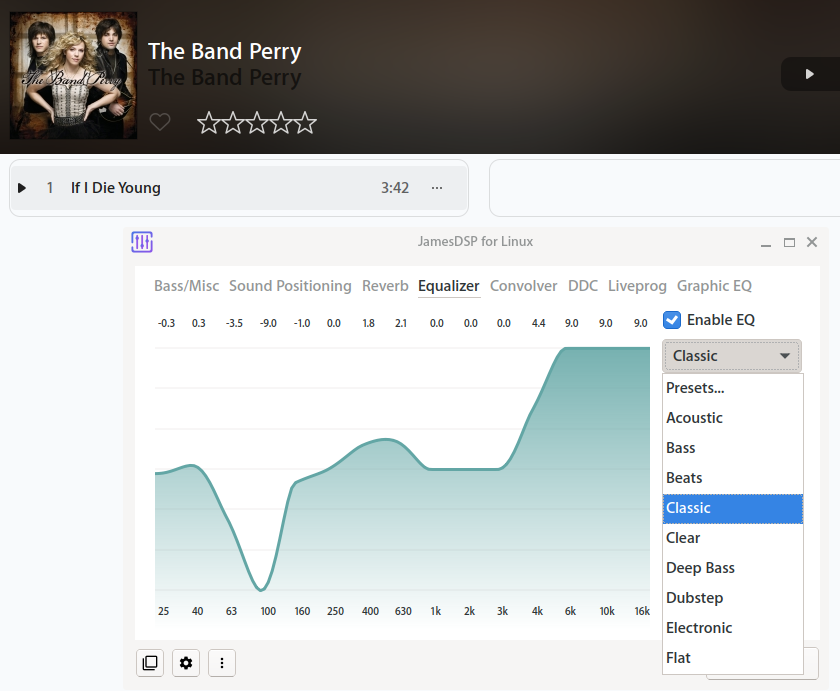
@ezh Did you try JamesDSP?
I borrowed an Ideapad 3 with AMD guts and did some rough tests.
The first one is that I get the Audio Coprocessor load its driver out of the box:
localhost:~ # lspci -nnk |grep -A3 Audio
03:00.1 Audio device [0403]: Advanced Micro Devices, Inc. [AMD/ATI] Raven/Raven2/Fenghuang HDMI/DP Audio Controller [1002:15de]
	Subsystem: Lenovo Device [17aa:3805]
	Kernel driver in use: snd_hda_intel
	Kernel modules: snd_hda_intel
--
03:00.5 Multimedia controller [0480]: Advanced Micro Devices, Inc. [AMD] ACP/ACP3X/ACP6x Audio Coprocessor [1022:15e2]
	Subsystem: Lenovo Device [17aa:3807]
	Kernel driver in use: snd_pci_acp3x
	Kernel modules: snd_pci_acp3x, snd_rn_pci_acp3x, snd_pci_acp5x, snd_pci_acp6x, snd_acp_pci, snd_rpl_pci_acp6x, snd_pci_ps, snd_sof_amd_renoir, snd_sof_amd_rembrandt, snd_sof_amd_vangogh, snd_sof_amd_acp63
03:00.6 Audio device [0403]: Advanced Micro Devices, Inc. [AMD] Family 17h/19h HD Audio Controller [1022:15e3]
	Subsystem: Lenovo Device [17aa:3809]
	Kernel driver in use: snd_hda_intel
	Kernel modules: snd_hda_intel
localhost:~ #
It’s the same PCI_ID as yours [1022:15e2] so you are apparently lucky enough to need a kernel quirk 
Then I fired up some known music and found that substantial overdrive can be applied without much distortion (good) and the usual laptop lack of bass energy (bad).
Then I played with the deadbeef equalizer to make a technical sense of all that (BTW, there is a good enough OSS version in the standard repo).
I ended up with the following setup to have a decent performance (to my taste):
110 and 156 Hz          +10 dB
220 Hz                  +7.5 dB
311 Hz                  +4 dB
2.5 kHz                 +3 dB
3.5 5 7 and 10 kHz      +6 dB
If you find it not powerful enough you can still boost the “preamplifier” by 3 or 4 dB without noticeable distortion.
With that setup the Ideapad was on par with other good sounding laptops I had my hands on (not the super tweaked ASUS models, but somewhat near) and I think that might be a good starting point, better than going blind to test this and that.
Next step would entail a detailed sound measurement of the HW to possibly fill gaps or resonances that might show up, but that is no easy task.
Then if you really miss Surround or Dolby, JamesDSP may help.
I suspect that Lenovo did all of the above (or the likes of Dolby Labs, Bang&Olufsen, Harman Kardon etc. did the job for them).
PS: boosting frequencies below 110 Hz is useless since the tiny loudspeakers cannot reproduce them anyway and boosting would add to the distortion.
/sbin/modinfo snd-rn-pci-acp3x | grep -E "filename:|alias"
filename:       /usr/lib/modules/6.11.0-1-default/kernel/sound/soc/amd/renoir/snd-rn-pci-acp3x.ko.zst
alias:          pci:v00001022d000015E2sv*sd*bc04sc80i00*

/sbin/modinfo snd-pci-acp3x | grep -E "filename:|alias"
filename:       /usr/lib/modules/6.11.0-1-default/kernel/sound/soc/amd/raven/snd-pci-acp3x.ko.zst
alias:          pci:v00001022d000015E2sv*sd*bc04sc80i00*
Since yours is a Raven device it works… @ezh is a Renoir device which is the other module, same aliases… It’s a bug I think…
~> lsmod | grep acp6x
snd_rpl_pci_acp6x 20480 0
snd_pci_acp6x 20480 0
snd_pcm 221184 13 snd_sof_amd_acp,snd_hda_codec_hdmi,snd_pci_acp6x,snd_hda_intel,snd_hda_codec,snd_sof,snd_compress,snd_soc_core,snd_sof_utils,soundwire_amd,snd_hda_core,snd_pci_ps,snd_pcm_dmaengine
snd_acp_config 20480 9 snd_rn_pci_acp3x,snd_pci_acp6x,snd_pci_acp5x,snd_sof_amd_rembrandt,snd_sof_amd_vangogh,snd_sof_amd_acp63,snd_acp_pci,snd_pci_ps,snd_sof_amd_renoir
~> sudo modprobe snd_pci_acp6x
~> lsmod | grep acp6x
snd_rpl_pci_acp6x 20480 0
snd_pci_acp6x 20480 0
snd_pcm 221184 13 snd_sof_amd_acp,snd_hda_codec_hdmi,snd_pci_acp6x,snd_hda_intel,snd_hda_codec,snd_sof,snd_compress,snd_soc_core,snd_sof_utils,soundwire_amd,snd_hda_core,snd_pci_ps,snd_pcm_dmaengine
snd_acp_config 20480 9 snd_rn_pci_acp3x,snd_pci_acp6x,snd_pci_acp5x,snd_sof_amd_rembrandt,snd_sof_amd_vangogh,snd_sof_amd_acp63,snd_acp_pci,snd_pci_ps,snd_sof_amd_renoir
~> sudo inxi -M
Machine:
Type: Laptop System: LENOVO product: 82RQ v: IdeaPad 3 17ABA7 serial: PF462H1L
Mobo: LENOVO model: LNVNB161216 v: SDK0T76463WIN serial: PF462H1L UEFI: LENOVO v: JTCN44WW
date: 03/02/2023
Here it is.
On the desktop I have installed JamesDSP and could get somehow matching sound to Windows. I have to boot into Windows and hear the difference.
Seems indeed, that Sound Blaster and Lenovo are shipping tweaked default settings and Linux goes the straight way - pure audio. As Linux usage grows, I hope vendors will support Linux more and more.
Interesting, there are 4 modules all with the same PCI_ID:
LT-B:~ # modinfo  snd_pci_acp3x | grep -E "filename:|alias"
filename:       /usr/lib/modules/6.11.0-1-default/kernel/sound/soc/amd/raven/snd-pci-acp3x.ko.zst
alias:          pci:v00001022d000015E2sv*sd*bc04sc80i00*

LT-B:~ # modinfo  snd_rn_pci_acp3x | grep -E "filename:|alias"
filename:       /usr/lib/modules/6.11.0-1-default/kernel/sound/soc/amd/renoir/snd-rn-pci-acp3x.ko.zst
alias:          pci:v00001022d000015E2sv*sd*bc04sc80i00*

LT-B:~ # modinfo  snd_pci_acp5x | grep -E "filename:|alias"
filename:       /usr/lib/modules/6.11.0-1-default/kernel/sound/soc/amd/vangogh/snd-pci-acp5x.ko.zst
alias:          pci:v00001022d000015E2sv*sd*bc04sc80i00*

LT-B:~ # modinfo  snd_pci_acp6x | grep -E "filename:|alias"
filename:       /usr/lib/modules/6.11.0-1-default/kernel/sound/soc/amd/yc/snd-pci-acp6x.ko.zst
alias:          pci:v00001022d000015E2sv*sd*bc04sc80i00*
LT-B:~ #
and the OP has snd_pci_acp6x loaded (but apparently not working?)
So what happens, given the pci:v00001022d000015E2 modprobe looks in alphabetical order and just picks the first one not caring for the architecture actually installed?
Need to blacklist the irrelevant modules?
I know this topic is essentially finished but I want to add some extra clarity for the original poster and anyone who stumbles upon this thread trying to figure out their own problem identical to this.
From what I understand, Windows has has a built-in way of mixing that does some funky stuff with the audio; it’s why on apps like MusicBee and Foobar there’s an option in settings to turn on “exclusive mode” and bypass said audio mixing by only allowing that one app to control the audio across the PC, and I believe you need an external DAC for it to work. Most people prefer the way music and audio sounds without it which is why those apps have the mode and why every OS that isn’t Windows doesn’t really do that. The original poster of this topic has seemingly grown to prefer how audio sounds with Window’s mixing.
I prefer the rich sound, that Windows gives by only installing drivers, than the Linux gramophone sound.
I tried the JamesDSP, but even playing with it it could meet my expectations, as it does on Windows. I really cannot live with current Linux sound.
I wrote a message to Creative (Sound Blaster) support, if they would support Linux as they do Windows. But Linux have to gain a market share for it to be happen.
I think that what @Estilon is referring to is described in the following:
Audio Processing Object
Audio Signal Processing Modes
Linux offers what Win* calls “RAW processing” as a default; pipewire is powerful and flexible enough to implement any other mode described, but the “Pro Audio” and audio enthusiast audience has the like of JamesDSP while general purpose laptop users need model-specific tuning that manufacturers don’t see as economically viable to entice just a fraction of an already tiny share of linux desktop users.
And, BTW, Linux already has a huge market share in disguise, it is called “Android”, but runs on completely different HW with regard to sound physics…
Hi ezh, try pressing the right arrow key in alsamixer if there are other settings hidden.
I only see a few option from your screenshot. If you press the right arrow key it will show the front, left, center etc. volumes and other features.
TNX! Indeed, there are… But it makes no big difference on Sound Blaster. Will boot into Windows and see which settings are there.
This topic was automatically closed 30 days after the last reply. New replies are no longer allowed.