ALSA priority of sound devices?

Let me start by stating sound is working.

Something weird is happening though. When I quit Ardour, my system seems the decide its time to use the sounds chip of my video card.

Ardour uses ALSA.

When I check Alsa mixer I see 3 default devices.

HDMI is defailt 0
Onboard sound default 1
The focus scarlett solo default 2

I wonder if my issue would be fixed by making the usb sound device default 0 ?

When I open modprob.d

There is one line in there:

options snd_usb_audio vid=0x1235 pid=0x8211 device_setup=1

I am lost on how to continue.

Please share the actual output from

cat /proc/asound/cards
cat /proc/asound/modules

You should be able to specify ‘index=0’ for the USB device entry? Something like the following might be sufficient (to set device order explicitly)

options snd_usb_audio index=0

FWIW, as similar thread:
https://bbs.archlinux.org/viewtopic.php?id=224241

Thank you:

cat /proc/asound/cards
 0 [HDMI           ]: HDA-Intel - HDA ATI HDMI
                      HDA ATI HDMI at 0xfce60000 irq 77
 1 [Generic        ]: HDA-Intel - HD-Audio Generic
                      HD-Audio Generic at 0xfcd00000 irq 79
 2 [USB            ]: USB-Audio - Scarlett Solo USB
                      Focusrite Scarlett Solo USB at usb-0000:02:00.0-9, high speed


cat /proc/asound/modules
 0 snd_hda_intel
 1 snd_hda_intel
 2 snd_usb_audio

Do you use pure alsa? It’s a bit unusual today. But if you are, it would be in $HOME/.asoundrc that you should make the changes in.

Please show us cat $HOME/.asoundrc?

Ok, create a custom config (eg /etc/modprobe.d/10-sound.conf), and add the entry as mentioned earlier. It will take effect the next time the module is loaded or system reboots. Confirm that the sound card order is as desired.

1 Like

I am using pipe wire, but Ardour uses ALSA directly or at least will try to do so.

When you start Ardour it high jacks all sound. This seems to a common ALSA behavior.

I’m not familiar with Ardour, but it apparently can use ALSA, JACK, PipeWire and PulseAudio, depending on the build?

In any case, assuming PipeWire is active, then ‘pipewire-alsa’ could provide the necessary support?

1 Like

The main developer of Ardour, want us to use ALSA or JACK.

I do not have an opinion on this myself, but it has to do with recording life instruments and latency.

I also saw a person asking for pipewire support on the Ardour forum, and his reply was that if pipewire is working fine, he does not have too.

To some extent he is right, Ardour is working, but the issue start when quitting Ardour.

Okay. Then I suspect it’s Wireplumber you need.

wpctl status
wpctl set-default <id>

Few seem to get everything about Wireplumber (including me) so a more comprehensive read is probably needed.

That is definitely true. I have two computers for music. My laptop (my daily driver) and my studio computer. In the studio, low latency is required as I record while listening to what I’m playing to. On the laptop I have pipewire as I don’t record there and then it does no harm with >15-20ms (approximately 5 meters distance and further to the sound source) plus as I said I use it as a normal desktop and then it is easier to have pipewire where.

WirePlumber is a session and policy manager for PipeWire, so applies if using PipeWire.

Yes. That’s true and Ardour probably takes over alsa. One way to solve this is to start ardour with pw-jack from pipewire-libjack-0_3.

@Gps2010 Check to see you’ve this installed.
zypper se -x pipewire pipewire-alsa pipewire-jack pipewire-libjack-0_3 pipewire-pulseaudio

and then (in my case):
pw-jack /usr/bin/ardour8

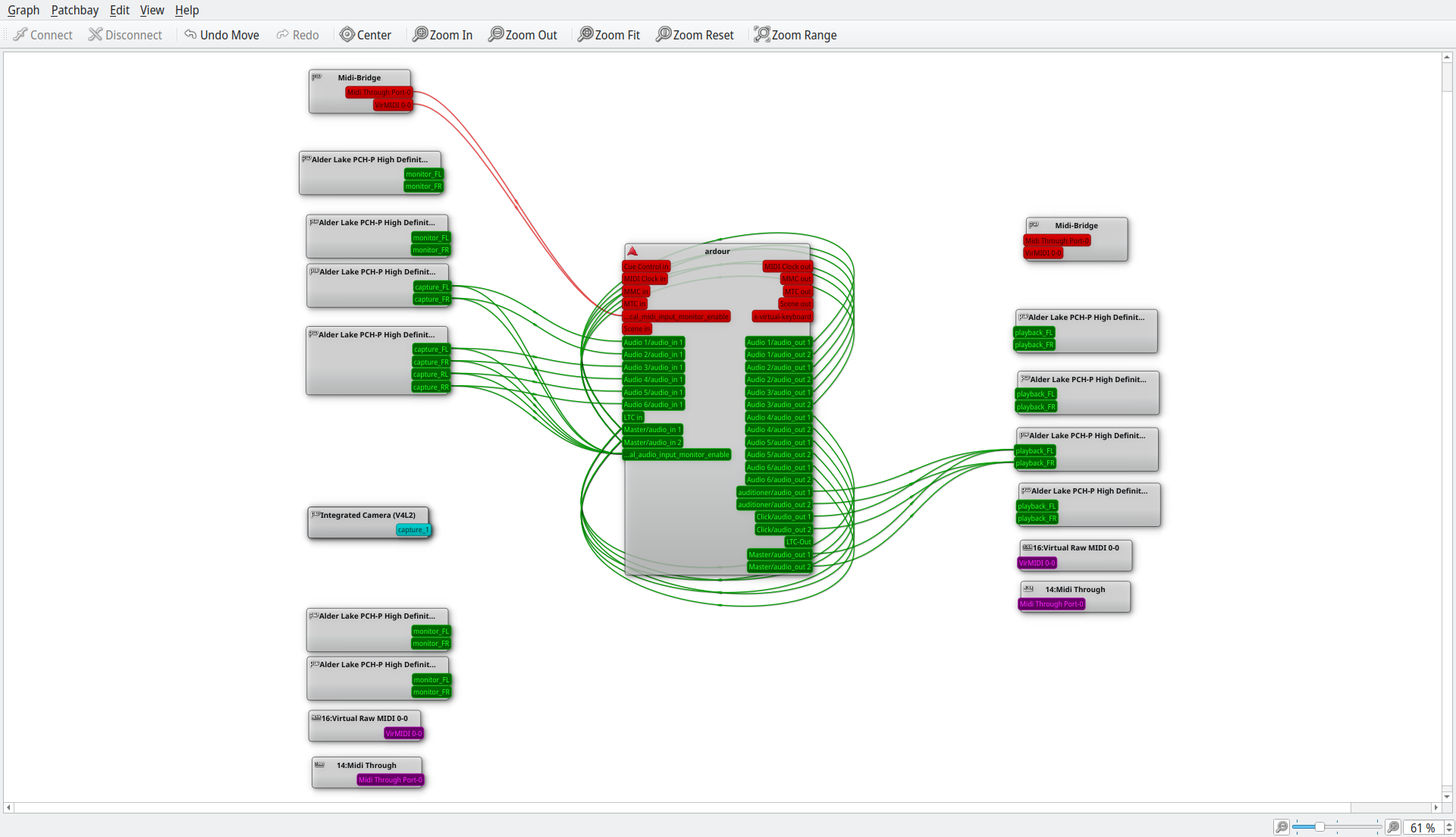
This is how qpwgraph looks when I’m using pw-jack. Without pw-jack all green (pw) is removed.

LOL, this totally reminds me of MIDI and the AtariST days.

If the midi cables were too long, your midi instruments would get out of sync.

I will get back to the wire plumber part.

For now I made thing worse. :smile:

I think I know what I did wrong.

In the config file, I wrote only one line.

options snd_usb_audio index=0

I need to add one or two more lines, about the intel sound chips. (the one on my motherboard and the one on my vid card).

I suspect I now created a conflict, two index 0 devices.

Those were the days. And before that I soldered my own midi interface for the PC and C64. We’ve come a long way since then :slight_smile:

BTW. I use Ubuntustudio in my studio. There I have “studio-controls” that handle jack and the like. I ported it to opensuse a couple of years ago and since then edogawa has made a better port. Don’t think it’s relevant to pipewire as it mostly focused on jack. But I guess I’ll see soon. Will upgrade to 23.10 within the next few days. Have great faith in Eickmeyer and Ubuntustudio although I wish I could run a pure opensuse pro audio version with all the bells and whistles and full audio support and simplicity like in Ubuntustudio.

1 Like

I think we have a winner.

cat /proc/asound/cards
 0 [USB            ]: USB-Audio - Scarlett Solo USB
                      Focusrite Scarlett Solo USB at usb-0000:02:00.0-9, high speed
 1 [HDMI           ]: HDA-Intel - HDA ATI HDMI
                      HDA ATI HDMI at 0xfce60000 irq 77
 2 [Generic        ]: HDA-Intel - HD-Audio Generic
                      HD-Audio Generic at 0xfcd00000 irq 79
cat /proc/asound/modules
 0 snd_usb_audio
 1 snd_hda_intel
 2 snd_hda_intel

This is what the file in modprobe.d looks like

options snd_usb_audio index=0
options snd_hda_intel index=1,2

Thank you all :slight_smile:

Now I have to test if all stays fine after quitting Ardour, but I am optimistic it will.

I was ones able to try out a Yamaha DX7, and hooked it up to the Atari ST with Cubase.

After trying and failing for a week, I learned the DX7 is not multitimberal.

In normal English, the DX7 can only play one sound(instrument ) at a time.

Indeed those were the days.
Now we install LMMS and or Adour, and can do much more, without spending a lot of money on MIDI hardware.

Have you heard about this?

Its like the kx repositories, but then for openSUSE.
Its were I got Ardour 8.1.0 from, and a fully working LMMS and Carla.

S  | Name                 | Summary                                                                  | Type
---+----------------------+--------------------------------------------------------------------------+-----------
i+ | pipewire             | A Multimedia Framework designed to be an audio and video server and more | pakket
   | pipewire             | A Multimedia Framework designed to be an audio and video server and more | bronpakket
i+ | pipewire-alsa        | PipeWire media server ALSA support                                       | pakket
   | pipewire-jack        | PipeWire JACK implementation                                             | pakket
   | pipewire-libjack-0_3 | PipeWire libjack replacement libraries                                   | pakket
i+ | pipewire-pulseaudio  | PipeWire PulseAudio implementation                                       | pakket
:slight_smile:

At first I thought, it had not worked, but yesterday when I wanted to show the problem with Ardour, to a friend.

After quiting Ardour the sound from my usb soundcard was restored.

Maybe it needed more then one reboot? I am confused, but changing the order seems to have fixed the issue.