Agama LVM Questions

Did anyone setup encryption with LVM with openSUSE 16.0? Is this particular configuration supported at all? This was the setup I went for with openSUSE 15.* and it worked quite nicely. I went through at least one dot version distro upgrade without reinstall, not much issues there either.

I had an impression that encrypting LVM and keeping everything else inside was sort of recommended hassle-free way to do full disk encryption. Is it not anymore? What is the recommended way?


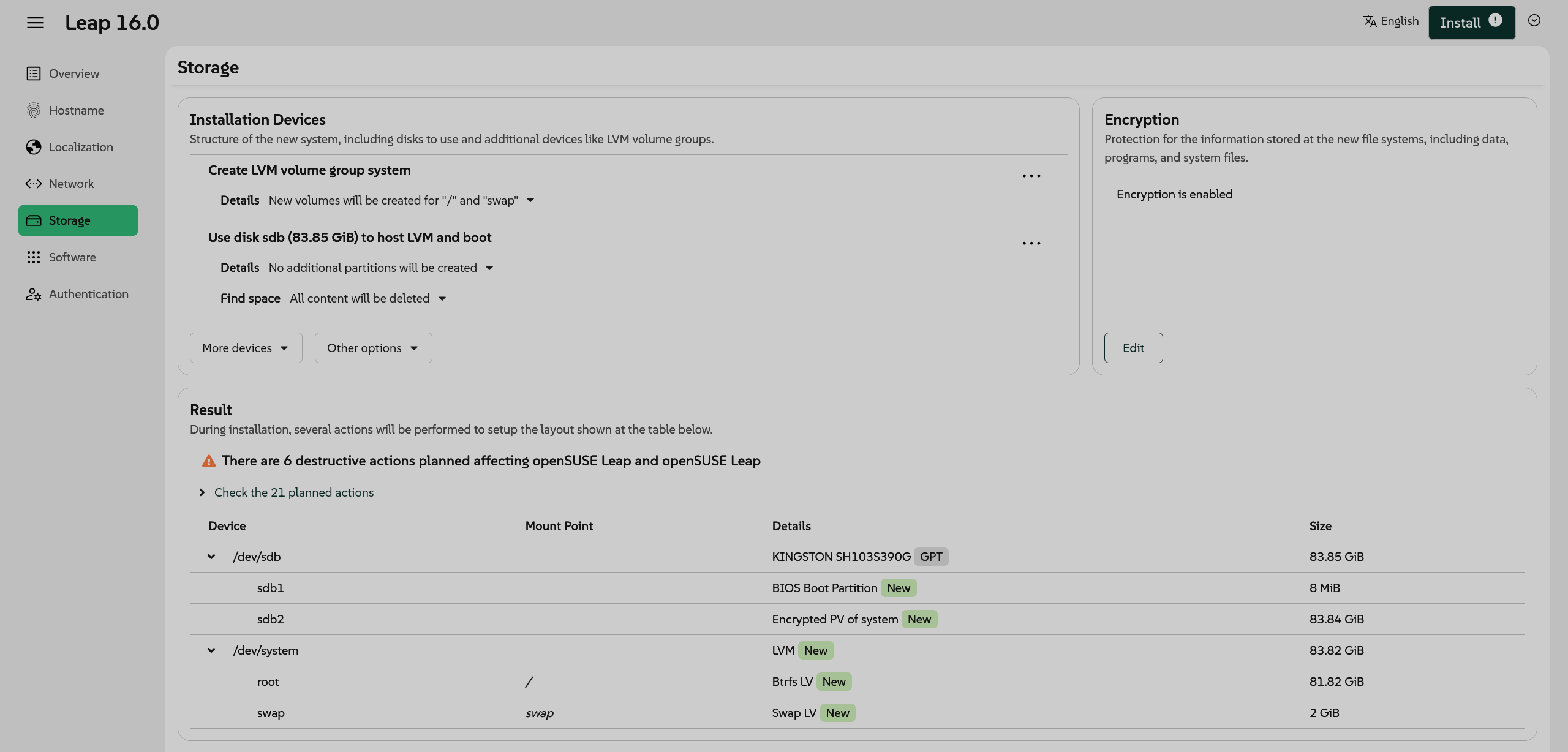
I am trying to do the same setup with Agama installer and I am okay with completely wiping everything on the disk (so it should be simpler than for doming’s case, right?). I managed to click through the UI and I got this:

/dev/sdb
sdb1 - /boot/efi
sdb2 - Enrypted PV of system

/dev/system (inside of sdb2)
home /home (Ext4 LV)
root / (Ext4 LV)

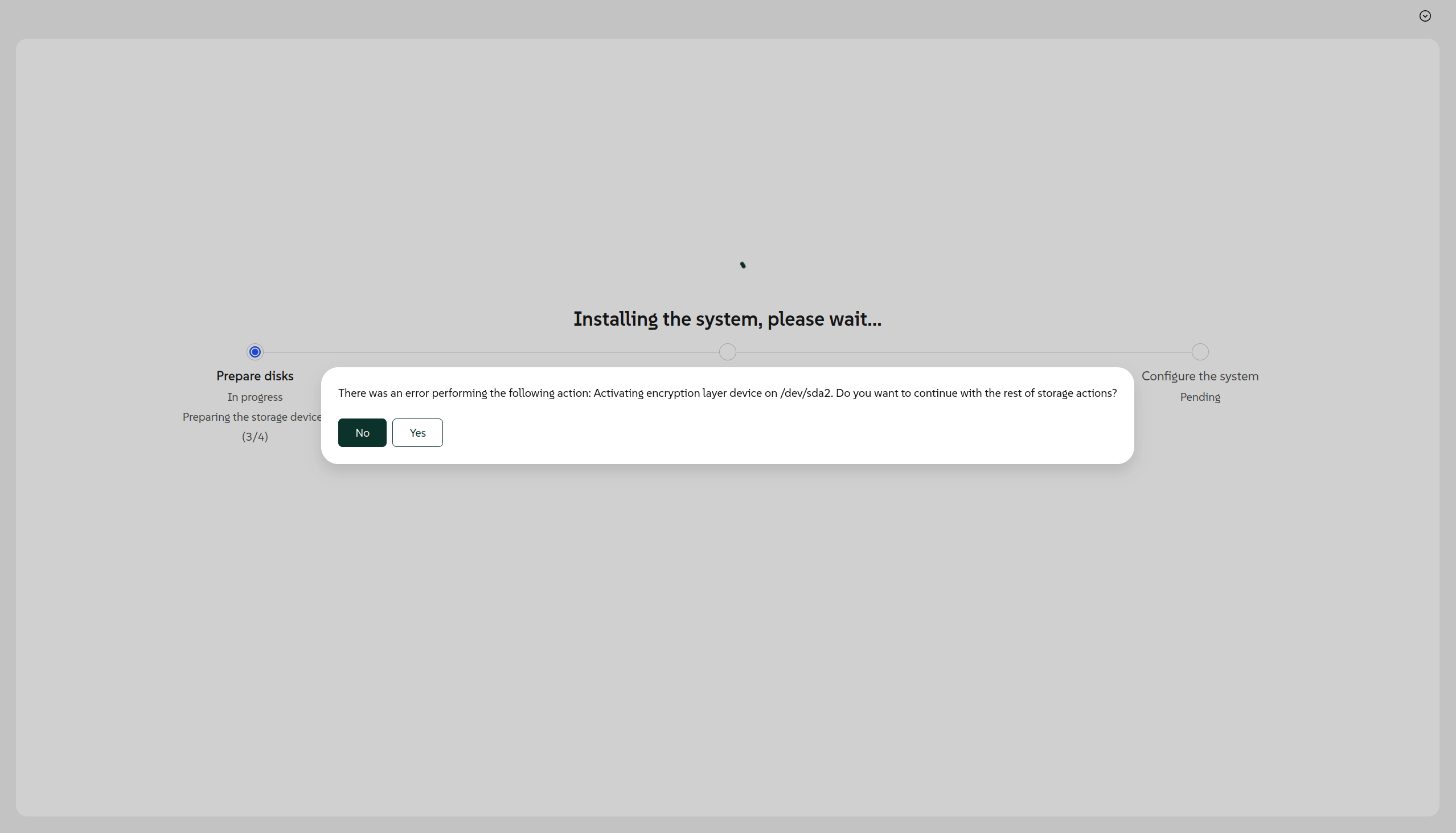
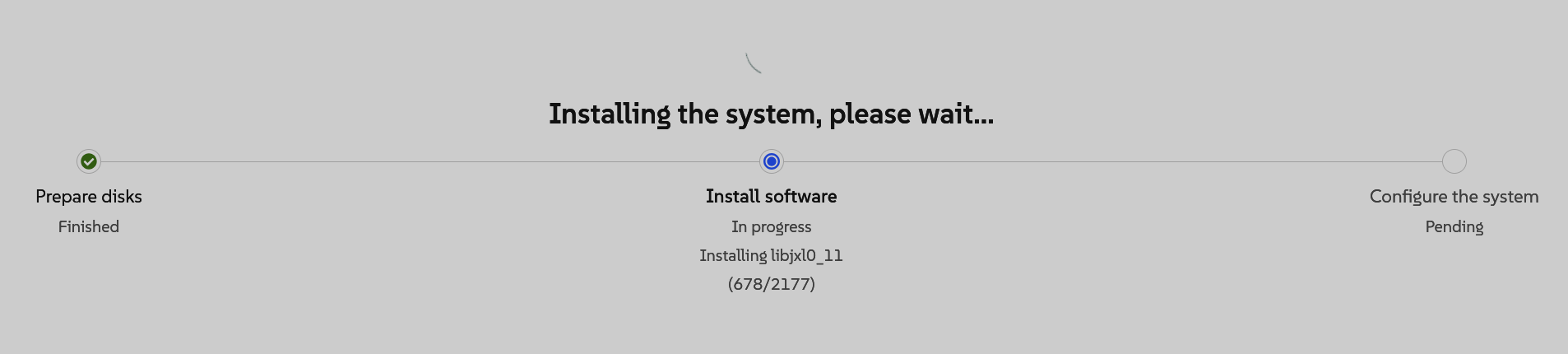
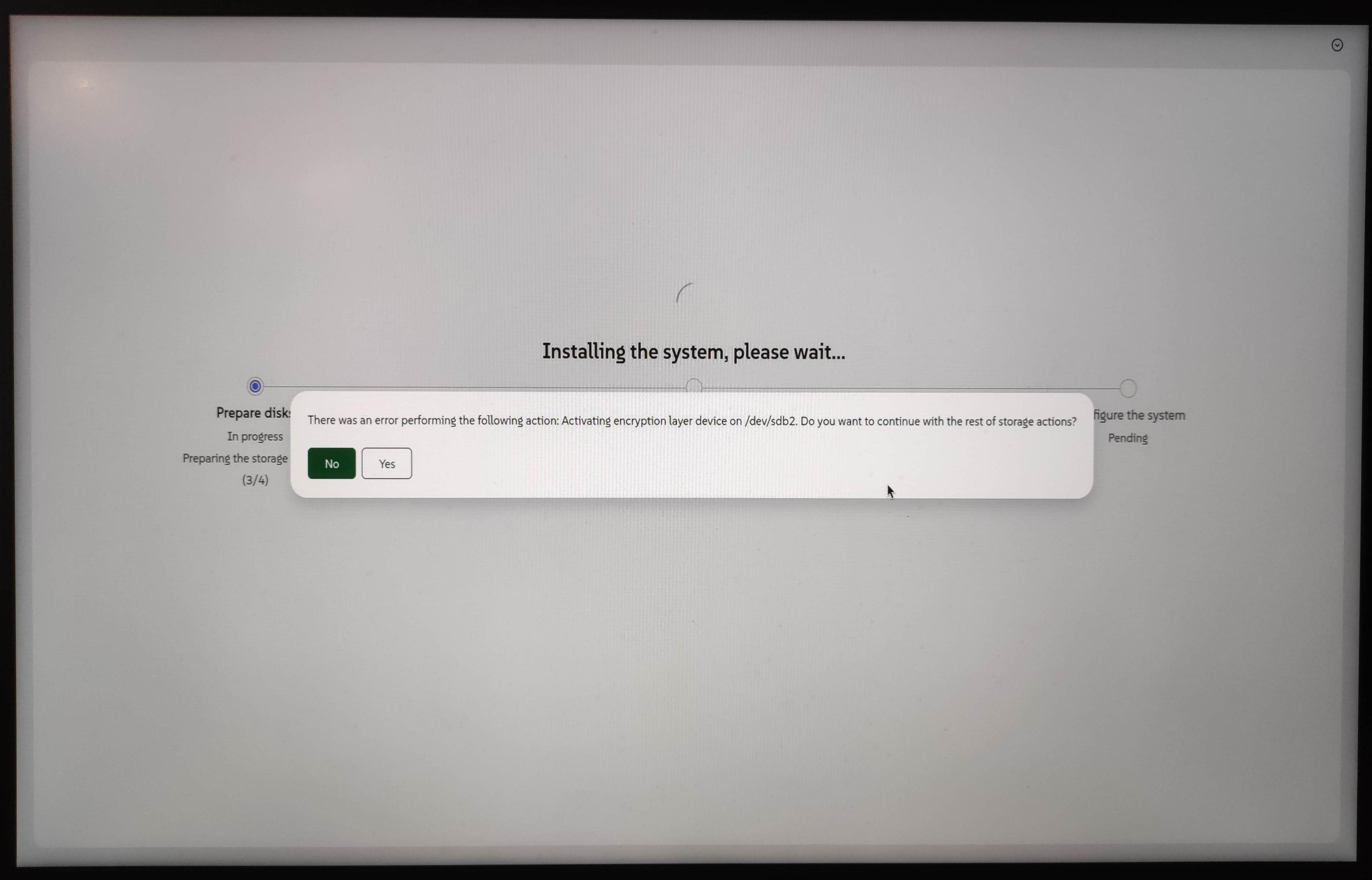
At 3/4 preparing storage stage I get an error popping up (I repeated the same setup and got the same error again just to be sure it is reproducible):

There was an error performing the following action: Activating encryption layer device on /dev/sdb2. Do you want to continue with the rest of storage actions?

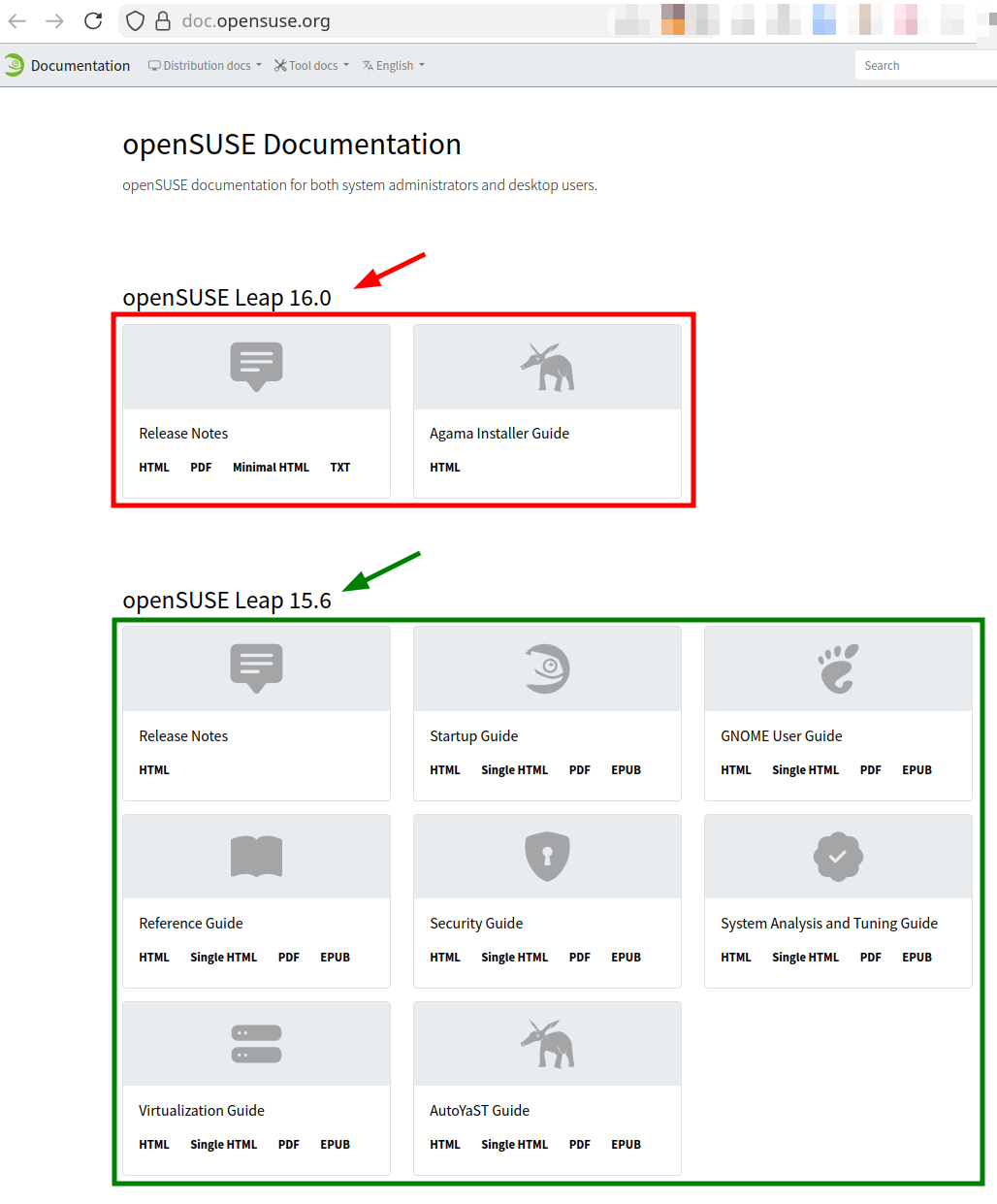
I tried looking for docs of what is supported an what is not and it seems that for openSUSE Leap 16.0 information is quite scarce: https://doc.opensuse.org/ (compare what you see there for 15.6 and previous releases).

I am getting a bit worried about this since I have my daily driver on 15.6 with encryption enabled on LVM and given that even fresh install fails I am suspecting I might get stuck if I go the upgrade path through zypper. Support is ending in April and I would really hate to distro-hop. I have been on SUSE/openSUSE since 10.0 and I quite like the zypper package manager.

Any hints (especially links to docs) regarding the recommended encryption setup are welcome (there is an encryption option in UI so in some way it is supported, right?). I would like to least understand what are the supported options and then decide what to do next.

1 Like

Have you considered upgrading Leap 15.6 to Leap 16.0 using the opensuse-migration-tool?

1 Like

Just in case the following information is helpful to you:

1 Like

This is exactly what I am considering and I do hope it works. But hope is not good enough for my daily driver machine. I understand distro upgrade in openSUSE land is always ā€œbest effortā€, but I would like to know my options before I bork my system. Of course I will prepare backups, but I still prefer to understand beforehand what is supported and what is not.

I need to have my machine encrypted and in a working condition in a reasonable amount of time (clean install or even choosing another distro is not out of question, but I would like to avoid that).

What I am thinking: if LVM+encryption is not supported in the installer on a clean system, would it be reasonable to expect migration tool to fail and bork my bootloader since I do have LVM+encryption?

With openSUSE 16.0 it is particularly challenging to find anything regarding encryption (and generally finding documentation). Page with docs looks very sad for 16.0 comparing to previous releases:

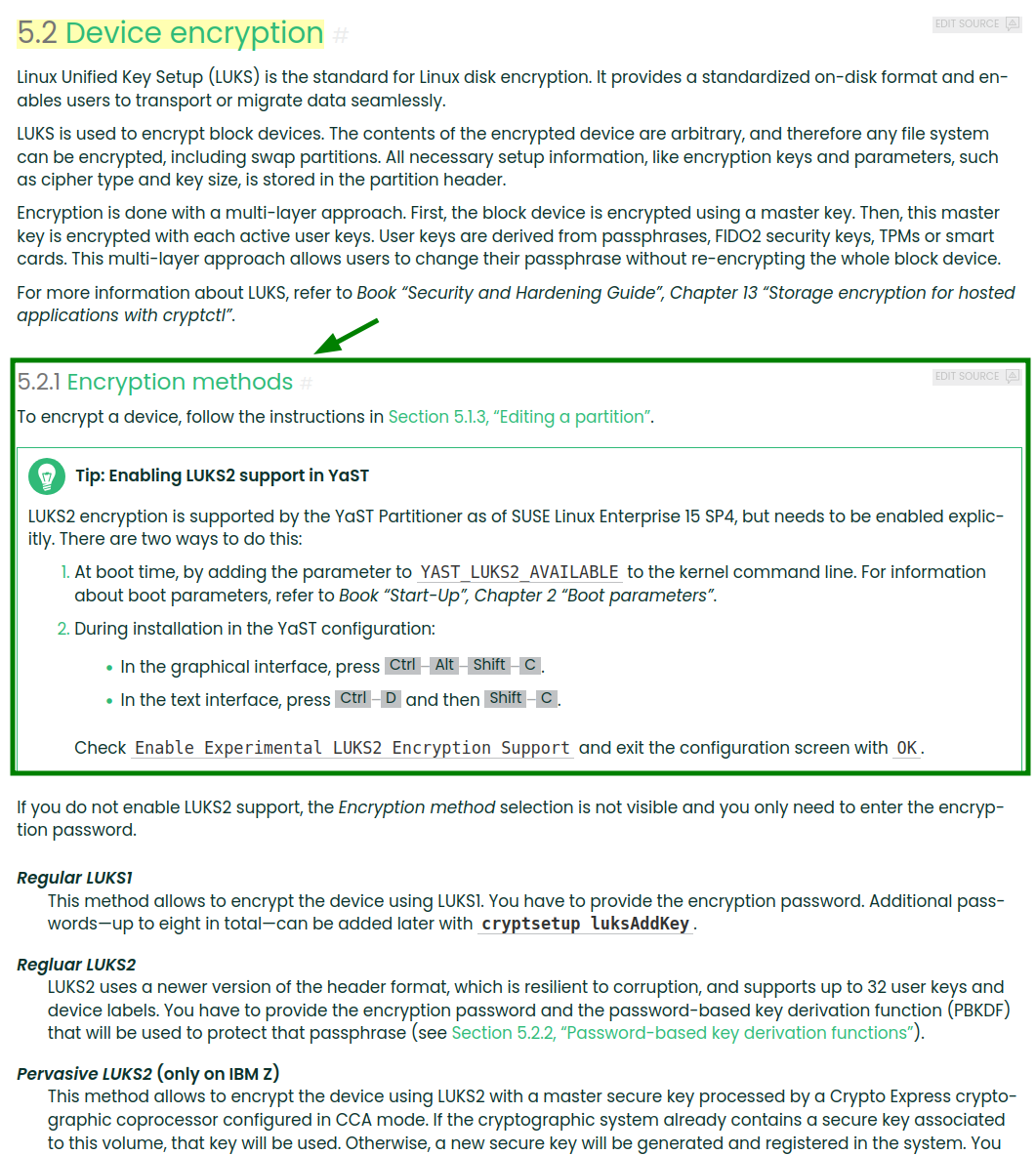
I am looking for something likes this (it obviously applies only up to openSUSE 15.6 (since it mentions YaST):

I am starting to suspect that equivalent documentation for openSUSE 16.0 is not written (yet?), but if there is any wiki or something similar, it would be also helpful. I did find a few videos and news articles from SUSE developers talking about changes exactly in encryption area (TPM and what not). It is just not clear how does it affect end users in case of Leap 16.0.

See if the Agama page I linked to answers your questions. Otherwise wait for further advice. (I’m not using LVM so can’t help directly unfortunately.)

1 Like

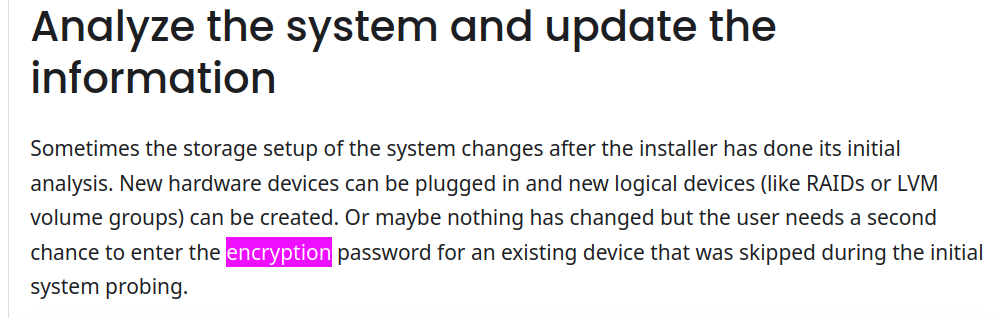
Thanks for the Agama docs link. I have went through them already. Not much about encryption is written there:


The image above is the only place where encryption word is mentioned at all.

1 Like

Seld,

in my exchange with Agama developer and search on their github repo, I have discovered that than neither LVM/LUKS nor Raid (MD) is supported. They claim that Agama is in development process.
I can accept that Agama is not ready for production, but then how has it ended in Leap 16.0 release. Leap is aim is to provide stability.
I am afraid that until 16.1 where may be that big miss will be corrected, it’s better to stay on 15.x or change distro.
I need LVM/LUK/MD, and with out OpenSUSE remains unusable. I guess that I am not the only one.
Sad progress.
Dominig

4 Likes

@dominig Can you provide a reference to the discussion? Whilst RAID is not supported by the installer, it can be created and used during install via the Agama shell, not optimal, but doable (there are a couple of Forum threads on how to do this), likewise creating a profile may suffice… Also see https://agama-project.github.io/docs/devel/storage

I don’t use LVM or need encryption, but did setup software RAID fine on a couple of test systems.

I think he must be referring to this discussion, 3 days before my first sign-on there.

2 Likes

Thanks for the link :smile:

If a new feature is not work, then give users old feature which works.
If devs don’t want to use YaST installer - then we have Myrlyn installer.

Myrlyn is for package management, nothing to do with Agama which is the Installer…

It was quite clear from almost two years ago that installing openSUSE Leap 16.0 was going to be better served with a fresh install, it was only later in development cycle that a migration tool would be offered for Leap 15.6 users.

The horse has bolted, you need to move on and perhaps assist with Leap 16.1 and the Agama Installer, create issues if you have them, submitting PR’s would be even better.

1 Like

A little update: I got a confirmation that LVM + encryption for fresh install should be indeed supported.

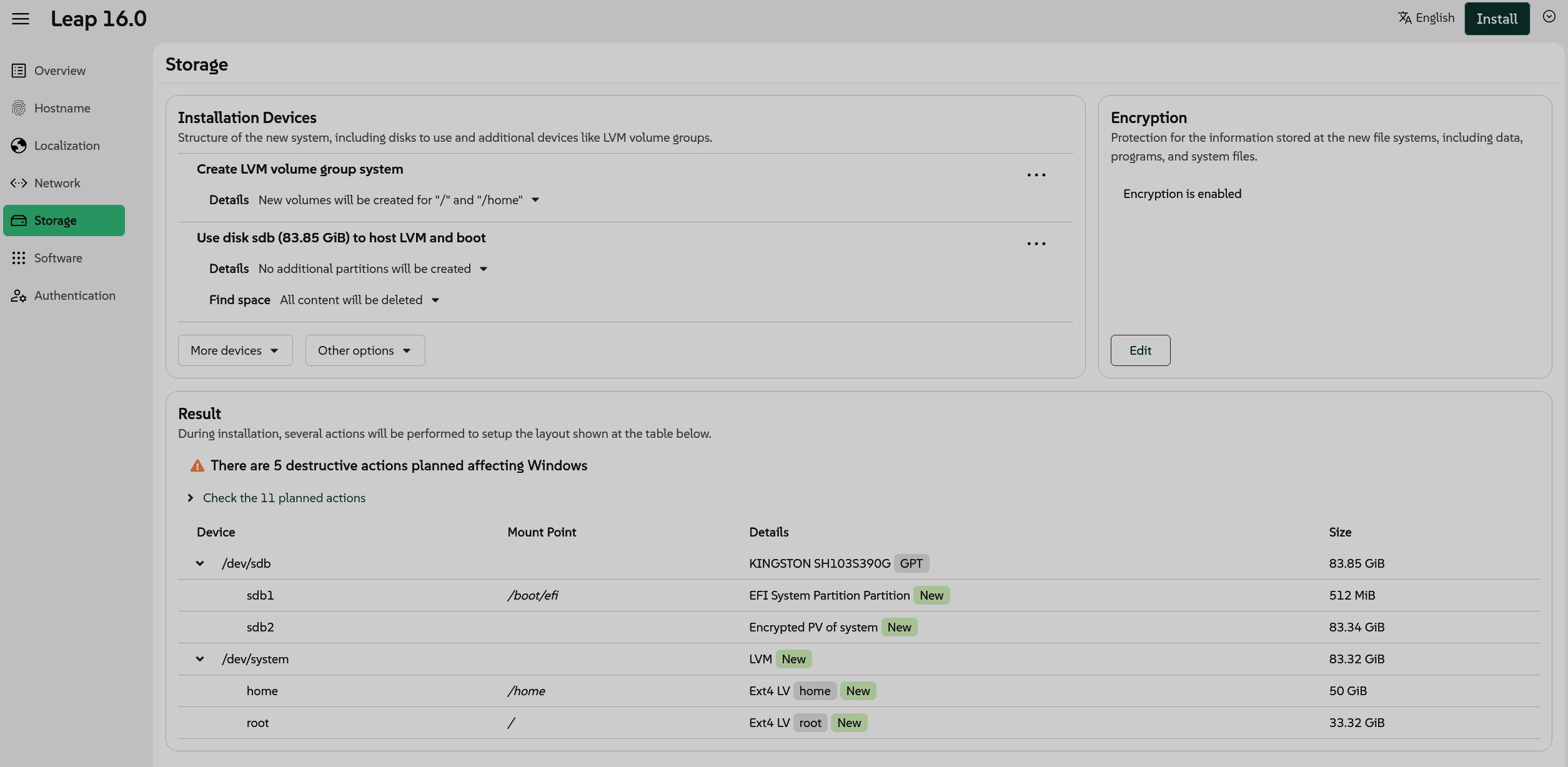
I retried doing the same: LVM + encryption, except this time I left the rest as default (Btrfs for root, swap partition, no separate home partition). Result is still the same:

I tried to dig for logs or something on top of the error on the screenshot , but I am not so sure where to look except for virtually consoles accessible via Ctrl-Alt+F1-F12 buttons). Alt+Ctrl+F3 shows details for the connections. So I managed to connect to SSH like this (password is shown on (Alt+Ctrl+F3 virtual console), it can also be used to open the installer in the browser - https://<local_nework_ip> - (actually that’s pretty neat, you can use another machine to conduct the installation, make screenshots, copy-paste text, etc.):

ssh root@<local_network_ip>

I found out that there are quite a few systemd services with agama name in the running:

agama:~ # systemctl list-units --type=service --all | grep agama
  agama-autoinstall.service                loaded    inactive dead    Agama automatic profile runner
  agama-avahi-issue.service                loaded    active   running Generate issue file for Agama URL from Avahi
  agama-certificate-issue.service          loaded    inactive dead    Generate issue file for Agama SSL certificate
  agama-certificate-wait.service           loaded    inactive dead    Postpone login prompt after the SSL fingerprint issue is generated
  agama-cmdline-process.service            loaded    inactive dead    Agama kernel cmdline processing
  agama-dbus-monitor.service               loaded    active   running Agama's D-Bus bus monitor
  agama-hostname.service                   loaded    inactive dead    Set Agama hostname
  agama-proxy-setup.service                loaded    inactive dead    Configure wide proxy setup for agama and systemd services
  agama-self-update.service                loaded    inactive dead    Agama self-update
  agama-ssh-issue.service                  loaded    inactive dead    Generate issue file for SSH host keys
  agama-url-issue.service                  loaded    active   running Generate issue file for Agama URLs
  agama-web-server.service                 loaded    active   running Agama Web Server
  agama-welcome-issue.service              loaded    inactive dead    Generate Agama welcome message
  agama.service                            loaded    active   running Agama Installer Service
agama:~ # 

The last one looks promising. I will try to dig out the logs out of it.

1 Like

Found a bit more about logs:

There is even a dedicated command for that:

Let’s see if I can get to the bottom of this.

Okay, I think I found it.

This is not very useful, about half of the paths here don’t even exist on the system:

agama:~ # agama logs list
Log files:
        /var/log/build
        /var/log/YaST2
        /var/log/zypper.log
        /var/log/pbl.log
        /var/log/linuxrc.log
        /var/log/wickedd.log
        /var/log/NetworkManager
        /var/log/messages
        /var/log/boot.msg
        /var/log/udev.log
        /run/agama/dbus.log
        /run/agama/inst-scripts
        /etc/install.inf
        /etc/os-release
        /linuxrc.config
        /.packages.root
Log commands:
        journalctl
        rpm -qa
agama:~ # 

But this one actually has all the details:

journalctl --unit agama | less

This seems to be the relevant part:

Mar 07 14:27:45 agama agamactl[3170]: [INFO]: storage: Selecting these packages for installation: ["lvm2", "btrfsprogs", "e2fsprogs", "dosfstools", "device-mapper", "cryptsetup", "snapper"]
Mar 07 14:27:45 agama agamactl[3170]: [INFO]: storage: Preparing the storage devices (3/4)
Mar 07 14:27:57 agama agamactl[3170]: [INFO]: storage: Storage commit error, asking to the user whether to continue
Mar 07 14:27:57 agama agamactl[3170]: [INFO]: storage: Error message: Activating encryption layer device on /dev/sda2
Mar 07 14:27:57 agama agamactl[3170]: [INFO]: storage: Error details: command '/sbin/cryptsetup --batch-mode open --type luks '/dev/sda2' 'cr_usb-USB_SanDisk_3.2Gen1_0101d6b5332fd5c020db058ff43097fb41c8dd098113056fd46fd004e5d9951a53d700000000000000000000d61c514c00930d00a95581071b308677-0:0-part2' --tries 1  --key-file -' failed:
Mar 07 14:27:57 agama agamactl[3170]: stderr:
Mar 07 14:27:57 agama agamactl[3170]: Name "cr_usb-USB_SanDisk_3.2Gen1_0101d6b5332fd5c020db058ff43097fb41c8dd098113056fd46fd004e5d9951a53d700000000000000000000d61c514c00930d00a95581071b308677-0:0-part2" too long.
Mar 07 14:27:57 agama agamactl[3170]: Cannot use device cr_usb-USB_SanDisk_3.2Gen1_0101d6b5332fd5c020db058ff43097fb41c8dd098113056fd46fd004e5d9951a53d700000000000000000000d61c514c00930d00a95581071b308677-0:0-part2, name is invalid or still in use.
Mar 07 14:27:57 agama agamactl[3170]: Name "cr_usb-USB_SanDisk_3.2Gen1_0101d6b5332fd5c020db058ff43097fb41c8dd098113056fd46fd004e5d9951a53d700000000000000000000d61c514c00930d00a95581071b308677-0:0-part2" too long.
Mar 07 14:27:57 agama agamactl[3170]: Cannot use device cr_usb-USB_SanDisk_3.2Gen1_0101d6b5332fd5c020db058ff43097fb41c8dd098113056fd46fd004e5d9951a53d700000000000000000000d61c514c00930d00a95581071b308677-0:0-part2, name is invalid or still in use.
Mar 07 14:27:57 agama agamactl[3170]: exit code:
Mar 07 14:27:57 agama agamactl[3170]: 1
Mar 07 14:27:57 agama agamactl[3368]: 2026-03-07T13:27:57.422761Z  INFO agama_server::questions: agama-server/src/questions.rs:122: Creating new question with text: There was an error performing the following action: Activating encryption layer device on /dev/sda2. Do you want to continue with the rest of storage actions?.
Mar 07 14:27:57 agama agamactl[3170]: [INFO]: storage: Waiting for questions to be answered
Mar 07 14:41:47 agama agamactl[3208]: [INFO]: software: Probing software
Mar 07 14:41:47 agama agamactl[3208]: [INFO]: software: Refreshing repositories metadata (1/2)
Mar 07 14:41:47 agama agamactl[3208]: [INFO]: software: Calculating the software proposal (2/2)
Mar 07 14:41:48 agama agamactl[3208]: I, [2026-03-07T14:41:48.403276 #3208]  INFO -- : Selecting the base product 'Leap'
Mar 07 14:41:48 agama agamactl[3208]: I, [2026-03-07T14:41:48.418707 #3208]  INFO -- : Solver run true

Zooming in further - this looks like the actual problem:

Name "cr_usb-USB_SanDisk_3.2Gen1_0101d6b5332fd5c020db058ff43097fb41c8dd098113056fd46fd004e5d9951a53d700000000000000000000d61c514c00930d00a95581071b308677-0:0-part2" too long.

So it seem that cryptsetup doesn’t like the length of the partition.

Full disclosure of my setup:

  1. openSUSE 16.0 installer on one USB drive
  2. Second USB drive as a target for install
  3. Everything else disconnected form my machine, so I don’t mess existing installation up

I will try to find either another USB drive or will look for something to plug via SATA (hopefully ID will be shorter in that case and error will not get triggered).
1 Like

@seld I use USB M.2 enclosures for SSD’s and NVMe’s may be an option?

Bus 004 Device 003: ID 152d:0580 JMicron Technology Corp. / JMicron USA Technology Corp. SSK Storage

smartctl -a /dev/sdd
smartctl 7.5 2025-04-30 r5714 [x86_64-linux-6.19.5-2-default] (SUSE RPM)
Copyright (C) 2002-25, Bruce Allen, Christian Franke, www.smartmontools.org

=== START OF INFORMATION SECTION ===
Device Model:     Netac SSD 128GB

Bus 004 Device 004: ID 0bda:9210 Realtek Semiconductor Corp. RTL9210 M.2 NVME Adapter

smartctl -a /dev/sdd
smartctl 7.5 2025-04-30 r5714 [x86_64-linux-6.19.5-2-default] (SUSE RPM)
Copyright (C) 2002-25, Bruce Allen, Christian Franke, www.smartmontools.org

=== START OF INFORMATION SECTION ===
Model Number:                       SPCC M.2 PCIe SSD
1 Like

I use USB M.2 enclosures for SSD’s and NVMe’s may be an option?

Yep, that’s what I am trying at the moment (except it’s very old USB 2.0 enclosure for SATA, but that’s good enough for testing):


…and it still fails, but differently (I am using journalctl --unit agama --follow to check the logs, below is the relevant part copy pasted) :

Mar 07 16:17:11 agama agamactl[3113]: [INFO]: storage: Preparing the storage devices (3/4)
Mar 07 16:17:22 agama agamactl[3113]: [INFO]: storage: Storage commit error, asking to the user whether to continue
Mar 07 16:17:22 agama agamactl[3113]: [INFO]: storage: Error message: Activating encryption layer device on /dev/sdb2
Mar 07 16:17:22 agama agamactl[3113]: [INFO]: storage: Error details: command '/usr/bin/udevadm info /dev/mapper/cr_ata-_h______lĪ‘3Ϙ_____4_N______n__5w_8j____-part2' failed:
Mar 07 16:17:22 agama agamactl[3113]: stderr:
Mar 07 16:17:22 agama agamactl[3113]: Unknown device "/dev/mapper/cr_ata-_h______lĪ‘3Ϙ_____4_N______n__5w_8j____-part2": No such device
Mar 07 16:17:22 agama agamactl[3113]: exit code:
Mar 07 16:17:22 agama agamactl[3113]: 1

ID looks kind of strange. Okay, I will try to plug it into SATA port directly as a next step.

Okay, it works with SATA connected directly to the host:

I guess it would work okay with M.2 disks directly connected to the machine. Encrypting installation on a USB drive though (or a drive enclosure) is likely to fail. For the record: I attempted to install to a USB drive also from a not-so-old Levenot T16 Gen 1 and it also failed.

In any case for me the issue is (somewhat) resolved. Being able to encrypt from the host machine is good enough, all this USB storage dance is mostly for testing purposes anyway.

1 Like

I found out that with ā€œBIOS Boot Partitionā€ instead of ā€œEFI System Partition Partitionā€ LVM+encryption works also with USB 2.0 external drive.


Resulting installation is compatible both with BIOS (old) and UEFI systems (compatibility/legacy mode has to be turned in UEFI for that). I just tested booting on two different desktops from the same drive, one from ~2012 (quite old) and another one from 2025 (quite new).

The problem is: there is no way to control whether BIOS or UEFI option will be chosen by Agama. That option is not configurable (even through by editing configuration file), instead the installer uses own heuristics to choose either option.

Here are the options which are possible to configure:

And here is the full schema for configuration:

Just to conclude this thread:

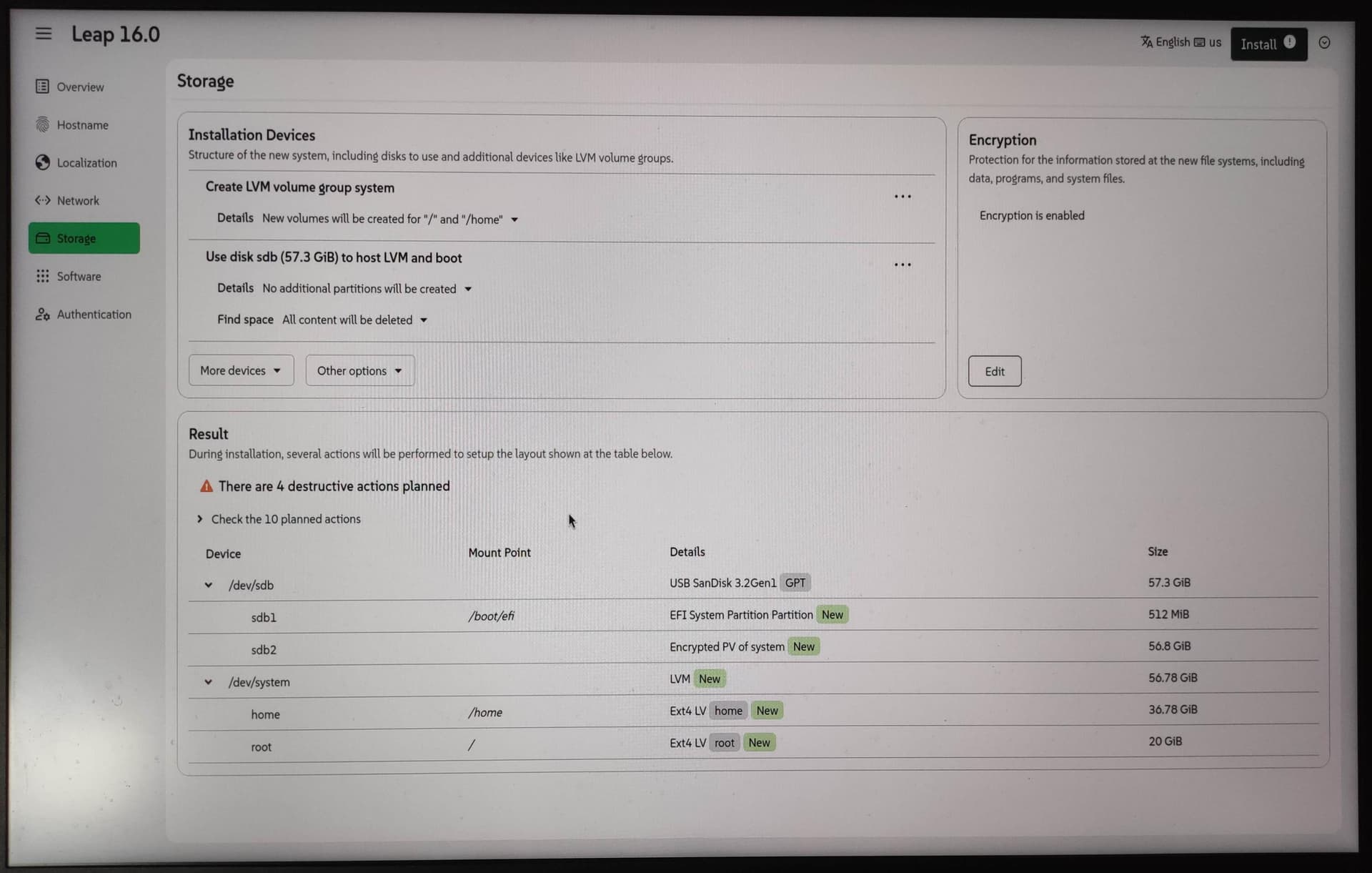
I can confirm that LVM + encryption setup works with . There are some limitations when encrypting USB storage devices, but ā€œnormalā€ case with SATA SSD drive connected directly to SATA on the motherboard works fine (it is likely the same with NVMe). I configured separate ext4 LV (logical volume) / , and ext4 LV (logical volume) /home within encrypted LVM PV (physical volume), just like on the picture:

First thing I see when booting is the encryption password prompt, after password is entered (you have to do it just once), encryption starts, then bootloader menu is displayed and normal boot goes as expected.


P.S. Perhaps, it’s an unpopular opinion, but after installing openSUSE with Agama for quite a few times, I think I started to like it. It’s quite convenient to do the install from another machine through the browser (that’s how I go the screenshot) and SSH comes handy if some debugging is needed.

This works also when graphical installation fails on the target machine (e.g. nomodeset workaround can be skipped). To see the credentials you have to switch to another virtual console, the easiest ways is to go through Alt+Ctrl+F1/F2/F3/F4 until you see them) and you have to accept the self-signed certificate when connecting over HTTPS (that’s expected behavior as with home routers).

1 Like