After upgrade to 16.0: Failed to start KDE Plasma Workspace and more

Hi all,

I searched the forum but didn’t find any solution, so I need to ask for help. I upgraded all machines to Leap 16.0 using the migration tool without relevant problems, except one. The laptop (optimus: NVidia, intel) was last, very late due to lack of time and (as almost expected) ran into an issue:
It starts into sddm login screen. Then, when I log in as user (tested two existing users) I see a black screen, cursor is moving. Plasma / Wayland doesn’t start properly. But I can start programs with “alt+F2”, I’m actually using firefox on this box right now. But most KDE/Plasma related things don’t work, no menue, no starter, no widgets… . It seems to be some issue with permissions. I’m posting information I could gather:

inxi -G doesn’t come back, neither as root nor as user.
I can login to icewm as user without this problem.
I can login to plasma / wayland as root without this problem! (Just testwise, wouldn’t do this normally.)

kasi@pluto:~> switcherooctl list
Device: 0
  Name:        Intel® UHD Graphics 620
  Default:     yes
  Environment: DRI_PRIME=pci-0000_00_02_0

Device: 1
  Name:        NVIDIA Corporation GP108M [GeForce MX150]
  Default:     no
  Environment: DRI_PRIME=pci-0000_01_00_0
kasi@pluto:~> 

Both GPUs seem to work, as user, I can start dolphin dedicated to 0 or 1:
kasi@pluto:~> switcherooctl launch -g 1 dolphin

pluto:~ # uname -a
Linux pluto.langer 6.12.0-160000.35-default #1 SMP PREEMPT_DYNAMIC Wed Jun 10 13:35:47 UTC 2026 (c70d539) x86_64 x86_64 x86_64 GNU/Linux
pluto:~ # inxi
CPU: quad core Intel Core i7-8550U (-MT MCP-) speed/min/max: 400/400/1800 MHz
Kernel: 6.12.0-160000.35-default x86_64 Up: 0h 32m Mem: 3.2/7.63 GiB (41.9%)
Storage: 1.14 TiB (15.5% used) Procs: 334 Shell: Bash inxi: 3.3.36
pluto:~ # 
journalctl -e

https://paste.opensuse.org/pastes/d402546e7cda

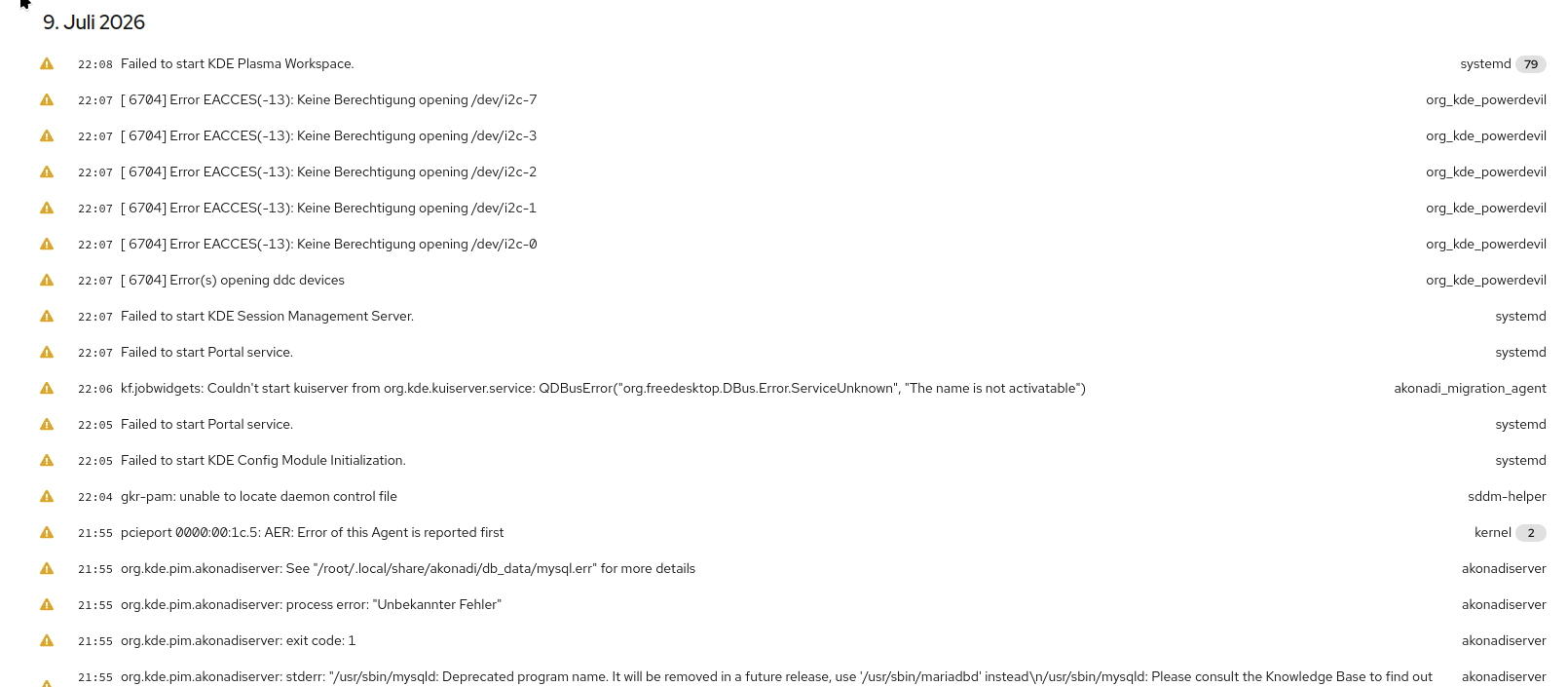
There’s a lot of “failed to start…”, some coredump.
More protocol info from cockpit:

org_kde_powerdevil
This application failed to start because no Qt platform plugin could be initialized. Reinstalling the application may fix this problem.

I tried to reinstall “a lot” plasma, KDE, wayland packages with zypper -f to no avail. Not sure if I got the right packages, though.

kernel
x86/cpu: SGX disabled or unsupported by BIOS.
systemd-modules-load
Failed to find module 'bbswitch'

(bbswitch was never installed nor used before…)

kernel
NVRM: GPU 0000:01:00.0 is already bound to nouveau.
pluto:~ # lsmod | grep nouveau
nouveau              3624960  2
drm_ttm_helper         16384  1 nouveau
gpu_sched              69632  1 nouveau
drm_gpuvm              49152  1 nouveau
drm_exec               16384  2 drm_gpuvm,nouveau
mxm_wmi                12288  1 nouveau
i2c_algo_bit           24576  2 i915,nouveau
ttm                   110592  3 drm_ttm_helper,i915,nouveau
video                  81920  3 acer_wmi,i915,nouveau
drm_display_helper    282624  2 i915,nouveau
wmi                    32768  6 video,intel_wmi_thunderbolt,acer_wmi,wmi_bmof,mxm_wmi,nouveau
button                 24576  1 nouveau
pluto:~ # 

That’s most weird. Nouveau wasn’t used before and isn’t installed, as far I can see:

pluto:~ # LANG=C zypper se -si nouveau
Loading repository data...
Reading installed packages...
No matching items found.
pluto:~ # 

How did the nouveau entries get added?
How to get rid of them? (I assume that might be the / a culprit.)

One more thing about the upgrade:
When starting the migration tool firstly it complained a lot about the repos: invalid metadata, skipping the repos (actually all of them), even after I deactivated them. I forcely added the two needed (Nos. 11, 12) ones with “$releasever=16.0” and installed openSUSE-repos-Leap (don’t remember which action first) then the migration tool would start. (Didn’t have to do that with any other machine.)
Now:

pluto:~ # zypper lr -d
Dienst 'openSUSE' wird aktualisiert.
#  | Alias                                | Name                                     | Enabled | GPG Check | Refresh | Keep | Priority | Type     | URI                                                                                                             | Service
---+--------------------------------------+------------------------------------------+---------+-----------+---------+------+----------+----------+-----------------------------------------------------------------------------------------------------------------+---------
 1 | Network                              | Network                                  | Nein    | ----      | ----    | -    |   99     | rpm-md   | http://download.opensuse.org/repositories/network/16.0/                                                         | 
 2 | download.nvidia.com-leap             | nVidia Graphics Drivers                  | Ja      | (r ) Ja   | Ja      | -    |   99     | rpm-md   | https://download.nvidia.com/opensuse/leap/16.0                                                                  | 
 3 | download.opensuse.org-non-oss_1      | Aktualisierungs-Repository (Nicht-Open-> | Nein    | ----      | ----    | -    |   99     | rpm-md   | http://download.opensuse.org/update/leap/16.0/non-oss/                                                          | 
 4 | download.opensuse.org-oss_1          | Hauptaktualisierungs-Repository          | Nein    | ----      | ----    | -    |   99     | rpm-md   | http://download.opensuse.org/update/leap/16.0/oss                                                               | 
 5 | home_shundhammer_myrlyn-stable       | Myrlyn package manager GUI (stable) (o-> | Nein    | ----      | ----    | -    |   99     | rpm-md   | https://download.opensuse.org/repositories/home:/shundhammer:/myrlyn-stable/openSUSE_Leap_15.6_Update_standard/ | 
 6 | https-download.opensuse.org-427e2937 | home:wolfi323:branches:KDE:Frameworks5   | Nein    | ----      | ----    | -    |   99     | N/A      | https://download.opensuse.org/repositories/home:/wolfi323:/branches:/KDE:/Frameworks5/openSUSE_Leap_16.0/       | 
 7 | install                              | Lokale Quellen                           | Ja      | ( p) Ja   | Ja      | -    |   99     | plaindir | dir:/home/kasi/unsers/install                                                                                   | 
 8 | mozilla                              | mozilla                                  | Nein    | ----      | ----    | -    |   10     | rpm-md   | https://packages.mozilla.org/rpm/firefox                                                                        | 
 9 | openSUSE:repo-non-oss                | repo-non-oss (16.0)                      | Ja      | (r ) Ja   | Ja      | -    |   99     | rpm-md   | http://cdn.opensuse.org/distribution/leap/16.0/repo/non-oss/x86_64                                              | openSUSE
10 | openSUSE:repo-non-oss-debug          | repo-non-oss-debug (16.0)                | Nein    | ----      | ----    | -    |   99     | N/A      | http://cdn.opensuse.org/debug/distribution/leap/16.0/repo/non-oss/x86_64                                        | openSUSE
11 | openSUSE:repo-openh264               | repo-openh264 (16.0)                     | Ja      | (r ) Ja   | Ja      | -    |   99     | rpm-md   | https://codecs.opensuse.org/openh264/openSUSE_Leap_16                                                           | openSUSE
12 | openSUSE:repo-oss                    | repo-oss (16.0)                          | Ja      | (r ) Ja   | Ja      | -    |   99     | rpm-md   | http://cdn.opensuse.org/distribution/leap/16.0/repo/oss/x86_64                                                  | openSUSE
13 | openSUSE:repo-oss-debug              | repo-oss-debug (16.0)                    | Nein    | ----      | ----    | -    |   99     | N/A      | http://cdn.opensuse.org/debug/distribution/leap/16.0/repo/oss/x86_64                                            | openSUSE
14 | openSUSE:repo-oss-source             | repo-oss-source (16.0)                   | Nein    | ----      | ----    | -    |   99     | N/A      | http://cdn.opensuse.org/source/distribution/leap/16.0/repo/oss                                                  | openSUSE
15 | opensuse-guide.org-repo              | Libdvdcss Repository                     | Nein    | ----      | ----    | -    |   99     | rpm-md   | http://opensuse-guide.org/repo/openSUSE_Leap_16.0/                                                              | 
16 | packman                              | Packman Repository                       | Ja      | (r ) Ja   | Ja      | -    |   99     | rpm-md   | http://ftp.gwdg.de/pub/linux/misc/packman/suse/openSUSE_Leap_16.0/                                              | 
17 | system_packagemanager                | Packagemanagers for/from different dis-> | Nein    | ----      | ----    | -    |   99     | N/A      | https://download.opensuse.org/repositories/system:/packagemanager/15.6/                                         | 
18 | unison                               | unison                                   | Ja      | (r ) Ja   | Ja      | -    |   80     | rpm-md   | https://download.opensuse.org/repositories/Archiving:/unison/16.0/                                              | 
pluto:~ # 

(Yeah, I need to remove some of them.) All repos except 11 and 12 were deactivated. After reactivating the others, I repeated zypper dup and zypper up, didn’t help.

Phew, were to start?

Edit: It’s quite late, already. I might reply a bit delayed. :wink:

For that hardware, only Nouveau can be used, no nvidia proprietary support…

This is somewhat similar (Tumbleweed) from this post on is worth perusing;
https://forums.opensuse.org/t/dual-boot-upgrade-from-16-0-to-tumbleweed/194428/51

Sure? It did work with G06 on 15.6 before:
https://forums.opensuse.org/t/cant-change-nvidia-driver-to-g05-or-g06/182083/26
Would this be related to the newer kernel?
I changed from the proprietary to the open G06. But that didn’t help. Should I go for nouveau? I’m not doing so much stuff causing heavy loads, I could stick with the Intel GPU, but how?

Ah, OK. On 15.6 it was: nvidia v: 550.144.03, now, G06 there’s 580. I’ll look into this, tomorrow. Thanks, so far.

@kasi042 My bad, I saw the MX150, but it’s a GP108 which is Pascal… So it can run the G06, but only the propriatary version…

So, if you run zypper inr (install new recommends) it should add the Nvidia repo and install the appropriate packages and add the boot options etc to blacklist the nouveau driver…

Hi @malcolmlewis , Thanks and sorry for the late reply. (Too much garden work in summer time.)
I uninstalled all “nvidia” related packages and then did th zypper inr. The nouveau modules are gone:

pluto:/var/log/zypp # lsmod | grep nouveau
pluto:/var/log/zypp # 

Unfortunately, it didn’t help. It pulled a lot of packages, during installation there came a huge lot of warnings about some “‘naked return’ found…”. Here’s the last lines of /var/log/zypp/history:

(many, many of the following before:)
# /usr/src/kernel-modules/nvidia-580.159.03-default/nvidia.o: warning: objtool: _nv012649rm+0x26: 'naked' return found in MITIGATION_RETHUNK build
# /usr/src/kernel-modules/nvidia-580.159.03-default/nvidia.o: warning: objtool: _nv012651rm+0x99: 'naked' return found in MITIGATION_RETHUNK build
# /usr/src/kernel-modules/nvidia-580.159.03-default/nvidia.o: warning: objtool: _nv020357rm+0x47: 'naked' return found in MITIGATION_RETHUNK build
# /usr/src/kernel-modules/nvidia-580.159.03-default/nvidia.o: warning: objtool: _nv020358rm+0x77: 'naked' return found in MITIGATION_RETHUNK build
# [truncated]
# 
2026-07-09 10:06:23|install|nvidia-driver-G06-kmp-default|580.159.03_k6.12.0_160000.35-lp160.60.1|x86_64||download.nvidia.com-leap|f4383c314e84f92331d5cc6ccdebbeb4649d54310d5613f9f91e906aeccfdf4d|
2026-07-09 10:06:23|install|nvidia-userspace-meta-G06|580.159.03-lp160.53.1|x86_64||download.nvidia.com-leap|8b961196af6f09eca25df5277dd3c8e3002d82a15c97b08f28f45cfbe582f46c|
2026-07-09 10:06:24|install|nvidia-driver-G06-kmp-meta|580.159.03-lp160.53.1|x86_64||download.nvidia.com-leap|d03c87dd91c0fd01526bfec900eec8ec0dcc2b1e5db7145c272bffdedcf9d0a8|
# 2026-07-09 10:06:28 Ausgabe des Skripts %posttrans(nvidia-common-G06-580.159.03-lp160.60.1.x86_64):
# /usr/bin/ldd: line 159: /lib/ld-linux.so.2: cannot execute binary file: Exec format error
2026-07-09 10:07:29|patch  |openSUSE-Leap-16.0-546|1|noarch|openSUSE:repo-oss|moderate|recommended|not-needed|applied|
pluto:/var/log/zypp # 

Actually, I don’t think it’s related to the nvidia driver (alone). I can login as root and get the plasma (wayland) session running. I could even use the network manager widget to switch on wifi. And, in konsole as root inxi -G actually comes back:

pluto:~ # inxi -G
Graphics:
  Device-1: Intel Kaby Lake-R GT2 [UHD Graphics 620] driver: i915 v: kernel
  Device-2: NVIDIA GP108M [GeForce MX150] driver: nvidia v: 580.159.03
  Device-3: Quanta HD Webcam driver: uvcvideo type: USB
  Display: wayland server: X.org v: 1.21.1.15 with: Xwayland v: 24.1.6
    compositor: kwin_wayland driver: X: loaded: intel,nvidia
    unloaded: modesetting,vesa dri: iris gpu: i915,nvidia
    resolution: 1920x1080
  API: OpenGL v: 4.6 vendor: intel mesa v: 24.3.3 renderer: Mesa Intel UHD
    Graphics 620 (KBL GT2)
  API: Vulkan v: 1.4.309 drivers: N/A surfaces: xcb,xlib,wayland
  API: EGL Message: EGL data requires eglinfo. Check --recommends.
pluto:~ # 

There’s a lot of log warnings. I tried to gather as many as possible in my first post but I’m not sure which (other) would be crucial.
As I said before, it seems to be some permission issue. I’m sure there was some xauth/polkit problem, but can’t find it in the logs, now.
Edit:
Cockpit shows:

Any idea?

Need to see inxi -GSaz logged into the desktop as your user…

The naked return can be ignored.

Also check with nvidia-smi

Looks like you also need to install grub2-compat-ia32 do that first and reboot, then the above commands.

OK…

Done!
No change.

As before, inxi -G doesn’t come back at all, neither as user nor root. (My above post shows it as root.) Same with inxi -S, no respond.

kasi@pluto:~> inxi -az
CPU: quad core Intel Core i7-8550U (-MT MCP-) speed/min/max: 400/400/1800 MHz
Kernel: 6.12.0-160000.35-default x86_64 Up: 0h 4m Mem: 3.1/7.63 GiB (40.7%)
Storage: 1.14 TiB (14.6% used) Procs: 357 Shell: Bash 5.2.37 inxi: 3.3.36
kasi@pluto:~> 

Maybe not too helpful, now. nvidia-smi as user and root:

kasi@pluto:~> nvidia-smi
Thu Jul  9 23:20:42 2026       
+-----------------------------------------------------------------------------------------+
| NVIDIA-SMI 580.159.03             Driver Version: 580.159.03     CUDA Version: 13.0     |
+-----------------------------------------+------------------------+----------------------+
| GPU  Name                 Persistence-M | Bus-Id          Disp.A | Volatile Uncorr. ECC |
| Fan  Temp   Perf          Pwr:Usage/Cap |           Memory-Usage | GPU-Util  Compute M. |
|                                         |                        |               MIG M. |
|=========================================+========================+======================|
|   0  NVIDIA GeForce MX150           On  |   00000000:01:00.0 Off |                  N/A |
| N/A   40C    P8            N/A  /   14W |       5MiB /   2048MiB |      0%      Default |
|                                         |                        |                  N/A |
+-----------------------------------------+------------------------+----------------------+

+-----------------------------------------------------------------------------------------+
| Processes:                                                                              |
|  GPU   GI   CI              PID   Type   Process name                        GPU Memory |
|        ID   ID                                                               Usage      |
|=========================================================================================|
|    0   N/A  N/A            2353      G   /usr/bin/Xorg.bin                         4MiB |
+-----------------------------------------------------------------------------------------+
kasi@pluto:~> inxi -G
^C
kasi@pluto:~> inxi -Saz
^Z
[1]+  Angehalten              inxi -Saz
kasi@pluto:~> su -
Passwort: 
pluto:~ # nvidia-smi
Thu Jul  9 23:26:12 2026       
+-----------------------------------------------------------------------------------------+
| NVIDIA-SMI 580.159.03             Driver Version: 580.159.03     CUDA Version: 13.0     |
+-----------------------------------------+------------------------+----------------------+
| GPU  Name                 Persistence-M | Bus-Id          Disp.A | Volatile Uncorr. ECC |
| Fan  Temp   Perf          Pwr:Usage/Cap |           Memory-Usage | GPU-Util  Compute M. |
|                                         |                        |               MIG M. |
|=========================================+========================+======================|
|   0  NVIDIA GeForce MX150           On  |   00000000:01:00.0 Off |                  N/A |
| N/A   38C    P8            N/A  /   14W |       5MiB /   2048MiB |      0%      Default |
|                                         |                        |                  N/A |
+-----------------------------------------+------------------------+----------------------+

+-----------------------------------------------------------------------------------------+
| Processes:                                                                              |
|  GPU   GI   CI              PID   Type   Process name                        GPU Memory |
|        ID   ID                                                               Usage      |
|=========================================================================================|
|    0   N/A  N/A            2353      G   /usr/bin/Xorg.bin                         4MiB |
+-----------------------------------------------------------------------------------------+
pluto:~ # 

Is intel-gpu-tools installed, if not install and what does lsgpu show?

That shows the Nvidia driver is working fine.

It wasn’t installed. Now:

pluto:~ # lsgpu
card1                    Intel Kabylake (Gen9)             drm:/dev/dri/card1
└─renderD128                                               drm:/dev/dri/renderD128
card0                    10de:1d10                         drm:/dev/dri/card0
└─renderD129                                               drm:/dev/dri/renderD129
pluto:~ # 

OK, that’s good, so add your user to the video and render groups as well…

Apart from that, not really sure why the desktop’s not working, but drivers etc seem fine.

What does cat /proc/cmdline show?

video group was already there. “render”, I just added. Need to re-login, though.

pluto:~ # cat /proc/cmdline
BOOT_IMAGE=/boot/vmlinuz-6.12.0-160000.35-default root=UUID=57e6092c-fa17-40bb-980e-6528d58c488d resume=/dev/sdb3 splash=verbose showopts security=apparmor rd.driver.blacklist=nouveau ia32_emulation=1
pluto:~ # 

(Yeah, I have no idea of SELinux, so I stuck with Apparmor, just because it worked.)

All looks fine.

Well, back again after login (issues).
Thanks, Malcolm, for your confirmation.

That remains a kind of worry. :wink:

Anybody?
Summer and vacation season probably aren’t the best timing to come up with such issues…
:roll_eyes: :laughing:
I can provide a lot more information, just need to know what.

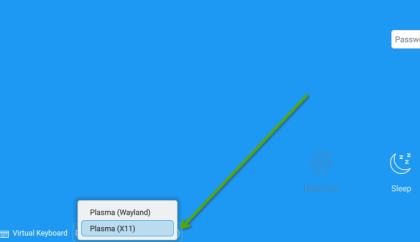
I see no mention of it in the thread … a typical, and easy, test is to log out , then at the login screen,
choose “Plasma (X11)” and see how it goes.
(vs using Plasma (wayland) ).

Thanks!
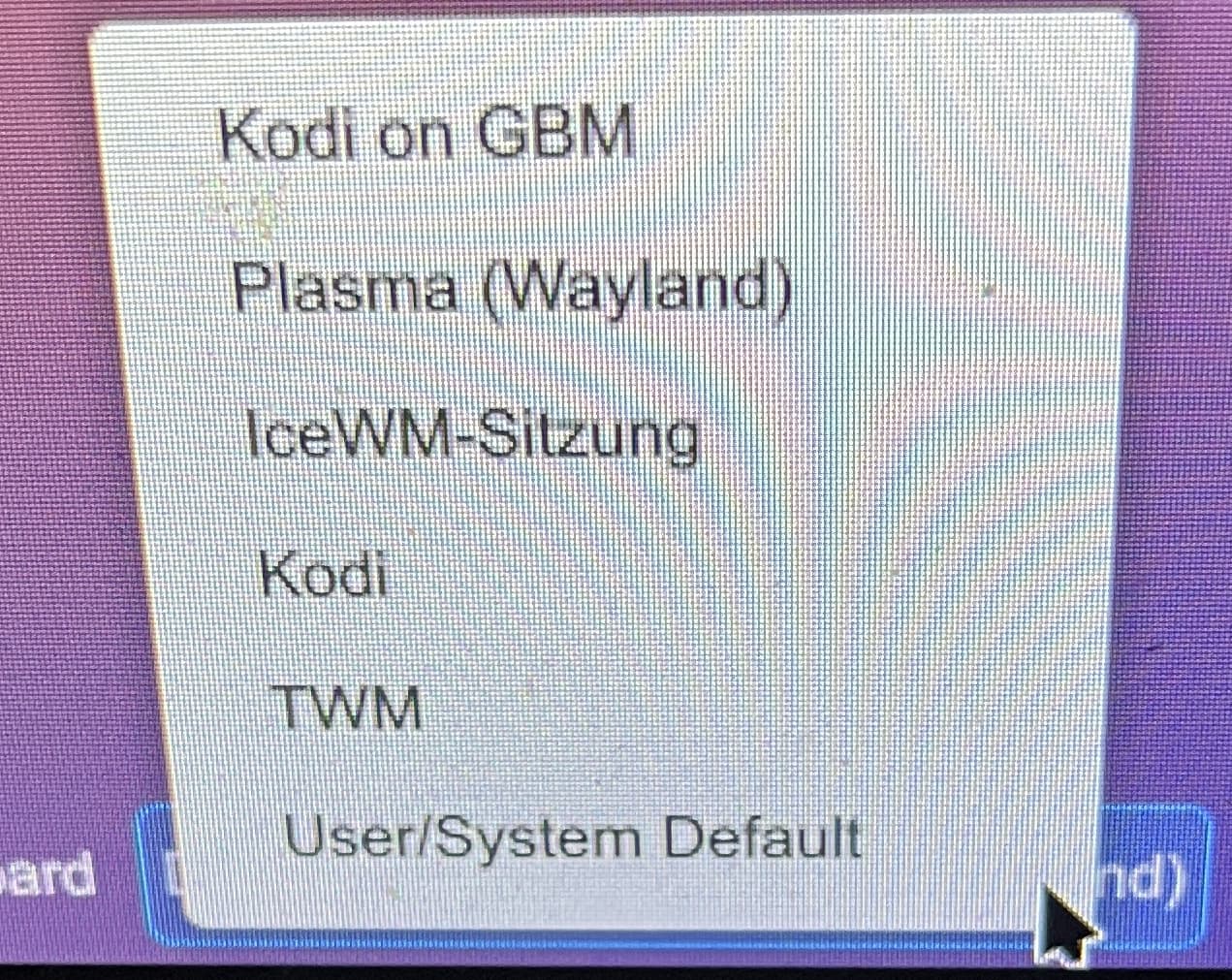
Yeah, tried that. But Plasma (X11) is (literally) not on the menue. Only Plasma (wayland) and some stuff like kodi (never worked). icewm is there and works, with flaws (vlc doesn’t start as I tried to pull some graphic performancs), login as my wife’s user didn’t work in wayland, as root, as said before, did work.

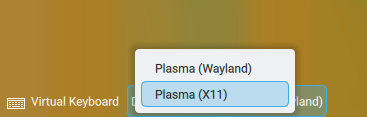
If you click on “Plasma(Wayland)” session, does a popup not then show something like…


If not, check if plasma6-session-x11 is installed.

1 Like

“kodi” ??? Why in the world is “kodi” there ? Makes absolutely no sense to me.

Are we both referring to the same “boot menu options”?? When I boot up using Leap KDE, at the login screen (SDDM for me), at the lower-left of the screen are the “boot choices”.

I click the mouse and the choices pop-up. (screenshot)

My opinion, based on what Kodi is for, it should not be there as a boot choice.

Quote from their website:
“Kodi is a free and open source media player application developed by the Kodi Foundation …”
If Kodi is a boot choice, I’d agree you have major KDE issues :+1:

Thank you all. I’m back.

Yes, that did the trick. That package wasn’t installed. It pulled three more packages: kwin6, libkwin-x11-6, plasma6-session-x11, now X11 is back and running. I don’t know why/how these packages have been removed. My bad: I was under the impression X11 is phased out, so I though I had to make do with wayland, didn’t even look for X11 anymore.

I fully agree with you. Yet, it is there:

I didn’t put it there on purpose,just installed kodi some time ago to test the DLNA server accessibility. Nevermind, I’m not using it and have no need for wayland (yet).
Thanks and have a nice weekend.