After 15.6 to 16.0 migration, boot stops after plymouth with no graphical login screen

I had a smoothly running openSUSE 15.6 environment. I followed the upgrade root advised by openSUSE, namely using the migration tool, and now the machine won’t go into the graphical login screen. Grub allows me to select which environment to boot, Plymouth does its swirling circle bit, then I get a black screen bar one line of text at the top of the screen and a flash of colour at the bottom of the screen.

Since in recovery mode I seem to have a functional Linux I don’t think the errors produced in the boot script are the issue, rather the problem is with the graphics. But just in case, the one line at the top of the screen says
x86/cpu: VMX (outside TXT) disabled by BIOS
lscpu gives
Itlb multihit: KVM: Mitigation: VMX unsupported
and
egrep -c ‘(vmx|svm)’ /proc/cpuinfo
gives 0.
On the other hand, when I look at the CPU specs in the BIOS I see
Intel VT-x Technology Supported
Intel SMX Technology Not supported

If the BIOS is disabling VT-x then I can’t see where in the various BIOS screens I can enable it, if it even matters here.
dmesg | grep error produces
EDAC sbridge: Failed to register device with error -19
journalctl -xb produces a number of lines of the form
/etc/udev/rules.d/80-canon_mfp.rules:<integer> Invalid key ‘SYSFS’
where the integer ranges from 10 to 72. Perhaps that’s to do with the driver for the Canon printer.
journalctl -b | grep -i “kernel parameter” produces no output.
Please understand that although I’ve been using this distro since version 8 I am not a learned Linux sysop: I spent hours yesterday searching the web for a fix to the black screen and those were some of the test commands that I came across.
The main two culprits for a black screen seem to be selinux and Nvidia drivers. I tried adding selinux=0 nomodeset to the linux line at Grub boot screen but it made no difference. To avoid having to do that repeatedly I added security selinux=0 to the /etc/default/grub line GRUB_CMDLINE_LINUX_DEFAULT then did
grub2-mkconfig -o /boot/grub2/grub.cfg
which also made no difference.
So I concentrated on the graphics drivers. I read that openSUSE 16.0 only supports G06 generation Nvidia cards. I searched all over to see what generation my Nvidia GTX Titan X card was but couldn’t find an answer. I noticed that when the migration tool was running it deleted a number of Nvidia driver packages then installed some new ones. When I checked all but one were G05 and that one was G06. I can’t list them here because I did
zypper rm ‘*nvidia*’
In retrospect that might not have been a good choice because when I checked for the nouveau drivers I found that they were also installed:

S  | Name                       | Summary                                                      | Type
---+----------------------------+--------------------------------------------------------------+--------
i  | libdrm_nouveau2            | Userspace interface for Kernel DRM services for NVIDIA chips | package
i+ | libvdpau_nouveau           | VDPAU state tracker for Nouveau                              | package
i+ | libvdpau_nouveau-debuginfo | Debug information for package libvdpau_nouveau               | package
i  | xf86-video-nouveau         | Accelerated Open Source driver for nVidia cards              | package

As far as I know I had the nouveau drivers blacklisted in 15.6 but now they are installed and two were, apparently, deliberately installed. Maybe the migration tool overrode the blacklisting and installed them. In the past when I’ve had no graphics at boot time I have solved the problem by deleting the Nvidia drivers, booting with the nouveau drivers, then re-installing the Nvidia and deleting the nouveau drivers. It hasn’t worked this time.
A likely bigger problem though is that the addresses of the repositories seem to be a big mess. In other discussion threads the response always seems to be “you must have changed the repositories.” No, no, no: the only thing I did was run the migration tool, the version that is in the 15.6 repository and which I had hoped would be well and truly debugged by now. If the addresses of the repositories are wrong then it was the migration tool what dun it.
Although all the repositories I had previously used were still listed, the only ones enabled were:

#  | Alias                                | Name                                 | Enabled | GPG Check | Refresh
---+--------------------------------------+--------------------------------------+---------+-----------+--------
 8 | NVIDIA:repo-non-free                 | repo-non-free (16.0)                 | Yes     | (r ) Yes  | Yes
16 | google-chrome                        | google-chrome                        | Yes     | (r ) Yes  | Yes
24 | openSUSE:repo-openh264               | repo-openh264 (16.0)                 | Yes     | (r ) Yes  | Yes
25 | openSUSE:repo-oss                    | repo-oss (16.0)                      | Yes     | (r ) Yes  | Yes

When I did
zypper se ‘*nouveau*’
I got the list above but before zypper printed that list it printed this:

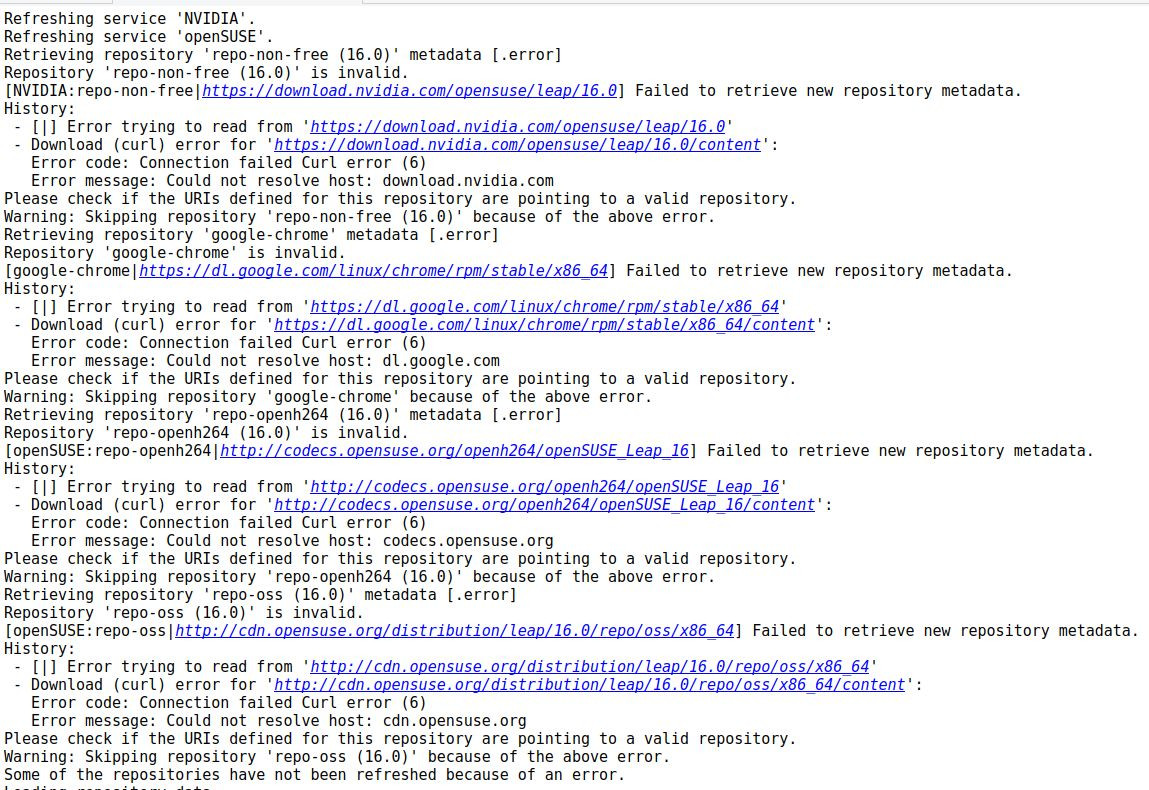
Refreshing service 'NVIDIA'.
Refreshing service 'openSUSE'.
Retrieving repository 'repo-non-free (16.0)' metadata [.error]
Repository 'repo-non-free (16.0)' is invalid.
[NVIDIA:repo-non-free|<Nvidia's URL>] Failed to retrieve new repository metadata.
History:
 - [|] Error trying to read from '<Nvidia's URL>'
 - Download (curl) error for '<Nvidia's URL>':
   Error code: Connection failed Curl error (6)
   Error message: Could not resolve host: <Nvidia's URL>
Please check if the URIs defined for this repository are pointing to a valid repository.
Warning: Skipping repository 'repo-non-free (16.0)' because of the above error.
Retrieving repository 'google-chrome' metadata [.error]
Repository 'google-chrome' is invalid.
[google-chrome|<Google chrome's URL>] Failed to retrieve new repository metadata.
History:
 - [|] Error trying to read from '<Google chrome's URL>'
 - Download (curl) error for '<Google chrome's URL>':
   Error code: Connection failed Curl error (6)
   Error message: Could not resolve host: <Google chrome's URL>
Please check if the URIs defined for this repository are pointing to a valid repository.
Warning: Skipping repository 'google-chrome' because of the above error.
Retrieving repository 'repo-openh264 (16.0)' metadata [.error]
Repository 'repo-openh264 (16.0)' is invalid.
[openSUSE:repo-openh264|<codec's URL>] Failed to retrieve new repository metadata.
History:
 - [|] Error trying to read from '<codec's URL>'
 - Download (curl) error for '<codec's URL>':
   Error code: Connection failed Curl error (6)
   Error message: Could not resolve host: <codec's URL>
Please check if the URIs defined for this repository are pointing to a valid repository.
Warning: Skipping repository 'repo-openh264 (16.0)' because of the above error.
Retrieving repository 'repo-oss (16.0)' metadata [.error]
Repository 'repo-oss (16.0)' is invalid.
[openSUSE:repo-oss|<repo-oss's URL>] Failed to retrieve new repository metadata.
History:
 - [|] Error trying to read from '<repo-oss's URL>'
 - Download (curl) error for '<repo-oss's URL>':
   Error code: Connection failed Curl error (6)
   Error message: Could not resolve host: <repo-oss's URL>
Please check if the URIs defined for this repository are pointing to a valid repository.
Warning: Skipping repository 'repo-oss (16.0)' because of the above error.
Some of the repositories have not been refreshed because of an error.

The forum doesn’t like all the repository web addresses in the zypper output so here is a screenshot:
In summary, there are some errors during boot but they probably have nothing to do with the problem at hand, namely no graphics and so no login screen. The two main fixes I’ve found searching the web are to set selinux=0 and nomodeset in the grub configuration. These make no difference here. The Nvidia drivers could be a problem if the card is not supported by opensuse 16.0 but removing them made no difference here. It could have been that there was a clash because both Nvidia drivers and nouveau drivers seem to have been installed although the graphics should work with the nouveau drivers but don’t. The repositories seem to be in a corrupted state.

Where do I go from here?

Just to clarify regarding the repository web addresses, curl fails because networking isn’t working (set-up) in recover mode. I haven’t yet found out if/how I can establish networking in that mode.
The point I was trying to make was that those web addresses reference “content” when I expect that they should reference “repodata.”

Continuing the discussion from After 15.6 to 16.0 migration, boot stops after plymouth with no graphical login screen:

Yours is different issue: “Could not resolve host” means there is no proper internet connection. Show:
cat /etc/resolv.conf from the machine involved.

Yes, that was because when I wrote that I was using the recovery mode environment and it does not set up networking. Since that environment showed that I had a working linux I rebooted normally and when the boot stopped I used alt-F2 to go into console mode knowing that networking will have been set up. I did some repair work on the repositories; it seems that the content bit was a red herring. That repair work included making sure that there were no Nvidia drivers installed, just nouveau, because it turns out my graphics card is too old for the G06 drivers. I did a zypper update then rebooted but still no graphical interface (and nomodeset still has no effect).
This is definitely a “graphics not working” issue not a networking problem.

Did you also undo the nouveau blacklisting?

Yes, all the packages are unlocked except Mesa-dri-nouveau (I think that’s the correct package name – I’m on a different machine at the moment). That was locked years ago because the package was considered to be “experimental” and liable to cause problems for the Nvidia drivers. I don’t know the state of that package now so I left it locked. As I understand it that package offers 3D acceleration which should not be relevant to the basic GUI.

That is not what I meant. There should be a *blacklist.conf file in /etc/modprobe.d for nvidia. As long as that is there, the nouveau driver cannot be loaded. To check whether nouveau is even loaded, do lsmod | grep nouveau.

This is what is in /etc/modprobe.d:

50-nvidia-default.conf.rpmsave
50-sound.conf
50-sound.conf.YaST2save
50-yast.conf

and the result of lsmod | grep nouveau is:

nouveau              3624960  0
drm_gpuvm              49152  1 nouveau
drm_exec               16384  2 drm_gpuvm,nouveau
gpu_sched              69632  1 nouveau
drm_ttm_helper         16384  2 nouveau
ttm                   110592  2 drm_ttm_helper,nouveau
i2c_algo_bit           24576  1 nouveau
drm_display_helper    282624  1 nouveau
video                  81920  2 asus_wmi,nouveau
mxm_wmi                12288  1 nouveau
wmi                    32768  6 video,intel_wmi_thunderbolt,asus_wmi,wmi_bmof,mxm_wmi,nouveau
button                 24576  1 nouveau

That wmi line appears truncated on my screen. It lists video,intel_wmi_thunderbolt,asus_wmi,wmi_bmof,mxm_wmi,nouveau
Please let me know if any of that is problematic, things there that shouldn’t be or things that should be there that aren’t.
Since the Nvidia driver packages have been removed do I still need to explicitly blacklist them?

That looks OK.

No.

What I lack knowledge about is whether you could use some nvidia driver.

What I lack knowledge about is whether you could use some nvidia driver.

Apparently not. I used Google’s AI search (while understanding the risk of the AI tool talking nonsense) with the result:

It is highly unlikely that NVIDIA G05 drivers will work reliably on openSUSE Leap 16.0, even if forced, because G05 driver support has been dropped in Leap 16. Installing it may result in a black screen, terminal-only boot (CLI), or system instability, particularly with newer kernel versions and Wayland.
Key Considerations for Leap 16.0 and G05 Drivers:
Driver Dropped: Leap 16 has removed native support for G04/G05 drivers.
Kernel Compatibility: G05 drivers (typically 470.xx series) lack support for newer Linux kernels found in Leap 16, which may prevent the kernel module from compiling.
Wayland/KDE Issues: Users reporting tests of older drivers on Leap 16 found that they do not work with Wayland.
GPU Support: If you are using a Pascal-based card or newer, you should move to G06 drivers (v550+).
Alternatives if you try:
Use Nouveau: The open-source nouveau driver is the recommended default, though it lacks 3D hardware acceleration.
Manual Install (The “Hard Way”): You may try downloading the .run file directly from NVIDIA, though it will likely fail on newer kernels without significant patching.
Upgrade Hardware: Users with older cards have found they cannot use proprietary drivers on Leap 16, often resorting to rolling back to Leap 15.6 or upgrading to a card supported by G06 (RTX series).

So, as suggested for older hardware, I investigated whether I could use the graphics card if I changed to Slowroll, and Google responded:

Yes, it is possible for the NVIDIA G05 driver to run on openSUSE Slowroll even if not officially supported for your hardware, but it is highly likely to break during kernel updates due to compatibility issues with newer Linux kernels.
While G05 (470.xx) might work on older hardware (Pascal and older) that has been excluded from G06 support, using it on Slowroll—which still uses modern, rolling-release kernels—requires manual intervention and, at times, patching.
Key Takeaways and Risks:
Kernel Incompatibility: Major kernel updates on Slowroll (6.x and higher) often break the G05 driver, requiring users to wait for patched drivers in the repository, use DKMS, or apply patches manually.
Silent Failure: Sometimes the driver installation reports success, but the kernel module fails to load, resulting in a black screen or booting into the Command Line Interface (CLI).
Best Practice: Use the official Nvidia repository within YaST to install drivers and ensure that nouveau is completely blacklisted.
Alternative: If G05 fails, try to see if your card is supported by G06 (550+) or try to use the nvidia-open module.
Steps for Success (if attempting):
Add the official NVIDIA repository for Slowroll.
Install nvidia-computeG05, nvidia-gfxG05-kmp-default, and related packages.
Disable Secure Boot, as this often prevents unsigned Nvidia drivers from loading.
If the driver fails, use inxi -GSaz to check the status and journalctl to diagnose.
If you find that the driver fails to build, you may need to wait until the nvidia-gfxG05-kmp-default package is updated to support the current kernel.

But according to Google, the basic KDE/Plasma GUI should work with the nouveau drivers:

Older NVIDIA graphics cards can work with openSUSE Leap 16.0 (released Oct 2025) using the open-source nouveau drivers, but performance for 3D applications will be limited compared to proprietary drivers, and some older cards may experience graphical artifacts. While nouveau provides basic desktop rendering and 2D acceleration out of the box, it often lacks advanced reclocking support for very old cards, resulting in lower performance.
Key Considerations for Older Cards and Leap 16.0:

  • Nouveau as Default: The open-source nouveau driver is the default, providing basic graphics capabilities (GNOME/KDE) automatically.
  • Performance Limitations: Without proper reclocking support, older GPUs may struggle with 3D acceleration or gaming.
  • Legacy Support: Some very old cards (e.g., Tesla architecture, GeForce 8400GS) may have limited support or face issues with newer Mesa libraries used in Leap 16.0.
  • Proprietary Alternatives: If the card is supported, the proprietary G06 driver (legacy) might be better, but the G07 open driver is also supported on 16.0 for newer cards.
    Alternatives for Better Compatibility:
  • AMD/ATI GPUs: Generally better supported in modern Linux distributions via built-in drivers.
  • Software Rendering: If nouveau causes crashes (as reported with some legacy cards), you may need to use LLVMPipe for software-based rendering.
    For the best experience, Nouveau is intended for basic desktop usage on older NVIDIA hardware.

My first priority is to make the machine usable, which means a graphical interface, and that should be possible with the nouveau drivers. I guess my second priority is to source a new graphics card.

To sum up:
When I did the upgrade I followed the recommendation to use the migration tool. There was nothing in the tool’s output to warn that my Nvidia graphics card (G05) is no longer supported by openSUSE. Perhaps the situation wasn’t helped because I (stupidly?) agreed to the recommended option to use Wayland; the tool should offer the option of changing from Nvidia to nouveau drivers too.
My investigations suggest that the root of the problem is the wrong drivers being installed in openSUSE 16.0. The installed 15.6 system was using the Nvidia drivers, not nouveau. The 16.0 upgrade should have told X to use the nouveau drivers but it didn’t. Using the console I removed the Nvidia drivers but X was still trying to load them, which probably explains the flash of colour when the login screen should have been displayed.
I searched the web with various forms of query but could not find instructions on how to change that dependency on the Nvidia drivers to dependency on the nouveau drivers. There are quite a few posts on how to go the other way (nouveau to Nvidia) but they couldn’t be “understood backwards” for going from Nvidia to nouveau.
Since I really needed access to the machine I installed Ubuntu. And it just worked. No hissy fits about the graphics card, no clash over nouveau or Nvidia drivers, just high res graphics.
I have a vast investment – twenty two year’s worth – in using openSUSE (including a high dependence on downloaded rpm’s and online rpm-based repositories) which would make adopting Ubuntu (and deb repositories) and then rebuilding my environment very time consuming on top of all the time spent (wasted?) trying to resolve this failed 15.6 to 16.0 upgrade.
Consequently I have purchased a new graphics card to replace the (perfectly well) working old card. I couldn’t afford, either in money or cabinet space, to replace like for like so have settled for a lower spec card. It is, though, a Radeon and not an Nvidia card. Nvidia cards are better – possibly much better – devices, but driving Nvidia cards with openSUSE has caused me so much grief over the years that it seems the possible loss of performance using a Radeon card is worth it.
I recently read a comment in the forums that said that the openSUSE team has lost interest in single machine environments in favour of enterprise environments. The indifference to older equipment (as exemplified by the lack of a use case in the migration tool for coping with older devices) does seem to add weight to that view. I am considering whether, as I get time, I should mirror my working environment on Ubuntu and eventually drop openSUSE in favour of Ubuntu. We’ll see …