Access remote NFS folder with right permissions on a Synology NAS

Here I am again :slight_smile: It’s that time of year when I get the urge to configure access to my NAS via NFS. In some folders managed by the admin user, it’s easy to set permissions by setting the “squash” and “map all users to admin” permissions in Synology.

But when it comes to matching my local user with the remote one, it’s a mess because the PUID and GUID don’t match.

I started with the wiki (YaST NFS Client - openSUSE Wiki), but even after installing yast2-nfs-utils, I don’t have this option.

Most of the references I found use the simplification of a shared folder and admin user.

Others use nfs-utils (which I don’t have in Tumbleweed) and idmapd, which I can’t find.

Do you have any references/suggestions for doing this accurately?

PS. I know I could use SMB, which works and I have already configured, but from the tests I’ve done, NFS is much more fluid in my configuration.

Edit:

192.168.20.2:/volume1/home      /mnt/magnum/home      nfs     defaults,noatime,x-systemd.automount     0 0
192.168.20.2:/volume1/shared    /mnt/magnum/shared    nfs     defaults,noatime,x-systemd.automount     0 0

forgot to past my current entry in /etc/fstab.
For shared it’s ok to squash the permission but for my home I’d like to sync my permissions.
found this package

sudo zypper in utils-libnfs

and now I have the option in Yast, but still need to figure out how to assign the right permission on the NAS side.

First off, I’m assuming you’re using NFSv3

You don’t ‘sync’ permissions, you match them. If you have UID 1000 on your desktop for your user, you want that same user on every host have the same UID. If a process is running on one host and you want another to access it’s files, you have to create the same UID/GID on each host. At scale this is done with centralized user management.

That’s it, NFSv3 trusts the host to provide the user context. NFSv3 is simple and brain-dead. You make the UID/GID’s match or you have a central management tool that does.

idmapd is used for NFSv4.

1 Like

Thank you for the answer!
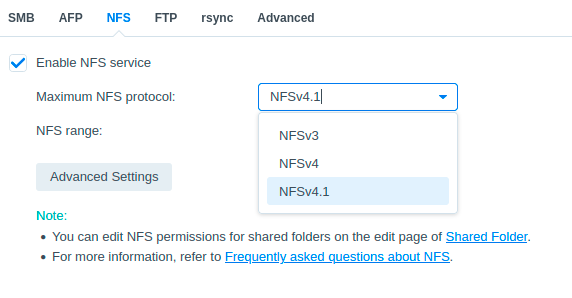
On the NAS I can set different versions. I put 4.1 but only out of ignorance. If a lower version works better for my case, I can change.

On Synology, via the UI I can’t change much, and the only options are limited.
Reading the documentation better, I realized that on the host side I can edit the /etc/exports file it contains:


/volume1/data 192.168.30.0/24(rw,async,no_wdelay,all_squash,insecure_locks,sec=sys,anonuid=1024,anongid=100)


if I understand correctly I need to change anonuid=1024,anongid=100 to match my local user on Tumbleweed.

Can I have the same setting for another user?
Or does the IP range have to be unique?
Do you suggest NFSv3 for any particular reason or can I use NFSv4.1 which is the highest supported by NAS and Tumbleweed?

If you are running with known users, and it’s your own stuff so you should be, don’t bother with squash or anon* options, just create your users on your hosts and the Synology with the same UID’s and groups with the same GID’s.

If you want to run NFSv4 while trusting the hosts to send the right UID/GID’s, then you have to mount it with the option sec=sys, that makes the security act like v3. But honestly, it sounds like this is just a small home network, v3 is fine, you won’t be taking any advantage of v4’s abilities.

What does “host side” mean?

No.

Yes, you can have different options in exports to different IP addresses (assuming your appliance supports it). It does not mean that different IP addresses will suddenly see different owners of the same file.

Anyway, I do not really understand the problem. Instead of forcing some random UID on all connections just remove all_squash and let files to be owned by your local user(s), just like files on your local filesystems.

After some research and testing, I realized that my Synology NAS uses its own default ACLs, which are set by default when you create a ‘shared folder’.

Let’s assume there are two users:

  • me (1026)
  • wife (1027)

The folder can contain files with mixed permissions:

-rwxrwxrwx+ 1 1026 100   0 Sep 22 18:32  testA.txt
-rwxrwxrwx+ 1 1027 100   0 Sep 22 18:32  testB.txt

By keeping this default ACL setting, “squash permissions to a single user”:


/volume1/shared 192.168.30.91(rw,async,no_wdelay,crossmnt,all_squash,insecure_locks,sec=sys,anonuid=1026,anongid=100)

simplifies my life because when I work—connected to my workstation—on a shared folder, my files will be written to the NAS with owner 1026, while my wife’s files will always be 1027.

On other shared folders, e.g., docker, since I am the owner, the files and folders will always be consistent with the NAS user.

Changing the permissions — overwriting the default ACLs — makes things more complex. I had some folders in which I manually changed the permissions, but by restoring the defaults, everything worked right away.

It’s definitely not the “handbook” solution, but for a home system — almost single-user — and private, I’d say it works very well.

This topic was automatically closed 30 days after the last reply. New replies are no longer allowed.