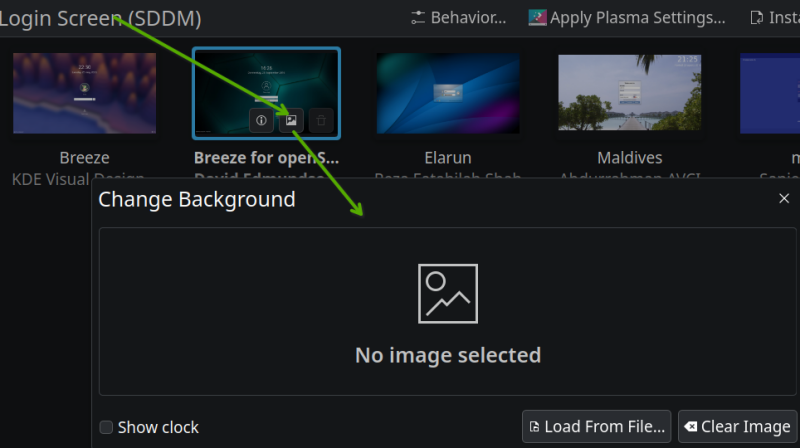
There doesn’t appear to be any way to change the theme of the SDDM login page.
YAST doesn’t work, in spite of it apparently being available and installable. When I install YAST (using myrlyn) and try to use it, I get the following:
ian@localhost:~> sudo /usr/sbin/yast2
[sudo] password for ian:
package yast2-ncurses is not installed
package yast2-qt is not installed
package yast2-gtk is not installed
Something is wrong with the YaST user interface.
I thought this might be due to absence of libyui which is not present in the RC distro. So i tried installing the libyui packages from
If I now try to run yast, the above messages do not appear, but the system appears to go into an endless loop with no output. Then, if I delete all the YAST packages that were loaded from the RC distribution, and replace them with the corresponding packages from the above repo, I get a working YAST.
And I take one other configuration step.
I edit the file I show below using cat.
I change two settings, which I have arrows pointing
I change type=image to “color”
On the next line, I change color value to 000000.
So, my login screen is all black background - personally not interested in an image.
# cat /usr/share/sddm/themes/breeze-openSUSE/theme.conf
[General]
showlogo=hidden
showClock=false
logo=/usr/share/sddm/themes/breeze/default-logo.svg
type=color     <==== i change to color
color=#000000  <==== that is the blackest of black
fontSize=10
background=/usr/share/wallpapers/openSUSEdefault/contents/images/1920x1200.png
needsFullUserModel=falseneedsFullUserModel=false
#
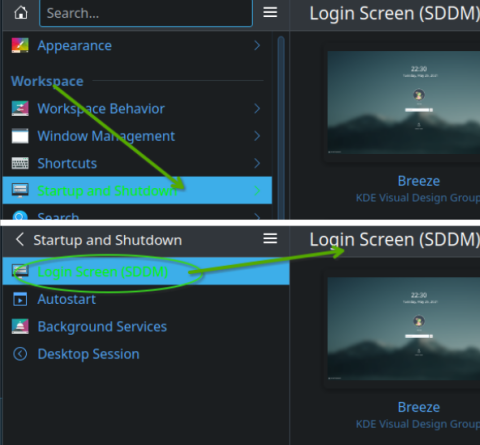
I checked my Leap 15.6 System Settings and it’s under a section named Workspace, which has the option Startup and Shutdown … click on that, and then the first option displayed is Login Screen SDDM. (first screenshot)
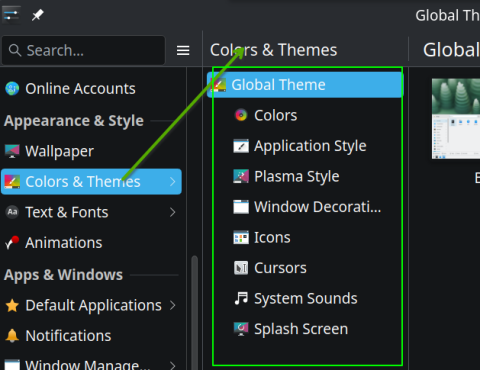
BUT … on Leap 16.1 RC, there is no explicitly shown Login Screen SDDM option. But, if you search “sddm”, it shows up as existing under Colors and Themes. (second screenshot). But navigating there using the mouse (NOT using the Search tool), clicking the choice (Colors / Themes), it’s not there.
.
( sidenote: I have ALWAYS done a Search for SDDM to change its settings, because I can not remember where it exists. Why? Because I ONLY change its visual settings after a fresh install has been completed. I never change SDDM visual settings afterwards. )
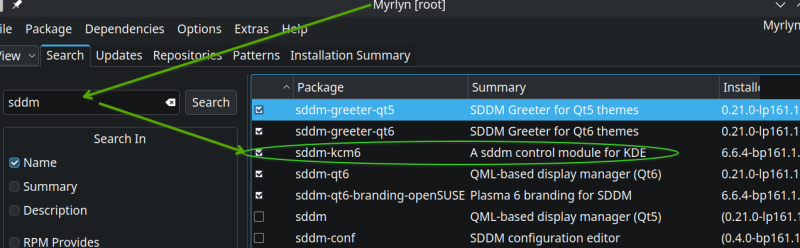
Oooops … sorry, it’s already there, confirmed with zypper and Myrlyn
# zypper in sddm-kcm6
Refreshing service 'openSUSE'.
Loading repository data...
Reading installed packages...
'sddm-kcm6' is already installed.
No update candidate for 'sddm-kcm6-6.6.4-bp161.1.2.x86_64'. The highest available version is already installed.
Resolving package dependencies...
Nothing to do.
#
Yea, that link references a KDE v5 issue (Leap 15.6 uses KDE 5 … Leap 16.xx uses KDE 6). But I checked the file anyway … no entry as shown here for KDE v6.
Personally, I can simply search for “sddm” and its configuration shows up magically, as I’ve shown. And I only make a change one time, after initial install.
We should wait and see if @ian_gay has any feedback with any of their test results provided by last few suggestions.
then log out of the desktop session and log back in. Any different?
The Archlinux topic was worth looking at (irrespective of the KDE version) as KDE can be configured to explicitly hide specific System Settings modules via restriction entries (system-wide /etc/xdg/kdeglobals or user-specifc under ~/.config/kdeglobals). So nothing like this present…
[KDE Control Module Restrictions][$i]
kcm_sddm.desktop=false