Download and use rpm to install… Or try a different mirror…
Surfed to
https://download.opensuse.org/update/tumbleweed/x86_64/
``
and downloaded 1.0-67.1
Afterwards:
sudo zypper install openSUSE-build-key-1.0-67.1.x86_64.rpm
[sudo] password for root:
'openSUSE-build-key-1.0-67.1.x86_64.rpm' looks like an RPM file. Will try to use it.
Loading repository data...
Reading installed packages...
Resolving package dependencies...

The following package is going to be upgraded:
  openSUSE-build-key

1 package to upgrade.

Package download size:    43.5 KiB

Package install size change:
            |      39.9 KiB  required by packages that will be installed
      -7 B  |  -   39.9 KiB  released by packages that will be removed

Backend:  classic_rpmtrans
Continue? [y/n/v/...? shows all options] (y): y
Retrieving: openSUSE-build-key-1.0-67.1.x86_64 (Plain RPM files cache)                                        (1/1),  43.5 KiB
openSUSE-build-key-1.0-67.1.x86_64.rpm:
    Header V3 RSA/SHA512 Signature, key ID 35a2f86e29b700a4: NOTTRUSTED
    V3 RSA/SHA512 Signature, key ID 35a2f86e29b700a4: NOTTRUSTED

openSUSE-build-key-1.0-67.1.x86_64 (Plain RPM files cache): Signature verification failed [5-File does not exist or signature can't be checked]
Abort, retry, ignore? [a/r/i] (a): i

Checking for file conflicts: ...............................................................................................[done]
error: Key 35a2f86e29b700a4 (openSUSE Project Signing Key <opensuse@opensuse.org>) expired on 2026-06-19 16:03:14
warning: /var/cache/zypper/RPMS/openSUSE-build-key-1.0-67.1.x86_64.rpm: Header V3 RSA/SHA512 Signature, key ID 29b700a4: NOTTRUSTED
error: Key 35a2f86e29b700a4 (openSUSE Project Signing Key <opensuse@opensuse.org>) expired on 2026-06-19 16:03:14
error: Key 35a2f86e29b700a4 (openSUSE Project Signing Key <opensuse@opensuse.org>) expired on 2026-06-19 16:03:14
        package openSUSE-build-key-1.0-67.1.x86_64 does not verify: Header V3 RSA/SHA512 Signature, key ID 29b700a4: NOTTRUSTED
(1/1) Installing: openSUSE-build-key-1.0-67.1.x86_64 ......................................................................[error]
Installation of openSUSE-build-key-1.0-67.1.x86_64 failed:
Error: Subprocess failed. Error: RPM failed: Command exited with status 2.
Abort, retry, ignore? [a/r/i] (a):
Apparently no way, after the key has expired…
Use the rpm command to install, not zypper…
“the rpm command”. OK, which?
I found at the interwebs some solutions along the line
sudo zypper --no-gpg-checks install openSUSE-build-key-1.0-67.1.x86_64.rpm
'openSUSE-build-key-1.0-67.1.x86_64.rpm' looks like an RPM file. Will try to use it.
Loading repository data...
Reading installed packages...
Resolving package dependencies...

The following package is going to be upgraded:
  openSUSE-build-key

1 package to upgrade.

Package download size:
            |      43.5 KiB  overall package size
       0 B  |  -   43.5 KiB  already in cache

Package install size change:
            |      39.9 KiB  required by packages that will be installed
      -7 B  |  -   39.9 KiB  released by packages that will be removed

Backend:  classic_rpmtrans
Continue? [y/n/v/...? shows all options] (y): y
In cache openSUSE-build-key-1.0-67.1.x86_64.rpm                                       (1/1),  43.5 KiB

Checking for file conflicts: .......................................................................[done]
error: Key 35a2f86e29b700a4 (openSUSE Project Signing Key <opensuse@opensuse.org>) expired on 2026-06-19 16:03:14
warning: /var/cache/zypper/RPMS/openSUSE-build-key-1.0-67.1.x86_64.rpm: Header V3 RSA/SHA512 Signature, key ID 29b700a4: NOTTRUSTED
error: Key 35a2f86e29b700a4 (openSUSE Project Signing Key <opensuse@opensuse.org>) expired on 2026-06-19 16:03:14
error: Key 35a2f86e29b700a4 (openSUSE Project Signing Key <opensuse@opensuse.org>) expired on 2026-06-19 16:03:14
        package openSUSE-build-key-1.0-67.1.x86_64 does not verify: Header V3 RSA/SHA512 Signature, key ID 29b700a4: NOTTRUSTED
(1/1) Installing: openSUSE-build-key-1.0-67.1.x86_64 ..............................................[error]
Installation of openSUSE-build-key-1.0-67.1.x86_64 failed:
Error: Subprocess failed. Error: RPM failed: Command exited with status 2.
Abort, retry, ignore? [a/r/i] (a):
including manipulating the zypper.conf, none of them work…
Hmm, rpm next try:
sudo rpm -i openSUSE-build-key-1.0-67.1.x86_64.rpm
error: Key 35a2f86e29b700a4 (openSUSE Project Signing Key <opensuse@opensuse.org>) expired on 2026-06-19 16:03:14
warning: openSUSE-build-key-1.0-67.1.x86_64.rpm: Header V3 RSA/SHA512 Signature, key ID 29b700a4: NOTTRUSTED
error: Key 35a2f86e29b700a4 (openSUSE Project Signing Key <opensuse@opensuse.org>) expired on 2026-06-19 16:03:14
error: Key 35a2f86e29b700a4 (openSUSE Project Signing Key <opensuse@opensuse.org>) expired on 2026-06-19 16:03:14
        package openSUSE-build-key-1.0-67.1.x86_64 does not verify: Header V3 RSA/SHA512 Signature, key ID 29b700a4: NOTTRUSTED
        file /usr/lib/rpm/gnupg/keys/gpg-pubkey-29b700a4-62b07e22.asc from install of openSUSE-build-key-1.0-67.1.x86_64 conflicts with file from package openSUSE-build-key-1.0-66.1.x86_64
So uninstall openSUSE-build-key-1.0-66.1.x86_64 Or use rpm -iv --replacepkgs
Or one can also use
rpm -i --force openSUSE-build-key-1.0-67.1.x86_64.rpm
sigh
sudo rpm -iv --replacepkgs --nosignature openSUSE-build-key-1.0-67.1.x86_64.rpm
Verifying packages...
Preparing packages...
        file /usr/lib/rpm/gnupg/keys/gpg-pubkey-29b700a4-62b07e22.asc from install of openSUSE-build-key-1.0-67.1.x86_64 conflicts with file from package openSUSE-build-key-1.0-66.1.x86_64
You need to use --force or --replacefiles. See man rpm.
Just delete the old rpm first…
Finally and in the end: The juice …eeeh the force was with me:
sudo rpm -i --force --nosignature openSUSE-build-key-1.0-67.1.x86_64.rpm
But now both versions are installed, which makes zypper dup fail.
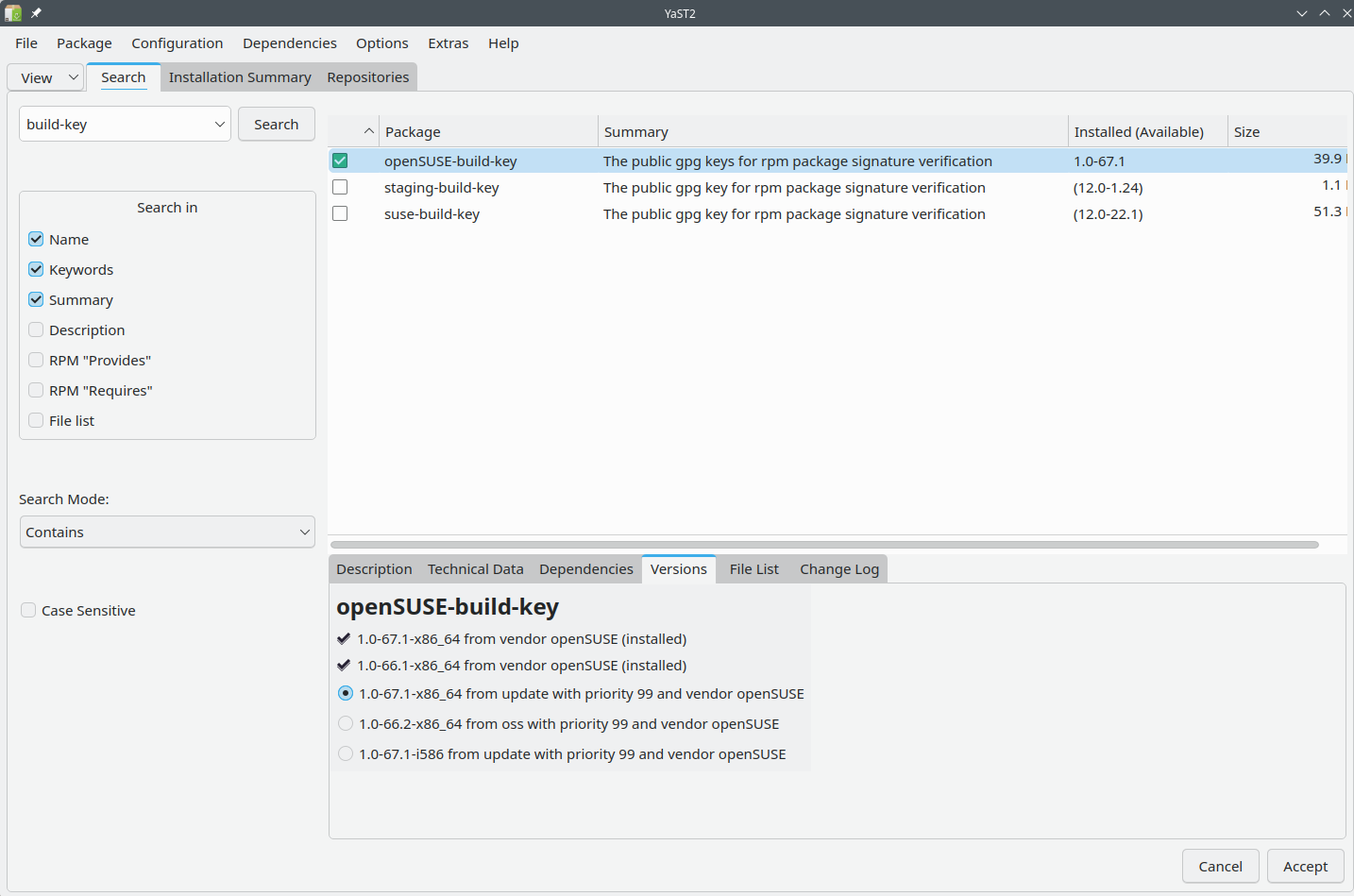
How to remove this 1.0-66.1
1 Like
You should be able to uncheck the checkmark in the versions tab…
Ehhm, nope. Nothing to click there…
What does zypper se -si openSUSE-build-key show?
You can uninstall a specific package version
sudo zypper rm openSUSE-build-key-1.0-66.1
> sudo zypper se -si openSUSE-build-key
Loading repository data...
Reading installed packages...

S  | Name               | Type    | Version  | Arch   | Repository
---+--------------------+---------+----------+--------+------------------
i+ | openSUSE-build-key | package | 1.0-66.1 | x86_64 | (System Packages)
i+ | openSUSE-build-key | package | 1.0-67.1 | x86_64 | update
type or paste code here
zypper rm openSUSE-build-key-1.0-66.1 or use rpm to uninstall. Likely need to rebuild the rpm database as well…
rpm database rebuilt? How?
sudo zypper rm openSUSE-build-key-1.0-66.1
[sudo] password for root:
Reading installed packages...
Resolving package dependencies...

The following package is going to be REMOVED:
  openSUSE-build-key

1 package to remove.

Package install size change:
              |         0 B    required by packages that will be installed
   -39.9 KiB  |  -   39.9 KiB  released by packages that will be removed

Backend:  classic_rpmtrans
Continue? [y/n/v/...? shows all options] (y): y
(1/1) Removing: openSUSE-build-key-1.0-66.1.x86_64 .................................................[done]
Running post-transaction scripts ...................................................................[done]
and then we have here:
sudo zypper se -si openSUSE-build-key
Loading repository data...
Reading installed packages...

S  | Name               | Type    | Version  | Arch   | Repository
---+--------------------+---------+----------+--------+-----------
i+ | openSUSE-build-key | package | 1.0-67.1 | x86_64 | update
As root:
zypper clean -a && rpm -rebuildb
2 Likes