Long, long time SuSE user here, since version 8 I think. Just installed Leap 16 on a test box. The thing is, I use YaST a lot, to the point that I have it pinned to my taskbar. My primary use case is package and repository management, but I also use it to work with Network Settings, Partitioning, and occasionally Services and Printers. What is the proposed workflow now that there is no central authority for working with these items? Shell certainly is not the answer particularly when it comes to new users. To me YaST was what made SuSE special. I distro hopped a lot it the early days but SuSE is where I found my home. I feel like it’s just another neutered distro now.
Package and repo management: Myrlyn
Partitioning: Cockpit
Services: Cockpit
Printers: In most cases no configuration tool needed. Or use the tools from the DE.
Network settings: Networkmanager or Cockpit
And there are several threads which explained all the replacement tools for YaST. You are quite late to the party…
5 Likes
Is cockpit installed by default as I see no reference to it. Mrylyn is fine. Printers you can apparently configure and add cups printers via the system configuration settings. Network Manager is fine since I also use that on 15.6.
You might consider adding a Myrlyn link or something under Apps & Windows in System Settings. As it is you have to ‘just know’ and search for it. Even the description field is not intuitive. “Full root access (via sudo)” and “Read only mode for non-privileged users”. No idea what it is or does, but at least I know I have to be privileged or not to use it.
For Cockpit:
https://en.opensuse.org/Main:Cockpit
Myrlyn is not a KDE Plasma tool. That is why it does not show up in Plasma systemsettings. But it is available via the usual application menu.
2 Likes
Just my opinion, but awful default configuration for new users.
2 Likes
I disagree.
- But, as a KDE Plasma user, I have moved from Leap 16 to Tumbleweed – due to the “Rolling Release” schedule of the KDE Plasma folks and, my need for “digiKam”.
And, because I now have the actual KDE component versions, the KDE folks are amazingly helpful and tend to quickly repair the issues when I raise Bug Reports there – they’re also polite – which wasn’t always the case when I reported issues with the KDE versions running on Leap …
On the other hand, I have openSUSE Leap running in a Virtual Machine with a GNOME Desktop, which doesn’t get booted so often.
- When I boot it every now and again, it updates automagically – which I consider to be very useful for 1st time users …

 > kinfo
Operating System: openSUSE Tumbleweed 20261024
KDE Plasma Version: 6.8.1
KDE Frameworks Version: 6.31.0
Qt Version: 6.12.0
Kernel Version: 7.3.0-1-default (64-bit)
Graphics Platform: Wayland
Processors: 12 × AMD Ryzen 5 8600G w/ Radeon 760M Graphics
Memory: 34 GB of RAM (32.8 GB usable)
Graphics Processor: AMD Radeon 760M Graphics
 >
I’m not so much talking about the desktop appearance and layout. It’s fine. I only use KDE. My gripe is if you’re going to take away something like YaST you have to consider all of the use cases that it had and provide a meaningful effort at replacing the things that were in there and make it clear that ‘this is the new way you do X’. Discovery is one way of doing that but labels need to be better and if a function is performed that requires ‘Cockpit’ then it should be installed by default and also added to the base desktop. Perhaps cockpit is not a KDE app, I don’t know the politics. The System Settings widget is a fine place and contains a lot of functionality that YaST had but it falls down when it comes to the more advanced functions like disk partitioning and package management.
I will say the 16 installer is very nice, almost jarringly so. Very impressed by it.
Doesn’t give the poor description a pass.
Ooofta mae…So I took a quick look at cockpit. I don’t care much for having a web service running with that much privilege. So I did a quick check that maybe KDE has an equivalent partition manager but after installation it doesn’t appear in any menu. A quick jump out to the shell (already a fail for a newbie), at a guess I tried ‘partitionmanager’ on the CLI and lo and behold an actual partition manager launches. I do like how partition manager integrates into a lot of places inside of KDE, just not sure why it’s not present in the base install and there is no standalone launcher in the application menus once it is installed.
**The launcher for KDE Partition Manager appeared after I went in the Menu Editor.
Also great work on Mrylyn. Pretty much works as well as the old YaST app. Who knows maybe it’s partially the same code base. Thanks to all who chimed in and listened to my feedback. This was an honest first time exposure to v16. I like it, just not sure about it yet. Need to bang on it some more.
And finally to those that don’t understand where I’m coming from. I have been a SuSE desktop DAILY user for over 20 years, actually longer than my account date here represents. I was here during the Novell reshuffle that nuked my original account. I also manage an office of OpenSUSE desktops and servers and I use it at home. I don’t often dig into the technical aspects of the applications I use unless it is absolutely necessary. So saying I’m ‘late to the party’ misses the plot. New users come from all over the place and at different times. There are no start and end points.
1 Like
I think Cockpit is pre-installed. Correct me if I’m wrong. For the GUI, there’s an additional step, but in your browser, go to
and you’ll find everything there.
Yes, that’s a legitimate concern, although access can be restricted through the firewall if direct web access isn’t desired. Cockpit also supports managing additional machines over SSH…
Some background in this forum thread and in this hack week 2024 project.
See also the motivation on the Myrlyn home page.
Notice this:
Is this an Official SUSE Project?
No.
This started as a one-man project during the SUSE Hack Week in 11/2024, so it was sponsored by SUSE during that first week, but since then it has been a private Open Source project.
You’re wrong. And no Cockpit installed by default was really a major weak point of Leap 16.0. Myrlyn came late to the party, so there is an excuse for that, but not even Cockpit made for a very miserable user experience.
1 Like
Stefan, thank you so much for your work on Myrlyn. It is a proper package and repository management system. Please send kind regards to your team.
2 Likes
Strangely YAST is still available in Tumbleweed - so if you are wedded to it & still want to use it you could always upgrade to TW. The caveat being though that it is no longer supported & may well stop working there before too long.
Most of the things you mentioned are still featured in there:
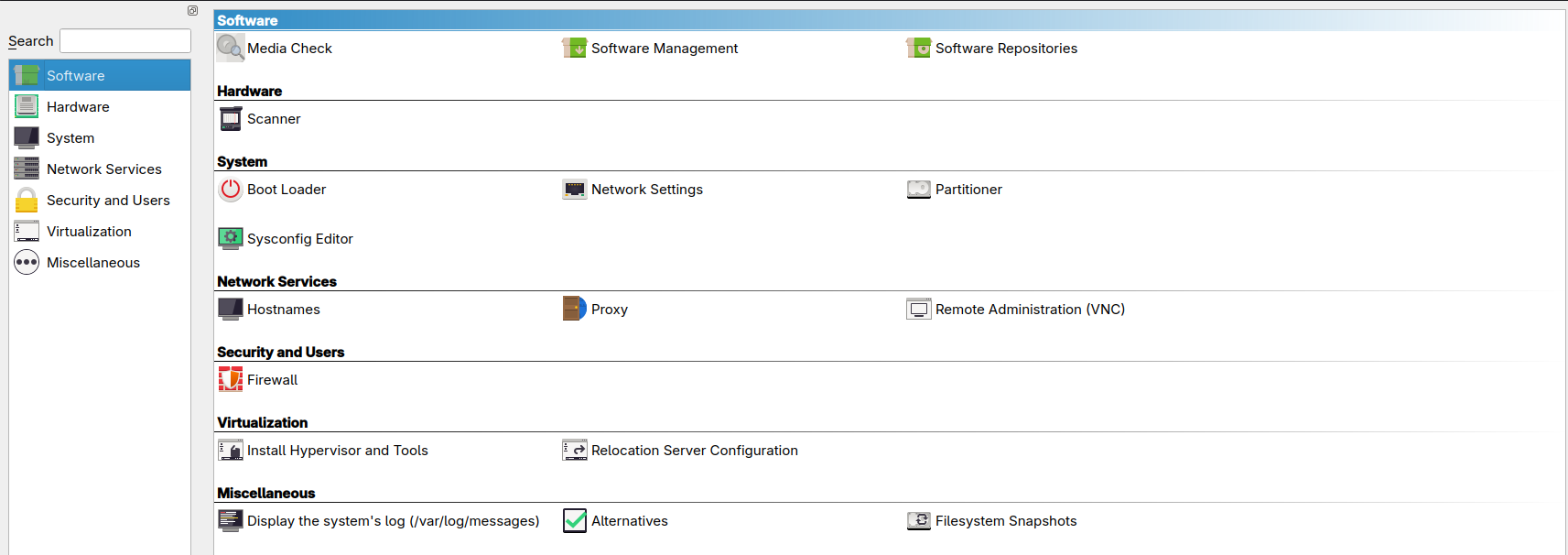
Noticed in today’s “News and Announcements - openSUSE Forums” RSS Feed –
<New Tumbleweed snapshot 20261026 released!>
=== patterns-base ====
- Stop pulling YaST into default Tumbleweed installations:
- enhanced_base: drop the Recommends on pattern() = yast2_basis
- x11_enhanced: drop the Recommends on pattern() = x11_yast,
pattern() = yast2_desktop, yast2-control-center-gnome and
yast2-network- apparmor: drop the Recommends on yast2-apparmor
Drop YaST from the pattern recommendations. The YaST patterns
and packages stay in the repository for anyone who has them or
wants them; new installations simply come without YaST.
Completes code-o-o#leap/features/173 for Tumbleweed defaults.==== patterns-desktop ====
Subpackages: patterns-desktop-books patterns-desktop-imaging patterns-desktop-mobile patterns-desktop-multimedia
- Stop pulling YaST into default Tumbleweed installations: drop
the Recommends on yast2-sound from the multimedia pattern.
Drop YaST from the pattern recommendations. The YaST patterns
and packages stay in the repository for anyone who has them or
wants them; new installations simply come without YaST.==== patterns-kde ====
Subpackages: patterns-kde-kde patterns-kde-kde_edutainment patterns-kde-kde_games patterns-kde-kde_ide patterns-kde-kde_imaging patterns-kde-kde_internet patterns-kde-kde_multimedia patterns-kde-kde_office patterns-kde-kde_pim patterns-kde-kde_plasma patterns-kde-kde_utilities patterns-kde-kde_utilities_opt patterns-kde-kde_yast
- Drop the Tumbleweed-only Recommends on yast2-control-center-qt and
pattern() = kde_yast from the kde pattern.
[edited by fabian@ritter-vogt.de]
1 Like
Please be aware that from TW20261026 YaST is no longer installed by default.
==== patterns-base ====
Subpackages: patterns-base-apparmor patterns-base-base patterns-base-basesystem patterns-base-basic_desktop patterns-base-console patterns-base-enhanced_base patterns-base-minimal_base patterns-base-selinux patterns-base-sw_management patterns-base-x11 patterns-base-x11_enhanced
- Stop pulling YaST into default Tumbleweed installations:
- enhanced_base: drop the Recommends on pattern() = yast2_basis
- x11_enhanced: drop the Recommends on pattern() = x11_yast,
pattern() = yast2_desktop, yast2-control-center-gnome and
yast2-network- apparmor: drop the Recommends on yast2-apparmor
Drop YaST from the pattern recommendations. The YaST patterns
and packages stay in the repository for anyone who has them or
wants them; new installations simply come without YaST.
Completes code-o-o#leap/features/173 for Tumbleweed defaults.
It is still available if you really love it but some modules don’t work anymore, some are not needed (Sound, Printing) and some still work but use old configs (Users, Firewall come to mind) so they might cripple new installations in a subtle way.
And nobody knows if it will survive the next Ruby upgrade.
[Well, Donald beat me on time  ]
2 Likes
Prepare mentally that YaST might not survive the end of this year: A new Ruby version is typically released at the end of the year, and Ruby loves to become subtly icompatible with itself with new versions.
That typically means having to adapt existing code with quite some Ruby expertise; and that kept a large part of the YaST team quite busy at that time of the year. But this is almost certainly not going to happen anymore.
So YaST will fail its unit tests in several dozen places, and that will mean dropping the failing packages from Factory and hence Tumbleweed and Slowroll.
R.i.P. YaST. It was good while it lasted.
Released SLE and Leap products will be fine: They will keep their old Ruby versions (and hence YaST packages) until they run out of maintenance.
3 Likes