In Yast installer for TW I set the correct keyboard language before setting the password but at every login the keyboard language is apparently English which forces me to write the password with different keys due to special characters.
In KDE and lock screen the keyboard language is correct.
How can I set the keyboard language for the sddm login screen?
If you call the “localectl” command from a Linux Console (VT → Ctrl-Alt-F1/2/3/4/5/6) you should be seeing more or less the same output – I called the example above from a KDE Plasma (Wayland) Konsole window. On this system, a Linux Console uses the following Locale settings:
 > cat /etc/vconsole.conf
# Written by systemd-localed(8) or systemd-firstboot(1), read by systemd-localed
# and systemd-vconsole-setup(8). Use localectl(1) to update this file.
KEYMAP=de-nodeadkeys
FONT=
FONT_MAP=
FONT_UNIMAP=
XKBLAYOUT=de
XKBMODEL=cymotionlinux
XKBOPTIONS=terminate:ctrl_alt_bksp
XKBVARIANT=nodeadkeys
 >
I do not think there is such a thing as a “keyboard language”.
Keyboards may have different layouts (locations where the keys are as well as the glyphs that are written on the keys). One configures what type of keyboard one has. That then specifies to the system which (ASCII or Unicode) character is to be put into the input buffer when a certain key is hit). No connection to any language at all.
OTOH, environment variables like LANG and a whole series of LC_* may be consulted by processes and the running program may then use them to choose a language for it’s output and for the formatting strings expressing e.g. date and time and currency, etc. Has nothing to do with the keyboard such a process may be connected to for input.
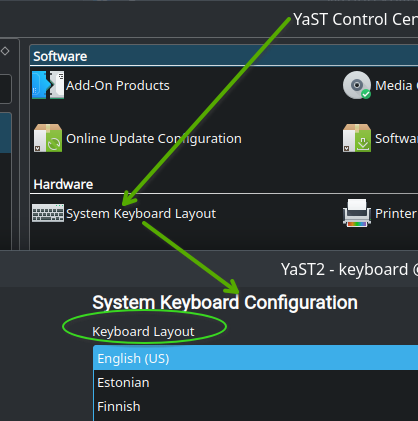
Well, my screenshot is not during an installation, but I fire up YaST (Leap 15.6) and under Hardware, I select System Keyboard Layout, and the System Keyboard Configuration dialog is displayed, with the Keyboard Layout list shown (obviously there are more than three options).
If I select an option, I tap Accept button … there are no other options to choose and configure.
.
I forgot to mention that I use English as system locale. It’s the keymap/layout that is wrong before login when it’s also set to English.
@dcurtisfra localectl always showed the correct keymap/layout but that was not applied/active before a login.
@hcvv Yeah you are probably right but everyone seemed to understand that I meant the keymap/layout
@ontdekik Many thanks! This fixed it. The correct keymap/layout was already selected but when pressing apply that setting finally seems to have been set active before login also.
I have been dealing with this issue since February. Should have registered here a long time ago
So is the problem the Installer then that failed to apply all the settings to the system so it’s also active before login?
I have a Tumbleweed VM in Virtualbox I installed about a month ago. This issue is also active there. So this bug hasn’t been fixed between February and September at least.
Do you want me to debug anything there since I didn’t provide any terminal outputs yet?
I encountered this issue using LightDM also. My guess is a YaST problem and since it’s deprecated I’m not sure when the bug will be fixed. Maybe only when the YaST installer will be replaced. But all these are only suppositions
This is not and was never a problem of the installer, no matter if YaST, Agama or an image-based installation. Read the bug report: The system locale was correctly set for localectl. This is where the responsibility of the installer ends (and always ended).
The problem is the desktops that stopped caring about users many years ago: They used to pick up the system locale (which includes the keyboard layout) upon the first login (or the first time the login manager started). They did that in the past, but some years ago they simply didn’t bother anymore.
We had this discussion dozens of times over recent years, and people (including internal testers!) always tried to blame the installer. And they were always wrong.
@shundhammer Thank you for the explanation.
I didn’t see such an explanation in the other similar topics, that’s why my suppositions.
Problem is how a regular user as i am to just find the solution by chance. It is really frustrating for those users who don’t use the default US keyboard layout