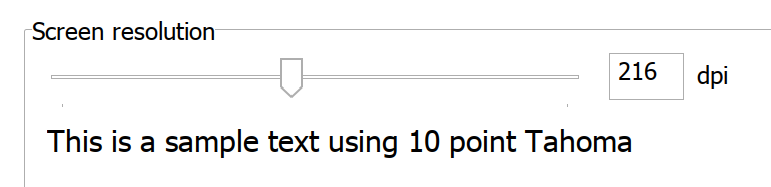
on my laptop with slowroll and KDE I use wine, the fonts in the windows menu appear blurred and small

I have this settings in
winecfg>graphic tab>screen resolution=216 dpi
this is an example text using 10 point tahoma
but it doesn’t reflect in menu fonts
how can I have a clear font and also bigger in applications menu?
Are you using a Wayland or X11 session, and which Windows application shows the small, blurred menus? Does this affect more than one Wine application?
I’m using wayland
I usually use wine only for filemakerpro and genopro and both shows this blur menu, I launched notepad and it works well, wordpad is ok

Thanks, that narrows it down: WordPad and Notepad render sharply while FileMaker Pro and Genopro do not. Which Wine version are you running? And do you know whether your Wine is using its native Wayland driver or running through XWayland?
hi, this is the wine version
pla@plaST-slowroll:~> wine --version wine-11.19 pla@plaST-slowroll:~>
and I don’t know if wine is using its native Wayland driver or running through XWayland, how can I get it?
Thanks for the version info. One read-only check is to look for the display-driver library loaded by the affected program. With FileMaker open, run pgrep -fa -i filemaker and identify its process ID, then replace NUMBER in grep -oE 'wine(x11|wayland)\.so' /proc/NUMBER/maps | sort -u with that ID. Wine 11.19 names these libraries winex11.so and winewayland.so; a match tells us which library that process has loaded. Please share only those library names, not the process listing or full maps output. If there is no match, more than one driver appears, or you cannot identify the process, that result is inconclusive rather than proof of either route.
manythanks, the library is winex11.so
pla@plaST-slowroll:~> grep -oE 'wine(x11|wayland)\.so' /proc/40301/maps | sort -u winex11.so