This has been bothering for a while while using KDE Plasma, but it’s much worse now that I’m trying out Sway and I have no idea how to fix it.
My problem is similar to “Ugly fonts under Wayland” but is unrelated to flatpak. In fact, in flatpak apps fonts look fine.
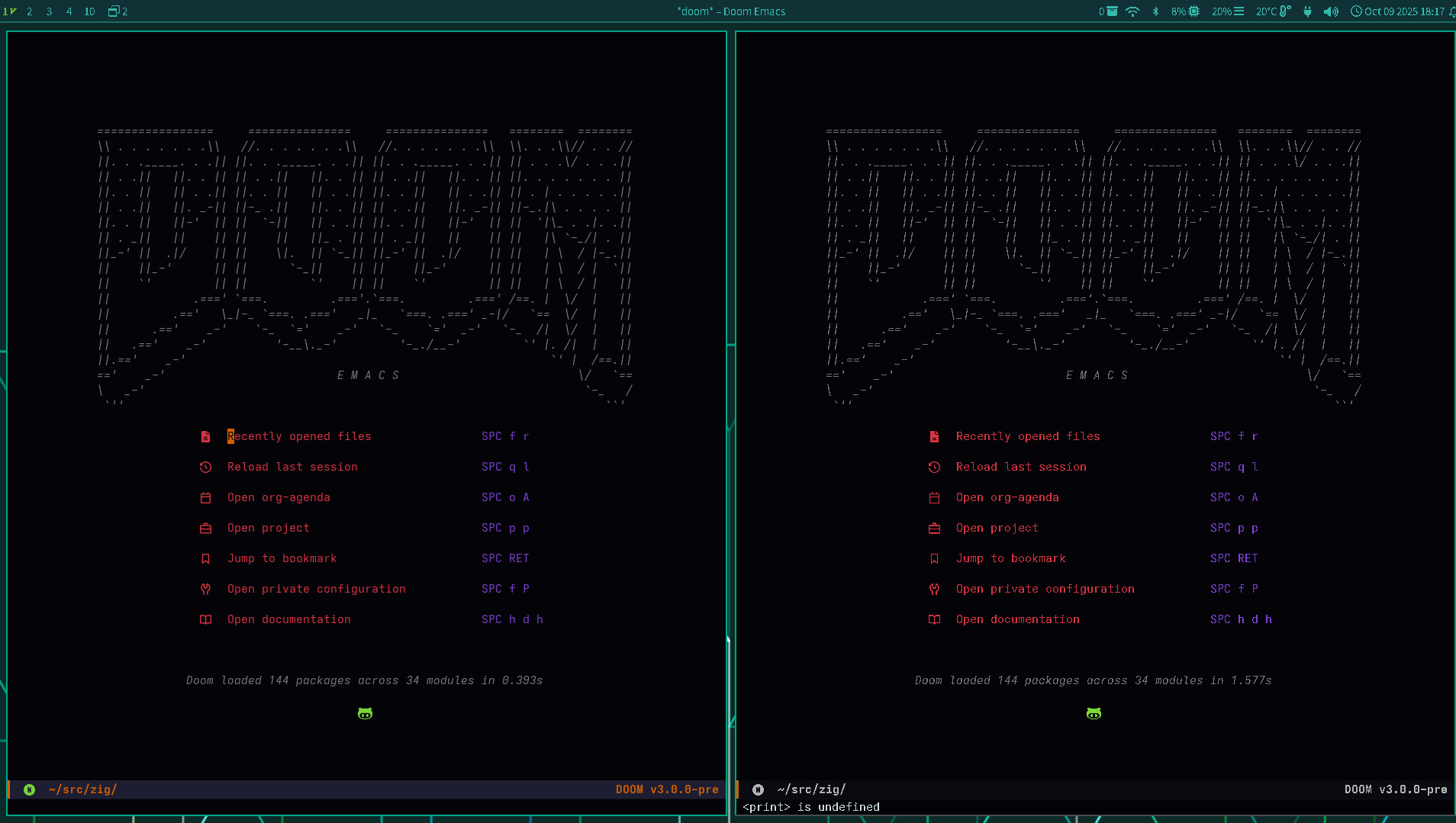
Here’s an example of how things look.
Left is /usr/bin/emacs-x11, right is /usr/bin/emacs-wayland
Note that the waybar on top is also blurry.
❯ inxi -GSaz
System:
  Kernel: 6.17.0-2-default arch: x86_64 bits: 64 compiler: gcc v: 15.2.0
    clocksource: tsc avail: acpi_pm
    parameters: BOOT_IMAGE=/boot/vmlinuz-6.17.0-2-default
    root=/dev/mapper/system-root mitigations=auto security=apparmor
    xe.force_probe=a7a1 i915.force_probe=!a7a1 iommu.passthrough=1
  Desktop: KDE Plasma v: 6.4.5 tk: Qt v: N/A wm: Sway v: 1.11 with: waybar
    tools: swayidle avail: swaylock,xscreensaver vt: 8 dm: SDDM Distro: openSUSE
    Tumbleweed 20251007
Graphics:
  Device-1: Intel Raptor Lake-P [Iris Xe Graphics] vendor: Dell driver: xe
    v: kernel alternate: i915 arch: Xe process: Intel 7 (10nm) built: 2022+
    ports: active: DP-5 off: eDP-1 empty: DP-1, DP-2, DP-3, DP-4, HDMI-A-1
    bus-ID: 0000:00:02.0 chip-ID: 8086:a7a1 class-ID: 0300
  Display: wayland server: X.org v: 1.21.1.15 with: Xwayland v: 24.1.8
    compositor: Sway v: 1.11 driver: X: loaded: modesetting unloaded: vesa
    alternate: fbdev,intel dri: iris gpu: xe d-rect: 3840x1200 display-ID: 1
  Monitor-1: DP-5 pos: right model: Samsung S24E450 serial: <filter>
    built: 2018 res: mode: 1920x1080 hz: 60 scale: 100% (1) dpi: 92 gamma: 1.2
    size: 531x299mm (20.91x11.77") diag: 609mm (24") ratio: 16:9 modes:
    max: 1920x1080 min: 720x400
  Monitor-2: eDP-1 pos: primary,left model: HKC OVERSEAS 0x36BB built: 2022
    res: 1920x1200 dpi: 161 gamma: 1.2 size: 302x189mm (11.89x7.44")
    diag: 356mm (14") ratio: 16:10 modes: 1920x1200
  API: EGL v: 1.5 hw: drv: intel iris platforms: device: 0 drv: iris
    device: 1 drv: swrast gbm: drv: iris surfaceless: drv: iris wayland:
    drv: iris x11: drv: iris
  API: OpenGL v: 4.6 compat-v: 4.5 vendor: intel mesa v: 25.2.4 glx-v: 1.4
    direct-render: yes renderer: Mesa Intel Iris Xe Graphics (RPL-U)
    device-ID: 8086:a7a1 memory: 30 GiB unified: yes
  API: Vulkan v: 1.4.321 layers: 1 device: 0 type: integrated-gpu name: Intel
    Iris Xe Graphics (RPL-U) driver: mesa intel v: 25.2.4 device-ID: 8086:a7a1
    surfaces: N/A device: 1 type: cpu name: llvmpipe (LLVM 21.1.2 256 bits)
    driver: mesa llvmpipe v: 25.2.4 (LLVM 21.1.2) device-ID: 10005:0000
    surfaces: N/A
  Info: Tools: api: clinfo, eglinfo, glxinfo, vulkaninfo
    de: kscreen-console,kscreen-doctor gpu: gputop, intel_gpu_top, lsgpu
    wl: kanshi, swaymsg, wayland-info x11: xdpyinfo, xprop, xrandr