I am wondering about this
//192.168.178.72/server/Server/Music
For NFS (where I am more used to) it should be:
192.168.178.72:/server/Server/Music
I am wondering about this
//192.168.178.72/server/Server/Music
For NFS (where I am more used to) it should be:
192.168.178.72:/server/Server/Music
Changing the entry to:
192.168.178.72/server/Server/Music /media/music cifs x-systemd.automount,noauto,rw,iocharset=utf8,guest,gid=100,uid=1000,guest,file_mode=0770,dir_mode=0770 0 0
Or:
192.168.178.72/server/Server/Music /media/music fuse fuse.gvfsd,rw,nosuid,nodev,relatime,gid=100,uid=1000,guest,file_mode=0770,dir_mode=0770 0 0
Still gives me the error, unfortunately:
sudo mount -a /bin/sh: //192.168.178.72/server/Server/Music: No such file or directory
Please re-read (or copy/paste) what I suggested. None of your two trials has what I have suggested.
I did add the “:”, as per your suggestion, just typed it wrong here. Wish I could edit posts!
192.168.178.72**:**/server/Server/Music /media/music fuse fuse.gvfsd,rw,nosuid,nodev,relatime,gid=100,uid=1000,guest,file_mode=0770,dir_mode=0770 0 0
Obviously it was also there in the error message, so:
sudo mount -a
/bin/sh: 192.168.178.72**:**/server/Server/Music: No such file or directory
Similar results as mounting it with cifs.
Post from the server:
ls -al /server/Server/Music
We assume here that what is between CODE tags is copied/pasted from a terminal window. That is because we do not trust people, we only trust computers lol!.
Haha, computers never make mistakes!
Post from the server:
ls -al /server/Server/Music
Sorry I am not quite sure what you mean? That directory is not mounted. But perhaps I misunderstand, so:
~] ls -al /server/Server/Music
/server/Server/Music [error opening dir]

0 directories, 0 files
~] ls -al 192.168.178:/server/Server/Music
192.168.178:/server/Server/Music [error opening dir]

0 directories, 0 files
~] ls -al smb://192.168.178/server/Server/Music
smb://192.168.178/server/Server/Music [error opening dir]

0 directories, 0 files
And obviously:
~] ls -al /media/music/
/media/music/

0 directories, 0 files
edit (just in time):
I think you mean this? Taken from ssh:
jan@netbook:~$ ls hardeschijf/Server/Music/ -al
total 533
Mind you: the samba server is called ‘server’ and starts at /hardeschijf/, hence the different ls command. My server-side samba config:
[server]
        comment = media server
        browsable = yes
        path = /home/jan/hardeschijf/
        guest ok = yes
        read only = no
hardeschijf/Server/Music/
192.168.178.72:/server/Server/Music
There is no directory server in the first output.
I wish I could help you further.:shame: It’s only because I noticed the aforementioned automount. I was hoping someone more knowledgeable would see my comment and jump in. And yes, I believe autofs is probably what you’re looking for. Again, if any other member who’s knowledgeable on this matter, please join in. Good luck.
I don’t use nautilus, but I wonder if the SMB protocol level might be tripping it up? The reason I’m thinking this is because some of my android client apps had trouble when openSUSE defaulted to higher protocol levels. A google of nautilus which samba protocol yields some results that discuss the protocol level. It might be worth trying different global server min protocol settings. At least one page said min of SMB2 worked:
client min protocol = SMB2
client max protocol = SMB3
[FONT=system]If that doesn’t work, perhaps experiment with setting min to NT1 so test whether nautilus behaves, then move up from there (if you can).
My relevant firewalld settings are:
[/FONT]
firewall-cmd --zone internal --permanent --add-service=samba
[FONT=system]
I should say that by now mounting via Nautilus works fine. I only have problems with automounting via fstab.
Changing the protocols sadly didn’t change things.
My relevant firewalld settings are:
[/FONT]
firewall-cmd --zone internal --permanent --add-service=samba
I ran that command, but it seems it was already configured as such (thanks YaST!)
I wish I could help you further.:shame: It’s only because I noticed the aforementioned automount. I was hoping someone more knowledgeable would see my comment and jump in. And yes, I believe autofs is probably what you’re looking for. Again, if any other member who’s knowledgeable on this matter, please join in. Good luck.
No problem! I think it is either a problem with my automount config, or some other security setting disabling me. But I don’t know what it is…
Apparently you missed something that @Sauerland asked you in post #25.
You said in post #18
But I assure you it’s there
But that was not true, because you said so about the directory
//192.168.178.72/server/Server/Music: No such file or directory
and I am pretty sure that that one does indeed not exist.
Now we have changed the device speciffication in the /etc/fstab entry, but you say there is the same error message as earlier in post #22. But as you did not copy/paste there (as you admitted), we in fact do not believe what you have written there.
So, what we want to see is, from the client system:
grep music /etc/fstab
mount -a
All in copied/pasted in ONE sweep from the complete (including prompt) first command line, until and including the new prompt at the end.
And in fact post #25 @sauerland doubts that
/server/Server/Music
exists on the server. Thus he asked you to check that by doing on the server system
ls -al /server/Server/Music
You can also read that different. How did you arrive at the //192.168.178.72/server/Server/Music. It is a very strange construct and we are doubting now about almost all of the parts of it.
I am not quite sure what warrants for the change in tone, as you have been quite kind so far, but I guess I’ll just roll with it.
~] grep music /etc/fstab
//192.168.178.72/hardeschijf/server/Server/Music /media/music cifs x-systemd.automount,noauto,rw,iocharset=utf8,gid=100,uid=1000,file_mode=0770,dir_mode=0770 0 0
~] mount -a
~]
As you can see I’ve changed the line back to the original, since it was working fine for many years on different systems (arch/debian/ubuntu). Actually, it still is, as it is currently being used to play music on a Debian based media system.
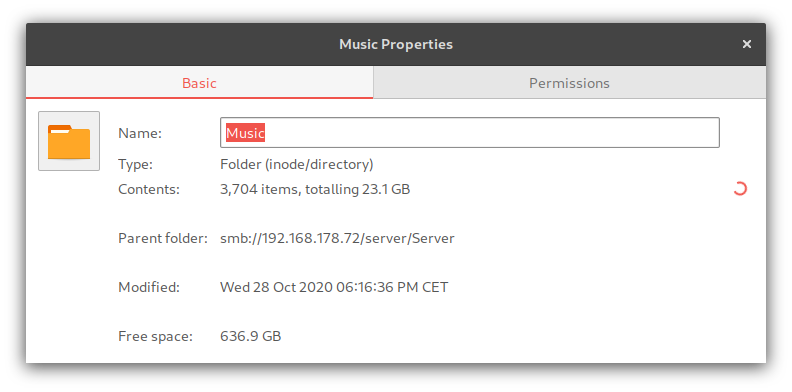
Like I said, I can assure you the folder /server/Server/Music exists, as I am (like I said) successfully mounting it in Nautilus:
When I try to navigate there in nautilus for example, I get the following error:
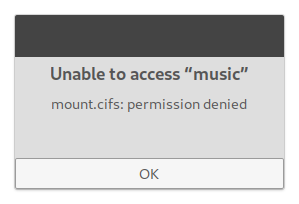
Which makes me believe there is something in OpenSuse’s default settings that disables this kind of use of samba shares in fstab. When I look at samba’s logs, like I did in post #13, you can indeed see something strange is going on:
Let’s hope someone knows whether this is in autofs config, or something else. 
This does appear like an SMB protocol issue at play, based on the ‘NT_STATUS_INVALID_PARAMETER_MIX’ error reported. As I already mentioned at the start of this thread, SMB2 is now the minimum protocol used to communicate with the server (unless otherwise forced). Your NAS may still be using the deprecated NT1 (SMB1) protocol.
As a test, do
smbclient -L //192.168.178.72
Are you prompted for server credentials? Do you get an error reported? Show the complete output (within CODE tags) when sharing the output.
If you’re connecting to an old samba server, you can also try forcing the NT1 protocol with
smbclient -L //192.168.178.72 -m NT1
If that works, try using the samba client to examine shares…
smbclient //192.168.178.72 -m NT1
For example, I get
> smbclient //linux-4k1z.local/dean/
Enter WORKGROUP\dean's password:
Try "help" to get a list of possible commands.
smb: \> dir
. D 0 Sat Oct 31 14:11:10 2020
.. D 0 Sat Mar 7 14:04:42 2020
.fishsrv.pl H 8363 Sat Apr 13 23:45:45 2019
.inputrc H 861 Sun Mar 10 11:08:43 2019
.emacs H 1637 Sun Mar 10 11:08:43 2019
mozilla.pdf N 180178 Thu Oct 29 10:39:54 2020
.xsession-errors H 10810 Wed Jul 15 15:09:16 2020
.ViberPC DH 0 Mon Jun 17 20:05:18 20
.
.
.
23831936 blocks of size 1024. 3692804 blocks available
smb: \>
You could try testing your mount on the fly with something like…
sudo mount -t cifs -o username=guest,nosuid,nodev,relatime,gid=100,uid=1000,guest,file_mode=0770,dir_mode=0770 //192.168.178.72/server/Server/Music /media/music
If you get errors report them here. In addition you can check dmesg…
dmesg|tail
Once your mount can work on the fly, then you can proceed with adding to /etc/fstab if desired (in the appropriate entry format).
Hey thanks for taking the time! I went right at it.
As a test, do
Code:
smbclient -L //192.168.178.72
Are you prompted for server credentials? Do you get an error reported? Show the complete output (within CODE tags) when sharing the output.
~] smbclient -L //192.168.178.72
lpcfg_do_global_parameter: WARNING: The "domain logons" option is deprecated
Enter WORKGROUP\jan's password:
Sharename Type Comment
--------- ---- -------
server Disk media server
print$ Disk Printer Drivers
IPC$ IPC IPC Service (netbook server)
SMB1 disabled -- no workgroup available
~]
As you can see, I was indeed asked for a password! I tried it with and without entering a pwd, and gave the same results (posted above). However, it did indeed not mount, as you predicted. So onto the following:
~] smbclient -L //192.168.178.72 -m NT1
lpcfg_do_global_parameter: WARNING: The "domain logons" option is deprecated
lp_load_ex: Max protocol NT1 is less than min protocol SMB2_02.
protocol negotiation failed: NT_STATUS_INVALID_PARAMETER_MIX
~]
Although it didn’t work, I went ahead and tried your following suggestion:
~] smbclient //192.168.178.72 -m NT1
lpcfg_do_global_parameter: WARNING: The "domain logons" option is deprecated
lp_load_ex: Max protocol NT1 is less than min protocol SMB2_02.
\\192.168.178.72: Not enough '\' characters in service
Usage: smbclient -?EgqBVNkPeC] -?|--help] --usage]
-R|--name-resolve=NAME-RESOLVE-ORDER] -M|--message=HOST]
-I|--ip-address=IP] -E|--stderr] -L|--list=HOST]
-m|--max-protocol=LEVEL] -T|--tar=<c|x>IXFvgbNan] -D|--directory=DIR]
-c|--command=STRING] -b|--send-buffer=BYTES] -t|--timeout=SECONDS]
-p|--port=PORT] -g|--grepable] -q|--quiet] -B|--browse]
-d|--debuglevel=DEBUGLEVEL] -s|--configfile=CONFIGFILE]
-l|--log-basename=LOGFILEBASE] -V|--version] --option=name=value]
-O|--socket-options=SOCKETOPTIONS] -n|--netbiosname=NETBIOSNAME]
-W|--workgroup=WORKGROUP] -i|--scope=SCOPE] -U|--user=USERNAME]
-N|--no-pass] -k|--kerberos] -A|--authentication-file=FILE]
-S|--signing=on|off|required] -P|--machine-pass] -e|--encrypt]
-C|--use-ccache] --pw-nt-hash] service <password>
~] smbclient //192.168.178.72/ -m NT1
lpcfg_do_global_parameter: WARNING: The "domain logons" option is deprecated
lp_load_ex: Max protocol NT1 is less than min protocol SMB2_02.
~] sudo mount -t cifs -o username=guest,nosuid,nodev,relatime,gid=100,uid=1000,guest,file_mode=0770,dir_mode=0770 //192.168.178.72/server/Server/Music /media/music
[sudo] password for root:
mount error(13): Permission denied
Refer to the mount.cifs(8) manual page (e.g. man mount.cifs) and kernel log messages (dmesg)
~] dmesg|tail
86.034708] FS-Cache: Loaded
86.035744] Key type dns_resolver registered
86.088170] FS-Cache: Netfs 'cifs' registered for caching
86.092838] Key type cifs.spnego registered
86.092848] Key type cifs.idmap registered
86.093798] CIFS: Attempting to mount //192.168.178.72/server/Server/Music
86.093859] CIFS: No dialect specified on mount. Default has changed to a more secure dialect, SMB2.1 or later (e.g. SMB3.1.1), from CIFS (SMB1). To use the less secure SMB1 dialect to access old servers which do not support SMB3.1.1 (or even SMB3 or SMB2.1) specify vers=1.0 on mount.
86.131399] CIFS: Status code returned 0xc000006d STATUS_LOGON_FAILURE
86.131406] CIFS: VFS: \\192.168.178.72 Send error in SessSetup = -13
86.131422] CIFS: VFS: cifs_mount failed w/return code = -13
So, it seems my server is indeed using a deprecated protocol! (ubuntu’s default, you would maybe like to know). Let’s try to force a more modern one:
[global]
workgroup = WORKGROUP
server string = %h server
dns proxy = no
log file = /var/log/samba/log.%m
max log size = 1000
syslog = 0
panic action = /usr/share/samba/panic-action %d
client min protocol = SMB2
client max protocol = SMB3
[server]
comment = media server
browsable = yes
path = /home/jan/hardeschijf/
guest ok = yes
read only = no
And then on client side (after restarting the samba service on the server):
~] sudo mount -t cifs -o username=guest,nosuid,nodev,relatime,gid=100,uid=1000,guest,file_mode=0770,dir_mode=0770 //192.168.178.72/server/Server/Music /media/music
[sudo] password for root:
mount error(13): Permission denied
Refer to the mount.cifs(8) manual page (e.g. man mount.cifs) and kernel log messages (dmesg)
~] dmesg|tail
2575.452795] Generic FE-GE Realtek PHY r8169-400:00: attached PHY driver [Generic FE-GE Realtek PHY] (mii_bus:phy_addr=r8169-400:00, irq=IGNORE)
2575.655093] r8169 0000:04:00.0 enp4s0: Link is Down
2577.287804] r8169 0000:04:00.0 enp4s0: Link is Up - 100Mbps/Full - flow control rx/tx
2577.287819] IPv6: ADDRCONF(NETDEV_CHANGE): enp4s0: link becomes ready
2579.124780] ata2: SATA link up 6.0 Gbps (SStatus 133 SControl 300)
2579.130617] ata2.00: configured for UDMA/133
2708.124057] CIFS: Attempting to mount //192.168.178.72/server/Server/Music
2708.177525] CIFS: Status code returned 0xc000006d STATUS_LOGON_FAILURE
2708.177532] CIFS: VFS: \\192.168.178.72 Send error in SessSetup = -13
2708.177549] CIFS: VFS: cifs_mount failed w/return code = -13
~]
No result yet, but I feel we are getting somewhere.
No that command is NOT used to mount the share, just list what is available. The openSUSE client is using SMB2 by default.
So onto the following:
~] smbclient -L //192.168.178.72 -m NT1
lpcfg_do_global_parameter: WARNING: The "domain logons" option is deprecated
lp_load_ex: Max protocol NT1 is less than min protocol SMB2_02.
protocol negotiation failed: NT_STATUS_INVALID_PARAMETER_MIX
~]
That suggests that the samba server does not support NT1, but likely supporting SMB2 (or higher).
Although it didn’t work, I went ahead and tried your following suggestion:
~] smbclient //192.168.178.72 -m NT1
lpcfg_do_global_parameter: WARNING: The "domain logons" option is deprecated
lp_load_ex: Max protocol NT1 is less than min protocol SMB2_02.

\\192.168.178.72: Not enough '\' characters in service
Usage: smbclient -?EgqBVNkPeC] -?|--help] --usage]
        -R|--name-resolve=NAME-RESOLVE-ORDER] -M|--message=HOST]
        -I|--ip-address=IP] -E|--stderr] -L|--list=HOST]
        -m|--max-protocol=LEVEL] -T|--tar=<c|x>IXFvgbNan] -D|--directory=DIR]
        -c|--command=STRING] -b|--send-buffer=BYTES] -t|--timeout=SECONDS]
        -p|--port=PORT] -g|--grepable] -q|--quiet] -B|--browse]
        -d|--debuglevel=DEBUGLEVEL] -s|--configfile=CONFIGFILE]
        -l|--log-basename=LOGFILEBASE] -V|--version] --option=name=value]
        -O|--socket-options=SOCKETOPTIONS] -n|--netbiosname=NETBIOSNAME]
        -W|--workgroup=WORKGROUP] -i|--scope=SCOPE] -U|--user=USERNAME]
        -N|--no-pass] -k|--kerberos] -A|--authentication-file=FILE]
        -S|--signing=on|off|required] -P|--machine-pass] -e|--encrypt]
        -C|--use-ccache] --pw-nt-hash] service <password>
~] smbclient //192.168.178.72/ -m NT1
lpcfg_do_global_parameter: WARNING: The "domain logons" option is deprecated
lp_load_ex: Max protocol NT1 is less than min protocol SMB2_02.
Is your server configured to use “domain logons”. It may well be that your server configuration needs changing for a modern samba environment.
No it isn’t. My client was, however. Probably from tweaking YaST, trying to make things work (my bad). I’ve commented the lines in the config:
[global]
        netbios name = jan-linux
        server string = ""
        name resolve order = bcast host lmhosts wins
        local master = Yes
        preferred master = Yes
        os level = 65
        passdb backend = tdbsam
        printing = cups
        printcap name = cups
        printcap cache time = 750
        cups options = raw
        map to guest = Bad User
        usershare allow guests = No
        log level = 1 auth:3
        wins support = Yes
**         #security = domain
        #domain logons = Yes
        #domain master = Auto **
        workgroup = WORKGROUP
        client min protocol = SMB2
        client max protocol = SMB3
However that did not change things for the better: the same error persists.
~] sudo vim /etc/samba/smb.conf
[sudo] password for root:
~] sudo systemctl restart smb.service
~] sudo mount -t cifs -o username=guest,nosuid,nodev,relatime,gid=100,uid=1000,guest,file_mode=0770,dir_mode=0770 //192.168.178.72/server/Server/Music /media/music
mount error(13): Permission denied
Refer to the mount.cifs(8) manual page (e.g. man mount.cifs) and kernel log messages (dmesg)
~] dmesg|tail
  817.864669] FS-Cache: Loaded
  817.865850] Key type dns_resolver registered
  817.909890] FS-Cache: Netfs 'cifs' registered for caching
  817.915753] Key type cifs.spnego registered
  817.915758] Key type cifs.idmap registered
  817.916646] CIFS: Attempting to mount //192.168.178.72/server/Server/Music
  817.916670] CIFS: No dialect specified on mount. Default has changed to a more secure dialect, SMB2.1 or later (e.g. SMB3.1.1), from CIFS (SMB1). To use the less secure SMB1 dialect to access old servers which do not support SMB3.1.1 (or even SMB3 or SMB2.1) specify vers=1.0 on mount.
  818.086114] CIFS: Status code returned 0xc000006d STATUS_LOGON_FAILURE
  818.086122] CIFS: VFS: \\192.168.178.72 Send error in SessSetup = -13
  818.086139] CIFS: VFS: cifs_mount failed w/return code = -13
~]
Although I am unsure why this time I get a prompt about ‘specifying dialects’…
Ok, that error relates to incorrect credentials. Can you try using any other username eg “username=fred”?
Sure can!
~] sudo mount -t cifs -o username=fred,nosuid,nodev,relatime,gid=100,uid=1000,guest,file_mode=0770,dir_mode=0770 //192.168.178.72/server/Server/Music /media/music
mount error(13): Permission denied
Refer to the mount.cifs(8) manual page (e.g. man mount.cifs) and kernel log messages (dmesg)
~] dmesg|tail
 1589.476919] ata2: SATA link up 6.0 Gbps (SStatus 133 SControl 300)
 1589.490879] ata2.00: configured for UDMA/133
 1662.665344] CIFS: Attempting to mount //192.168.178.72/server/Server/Music
 1662.685145] CIFS: Status code returned 0xc000006d STATUS_LOGON_FAILURE
 1662.685153] CIFS: VFS: \\192.168.178.72 Send error in SessSetup = -13
 1662.685169] CIFS: VFS: cifs_mount failed w/return code = -13
 1668.535007] CIFS: Attempting to mount //192.168.178.72/server/Server/Music
 1668.558579] CIFS: Status code returned 0xc000006d STATUS_LOGON_FAILURE
 1668.558588] CIFS: VFS: \\192.168.178.72 Send error in SessSetup = -13
 1668.558606] CIFS: VFS: cifs_mount failed w/return code = -13
~]