cat /boot/efi/EFI/opensuse/grub.cfg
~> sudo cat /boot/efi/EFI/opensuse/grub.cfg

#
# DO NOT EDIT THIS FILE
#
# It is automatically generated by grub2-mkconfig using templates
# from /etc/grub.d and settings from /etc/default/grub
#

### BEGIN /etc/grub.d/00_header ###
set btrfs_relative_path="y"
export btrfs_relative_path
if [ -f ${config_directory}/grubenv ]; then
  load_env -f ${config_directory}/grubenv
elif [ -s $prefix/grubenv ]; then
  load_env
fi

if [ "${env_block}" ] ; then
  set env_block="(${root})${env_block}"
  export env_block
  load_env -f "${env_block}"
fi

if [ "${next_entry}" ] ; then
   set default="${next_entry}"
   set next_entry=
   save_env next_entry
   if [ "${env_block}" ] ; then
     save_env -f "${env_block}" next_entry
   fi
   set boot_once=true
else
   set default="${saved_entry}"
fi

if [ x"${feature_menuentry_id}" = xy ]; then
  menuentry_id_option="--id"
else
  menuentry_id_option=""
fi

export menuentry_id_option

if [ "${prev_saved_entry}" ]; then
  set saved_entry="${prev_saved_entry}"
  save_env saved_entry
  set prev_saved_entry=
  save_env prev_saved_entry
  set boot_once=true
fi

function savedefault {
  if [ -z "${boot_once}" ]; then
    saved_entry="${chosen}"
    if [ "${env_block}" ] ; then
      save_env -f "${env_block}" saved_entry
    else
      save_env saved_entry
    fi

  fi
}

function load_video {
  if [ x$feature_all_video_module = xy ]; then
    insmod all_video
  else
    insmod efi_gop
    insmod efi_uga
    insmod ieee1275_fb
    insmod vbe
    insmod vga
    insmod video_bochs
    insmod video_cirrus
  fi
}

if [ x$feature_default_font_path = xy ] ; then
   font=unicode
else
insmod part_gpt
insmod btrfs
search --no-floppy --fs-uuid --set=root a5e8c093-f5a2-45ad-888b-6c2420f36622
    font="/usr/share/grub2/unicode.pf2"
fi

if loadfont $font ; then
  if [ "${grub_platform}" = "efi" ]; then
    clear
    echo "Please press 't' to show the boot menu on this console"
  fi
  set gfxmode=auto
  load_video
  insmod gfxterm
  set locale_dir=$prefix/locale
  set lang=en_US
  insmod gettext
fi
terminal_input console

for i in gfxterm; do
  if [ x${use_append} = xtrue ]; then
     terminal_output --append $i
  elif terminal_output $i; then
     use_append=true;
  fi
done

insmod part_gpt
insmod btrfs
search --no-floppy --fs-uuid --set=root a5e8c093-f5a2-45ad-888b-6c2420f36622
insmod gfxmenu
loadfont ($root)/boot/grub2/themes/openSUSE/ascii.pf2
loadfont ($root)/boot/grub2/themes/openSUSE/DejaVuSans10.pf2
loadfont ($root)/boot/grub2/themes/openSUSE/DejaVuSans12.pf2
loadfont ($root)/boot/grub2/themes/openSUSE/DejaVuSans-Bold14.pf2
insmod png
set theme=($root)/boot/grub2/themes/openSUSE/theme.txt
export theme
if [ x${boot_once} = xtrue ]; then
  set timeout=0
elif [ x$feature_timeout_style = xy ] ; then
  set timeout_style=menu
  set timeout=8
# Fallback normal timeout code in case the timeout_style feature is
# unavailable.
else
  set timeout=8
fi
if [ -n "$extra_cmdline" ]; then
  menuentry "Help on bootable snapshot #$snapshot_num" {
    echo "Select the default entry of the snapshot boot menu."
    echo "Examine the snapshot, and if it's OK,"
    echo "   run 'snapper rollback' and reboot."
    echo "See 'System Rollback by Booting from Snapshots'"
    echo "   in the manual for more information."
    echo "  ** Hit Any Key to return to boot menu **  "
    read
  }
fi
### END /etc/grub.d/00_header ###

### BEGIN /etc/grub.d/00_tuned ###
set tuned_params=""
export tuned_params
set tuned_initrd=""
export tuned_initrd
### END /etc/grub.d/00_tuned ###

### BEGIN /etc/grub.d/05_crypttab ###
### END /etc/grub.d/05_crypttab ###

### BEGIN /etc/grub.d/10_linux ###
menuentry 'openSUSE Tumbleweed'  --class opensuse --class gnu-linux --class gnu --class os $menuentry_id_option 'gnulinux-simple-a5e8c093-f5a2-45ad-888b-6c2420f36622' {
        load_video
        set gfxpayload=keep
        insmod gzio
        insmod part_gpt
        insmod btrfs
        search --no-floppy --fs-uuid --set=root a5e8c093-f5a2-45ad-888b-6c2420f36622
        echo    'Loading Linux 6.13.1-1-default ...'
        linux   /boot/vmlinuz-6.13.1-1-default root=UUID=a5e8c093-f5a2-45ad-888b-6c2420f36622  ${extra_cmdline} splash=silent modprobe.blacklist=nouveau rd.driver.blacklist=nouveau nvidia-drm.modeset=1 quiet security=selinux selinux=1 enforcing=1 mitigations=auto
        echo    'Loading initial ramdisk ...'
        initrd  /boot/initrd-6.13.1-1-default
}
submenu 'Advanced options for openSUSE Tumbleweed' --hotkey=1 $menuentry_id_option 'gnulinux-advanced-a5e8c093-f5a2-45ad-888b-6c2420f36622' {
        menuentry 'openSUSE Tumbleweed, with Linux 6.13.1-1-default' --hotkey=2 --class opensuse --class gnu-linux --class gnu --class os $menuentry_id_option 'gnulinux-6.13.1-1-default-advanced-a5e8c093-f5a2-45ad-888b-6c2420f36622' {
                load_video
                set gfxpayload=keep
                insmod gzio
                insmod part_gpt
                insmod btrfs
                search --no-floppy --fs-uuid --set=root a5e8c093-f5a2-45ad-888b-6c2420f36622
                echo    'Loading Linux 6.13.1-1-default ...'
                linux   /boot/vmlinuz-6.13.1-1-default root=UUID=a5e8c093-f5a2-45ad-888b-6c2420f36622  ${extra_cmdline} splash=silent modprobe.blacklist=nouveau rd.driver.blacklist=nouveau nvidia-drm.modeset=1 quiet security=selinux selinux=1 enforcing=1 mitigations=auto
                echo    'Loading initial ramdisk ...'
                initrd  /boot/initrd-6.13.1-1-default
        }
        menuentry 'openSUSE Tumbleweed, with Linux 6.13.1-1-default (recovery mode)' --hotkey=3 --class opensuse --class gnu-linux --class gnu --class os $menuentry_id_option 'gnulinux-6.13.1-1-default-recovery-a5e8c093-f5a2-45ad-888b-6c2420f36622' {
                load_video
                set gfxpayload=keep
                insmod gzio
                insmod part_gpt
                insmod btrfs
                search --no-floppy --fs-uuid --set=root a5e8c093-f5a2-45ad-888b-6c2420f36622
                echo    'Loading Linux 6.13.1-1-default ...'
                linux   /boot/vmlinuz-6.13.1-1-default root=UUID=a5e8c093-f5a2-45ad-888b-6c2420f36622 single  ${extra_cmdline}
                echo    'Loading initial ramdisk ...'
                initrd  /boot/initrd-6.13.1-1-default
        }
}

### END /etc/grub.d/10_linux ###

### BEGIN /etc/grub.d/20_linux_xen ###

### END /etc/grub.d/20_linux_xen ###

### BEGIN /etc/grub.d/30_os-prober ###
### END /etc/grub.d/30_os-prober ###

### BEGIN /etc/grub.d/30_uefi-firmware ###
if [ "$grub_platform" = "efi" ]; then
        menuentry 'UEFI Firmware Settings' $menuentry_id_option 'uefi-firmware' {
                fwsetup --is-supported
                if [ "$?" = 0 ]; then
                        fwsetup
                else
                        echo "Your firmware doesn't support setup menu entry from a boot loader"
                        echo "Press any key to return ..."
                        read
                fi
        }
fi
### END /etc/grub.d/30_uefi-firmware ###

### BEGIN /etc/grub.d/35_fwupd ###
### END /etc/grub.d/35_fwupd ###

### BEGIN /etc/grub.d/40_custom ###
# This file provides an easy way to add custom menu entries.  Simply type the
# menu entries you want to add after this comment.  Be careful not to change
# the 'exec tail' line above.
### END /etc/grub.d/40_custom ###

### BEGIN /etc/grub.d/41_custom ###
if [ -f  ${config_directory}/custom.cfg ]; then
  source ${config_directory}/custom.cfg
elif [ -z "${config_directory}" -a -f  $prefix/custom.cfg ]; then
  source $prefix/custom.cfg
fi
### END /etc/grub.d/41_custom ###

### BEGIN /etc/grub.d/80_suse_btrfs_snapshot ###
btrfs-mount-subvol ($root) /.snapshots @/.snapshots
if [ -f "/.snapshots/grub-snapshot.cfg" ]; then
  source "/.snapshots/grub-snapshot.cfg"
fi
### END /etc/grub.d/80_suse_btrfs_snapshot ###

### BEGIN /etc/grub.d/90_persistent ###
### END /etc/grub.d/90_persistent ###

### BEGIN /etc/grub.d/95_textmode ###
if [ "${grub_platform}" = "efi" ]; then
  # On EFI systems we can only have graphics *or* serial, so allow the user
  # to switch between the two
  hiddenentry 'Text mode' --hotkey 't' {
    set textmode=true
    terminal_output console
  }
fi
### END /etc/grub.d/95_textmode ###
lsblk -f -o +partuuid,parttype
~> lsblk -f -o +partuuid,parttype
NAME        FSTYPE FSVER LABEL UUID                                 FSAVAIL FSUSE% MOUNTPOINTS            PARTUUID                             PARTTYPE
nvme0n1
├─nvme0n1p1 vfat   FAT32       30C0-C687                             505.6M     1% /boot/efi              0c8386ab-8674-4d33-8bf1-7bc25fd399f7 c12a7328-f81f-11d2-ba4b-00a0c93ec93b
├─nvme0n1p2 btrfs              a5e8c093-f5a2-45ad-888b-6c2420f36622    1.2T    33% /var                   df2e4ab9-f6a4-4b26-87e8-c38bee627600 0fc63daf-8483-4772-8e79-3d69d8477de4
│                                                                                  /usr/local
│                                                                                  /root
│                                                                                  /opt
│                                                                                  /srv
│                                                                                  /home
│                                                                                  /boot/grub2/x86_64-efi
│                                                                                  /boot/grub2/i386-pc
│                                                                                  /.snapshots
│                                                                                  /
└─nvme0n1p3 swap   1           7cc4bd80-ea02-4f0f-9dc0-7a97397c7df5                [SWAP]                 c11bea9c-7b4b-4532-8bb0-de600f63db4b 0657fd6d-a4ab-43c4-84e5-0933c84b4f4f
So I’m guessing that is it. The computer is loading the /boot/efi/EFI/opensuse/grub.cfg file (which does indeed match what I see at log in. However when I update my systems and/or rebuild my grub.cfg I am updating the /boot/grub2/grub.cfg file. From the above we can see that that file is not in the boot, esp partition and likely is causing an issue with secure boot.
My two questions are now:
- How do I fix this. How do I point the system to the correct grub file?
- How did I get my system like this?


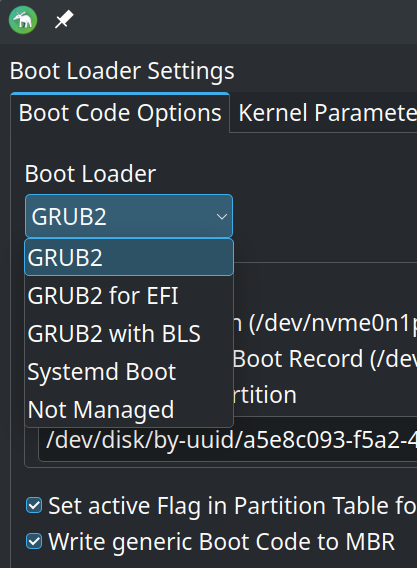
 It took a while to get back because I have a cat that thinks she needs to disco dance on my keyboard.

