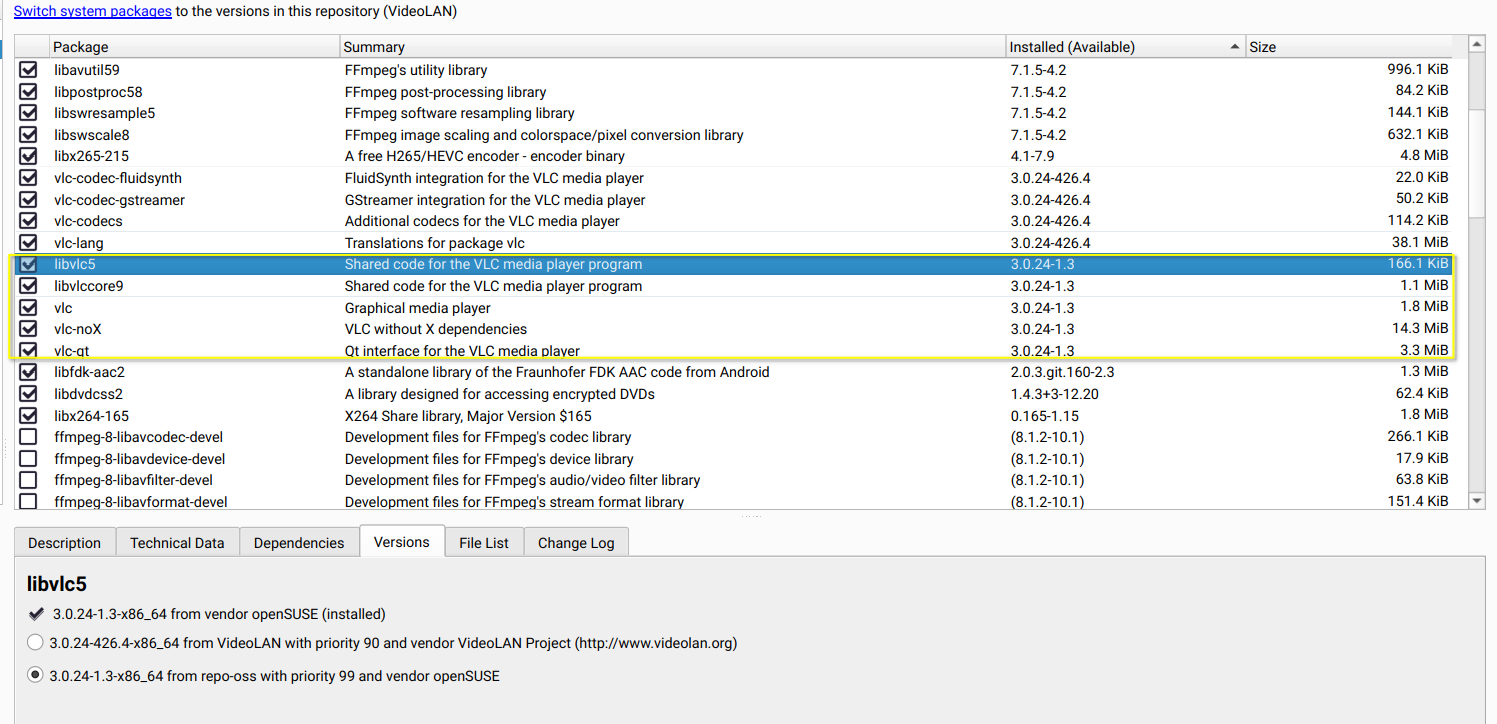
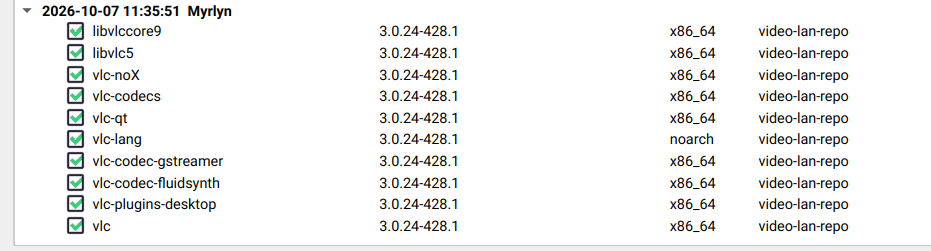
Problem: 1: nothing provides ‘this-is-only-for-build-envs’ needed by the to be installed ffmpeg-8-mini-libs-8.1.2-5.2.x86_64 again. It shows during zypper dup.
I do not have Packman repo installed. I have VLC repo only.
You are about to do a distribution upgrade with all enabled repositories. Make sure these repositories are compatible before you continue. See 'man zypper' for more information about this command.
Computing distribution upgrade...
8 Problems:
Problem: 1: nothing provides 'this-is-only-for-build-envs' needed by the to be installed ffmpeg-8-mini-libs-8.1.2-5.2.x86_64
Problem: 2: nothing provides 'this-is-only-for-build-envs' needed by the to be installed ffmpeg-8-mini-libs-8.1.2-5.2.x86_64
Problem: 3: nothing provides 'this-is-only-for-build-envs' needed by the to be installed ffmpeg-8-mini-libs-8.1.2-5.2.x86_64
Problem: 4: nothing provides 'this-is-only-for-build-envs' needed by the to be installed ffmpeg-8-mini-libs-8.1.2-5.2.x86_64
Problem: 5: nothing provides 'this-is-only-for-build-envs' needed by the to be installed ffmpeg-8-mini-libs-8.1.2-5.2.x86_64
Problem: 6: nothing provides 'this-is-only-for-build-envs' needed by the to be installed ffmpeg-8-mini-libs-8.1.2-5.2.x86_64
Problem: 7: nothing provides 'this-is-only-for-build-envs' needed by the to be installed ffmpeg-8-mini-libs-8.1.2-5.2.x86_64
Problem: 8: nothing provides 'this-is-only-for-build-envs' needed by the to be installed ffmpeg-8-mini-libs-8.1.2-10.1.x86_64

Problem: 1: nothing provides 'this-is-only-for-build-envs' needed by the to be installed ffmpeg-8-mini-libs-8.1.2-5.2.x86_64
 Solution 1: Following actions will be done:
  deinstallation of vlc-3.0.24-426.4.x86_64
  deinstallation of vlc-codecs-3.0.24-426.4.x86_64
  deinstallation of kf6-kfilemetadata-6.30.0-1.1.x86_64
  deinstallation of kid3-core-3.9.7-2.8.x86_64
  deinstallation of libKPipeWireRecord6-6.7.5-1.1.x86_64
  deinstallation of libQt6WebEngineCore6-6.11.2-2.1.x86_64
  deinstallation of libfreerdp3-3-3.32.1-1.1.x86_64
  deinstallation of libheif-ffmpeg-1.23.5-2.1.x86_64
  deinstallation of libmpv2-0.41.0+git20260918.e76a35ec95-1.2.x86_64
  deinstallation of libopenshot32-1.0.1-1.1.x86_64
  deinstallation of libwxsvg3-1.5.25-2.7.x86_64
  deinstallation of mpv-0.41.0+git20260918.e76a35ec95-1.2.x86_64
  deinstallation of pipewire-spa-plugins-0_2-1.6.9-1.1.x86_64
  deinstallation of qt6-multimedia-6.11.2-1.1.x86_64
  deinstallation of scrcpy-4.1-1.2.x86_64
  deinstallation of kid3-3.9.7-2.8.x86_64
  deinstallation of kpipewire6-imports-6.7.5-1.1.x86_64
  deinstallation of kontact-26.08.1-1.1.x86_64
  deinstallation of kmail-26.08.1-1.1.x86_64
  deinstallation of khelpcenter-26.08.1-1.1.x86_64
  deinstallation of kdeplasma6-addons-6.7.5-1.1.x86_64
  deinstallation of kdepim-runtime-26.08.1-1.1.x86_64
  deinstallation of kdepim-addons-26.08.1-1.1.x86_64
  deinstallation of kaccounts-providers-26.08.1-1.1.x86_64
  deinstallation of akregator-26.08.1-1.1.x86_64
  deinstallation of mpv-mpris-1.3-1.1.x86_64
  deinstallation of libmlt7-module-qt6-7.40.0-1.1.x86_64
  deinstallation of hypnotix-4.5-1.3.noarch
  deinstallation of pipewire-1.6.9-1.1.x86_64
  deinstallation of libpipewire-0_3-0-1.6.9-1.1.x86_64
  deinstallation of libQt6Multimedia6-6.11.2-1.1.x86_64
  deinstallation of kdenlive-lang-26.08.1-1.1.noarch
  deinstallation of kf6-kfilemetadata-lang-6.30.0-1.1.noarch
  deinstallation of libKF6FileMetaData3-6.30.0-1.1.x86_64
  deinstallation of kid3-core-lang-3.9.7-2.8.noarch
  deinstallation of spectacle-6.7.5-1.1.x86_64
  deinstallation of clipgrab-3.9.14-2.1.x86_64
  deinstallation of libQt6WebEngineQuick6-6.11.2-2.1.x86_64
  deinstallation of libQt6WebEngineWidgets6-6.11.2-2.1.x86_64
  deinstallation of libksieve6-26.08.1-1.1.x86_64
  deinstallation of messagelib-26.08.1-1.1.x86_64
  deinstallation of plasma6-nm-openconnect-6.7.5-1.1.x86_64
  deinstallation of python313-PyQt6-WebEngine-6.11.0-1.3.x86_64
  deinstallation of qt6-webengine-6.11.2-2.1.x86_64
  deinstallation of libuwac0-0-3.32.1-1.1.x86_64
  deinstallation of melt-7.40.0-1.1.x86_64
  deinstallation of python3-openshot-1.0.1-1.1.x86_64
  deinstallation of mpv-bash-completion-0.41.0+git20260918.e76a35ec95-1.2.noarch
  deinstallation of audacious-plugins-lang-4.6.1-1.3.noarch
  deinstallation of audacious-plugins-extra-4.6.1-1.3.x86_64
  deinstallation of audacious-4.6.1-1.3.x86_64
  deinstallation of kaddressbook-26.08.1-1.1.x86_64
  deinstallation of libopenal1-1.24.3~179-1.6.x86_64
  deinstallation of libfluidsynth3-2.6.1-1.1.x86_64
  deinstallation of libSDL3-0-3.4.16-1.1.x86_64
  deinstallation of libKPipeWire6-6.7.5-1.1.x86_64
  deinstallation of kwin6-6.7.5-1.1.x86_64
  deinstallation of gstreamer-plugin-pipewire-1.6.9-1.1.x86_64
  deinstallation of libKPim6MailCommon6-26.08.1-1.1.x86_64
  deinstallation of libKF6Prison6-6.30.0-1.1.x86_64
  deinstallation of konversation-26.08.1-1.1.x86_64
  deinstallation of konsole-part-26.08.1-1.1.x86_64
  deinstallation of kmousetool-26.08.1-1.1.x86_64
  deinstallation of kdeconnect-kde-26.08.1-1.1.x86_64
  deinstallation of kasts-26.08.1-1.1.x86_64
  deinstallation of gwenview-26.08.1-1.1.x86_64
  deinstallation of gpxsee-16.16-1.1.x86_64
  deinstallation of libKF6Baloo6-6.30.0-1.1.x86_64
  deinstallation of kf6-baloo-tools-6.30.0-1.1.x86_64
  deinstallation of kf6-baloo-kioslaves-6.30.0-1.1.x86_64
  deinstallation of kf6-baloo-file-6.30.0-1.1.x86_64
  deinstallation of baloo-widgets-26.08.1-1.1.x86_64
  deinstallation of dolphin-26.08.1-1.1.x86_64
  deinstallation of dolphin-part-26.08.1-1.1.x86_64
  deinstallation of libkerfuffle26-26.08.1-1.1.x86_64
  deinstallation of plasma6-browser-integration-6.7.5-1.1.x86_64
  deinstallation of kid3-doc-3.9.7-2.8.x86_64
  deinstallation of spectacle-lang-6.7.5-1.1.noarch
  deinstallation of xdg-desktop-portal-kde6-6.7.5-1.1.x86_64
  deinstallation of merkuro-26.08.1-1.1.x86_64
  deinstallation of libKPim6AkonadiCalendar6-26.08.1-1.1.x86_64
  deinstallation of akonadi-import-wizard-26.08.1-1.1.x86_64
  deinstallation of qt6-webengine-imports-6.11.2-2.1.x86_64
  deinstallation of signon-ui-0.17.20231016T221200~eef943f-1.10.x86_64
  deinstallation of pim-sieve-editor-26.08.1-1.1.x86_64
  deinstallation of messagelib-lang-26.08.1-1.1.noarch
  deinstallation of kontact-lang-26.08.1-1.1.noarch
  deinstallation of pim-data-exporter-26.08.1-1.1.x86_64
  deinstallation of kmail-lang-26.08.1-1.1.noarch
  deinstallation of khelpcenter-lang-26.08.1-1.1.noarch
  deinstallation of kdeplasma6-addons-lang-6.7.5-1.1.noarch
  deinstallation of kdepim-runtime-lang-26.08.1-1.1.noarch
  deinstallation of korganizer-26.08.1-1.1.x86_64
  deinstallation of ktnef-26.08.1-1.1.x86_64
  deinstallation of kdepim-addons-lang-26.08.1-1.1.noarch
  deinstallation of kaccounts-providers-lang-26.08.1-1.1.noarch
  deinstallation of akregator-lang-26.08.1-1.1.noarch
  deinstallation of pipewire-jack-1.6.9-1.1.x86_64
  deinstallation of pipewire-lang-1.6.9-1.1.noarch
  deinstallation of pipewire-pulseaudio-1.6.9-1.1.x86_64
  deinstallation of plasma6-session-6.7.5-1.1.noarch
  deinstallation of wireplumber-0.5.18-1.1.x86_64
  deinstallation of libwireplumber-0_5-0-0.5.18-1.1.x86_64
  deinstallation of pipewire-alsa-1.6.9-1.1.x86_64
  deinstallation of pipewire-libjack-0_3-1.6.9-1.1.x86_64
  deinstallation of pipewire-modules-0_3-1.6.9-1.1.x86_64
  deinstallation of pipewire-tools-1.6.9-1.1.x86_64
  deinstallation of speech-dispatcher-0.12.1-1.5.x86_64
  deinstallation of xdg-desktop-portal-1.22.1-1.3.x86_64
  deinstallation of xorg-x11-Xvnc-1.16.1-3.1.x86_64
  deinstallation of libQt6MultimediaQuick6-6.11.2-1.1.x86_64
  deinstallation of libQt6MultimediaWidgets6-6.11.2-1.1.x86_64
  deinstallation of libQt6Quick3DSpatialAudio6-6.11.2-1.1.x86_64
  deinstallation of libQt6SpatialAudio6-6.11.2-1.1.x86_64
  deinstallation of libQt6TextToSpeech6-6.11.2-1.1.x86_64
  deinstallation of libreoffice-26.8.1.1-1.1.x86_64
  deinstallation of python313-PyQt6-6.11.0-2.4.x86_64
  deinstallation of qt6-texttospeech-6.11.2-1.1.x86_64
  deinstallation of audacious-lang-4.6.1-1.3.noarch
  deinstallation of vlc-lang-3.0.24-426.4.noarch
  deinstallation of vlc-codec-gstreamer-3.0.24-426.4.x86_64
  deinstallation of vlc-codec-fluidsynth-3.0.24-426.4.x86_64
  deinstallation of vlc-qt-3.0.24-426.4.x86_64
  deinstallation of libQt5Multimedia5-5.15.19+kde2-1.3.x86_64
  deinstallation of libKDEGames6-26.08.1-1.1.x86_64
  deinstallation of gstreamer-plugins-bad-1.28.7-1.1.x86_64
  deinstallation of libSDL2-2_0-0-2.32.72-1.1.x86_64
  deinstallation of libKPim6ImportWizard6-26.08.1-1.1.x86_64
  deinstallation of kf6-prison-imports-6.30.0-1.1.x86_64
  deinstallation of konsole-26.08.1-1.1.x86_64
  deinstallation of kf6-baloo-imports-6.30.0-1.1.x86_64
  deinstallation of ark-26.08.1-1.1.x86_64
  deinstallation of plasma6-browser-integration-lang-6.7.5-1.1.noarch
  deinstallation of libKF6Baloo6-lang-6.30.0-1.1.noarch
  deinstallation of plasma6-desktop-6.7.5-1.1.x86_64
  deinstallation of plasma6-workspace-6.7.5-1.1.x86_64
  deinstallation of gwenview-lang-26.08.1-1.1.noarch
  deinstallation of dolphin-part-lang-26.08.1-1.1.noarch
  deinstallation of baloo-widgets-lang-26.08.1-1.1.noarch
  deinstallation of plasma6-integration-plugin-6.7.5-1.1.x86_64
  deinstallation of xdg-desktop-portal-kde6-lang-6.7.5-1.1.noarch
  deinstallation of kalendarac-26.08.1-1.1.x86_64
  deinstallation of akonadi-plugin-calendar-26.08.1-1.1.x86_64
  deinstallation of akonadi-calendar-tools-26.08.1-1.1.x86_64
  deinstallation of mimetreeparser-imports-26.08.1-1.1.x86_64
  deinstallation of signon-plugin-oauth2-0.25git.20231124T142245~fab6988-1.9.x86_64
  deinstallation of pim-sieve-editor-lang-26.08.1-1.1.noarch
  deinstallation of merkuro-lang-26.08.1-1.1.noarch
  deinstallation of merkuro-plasmoid-26.08.1-1.1.x86_64
  deinstallation of mbox-importer-26.08.1-1.1.x86_64
  deinstallation of libKPim6AkonadiCalendar6-lang-26.08.1-1.1.noarch
  deinstallation of libKPim6CalendarSupport6-26.08.1-1.1.x86_64
  deinstallation of libKPim6EventViews6-26.08.1-1.1.x86_64
  deinstallation of libKPim6IncidenceEditor6-26.08.1-1.1.x86_64
  deinstallation of akonadi-import-wizard-lang-26.08.1-1.1.noarch
  deinstallation of pim-data-exporter-lang-26.08.1-1.1.noarch
  deinstallation of korganizer-lang-26.08.1-1.1.noarch
  deinstallation of kaddressbook-lang-26.08.1-1.1.noarch
  deinstallation of patterns-kde-kde_plasma-20260830-1.1.noarch
  deinstallation of plasma6-session-x11-6.7.5-1.1.x86_64
  deinstallation of wireplumber-bash-completion-0.5.18-1.1.x86_64
  deinstallation of wireplumber-lang-0.5.18-1.1.noarch
  deinstallation of flatpak-1.18.4-1.1.x86_64
  deinstallation of MozillaFirefox-156.0-2.1.x86_64
  deinstallation of xdg-desktop-portal-gtk-1.15.3-1.6.x86_64
  deinstallation of xdg-desktop-portal-lang-1.22.1-1.3.noarch
  deinstallation of xorg-x11-Xvnc-module-1.16.1-3.1.x86_64
  deinstallation of mpg123-openal-1.33.7-1.1.x86_64
  deinstallation of libKPipeWire6-lang-6.7.5-1.1.noarch
  deinstallation of libKPipeWireDmaBuf6-6.7.5-1.1.x86_64
  deinstallation of kwin6-lang-6.7.5-1.1.noarch
  deinstallation of kwin6-x11-6.7.5-1.1.x86_64
  deinstallation of libKF6TextWidgets6-6.30.0-1.1.x86_64
  deinstallation of libKF6TextEditor6-6.30.0-1.1.x86_64
  deinstallation of libKF6TextAddons1-2.1.2-1.1.x86_64
  deinstallation of firewall-applet-2.3.2-2.1.noarch
  deinstallation of qt6-multimedia-imports-6.11.2-1.1.x86_64
  deinstallation of okular-26.08.1-1.1.x86_64
  deinstallation of libreoffice-base-26.8.1.1-1.1.x86_64
  deinstallation of libreoffice-calc-26.8.1.1-1.1.x86_64
  deinstallation of libreoffice-draw-26.8.1.1-1.1.x86_64
  deinstallation of libreoffice-impress-26.8.1.1-1.1.x86_64
  deinstallation of libreoffice-l10n-en-26.8.1.1-1.1.noarch
  deinstallation of libreoffice-l10n-pl-26.8.1.1-1.1.noarch
  deinstallation of libreoffice-math-26.8.1.1-1.1.x86_64
  deinstallation of libreoffice-pyuno-26.8.1.1-1.1.x86_64
  deinstallation of libreoffice-qt6-26.8.1.1-1.1.x86_64
  deinstallation of libreoffice-writer-26.8.1.1-1.1.x86_64
  deinstallation of backintime-qt-1.6.1-1.2.noarch
  deinstallation of python313-PyQt6-qt6pdf-6.11.0-2.3.x86_64
  deinstallation of libKPim6AkonadiContactWidgets6-26.08.1-1.1.x86_64
  deinstallation of qrca-26.08.1-1.1.x86_64
  deinstallation of konversation-lang-26.08.1-1.1.noarch
  deinstallation of konsole-part-lang-26.08.1-1.1.noarch
  deinstallation of kmousetool-lang-26.08.1-1.1.noarch
  deinstallation of kdeconnect-kde-lang-26.08.1-1.1.noarch
  deinstallation of kasts-lang-26.08.1-1.1.noarch
  deinstallation of ksudoku-26.08.1-1.1.x86_64
  deinstallation of kreversi-26.08.1-1.1.x86_64
  deinstallation of kpat-26.08.1-1.1.x86_64
  deinstallation of kmines-26.08.1-1.1.x86_64
  deinstallation of kmahjongg-26.08.1-1.1.x86_64
  deinstallation of libSDL-1_2-0-1.2.76-1.7.x86_64
  deinstallation of keysmith-26.08.1-1.1.x86_64
  deinstallation of ark-lang-26.08.1-1.1.noarch
  deinstallation of plasma6-theme-openSUSE-84.87~git20240313T170730~9c664b7-47.1.noarch
  deinstallation of plasma6-sddm-theme-openSUSE-84.87~git20240313T170730~9c664b7-47.1.noarch
  deinstallation of plasma6-desktop-emojier-6.7.5-1.1.x86_64
  deinstallation of plasma6-desktop-lang-6.7.5-1.1.noarch
  deinstallation of plasma6-workspace-lang-6.7.5-1.1.noarch
  deinstallation of kinfocenter6-6.7.5-1.1.x86_64
  deinstallation of kf6-frameworkintegration-plugin-6.30.0-1.1.x86_64
  deinstallation of plasma6-integration-plugin-lang-6.7.5-1.1.noarch
  deinstallation of plasma6-integration-plugin-qt5-6.7.5-1.1.x86_64
  deinstallation of mbox-importer-lang-26.08.1-1.1.noarch
  deinstallation of libKPim6CalendarSupport6-lang-26.08.1-1.1.noarch
  deinstallation of libKPim6EventViews6-lang-26.08.1-1.1.noarch
  deinstallation of libKPim6IncidenceEditor6-lang-26.08.1-1.1.noarch
  deinstallation of akonadi-calendar-tools-lang-26.08.1-1.1.noarch
  deinstallation of patterns-kde-kde-20260830-1.1.noarch
  deinstallation of xdg-desktop-portal-gtk-lang-1.15.3-1.6.noarch
  deinstallation of discover6-backend-flatpak-6.7.5-1.1.x86_64
  deinstallation of flatpak-remote-flathub-1.18.4-1.1.noarch
  deinstallation of flatpak-selinux-1.18.4-1.1.noarch
  deinstallation of MozillaFirefox-translations-common-156.0-2.1.x86_64
  deinstallation of python313-qt5-5.15.10-4.8.x86_64
  deinstallation of libkdegames-imports-26.08.1-1.1.x86_64
  deinstallation of gstreamer-plugins-bad-lang-1.28.7-1.1.noarch
  deinstallation of libavdevice58_13-4.4.8-5.2.x86_64
  deinstallation of libwx_gtk3u_core-suse-nostl16_0_0-3.2.8-4.6.x86_64
  deinstallation of sddm-branding-openSUSE-0.21.0+git57-1.1.noarch
  deinstallation of kwin6-x11-lang-6.7.5-1.1.noarch
  deinstallation of krusader-2.9.0-1.7.x86_64
  deinstallation of kdialog-26.08.1-1.1.x86_64
  deinstallation of kompare-26.08.1-1.1.x86_64
  deinstallation of kf6-ktexteditor-6.30.0-1.1.x86_64
  deinstallation of kate-plugins-26.08.1-1.1.x86_64
  deinstallation of kate-26.08.1-1.1.x86_64
  deinstallation of ktextaddons-2.1.2-1.1.x86_64
  deinstallation of akonadi-search-26.08.1-1.1.x86_64
  deinstallation of kirigami-addons6-1.14.0-1.1.x86_64
  deinstallation of qt6-virtualkeyboard-imports-6.11.2-1.1.x86_64
  deinstallation of okular-lang-26.08.1-1.1.noarch
  deinstallation of libKF6TextWidgets6-lang-6.30.0-1.1.noarch
  deinstallation of libKSaneWidgets6-26.08.1-1.1.x86_64
  deinstallation of libKPim6AddressbookImportExport6-26.08.1-1.1.x86_64
  deinstallation of libKPim6AkonadiContactCore6-26.08.1-1.1.x86_64
  deinstallation of libKPim6IdentityManagementWidgets6-26.08.1-1.1.x86_64
  deinstallation of libKPim6PimCommon6-26.08.1-1.1.x86_64
  deinstallation of libKPim6TextEdit6-26.08.1-1.1.x86_64
  deinstallation of libreoffice-filters-optional-26.8.1.1-1.1.x86_64
  deinstallation of libreoffice-mailmerge-26.8.1.1-1.1.x86_64
  deinstallation of plasma6-nm-6.7.5-1.1.x86_64
  deinstallation of libKPim6PimCommonAkonadi6-26.08.1-1.1.x86_64
  deinstallation of qrca-lang-26.08.1-1.1.noarch
  deinstallation of kf6-purpose-6.30.0-1.1.x86_64
  deinstallation of drkonqi6-6.7.5-1.1.x86_64
  deinstallation of python313-yt-dlp-2026.08.19-1.1.noarch
  deinstallation of audacity-3.7.9-1.1.x86_64
  deinstallation of plasma6-branding-openSUSE-84.87~git20240313T170730~9c664b7-47.1.noarch
  deinstallation of sddm-qt6-branding-openSUSE-6.7.5-1.1.x86_64
  deinstallation of kinfocenter6-lang-6.7.5-1.1.noarch
  deinstallation of hplip-utils-3.26.6-1.1.x86_64
  deinstallation of python313-qtwebengine-qt5-5.15.6-6.6.x86_64
  deinstallation of ksudoku-lang-26.08.1-1.1.noarch
  deinstallation of kreversi-lang-26.08.1-1.1.noarch
  deinstallation of kpat-lang-26.08.1-1.1.noarch
  deinstallation of kmines-lang-26.08.1-1.1.noarch
  deinstallation of kmahjongg-lang-26.08.1-1.1.noarch
  deinstallation of libwx_gtk3u_html-suse-nostl16_0_0-3.2.8-4.6.x86_64
  deinstallation of libwx_gtk3u_qa-suse-nostl16_0_0-3.2.8-4.6.x86_64
  deinstallation of libSDL_gfx16-2.0.27-1.7.x86_64
  deinstallation of liblavplay-2_2-0-2.2.1-3.6.x86_64
  deinstallation of mjpegtools-2.2.1-3.6.x86_64
  deinstallation of kidentitymanagement-imports-26.08.1-1.1.x86_64
  deinstallation of akonadi-imports-26.08.1-1.1.x86_64
  deinstallation of discover6-6.7.5-1.1.x86_64
  deinstallation of kirigami-addons6-lang-1.14.0-1.1.noarch
  deinstallation of kweather-26.08.1-1.1.x86_64
  deinstallation of plasma6-pa-6.7.5-1.1.x86_64
  deinstallation of plasma6-print-manager-6.7.5-1.1.x86_64
  deinstallation of plasma6-systemmonitor-6.7.5-1.1.x86_64
  deinstallation of keysmith-lang-26.08.1-1.1.noarch
  deinstallation of skanlite-26.08.1-1.1.x86_64
  deinstallation of krusader-lang-2.9.0-1.7.noarch
  deinstallation of kdialog-lang-26.08.1-1.1.noarch
  deinstallation of kompare-lang-26.08.1-1.1.noarch
  deinstallation of kf6-ktexteditor-lang-6.30.0-1.1.noarch
  deinstallation of kate-lang-26.08.1-1.1.noarch
  deinstallation of akonadi-plugin-contacts-26.08.1-1.1.x86_64
  deinstallation of libKPim6MailImporter6-26.08.1-1.1.x86_64
  deinstallation of libKPim6TextEdit6-lang-26.08.1-1.1.noarch
  deinstallation of ktextaddons-lang-2.1.2-1.1.noarch
  deinstallation of akonadi-search-lang-26.08.1-1.1.noarch
  deinstallation of plasma6-nm-lang-6.7.5-1.1.noarch
  deinstallation of plasma6-nm-openvpn-6.7.5-1.1.x86_64
  deinstallation of plasma6-nm-pptp-6.7.5-1.1.x86_64
  deinstallation of kf6-purpose-lang-6.30.0-1.1.noarch
  deinstallation of libKF6Purpose6-6.30.0-1.1.x86_64
  deinstallation of drkonqi6-lang-6.7.5-1.1.noarch
  deinstallation of yt-dlp-2026.08.19-1.1.noarch
  deinstallation of audacity-lang-3.7.9-1.1.noarch
  deinstallation of hplip-3.26.6-1.1.x86_64
  deinstallation of kweather-lang-26.08.1-1.1.noarch
  deinstallation of plasma6-pa-lang-6.7.5-1.1.noarch
  deinstallation of plasma6-print-manager-lang-6.7.5-1.1.noarch
  deinstallation of plasma6-systemmonitor-lang-6.7.5-1.1.noarch
  deinstallation of discover6-backend-fwupd-6.7.5-1.1.x86_64
  deinstallation of discover6-backend-packagekit-6.7.5-1.1.x86_64
  deinstallation of discover6-lang-6.7.5-1.1.noarch
  deinstallation of discover6-notifier-6.7.5-1.1.x86_64
  deinstallation of skanlite-lang-26.08.1-1.1.noarch
  deinstallation of libKPim6MailImporterAkonadi6-26.08.1-1.1.x86_64
  deinstallation of kio-gdrive-26.08.1-1.1.x86_64
  deinstallation of libKF6PurposeWidgets6-6.30.0-1.1.x86_64
  deinstallation of kio-gdrive-lang-26.08.1-1.1.noarch
 Solution 2: Following actions will be done:
  install libavcodec62-8.1.2-5.2.x86_64 from vendor openSUSE
    replacing libavcodec62-8.1.2-7.3.x86_64 from vendor VideoLAN Project (http://www.videolan.org)
  deinstallation of vlc-codecs-3.0.24-426.4.x86_64
 Solution 3: keep obsolete libavcodec62-8.1.2-7.3.x86_64
 Solution 4: break ffmpeg-8-mini-libs-8.1.2-5.2.x86_64 by ignoring some of its dependencies

Choose from above solutions by number or skip, retry or cancel [1/2/3/4/s/r/c/d/?] (c): c
What shoud I do? Wait?
My repos are:
zypper lr -d
Refreshing service 'NVIDIA'.
Refreshing service 'openSUSE'.
#  | Alias                      | Name              | Enabled | GPG Check | Refresh | Keep | Priority | Type     | URI                                                                     | Service
---+----------------------------+-------------------+---------+-----------+---------+------+----------+----------+-------------------------------------------------------------------------+---------
 1 | NVIDIA:repo-non-free       | repo-non-free     | Yes     | (r ) Yes  | Yes     | -    |   99     | rpm-md   | https://download.nvidia.com/opensuse/tumbleweed                         | NVIDIA
 2 | Network                    | Network           | Yes     | (r ) Yes  | Yes     | -    |   99     | rpm-md   | https://download.opensuse.org/repositories/network/openSUSE_Tumbleweed/ |
 3 | RPM_paczki                 | RPM packages      | Yes     | ( p) Yes  | Yes     | -    |   99     | plaindir | dir:/home/rektal/Dokumenty/Znotatki/rpm%20paczki                        |
 4 | VLC                        | VLC               | Yes     | (r ) Yes  | Yes     | -    |   99     | rpm-md   | https://download.videolan.org/pub/vlc/SuSE/Tumbleweed/                  |
 5 | brave-browser              | Brave Browser     | Yes     | (r ) Yes  | Yes     | -    |   99     | rpm-md   | https://brave-browser-rpm-release.s3.brave.com/x86_64                   |
 6 | openSUSE:repo-non-oss      | repo-non-oss      | Yes     | (r ) Yes  | Yes     | -    |   99     | rpm-md   | http://cdn.opensuse.org/tumbleweed/repo/non-oss                         | openSUSE
 7 | openSUSE:repo-openh264     | repo-openh264     | Yes     | (r ) Yes  | Yes     | -    |   99     | rpm-md   | https://codecs.opensuse.org/openh264/openSUSE_Tumbleweed                | openSUSE
 8 | openSUSE:repo-oss          | repo-oss          | Yes     | (r ) Yes  | Yes     | -    |   99     | rpm-md   | http://cdn.opensuse.org/tumbleweed/repo/oss                             | openSUSE
 9 | openSUSE:repo-oss-debug    | repo-oss-debug    | No      | ----      | ----    | -    |   99     | N/A      | http://cdn.opensuse.org/debug/tumbleweed/repo/oss                       | openSUSE
10 | openSUSE:repo-oss-source   | repo-oss-source   | No      | ----      | ----    | -    |   99     | N/A      | http://cdn.opensuse.org/source/tumbleweed/repo/oss                      | openSUSE
11 | openSUSE:update-tumbleweed | update-tumbleweed | Yes     | (r ) Yes  | Yes     | -    |   99     | rpm-md   | http://cdn.opensuse.org/update/tumbleweed                               | openSUSE