systemctl status switcheroo-control.service
● switcheroo-control.service - Switcheroo Control Proxy service
     Loaded: loaded (/usr/lib/systemd/system/switcheroo-control.service; enabled; preset: disabled)
     Active: active (running) since Wed 2024-02-07 16:00:03 CST; 16h ago
   Main PID: 1586 (switcheroo-cont)
      Tasks: 4 (limit: 5529)
        CPU: 419ms
     CGroup: /system.slice/switcheroo-control.service
             └─1586 /usr/libexec/switcheroo-control
Thanks
1 Like
There is no option.
Perhaps because
- my PC is a desktop
- I use the intel iGPU for the monitor and the NVIDIA dGPU for computing.
Please open a seperate thread as this topic is about a laptop with Optimus technology. Your desktop setup is something completely differemt…
@promeneur No, I’m on a couple of desktops running Tumbleweed, the one above and my main system with dual Nvidia which is T400 for displays and Tesla P4 for compute;
 nvidia-smi
Thu Feb  8 11:17:43 2024
+-----------------------------------------------------------------------------------------+
| NVIDIA-SMI 550.40.07              Driver Version: 550.40.07      CUDA Version: 12.4     |
|-----------------------------------------+------------------------+----------------------+
| GPU  Name                 Persistence-M | Bus-Id          Disp.A | Volatile Uncorr. ECC |
| Fan  Temp   Perf          Pwr:Usage/Cap |           Memory-Usage | GPU-Util  Compute M. |
|                                         |                        |               MIG M. |
|=========================================+========================+======================|
|   0  Tesla P4                       On  |   00000000:02:00.0 Off |                    0 |
| N/A   32C    P8              6W /   75W |       4MiB /   7680MiB |      0%      Default |
|                                         |                        |                  N/A |
+-----------------------------------------+------------------------+----------------------+
|   1  NVIDIA T400                    On  |   00000000:03:00.0  On |                  N/A |
| 38%   36C    P8             N/A /   31W |     631MiB /   2048MiB |     14%      Default |
|                                         |                        |                  N/A |
+-----------------------------------------+------------------------+----------------------+
glxinfo | grep "OpenGL renderer"
OpenGL renderer string: NVIDIA T400/PCIe/SSE2

switcherooctl glxinfo | grep "OpenGL renderer"
OpenGL renderer string: Tesla P4/PCIe/SSE2


switcherooctl list
Device: 0
  Name:        NVIDIA Corporation TU117GLM [Quadro T400 Mobile]
  Default:     yes
  Environment: __GLX_VENDOR_LIBRARY_NAME=nvidia __NV_PRIME_RENDER_OFFLOAD=1 __VK_LAYER_NV_optimus=NVIDIA_only

Device: 1
  Name:        NVIDIA Corporation GP104GL [Tesla P4]
  Default:     no
  Environment: __GLX_VENDOR_LIBRARY_NAME=nvidia __NV_PRIME_RENDER_OFFLOAD=1 __VK_LAYER_NV_optimus=NVIDIA_only
why there is no option at any desktop icon ?
@promeneur Are you on GNOME, it’s only integrated there…
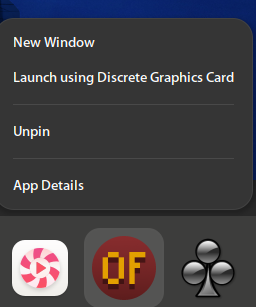
I am on KDE.
@promeneur ahh, then switchrooctl from the command line only… which I assume works? I beleive the Plasma folks are working on the interface, but I suspect you will need to check upstream.