Hey!
I have some issues with Slowroll updates, I think packman might be causing the trouble.
What should I do in this case?
There are two separate issues here…
The installed Packman VLC 3.0.23 conflicts with the openSUSE phonon-vlc packages requiring VLC 3.0.24.
The ffmpeg-8-mini-libs dependency on this-is-only-for-build-envs is a separate packaging issue.
For now I would cancel the transaction and try again after refreshing the repositories…
sudo zypper refresh
sudo zypper dup
If the same errors persist, please post the output of zypper lr -d so we can check your current configured repos.
The problem is still the same after refreshing
https://paste.opensuse.org/pastes/a36220f525e0
Sorry didn’t translate everything. Igen=Yes. Nem=No
nagy@localhost:~> zypper lr -d
#  | Alias                       | Name                                                  | Enabled | GPG Check | Refresh | Keep | Priority | Type   | URI                                                                             | Service
---+-----------------------------+-------------------------------------------------------+---------+-----------+---------+------+----------+--------+---------------------------------------------------------------------------------+---------
 1 | Google-Chrome               | Google-Chrome                                         | Igen    | (r ) Igen | Nem     | -    |   99     | rpm-md | https://dl.google.com/linux/chrome/rpm/stable/x86_64                            |
 2 | Kill_it                     | Kill_it                                               | Igen    | (r ) Igen | Igen    | -    |   99     | rpm-md | https://download.opensuse.org/repositories/home:/kill_it/openSUSE_Tumbleweed/   |
 3 | brave-browser               | Brave Browser                                         | Igen    | (r ) Igen | Igen    | -    |   99     | rpm-md | https://brave-browser-rpm-release.s3.brave.com/x86_64                           |
 4 | download.opensuse.org-oss_1 | Elsődleges frissítéseket tartalmazó telepítési forrás | Igen    | (r ) Igen | Igen    | -    |   99     | rpm-md | http://download.opensuse.org/update/slowroll/repo/oss/                          |
 5 | games_tools                 | Tools for Gamers (openSUSE_Slowroll)                  | Igen    | (r ) Igen | Nem     | -    |   99     | rpm-md | https://download.opensuse.org/repositories/games:/tools/openSUSE_Slowroll/      |
 6 | google-chrome               | google-chrome                                         | Igen    | (r ) Igen | Igen    | -    |   99     | rpm-md | https://dl.google.com/linux/chrome/rpm/stable/x86_64                            |
 7 | home_alvistack              | home:alvistack (openSUSE_Tumbleweed)                  | Nem     | ----      | ----    | -    |   99     | rpm-md | https://download.opensuse.org/repositories/home:/alvistack/openSUSE_Tumbleweed/ |
 8 | openSUSE:repo-non-oss       | repo-non-oss                                          | Igen    | (r ) Igen | Igen    | -    |   99     | rpm-md | http://download.opensuse.org/slowroll/repo/non-oss                              | openSUSE
 9 | openSUSE:repo-openh264      | repo-openh264                                         | Igen    | (r ) Igen | Igen    | -    |   99     | rpm-md | https://codecs.opensuse.org/openh264/openSUSE_Tumbleweed                        | openSUSE
10 | openSUSE:repo-oss           | repo-oss                                              | Igen    | (r ) Igen | Igen    | -    |   99     | rpm-md | http://download.opensuse.org/slowroll/repo/oss                                  | openSUSE
11 | openSUSE:repo-oss-debug     | repo-oss-debug                                        | Nem     | ----      | ----    | -    |   99     | N/A    | http://download.opensuse.org/debug/slowroll/repo/oss                            | openSUSE
12 | openSUSE:repo-oss-source    | repo-oss-source                                       | Nem     | ----      | ----    | -    |   99     | N/A    | http://download.opensuse.org/source/slowroll/repo/oss                           | openSUSE
13 | openSUSE:update-slowroll    | update-slowroll                                       | Igen    | (r ) Igen | Igen    | -    |   80     | rpm-md | http://download.opensuse.org/update/slowroll/repo/oss                           | openSUSE
14 | packman                     | packman                                               | Igen    | (r ) Igen | Igen    | -    |   90     | rpm-md | https://ftp.gwdg.de/pub/linux/misc/packman/suse/openSUSE_Slowroll/              |
15 | snappy                      | snappy                                                | Igen    | (r ) Igen | Igen    | -    |   99     | rpm-md | https://download.opensuse.org/repositories/system:/snappy/openSUSE_Slowroll/    |
nagy@localhost:~>
Mod edit: Add zypper repo output to post (as preformatted text).
BTW, Myrlyn 1.1.0 now has a convenient “Protect All” feature that lets you protect all installed packages from a selected repository with one click.
This might be helpful to simplifying the situation you are confronted with.
So I should lock pacakages?
How can I solve this? Should I just wait for the next big updates? Or is there a solution?
ffmpeg-8-mini-libs should be locked (and to be on the safe side I would lock also ffmpeg-7-mini-libs).
Then for problems 1 and 2 choose the solution to “Keep obsolete ” until Packman catches up.
I migrated from Packman to the VideoLAN repo some time ago, but I had the same problem there.
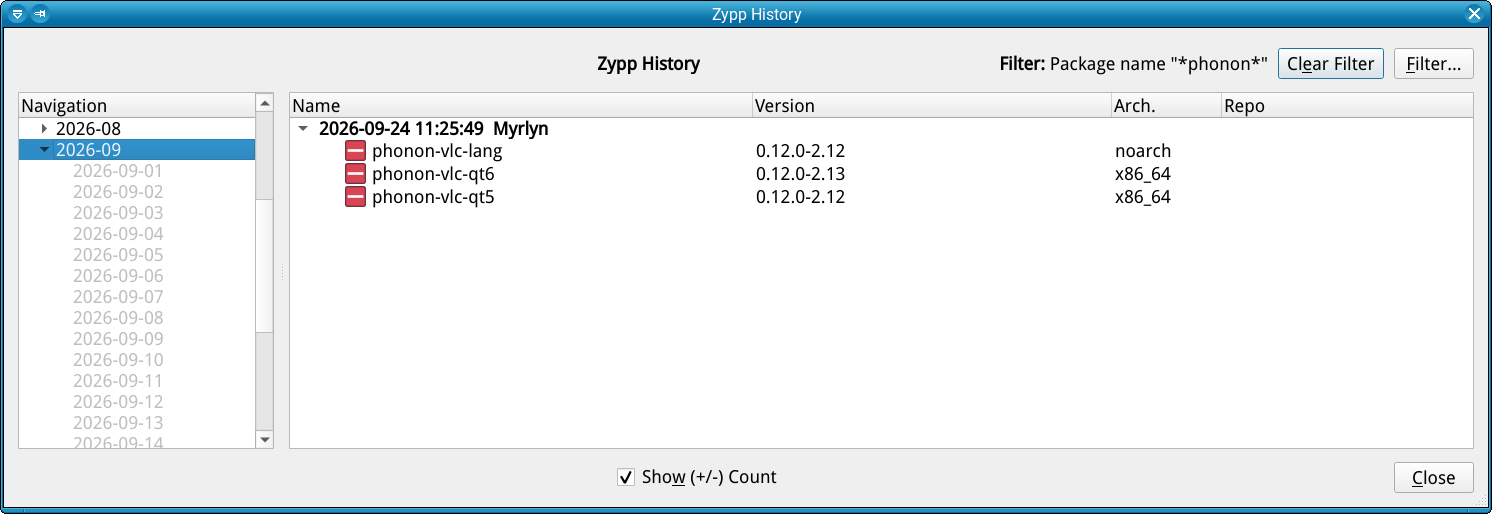
In my case the solution was to remove three phonon- packages first, then the update went through cleanly:
Caveat: I don’t use KDE, so getting rid of those packages was no loss to me. Your situation may be different. But try to mark them for removal and see if the dependency resolver wants to remove dozens of packages of your desktop. If it does, you may want to abandon those changes and start over.
Although I am using Tumbelweed (KDE Plasma) I had the same issue when I switched from Packman to Videolan for VLC. Removing the same 3 phonon packages resolved it.
This issue also affects Leap 16.0, the above mentioned packages by shundhammer have a hard dependency for VLC 3.0.23 but VLC 3.0.24 has been pushed out to repo-oss and is the reason for dependency hell.
Not ideal for us KDE users.
There is a bug report filed here by someone using Discover (Leap 16.0) and having the same issue:
Discover is primarily intended for straightforward software management, not for complex dependency resolution involving third-party repositories. For these situations, Myrlyn or zypper CLI are the tools for the job.
I’m using Leap 16.0 without any third party repo and also have this issue. So it is not caused by Packman or VideoLAN.
This should be able to be resolved even with Discover.
The problem is vlc 3.0.24 wanting phonon-vlc-qt6, but the one available is for vlc 3.0.23 ( which is the current. So vlc* cannot be updated.
Hmm, bug https://bugzilla.opensuse.org/show_bug.cgi?id=1288859 is closed now, because there seems to be a workaround (uninstalling vlc before update and reinstalling it later). But all those who do not read this are still hanging around with update problems.
Cannot this be solved in a way that even the non-experienced Discover user can continue to install updates the usual way?
Discover is developed by KDE Plasma and not related in any way to openSUSE. It is known that Discover is not able to resolve package conflicts. The openSUSE specific package managemnt tools (zypper, Myrlyn) are able to resolve package confilcts.
Let me look at the dependency problem:
When I look what requires phonon-vlc-qt6 on my computer, then indeed the list is finally empty. So it seems to be an unneeded package.
I Then tried to make the update with myrlyn. It displays an unhappy face next to 8 packages, updates the rest and keeps me with that conflict still pending.
So I did a sudo zypper up, and it just says that 10 packages cannot be installed and ends. It does not ask me anything.
So I went the road from Discover to Myrlyn to zypper, and so far none offers me a good solution.
This is the “good solution”: it upgrades what can be upgraded and holds back the rest until all packages are lined up with the proper dependencies.
BTW, on Slowroll like on Tumbleweed upgrades should always be done via zypper dup, never via zypper up.
On Slowroll, zypper up works fine for interim updates but zypper dup is required for the monthly major update bumps.
If you don’t know when the monthly major update is, i.e., you don’t follow the Slowroll subreddit, then stick with zypper dup.
For Leap 16.0 (this is what I’m using) the problem is solved since yesterday. Now even with Discover the updates work again. This is important to me because I have a few friends and relatives for whom I installed Leap 16 after Windows 10 reached the end of support. The first thing I always do is show them the update via Discover.