In light of the recent attention given to vulnerabilities in php, I upgraded my home server to Leap 16.0. And was introduced to SELinux the hard way.
To get my server serving samba shares and web pages again, I switched the mode to ‘permissive’ using the setenforce command, aware that this would not survive a reboot.
After reading about what I thought was a persistent solution, I modified /etc/selinux/config with
SELINUX=permissive
and then rebooted.
I spent most of yesterday trying to work out why my server was refusing to play ball. This morning, almost by accident, I discovered that it was operating in ‘enforcing’ mode. I rebooted the server, and ran the sestatus command immediately after logging in.
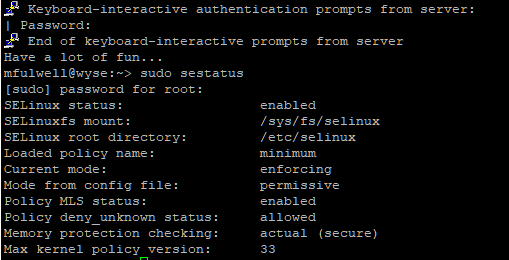
The screenshot is just to show that running the command was the first thing I did after logging in. The output of sestatus was
SELinux status:                 enabled
SELinuxfs mount:                /sys/fs/selinux
SELinux root directory:         /etc/selinux
Loaded policy name:             minimum
Current mode:                   enforcing
Mode from config file:          permissive
Policy MLS status:              enabled
Policy deny_unknown status:     allowed
Memory protection checking:     actual (secure)
Max kernel policy version:      33
The first comment in /etc/selinux/config states;
# This file controls the state of SELinux on the system.
That doesn’t appear to be the case. But I’ve found no mention of the possibility of the config file being over-ridden by the system (other than by use of the setenforce command). Nor does the system provide any kind of notification - that I could see - when it happens.
I haven’t provided the contents of /etc/selinux/config because there are only two lines in it that aren’t commented out (SELinux mode and type) and both of those are referenced in the output of the sestatus command.
I did change to policy to ‘minimum’ yesterday, to see whether that would bring my server back to life. And then I discovered that the policy file needed to be downloaded (it’s not included in the installation - a nice touch, I think) prior to making the change, or the server wouldn’t boot. How I laughed while I connected my headless server to a monitor and keyboard so I could boot it into rescue mode and reverse the change! That was another of yesterday’s highlights…
Is there a means to apply the ‘permissive’ mode in a persistent way? Ultimately, I’m aiming to run the server in ‘enforcing’ mode but until then, I need the server to be available. I am more than happy for someone to point out how this is all my fault, because the alternative is an existence of endless keyword searches, hoping to stumble across a solution.