Screen brightness button on desktop pc

after installing tumbleweed i configured things how i like and removed things i never use like some games and other stuff

i disabled bluetooth and other things i dont need on the status and notifications, but in the taskbar next to the clock, well, there is the screen brightness button/icon that also lets me adjust night light

anyone knows how to hide or remove that icon from there?

in a laptop this is very useful, but this is a desktop and i dont see a way to disable/hide this button/icon from there

It’s hard to answer anything useful without knowing anything about your setup; not even what desktop environment you are using. KDE Plasma? GNOME? Xfce? Something else?

1 Like

yes, kde plasma, lol, i never use anything else, sorry

Settings > Displays > Nightlight Off - Removes icon on GNOME

ok, i need that, but for kde

Click on the ^ then the config, and set Screen brightness to “Always off”

thank you, it already forgot i could do that, this button is not necessary at all when you are on a desktop pc with a monitor that has brightness controls

@nameles27:

Welcome to the openSUSE Forums.


You’ve mentioned that, you’re using the KDE Plasma Desktop –

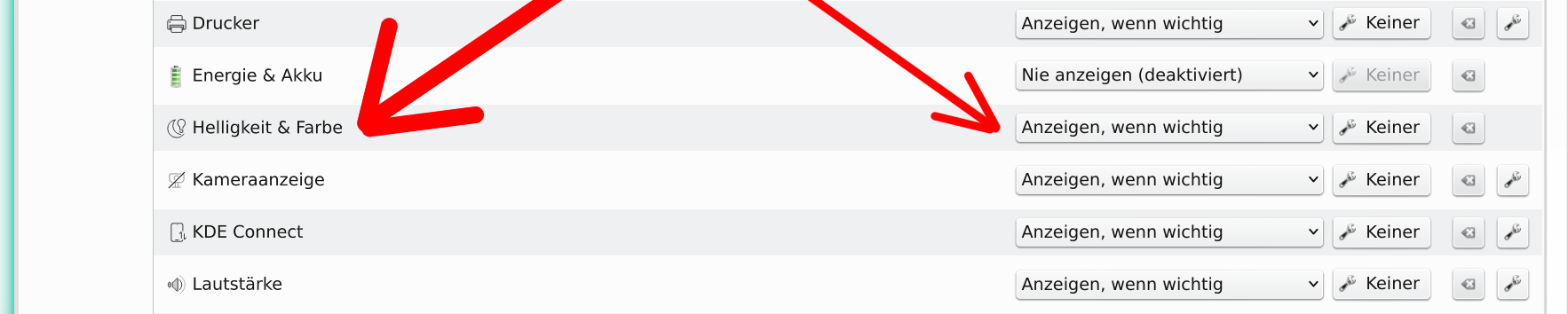
I make no apologies for the German language example here:

→ „Helligkeit & Farbe” → “Brightness & Color” 

→ „Anzeigen, wenn wichtig” → «possibly» “Auto” [or something similar] 


Which is what I posted ~30 minutes ago.

Sorry – I didn’t check the Plasma Handbook carefully enough 
 :flushed:

On my Plasma (Oxygen) Desktop, I don’t have a ‘^’ –
Bildschirmfoto_20261104_180435

i am going to be very honest with you, i cant even find documentation on how to do updates for opensuse, and no one looks at the kde documentation, like, ever, and i have been using it sinde the 90s

no one reads it and if you do it, you will not find a thing because you dont know what you are looking for, that is why people ask here, it is too much documentation to even remember it exists when one needs it

Eh, a search for “opensuse update” gives as a 1st result https://en.opensuse.org/System_Updates

KDE cannot document this per distro. With Discover they give the distros a kind of UI, that they can use for their own packaging environment. That way Debian and it’s derivatives, Arch and ditto and RedHat and SUSE ( the RPM distos ) and so on can all adapt Discover to their systems.

The hard thing with TW is that today’s documentation can be outdated tomorrow. That said, under the hood the “linux == linux” adagio rules. But, if you are new to linux or a distro, finding the proper docs can be a challenge. For openSUSE it helps if your search is “site: opensuse.org <search_phrase>” helps a lot.

no eh

i was looking on the welcome launcher, on all that information

no rolling release distro can, because everything changes, jumps form kde 6.7.5 to kde 6.8 are too big in some ways

that is why one comes to the forum , to say thank you, try to help others and find help for themselves

find information in documentation made me remember a old post o a old distro i used like a decade ago, someone complaining, because he couldnt find the documentation, i didnt even knew there was a documentation

some of us will click nonstop until we find our way, other times we will need help if we forget something, something that happens often if you keep a rolling release distro for like 5 years, you will forget how you did something half decade ago and will not remember to look for a wiki, you come to ask for help

i praise others who have time and patience to read the documentation, i cant do any of that anymore

i had more luck, for some reason by using google with a sarch and adding opensuse at the end, if you do that, you will eventually find the information, but that is, as i said, if you know what you are looking for or how something is called, if not, you come here, because, where else, reddit? linuxquestions.org?

i wont waste reading what google gemini will write, because i know form experience that is half trues and half lies that waste electricity and my time

still, thank you all for answering my dumb question
1 Like

I fully get your point, remembering way to good how we, in ~25 years, went from minimal documentation ( aside from the books the S.u.S.E./SUSE boxes came with ) to an overflow of ( mostly opinionated ) “info and tips” we see now. Hence my search tip, since that limits the search to the openSUSE infra covered pages.
Another problem is that many “experienced and knowledged” users have completely forgotten that at some point they themselves started with mostly ignorance, helpless even about what to ask where. For me, it always helps to think of some equivalent in my life. I f.e. know nothing about cars ( don’t even have a driving license ) and most likely would not even know what to ask when a car won’t work, make weird sounds or such. Throwing all kind of technical info at me will not help me in such a case.
On the other hand, it is sometimes hard to provide support to people, specially if they are already mad / angry out of frustration. People often feel they bought in on some distro and that that should simply work without them making any effort. This basically coming from the same cause: they forgot that they started blank at some point, and that it did take effort of some kind to achieve what they needed / wanted / expected.
Your stance on Gemini ( I read that as AI support ) is also related. The better the info in the prompt asked, the better the chance of an result that makes sense. I mostly get correct answers, but I pretty much learned in ~30 years what to make my search more effective and efficient. Which took a lot of effort that I had to make anyway being an IT professional. But I am not expecting anyone to do so, simply from the “me and a car” perspective.

BTW, I also want to thank you for your positive approach and thanks, much appreciated.

1 Like

thank you

at the point where we are, in general, i find that is very easy to feel frustrated or be negative about most things in life

the positivism is hard to find right now, but it is the only healthy approach to life we have, that i know, at least

I’ll quietly agree with you on this point – AFAICS the attitude of programmers to documentation hasn’t changed at all – ever – since the very beginning 


Code is fact. Documentation is fiction.

And, especially for the case of KDE Plasma, the Desktop icons displayed are different depending on which style you’re using → Breeze or, Oxygen or, something else.

The only thing which is consistent is, the placement of the Plasma widgets on the Panel – except that, there’s no clear explanation for new users as to what exactly is the “Panel” 


This topic was automatically closed 7 days after the last reply. New replies are no longer allowed.
