Repository Unknown in KDE Discover & Glitchy Application Window Movement

Two problems here

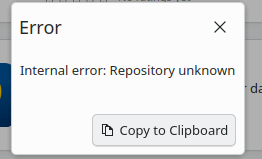
  1. I keep getting errors when trying to install, or even just browse the KDE discover store. In my case, trying to install boxes leads me to this error:

    Now I did see this topic before, and I ran the command to get the available repos I have, so if this helps, here you go:
#  | Alias                            | Name                                   | Enabled | GPG Check | Refresh | Keep | Priority | Type   | URI                                                                                                                               
                                                    | Service 
---+----------------------------------+----------------------------------------+---------+-----------+---------+------+----------+--------+-----------------------------------------------------------------------------------------------------------------------------------
-----------------------------------------------------+--------- 
1 | NVIDIA:repo-non-free             | repo-non-free                          | Yes     | ( p) Yes  | Yes     | -    |   99     | N/A    | https://download.nvidia.com/opensuse/tumbleweed                                                                                   
                                                    | NVIDIA 
2 | download.opensuse.org-non-oss    | Main Repository (NON-OSS)              | Yes     | (r ) Yes  | Yes     | -    |   99     | rpm-md | http://download.opensuse.org/tumbleweed/repo/non-oss/                                                                             
                                                    |  
3 | download.opensuse.org-oss        | Main Repository (OSS)                  | Yes     | (r ) Yes  | Yes     | -    |   99     | rpm-md | http://download.opensuse.org/tumbleweed/repo/oss/                                                                                 
                                                    |  
4 | download.opensuse.org-tumbleweed | Main Update Repository                 | Yes     | (r ) Yes  | Yes     | -    |   99     | rpm-md | http://download.opensuse.org/update/tumbleweed/                                                                                   
                                                    |  
5 | openSUSE-20250818-0              | openSUSE-20250818-0                    | No      | ----      | ----    | -    |   99     | rpm-md | hd:/?device=/dev/disk/by-id/usb-USB_SanDisk_3.2Gen1_04015e8e9767199d410a04931f392d47b325dc6b08b689906a33dfbfe93758341eb90000000000
0000000000a514f30200096b18815581075d334a8b-0:0-part2 |  
6 | openSUSE:repo-non-oss            | repo-non-oss                           | Yes     | ( p) Yes  | Yes     | -    |   99     | N/A    | http://cdn.opensuse.org/tumbleweed/repo/non-oss                                                                                   
                                                    | openSUSE 
7 | openSUSE:repo-openh264           | repo-openh264                          | Yes     | ( p) Yes  | Yes     | -    |   99     | N/A    | https://codecs.opensuse.org/openh264/openSUSE_Tumbleweed                                                                          
                                                    | openSUSE 
8 | openSUSE:repo-oss                | repo-oss                               | Yes     | ( p) Yes  | Yes     | -    |   99     | N/A    | http://cdn.opensuse.org/tumbleweed/repo/oss                                                                                       
                                                    | openSUSE 
9 | openSUSE:repo-oss-debug          | repo-oss-debug                         | No      | ----      | ----    | -    |   99     | N/A    | http://cdn.opensuse.org/debug/tumbleweed/repo/oss                                                                                 
                                                    | openSUSE 
10 | openSUSE:repo-oss-source         | repo-oss-source                        | No      | ----      | ----    | -    |   99     | N/A    | http://cdn.opensuse.org/source/tumbleweed/repo/oss                                                                                
                                                    | openSUSE 
11 | openSUSE:update-tumbleweed       | update-tumbleweed                      | Yes     | ( p) Yes  | Yes     | -    |   99     | N/A    | http://cdn.opensuse.org/update/tumbleweed                                                                                         
                                                    | openSUSE 
12 | repo-debug                       | openSUSE-Tumbleweed-Debug              | No      | ----      | ----    | -    |   99     | N/A    | http://download.opensuse.org/debug/tumbleweed/repo/oss/                                                                           
                                                    |  
13 | repo-openh264                    | Open H.264 Codec (openSUSE Tumbleweed) | Yes     | (r ) Yes  | Yes     | -    |   99     | rpm-md | http://codecs.opensuse.org/openh264/openSUSE_Tumbleweed                                                                           
                                                    |  
14 | repo-source                      | openSUSE-Tumbleweed-Source             | No      | ----      | ----    | -    |   99     | N/A    | http://download.opensuse.org/source/tumbleweed/repo/oss/          

  1. Moving application windows around is very glitchy
    Everything (at least in my view), is pretty smooth, however when it comes to moving application windows, such as the system monitor or dolphin file manager, it can be very glitchy. I wish I could show a video to describe what I mean, but moving a window feels like going through a slideshow, even though the mouse and everything else is animating just fine.
Do you mean gnome-boxes ? Try:

sudo zypper in gnome-boxes

and post the complete output if there is an error.
For glitchy windows movement you likely have a graphics driver problem, but that is another problem.

Just a hint for posting in the future. Please do not type this sort of “explanations”, but simply copy/paste one more line at the beginning of your computer test. Then the command is there, complete and understandable what you did for your audience.

3 Likes

Please do not type this sort of “explanations”, but simply copy/paste one more line at the beginning of your computer test.

That is fair, I’ll keep that in mind for the future. For reference, the command I was referring to was:

zypper lr -d

from Nrickert’s response

For glitchy windows movement you likely have a graphics driver problem, but that is another problem.

I had suspicions it was that, though I am not sure where to start with troubleshooting that issue.

Hi, is the Discover error still appearing? Can see more information in Konsole from the systemd journal with passing # journalctl -b | grep -i "discover"

For graphics issue possibly begin with output of inxi -GSaz

Which snapshot of Tumbleweed is machine using? You can see this by passing hostnamectl in Konsole. Look in the CPE OS Name: category. Newest is 20250822 currently as this is written.

So the output of inxi -GSaz was this:

System:
  Kernel: 6.16.1-1-default arch: x86_64 bits: 64 compiler: gcc v: 15.1.1
    clocksource: tsc avail: hpet,acpi_pm
    parameters: BOOT_IMAGE=/boot/vmlinuz-6.16.1-1-default
    root=UUID=11c9052b-bc3b-439a-a8e7-d48391b7ed43 splash=silent nomodeset
    mitigations=auto quiet security=selinux selinux=1
  Desktop: KDE Plasma v: 6.4.4 tk: Qt v: N/A info: frameworks v: 6.17.0
    wm: kwin_x11 tools: avail: xscreensaver vt: 2 dm: SDDM Distro: openSUSE
    Tumbleweed 20250820
Graphics:
  Device-1: NVIDIA GA106M [GeForce RTX 3060 Mobile / Max-Q] vendor: ASUSTeK
    driver: N/A alternate: nouveau non-free: 550/565.xx+ status: current (as of
    2025-01; EOL~2026-12-xx) arch: Ampere code: GAxxx process: TSMC n7 (7nm)
    built: 2020-2023 pcie: gen: 3 speed: 8 GT/s lanes: 8 link-max: gen: 4
    speed: 16 GT/s lanes: 16 bus-ID: 01:00.0 chip-ID: 10de:2520 class-ID: 0300
  Device-2: Advanced Micro Devices [AMD/ATI] Cezanne [Radeon Vega Series /
    Radeon Mobile Series] vendor: ASUSTeK driver: N/A alternate: amdgpu
    arch: GCN-5 code: Vega process: GF 14nm built: 2017-20 pcie: gen: 3
    speed: 8 GT/s lanes: 16 bus-ID: 04:00.0 chip-ID: 1002:1638 class-ID: 0300
  Display: x11 server: X.Org v: 21.1.15 with: Xwayland v: 24.1.8
    compositor: kwin_x11 driver: X: loaded: modesetting unloaded: vesa
    alternate: fbdev gpu: N/A display-ID: :0 screens: 1
  Screen-1: 0 s-res: 1920x1080 s-dpi: 96 s-size: 508x285mm (20.00x11.22")
    s-diag: 582mm (22.93")
  Monitor-1: Unknown-1 mapped: None-1 res: mode: 1920x1080 hz: 60
    scale: 100% (1) size: N/A modes: 1920x1080
  API: EGL v: 1.5 platforms: device: 0 drv: swrast surfaceless: drv: swrast
    x11: drv: swrast inactive: gbm,wayland
  API: OpenGL v: 4.5 vendor: mesa v: 25.1.7 glx-v: 1.4 direct-render: yes
    renderer: llvmpipe (LLVM 20.1.8 256 bits) device-ID: ffffffff:ffffffff
    memory: 37.67 GiB unified: yes
  API: Vulkan v: 1.4.321 layers: 1 device: 0 type: cpu name: llvmpipe (LLVM
    20.1.8 256 bits) driver: N/A device-ID: 10005:0000 surfaces: N/A
  Info: Tools: api: eglinfo, glxinfo, vulkaninfo
    de: kscreen-console,kscreen-doctor wl: wayland-info
    x11: xdpyinfo, xprop, xrandr

Runninghostnamectland finding CPE OS Name:, I got cpe:2.3:o:opensuse:tumbleweed:20250820:*:*:*:*:*:*:*. So a bit outdated but I did see that the new update just got announced 2 hours from when I am writing this.

I might no longer have the discover issue but I will need to check a bit more. I also see I have a ton of updates. I assume that’s related to the new OS update?

Your graphic system is severely broken, proper drivers are not installed or loaded on both GPUs, Vulkan is rendered through the CPU, no wonder that you have glitchy windows!
Please cancel the “nomodeset” option from the boot command line, then reboot and post the results of:

zypper lr -d
lsmod |grep -E "nvidia|amd|radeon"
zypper se -si nvidia

(you need superuser rights or use sudo)

Removing “nomodeset” definitely removed the glitchiness out of everything. Thanks for that, and I will still post the results from the commands you suggested. None of them asked me to have superuser rights, and I did not need to use sudo so I am not sure if the information I am about to give is complete.

For zypper lr -d

#  | Alias                            | Name                                   | Enabled | GPG Check | Refresh | Keep | Priority | Type   | URI                                                                                                                                                                                    | Service
---+----------------------------------+----------------------------------------+---------+-----------+---------+------+----------+--------+----------------------------------------------------------------------------------------------------------------------------------------------------------------------------------------+---------
 1 | NVIDIA:repo-non-free             | repo-non-free                          | Yes     | (r ) Yes  | Yes     | -    |   99     | rpm-md | https://download.nvidia.com/opensuse/tumbleweed                                                                                                                                        | NVIDIA
 2 | download.opensuse.org-non-oss    | Main Repository (NON-OSS)              | Yes     | (r ) Yes  | Yes     | -    |   99     | rpm-md | http://download.opensuse.org/tumbleweed/repo/non-oss/                                                                                                                                  | 
 3 | download.opensuse.org-oss        | Main Repository (OSS)                  | Yes     | (r ) Yes  | Yes     | -    |   99     | rpm-md | http://download.opensuse.org/tumbleweed/repo/oss/                                                                                                                                      | 
 4 | download.opensuse.org-tumbleweed | Main Update Repository                 | Yes     | (r ) Yes  | Yes     | -    |   99     | rpm-md | http://download.opensuse.org/update/tumbleweed/                                                                                                                                        | 
 5 | openSUSE-20250818-0              | openSUSE-20250818-0                    | No      | ----      | ----    | -    |   99     | rpm-md | hd:/?device=/dev/disk/by-id/usb-USB_SanDisk_3.2Gen1_04015e8e9767199d410a04931f392d47b325dc6b08b689906a33dfbfe93758341eb900000000000000000000a514f30200096b18815581075d334a8b-0:0-part2 | 
 6 | openSUSE:repo-non-oss            | repo-non-oss                           | Yes     | (r ) Yes  | Yes     | -    |   99     | rpm-md | http://cdn.opensuse.org/tumbleweed/repo/non-oss                                                                                                                                        | openSUSE
 7 | openSUSE:repo-openh264           | repo-openh264                          | Yes     | (r ) Yes  | Yes     | -    |   99     | rpm-md | https://codecs.opensuse.org/openh264/openSUSE_Tumbleweed                                                                                                                               | openSUSE
 8 | openSUSE:repo-oss                | repo-oss                               | Yes     | (r ) Yes  | Yes     | -    |   99     | rpm-md | http://cdn.opensuse.org/tumbleweed/repo/oss                                                                                                                                            | openSUSE
 9 | openSUSE:repo-oss-debug          | repo-oss-debug                         | No      | ----      | ----    | -    |   99     | N/A    | http://cdn.opensuse.org/debug/tumbleweed/repo/oss                                                                                                                                      | openSUSE
10 | openSUSE:repo-oss-source         | repo-oss-source                        | No      | ----      | ----    | -    |   99     | N/A    | http://cdn.opensuse.org/source/tumbleweed/repo/oss                                                                                                                                     | openSUSE
11 | openSUSE:update-tumbleweed       | update-tumbleweed                      | Yes     | (r ) Yes  | Yes     | -    |   99     | rpm-md | http://cdn.opensuse.org/update/tumbleweed                                                                                                                                              | openSUSE
12 | repo-debug                       | openSUSE-Tumbleweed-Debug              | No      | ----      | ----    | -    |   99     | N/A    | http://download.opensuse.org/debug/tumbleweed/repo/oss/                                                                                                                                | 
13 | repo-openh264                    | Open H.264 Codec (openSUSE Tumbleweed) | Yes     | (r ) Yes  | Yes     | -    |   99     | rpm-md | http://codecs.opensuse.org/openh264/openSUSE_Tumbleweed                                                                                                                                | 
14 | repo-source                      | openSUSE-Tumbleweed-Source             | No      | ----      | ----    | -    |   99     | N/A    | http://download.opensuse.org/source/tumbleweed/repo/oss/          

For lsmod |grep -E "nvidia|amd|radeon"

snd_sof_amd_acp70      16384  0
snd_sof_amd_acp63      16384  0
snd_sof_amd_vangogh    16384  0
snd_sof_amd_rembrandt    16384  0
snd_sof_amd_renoir     16384  0
snd_sof_amd_acp        73728  5 snd_sof_amd_acp70,snd_sof_amd_rembrandt,snd_sof_amd_vangogh,snd_sof_amd_acp63,snd_sof_amd_renoir
snd_sof_pci            24576  5 snd_sof_amd_acp70,snd_sof_amd_rembrandt,snd_sof_amd_vangogh,snd_sof_amd_acp63,snd_sof_amd_renoir
snd_sof_xtensa_dsp     16384  1 snd_sof_amd_acp
snd_sof               479232  2 snd_sof_amd_acp,snd_sof_pci
snd_soc_acpi_amd_match    12288  2 snd_sof_amd_acp63,snd_pci_ps
snd_amd_sdw_acpi       16384  2 snd_sof_amd_acp,snd_pci_ps
soundwire_amd          45056  2 snd_sof_amd_acp,snd_pci_ps
soundwire_generic_allocation    20480  1 soundwire_amd
soundwire_bus        1208320  2 soundwire_generic_allocation,soundwire_amd
snd_soc_core          430080  3 snd_sof,snd_soc_sdca,soundwire_amd
amd_atl                57344  1
snd_amd_acpi_mach      12288  1 snd_acp_pci
edac_mce_amd           40960  0
kvm_amd               241664  0
snd_pcm               233472  14 snd_sof_amd_acp,snd_hda_codec_hdmi,snd_pci_acp6x,snd_acp_legacy_common,snd_hda_intel,snd_hda_codec,snd_sof,snd_compress,snd_soc_core,snd_sof_utils,soundwire_amd,snd_hda_core,snd_pci_ps,snd_pcm_dmaengine
snd_acp_config         20480  10 snd_rn_pci_acp3x,snd_sof_amd_acp70,snd_pci_acp6x,snd_pci_acp5x,snd_sof_amd_rembrandt,snd_sof_amd_vangogh,snd_sof_amd_acp63,snd_acp_pci,snd_pci_ps,snd_sof_amd_renoir
kvm                  1376256  1 kvm_amd
snd_soc_acpi           16384  5 snd_sof_amd_acp,snd_acp_legacy_common,snd_acp_config,snd_amd_acpi_mach,snd_pci_ps
amd_pmc                57344  0
amdgpu              15585280  43
crc16                  12288  2 bluetooth,amdgpu
amdxcp                 12288  1 amdgpu
i2c_algo_bit           24576  2 amdgpu,nouveau
drm_ttm_helper         16384  3 amdgpu,nouveau
drm_suballoc_helper    16384  1 amdgpu
ttm                   126976  3 amdgpu,drm_ttm_helper,nouveau
drm_panel_backlight_quirks    12288  1 amdgpu
drm_exec               12288  3 drm_gpuvm,amdgpu,nouveau
gpu_sched              69632  2 amdgpu,nouveau
drm_buddy              28672  1 amdgpu
drm_display_helper    290816  2 amdgpu,nouveau
cec                    94208  2 drm_display_helper,amdgpu
video                  81920  4 asus_wmi,amdgpu,asus_nb_wmi,nouveau
ccp                   180224  1 kvm_amd

For zypper se -si nvidia

Loading repository data...
Reading installed packages...

S  | Name                          | Type    | Version              | Arch   | Repository
---+-------------------------------+---------+----------------------+--------+----------------------
i  | kernel-firmware-nvidia        | package | 20250516-4.1         | noarch | Main Repository (OSS)
i  | kernel-firmware-nvidia        | package | 20250516-4.1         | noarch | repo-oss
i  | openSUSE-repos-MicroOS-NVIDIA | package | 20250728.9adc675-1.1 | x86_64 | Main Repository (OSS)
i  | openSUSE-repos-MicroOS-NVIDIA | package | 20250728.9adc675-1.1 | x86_64 | repo-oss

OK, the amdgpu driver is loaded and working, so the basic graphic system is working.
But you have a dual VGA setup and the Nvidia RTX 3060 with the nouveau driver is sitting still. I don’t know if you have advanced graphics needs, but maybe you may consider to install the proprietary Nvidia drivers and find a way to use the Nvidia GPU for intensive tasks, but better open a new thread with a meaningful title if you want to go down that road.

Now at least you can try again to install “boxes” (or is it “gnome-boxes”?)

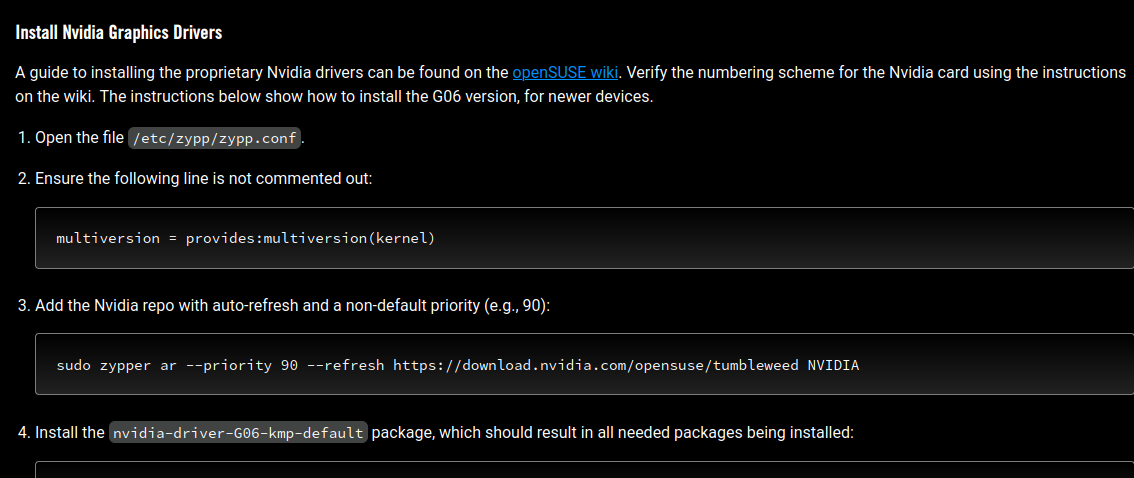
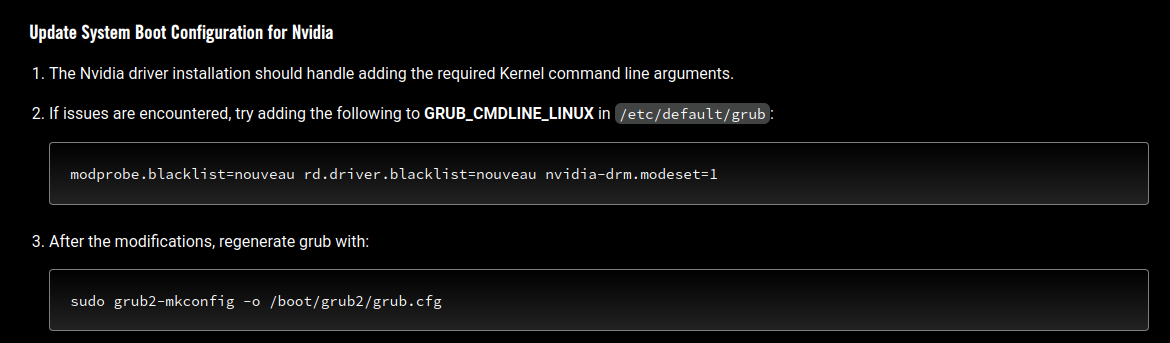
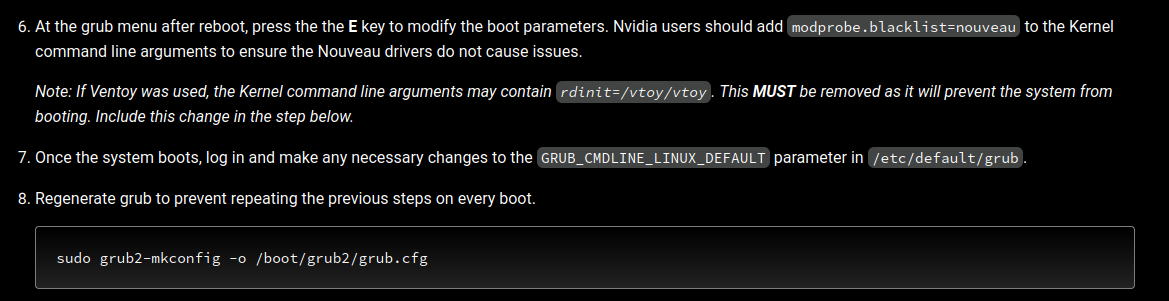
I have an ASUS ROG laptop, so I am planning on following this guide, which includes installing the nvidia drivers. That being said, removing nomodeset from the boot command line is only temporary, and comes back up when I restart my computer. The guide I linked earlier recommended I modify the grub file & regenerate it for another command related to the boot command line:

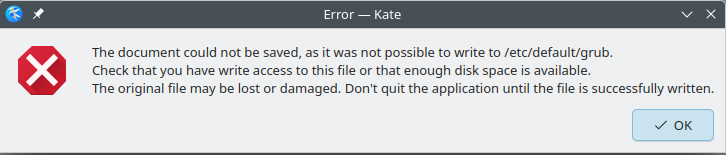
However, I cannot seem to save the grub file to regenerate it. I get the following error:

What should I do to remove nomodeset from the default boot command line?

On the bright side, boxes did get installed just from using KDE Discover, so whatever you suggested must’ve fixed it. Also installed KolourPaint & Kstars just to make sure, and both installed just fine. Just need to fully fix the glitchy window movement.

@ExesCarnival0891 Change the GPU order in the BIOS, use the amdgpu for graphics and Nvidia for Prime Render Offload when needed.

I wish I could follow your advice, but I genuinely do not see any where in my BIOS settings to change gpu order. Looking my device’s BIOS up did not help either.

Here is an openSUSE article Dual GPUs ("Optimus") - openSUSE User Documentation Project It is advanced for my understanding right now and may not be the article but it’s interesting. Advanced users will no doubt know more.

Here is some additional information :< [FEATURE REQUEST] - Allow GPU Selection on BIOS. - Republic of Gamers Forum - 955480

There is a GitLab Asus Linux page :< asus-linux · GitLab which includes asusctl a control daemon.

Can launch kate from Konsole by passing sudo -E kate /etc/default/grub finish modifications and save. Then pass sudo update-bootloader --refresh to update grub. I believe that passing sudo grub2-mkconfig -o /boot/grub2/grub.cfg is essentially the same result. Need to powercycle machine for changes to take effect.

Thanks for the information!

There is a GitLab Asus Linux page :< asus-linux · GitLab which includes asusctl a control daemon.

The one you linked (GitLab Asus Linux) is actually the website that I found the guide I linked to earlier. I am currently up to the part of installing nvidia drivers but the wording is confusing me a bit:


(“openSUSE wiki” hyperlink goes to the nvidia drivers article)

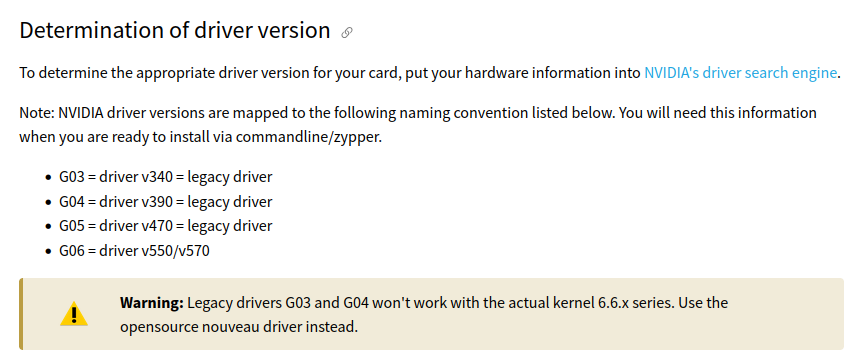
I assume when it is saying, “Verify the numbering scheme for the Nvidia card using the instructions on the wiki.”, it is referring to this section of the article?

In addition, I do not know whether I should be doing any of the steps in the article before doing the instructions here. I’ll probably bring this up on their support discord too.

Need to powercycle machine for changes to take effect.

I assume by powercycle you mean just rebooting/restarting the laptop?

Yes, powercycle means reboot. You have G06 = driver v550/v570 and your Nvidia chip ID: 10de:2520 as seen in inxi -GSaz results.
This can help solve trouble and identify your exact Nvidia card.

My failure to mention earlier on yet another option of installation using the Nvidia run file this alternative is called Nvidia the hard way . If possible read over this option a bit also to become more familiar with it’s possibilities.
SDB:NVIDIA the hard way - openSUSE Wiki

There are very advanced users here that no doubt will guide you with answers but the more you know.

1 Like

Thanks went ahead with the installation. I went ahead and just followed the instructions on the ROG ASUS Guide, and it seems like the installation went well.


A bit confused with the wording on this though, specifically step 6, I did zypper se G06 (as detailed in step 5) and got this:

S  | Name                                              | Summary                                                           | Type
---+---------------------------------------------------+-------------------------------------------------------------------+--------
   | kernel-firmware-nvidia-gsp-G06                    | Kernel firmware file for open NVIDIA kernel module driver G06     | package
   | kernel-firmware-nvidia-gspx-G06                   | Kernel firmware file for open NVIDIA kernel module driver G06     | package
   | kernel-firmware-nvidia-gspx-G06-cuda              | Kernel firmware file for open NVIDIA kernel module driver G06     | package
i  | nvidia-common-G06                                 | Common files for the NVIDIA driver packages                       | package
i  | nvidia-compute-G06                                | NVIDIA driver for computing with GPGPU                            | package
   | nvidia-compute-G06-32bit                          | 32bit NVIDIA driver for computing with GPGPU                      | package
i  | nvidia-compute-utils-G06                          | NVIDIA driver tools for computing with GPGPU                      | package
i+ | nvidia-driver-G06-kmp-default                     | NVIDIA graphics driver kernel module for GeForce 700 series and-> | package
   | nvidia-driver-G06-kmp-longterm                    | NVIDIA graphics driver kernel module for GeForce 700 series and-> | package
   | nvidia-driver-G06-kmp-meta                        | Meta package to select proprietary nvidia driver                  | package
   | nvidia-drivers-G06                                | Meta package for full installations (X, GL, etc.)                 | package
   | nvidia-drivers-minimal-G06                        | Meta package for compute only installations                       | package
i  | nvidia-gl-G06                                     | NVIDIA OpenGL libraries for OpenGL acceleration                   | package
   | nvidia-gl-G06-32bit                               | 32bit NVIDIA OpenGL libraries for OpenGL acceleration             | package
   | nvidia-open-driver-G06-signed-cuda-default-devel  | Devel Package to nvidia-open-driver-G06-signed-cuda               | package
   | nvidia-open-driver-G06-signed-cuda-kmp-default    | NVIDIA open kernel module driver for GeForce 16 series (GTX 16x-> | package
   | nvidia-open-driver-G06-signed-cuda-kmp-longterm   | NVIDIA open kernel module driver for GeForce 16 series (GTX 16x-> | package
   | nvidia-open-driver-G06-signed-cuda-longterm-devel | Devel Package to nvidia-open-driver-G06-signed-cuda               | package
   | nvidia-open-driver-G06-signed-default-devel       | Devel Package to nvidia-open-driver-G06-signed                    | package
   | nvidia-open-driver-G06-signed-kmp-default         | NVIDIA open kernel module driver for GeForce 16 series (GTX 16x-> | package
   | nvidia-open-driver-G06-signed-kmp-longterm        | NVIDIA open kernel module driver for GeForce 16 series (GTX 16x-> | package
   | nvidia-open-driver-G06-signed-kmp-meta            | Meta package to select open nvidia driver in sync                 | package
   | nvidia-open-driver-G06-signed-longterm-devel      | Devel Package to nvidia-open-driver-G06-signed                    | package
i  | nvidia-userspace-meta-G06                         | Meta package to autoselect NVIDIA userspace packages              | package
   | nvidia-utils-G06                                  | NVIDIA driver tools                                               | package
i  | nvidia-video-G06                                  | NVIDIA graphics driver for GeForce 700 series and newer           | package
   | nvidia-video-G06-32bit                            | 32bit NVIDIA graphics driver for GeForce 700 series and newer     | package

Step 6 says if any of the packages do not have an i or i+ next to them, that I install them, but there are not further instructions on how do to install the packages? Do I run the previous steps again?

All needed packages are installed. The ASUS guide is kind of superficial (and somewhat redundant and not that correct). The openSUSE wiki is better in this case.
Better use zypper se -si nvidia to show us the installed versions.

I see, I guess I’ll just continue with the rest of the guide. My nvidia driver version is at 580.76.05after installation.

In case someone else is following me, I didn’t seem to get errors during the nvidia driver installation, so I skipped updating the system configuration since it said, “if issues are encounter, try adding…”

Before I install ascutl I’ll update the grub to remove nomodeset by following what panorain suggested:

Can launch kate from Konsole by passing sudo -E kate /etc/default/grub finish modifications and save. Then pass sudo update-bootloader --refresh to update grub. I believe that passing sudo grub2-mkconfig -o /boot/grub2/grub.cfg is essentially the same result. Need to powercycle machine for changes to take effect.

Edit 1: Accidentally said, “I did seem to get errors” instead of “I didn’t seem to get errors”