Hope at least April 
It crashes only plasma for me because it mixed up plasma 5 and 6th packages all together. Manually reinstall/remove them solved the problem.
Hope at least April
It crashes only plasma for me because it mixed up plasma 5 and 6th packages all together. Manually reinstall/remove them solved the problem.
However after packages re-installation: some dialogs become English, not my native language while I’ve reinstalled -lang packages as well. And greeting sound on plasma start is distorted: I thought it some pipewire bug come with some recent upgrade. Hope it will be fixed soon, but now I can’t upgrade, so probably need to downgrade even more - not sure to which version however.
Why there is no other languages in the list in Plasma locale settings now?!
yeah, helped: seems some was still missed, thanks!
Here’s how I fixed my SDDM scaling on Wayland using a 4K screen.
Make a file named hidpi.conf in the folder /etc/sddm.conf.d
Put this in the file.
[General]
GreeterEnvironment=QT_SCREEN_SCALE_FACTORS=2,QT_FONT_DPI=192
Do we have forum rules against instigating flamewars?
Thanks, will use that next time I’ll try to migrate. This solves Plasma resolution as well or not?
To clarify, did you mean the rollback to a snapshot prior to the KDE 6 dup did not work due to the home dir not being rolled back?
No. Right click the Plasma desktop and select display then set your scale factor. If that doesn’t work you have bigger problems.
I thought this way. By fact - no: problem was in a lot of plasma6 packages was left behind (not uninstalled) and therefore there was a lot o conflicts with plasma5 packages with the same purpose. 2nd some: plasma5 and sddm5 packages were missed including *-lang. Forced to add them manually and justify all the KDE 5 dependencies and apps.
yes, does not work - scaling look ugly.
Not sure what you are referring to here, but if you think a post is inappropriate for any reason, you can click on the three dots beside the reply button on the post, from there you can flag it, and a Mod will check it out.
This is what I ended up with, after my pc crashing, during zypper dup.
Starting from a snap shot fixed most issues, but there is some weird desktop stuff.
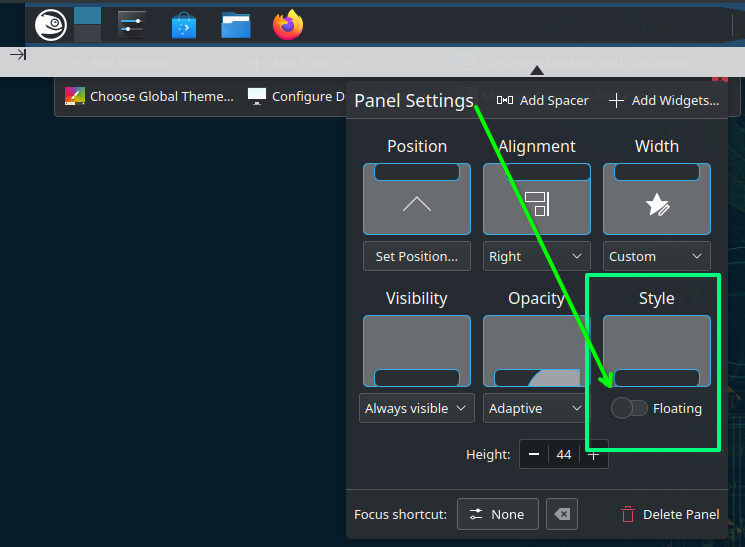
Task bar is not totally at the bottom anymore.
file:///usr/share/plasma/plasmoids/org.kde.plasma.systemmonitor/contents/ui/main.qml:17:1: module “org.kde.ksysguard.faces” is not installed
file:///usr/share/plasma/plasmoids/org.kde.plasma.systemmonitor/contents/ui/main.qml:16:1: module “org.kde.ksysguard.sensors” is not installed
file:///usr/share/plasma/plasmoids/org.kde.plasma.systemmonitor/contents/ui/main.qml:17:1: module “org.kde.ksysguard.faces” is not installed
file:///usr/share/plasma/plasmoids/org.kde.plasma.systemmonitor/contents/ui/main.qml:16:1: module “org.kde.ksysguard.sensors” is not installed
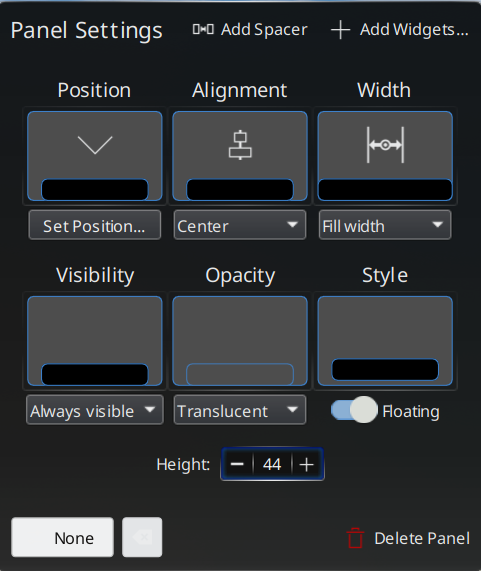
Yeah, that’s a new feature, which I actually like. It’s easy to disable if you don’t like it though…
That did fix the floating, but I am worried but will wait and see.
It still looks like the zypper update ended weird. (from an TTL)
Lets hope 3 times is a charm, because this was my third attempt at zypper dup. 
Unlike before though, zypper dup now tells me, there is nothing to do.
That is progress.
I just ran zypper dup, and after the upgrade my GUI performance is super laggy and close to unusable. top shows kwin_wayland hogging the CPU (slightly over 1000% sometimes).
I’m using KDE on an NVIDIA card with nvidia’s native drivers. The SDDM chooser doesn’t offer anything else (I know from my laptop that there should be a dropdown somewhere in a corner, but there isn’t.)
I have tried moving my ~/.config aside but that didn’t change anything performance-wise.
One thing that seems a little off is that inxi -G says something about “nouveau”, which seems wrong. I don’t have the nouveau drivers loaded:
~> lsmod |grep nvid
nvidia_drm             77824  13
nvidia_modeset       1511424  1 nvidia_drm
nvidia_uvm           2723840  0
nvidia              40747008  89 nvidia_uvm,nvidia_modeset
video                  77824  1 nvidia_modeset
~> inxi -G
Graphics:
  Device-1: NVIDIA GK208B [GeForce GT 710] driver: nvidia v: 470.239.06
  Display: wayland server: X.org v: 1.21.1.11 with: Xwayland v: 23.2.4
    compositor: kwin_wayland driver: X: loaded: modesetting,nouveau
    unloaded: fbdev,vesa gpu: nvidia resolution: 1600x1200
  API: OpenGL v: 4.5 vendor: mesa v: 23.3.6 renderer: llvmpipe (LLVM 17.0.6
    256 bits)
  API: Vulkan Message: No Vulkan data available.
  API: EGL Message: EGL data requires eglinfo. Check --recommends.
Ideas anyone?
Prove it. Every single document says Plasma 6 will NOT support X11…
There is no option (on the login screen) to select X11. Just Wayland and ICEDM (or something)