RE: YaST Gone Now What?

The moderator killed the thread because some guys went off the rails but I had some additional thoughts I wanted to share. I certainly didn’t think it was going to unleash the storm that it did. Quick shoutout to Malcolm and Jim. Been awhile since the Novell forum days.

YaST meant a lot of things to different people. One of the things that came out of the Novell acquisition was Novell’s commitment to ‘tools’. That was what made Netware stand out in so many ways. When you are an administrator of a number of machines or even if you have to dig into the operating system (beyond what a user would) the tools always made the difference.

Sure you could munge around in NDS (Novell Directory Services) by using esoteric commands on the console, but it made life so much easier to have a GUI tool to do so. The one that that in my opinion of course set what was then SuSE apart was its tools. YaST was one of them. NO OTHER DISTRO came close to offering anything as nice as YaST. Imagine a new user wanting to add a second account in OpenSUSE via CLI. Why?
Nobody does that anymore, but there are those of us that know how to munge a shadow file.

It’s been a bumpy ride with OpenSUSE as of late. Why on earth is 'the ability to ‘port skills’ to another distro even a thing? Even for SLE I don’t get it. You are homogenizing your environment to what end? Cost savings? You no longer have a competitive advantage if you are the same as everyone else but whatever. It’s not my business to run. Lee Iacoca said, ‘Lead, follow or get out of the way.’ It’s clear leadership has been ceded.

Looking at home desktop usage, I have always thought it funny how end users often base their favorite distro on what the ‘default’ desktop feels like. It’s probably the most customizable item. You won’t realize how difficult a distro is to work with until you need to ‘go off the rails’ and dig into it deeper. You often find a ruinous morass of package dependencies and outdated rpms. The next thing you know your OS looks like a developer environment. Give the user tools to succeed that don’t involve CLI munging. YaST did that. You didn’t need to even know what fdisk or parted was.

I have always based the quality of a distro on how quickly do I need to open a shell to get something done. The sooner I have to do that, the worse it is. (Also goes for Windows releases) That’s where the basic GUI tools shine. Losing YaST is a big big loss for OpenSUSE, it’ll take time for folks to realize it, but it is.

4 Likes

So far, openSUSE has had these four positive features for me compared to other distributions:

  • YaST
  • Packman
  • Straightforward polished installer
  • zypper

The current situation is as follows:

  • YaST – does not exist
  • Packman – will cease to exist in two months’ time
  • Former installer – does not exist; replaced by a disaster called Agama
  • zypper – last week it refused to install the Linux drivers for a new Epson printer; I had to use the rpm command directly
2 Likes

Definitely good to see you around, G - been a while since the old Novell forums days.

Just to address your question about porting skills from one distro to another - for SUSE as a business, requiring prospective customers to learn a different tool to manage the platform is a barrier to entry. While I don’t have any insider information on the rationale, it seems logical to me to look at what the market is doing and to leverage that as a way to let people bring their own skills rather than having to retool everything they know about Linux system administration.

It’s a shame that YaST is gone, and I think a lot of people do realize that it’s a loss, but with all of the maintenance headaches (there are over a hundred different modules for YaST, and most of them no longer work; as shundhammer noted, when Ruby updates in December to the latest version, that is likely going to break a lot of things. With no investment in maintaining that code, and nobody willing to step up, there really isn’t an option but to retire the tool. There’s over 20 years of cruft in it, and a lot of things have moved on (which is why many of the modules simply don’t work; configuration schemas updated for some things and YaST didn’t get updated, so the module was removed because it was no longer usable).

The community always has the option to step up and take over maintenance. In the meantime, for some things like Myrlyn (which shundhammer created to look/work like the YaST software management interface that is familiar), those ideas can be brought forward.

There’s no reason someone couldn’t create similar, maintainable versions of those YaST modules as standalone tools, or even write a wrapper that brings all of those kinds of standalone tools together under a “next generation” YaST frontend.

As often happens in open source communities, there are plenty of people to complain about something they don’t like and not enough people stepping up to do something about it, expecting someone else to do the work. It’s OK to not know where to start - but using that as an excuse to not do anything (which I’m not saying you or any specific individual is doing - it’s a general trend) rather than saying “I am willing to learn if someone will help me get started” is a big part of the issue here.

Look at Packman and what ultimately has happened with it. The original maintainers decided they were done, and a group of people stepped up and offered to pick it up. Rather than just complain, they decided to do something about it, and now they’re doing something about it with the support of the current maintainers to do an orderly handover.

That’s how it should work. :slight_smile:

2 Likes

No, a group of people have volunteered to pick it up, which is how this is supposed to work.

Those who do, decide.

2 Likes

I fully expect someone to come up with a similar YaST system. Seems like something that could be sent through Claude and solve a lot of issues. Have it jank out code in something other than Ruby. I think all the bits are still there they are just disjointed with no centrally organized linkage.

2 Likes

I am getting tired of explaining it to everybody in person. Please read the forum archives.

What YaST modules have you used recently? Which of them do not have a counterpart in the major desktops (KDE, GNOME, Xfce)?

How do you configure your printer, your graphical session, your language support, your keyboard, your network card / your network (including Wi-fi) these days?

Most YaST modules are obsolete today. You don’t need to configure X11, sound or most other hardware at all. And the desktops have much better tools for your printer, keyboard layout, language support. NetworkManager in its different shapes and sizes is so much easier than the YaST network module.

For package management and update we now have Myrlyn. Other common tasks like adding a new user is done very well by Cockpit (and IIRC KDE even has an applet for it as well).

What’s left?

I miss the YaST partitioner. That would be something worthwhile saving; but unfortunately, it drags in roughly half of the complete YaST infrastructure. There is no easy way to make it standalong like I did with Myrlyn.

What else?

8 Likes

Not trying to get into an argument and no need for you to explain. I get it, I really do. I also think Myrlyn is a fine piece of software. Thank you for that. As I stated in the other post there are alternatives to most functions that were previously in YaST. I have been able to uncover them over time.

Everything under the category ‘Network Services’ in YaST I have been known to use. Samba Server, HTTPS Server, DNS Server settings and NTP Configuration. That section is very handy for new aspiring admins to get a base system going. No you cannot do everything you will ultimately need, but it will get you going and start the ball rolling so you can explore the more advanced stuff which will ultimately lead you to the command line. It’s just how it is. Systemd Journal Entry app, Syslog viewer can also be handy. I am a KDE user, do I use Network Manager? No. Why? Probably the single most flakey app in KDE that I have encountered. There is no need to manage wireless connections on a wired machine with a static IP. I got tired of it. I use Wicked and I go to YaST>Network Settings to work with network configs. YaST>Partitioner I use quite a bit for USB thumbdrives and other USB devices I need to create filesystems on.

The biggest issue is that what was previously in YaST is now scattered around. As I suggested in the other post, it’s more a matter of centralizing those items and I’m not sure that will ever happen with a lot of disparate apps that aren’t really a part of base SUSE. That’s why I suggested a ‘pattern’ that could be selected at install time that would gather those apps, install them and make some sort of Administrative group (could be under System Settings app inside KDE/Gnome whatever DE flavor the user wants. Again, not sure if that is possible because those ‘patterns’ may require apps that are a part of the SUSE ‘base’. Forgive me of my ignorance of the build and packaging system. It’s not something I work with. IMHO Myrlyn should be included in base SUSE or at least OpenSUSE.

It does seem like the ‘System Settings’ app of OpenSUSE is aspiring to be what YaST was. It may get there, it just wasn’t quite there in this version which is why I started the inquiry to get some insight into how the new non-YaST workflow was supposed to work.

Thank you for your time and effort should you decide to pursue any of this.

@GofBorg Hi there :wink:
This is the important part and why Agama Installer and profiles (think AutoYaST) fit the bill to do all the hard work :smile:

Many configurations on a local system are done via drop ins these days which override the defaults. In your case NTP, with the Agama profile I install chrony-pool-empty, then a drop in pointing to my local time server in /etc/chrony.d/01-pool.conf

https://agama-project.github.io/

If Agama is such a disaster, then there are sure to be a few volunteers willing to provide Calamares-based ISOs.

Incidentally, there is a distribution derived from openSUSE, GeckoLinux, which uses Calamares.

Once installed, running zypper dup should allow you to switch back to a standard openSUSE installation, I suppose.

No, KDE System Settings is not intended to be a system administration utility. Its modules provide integration with underlying system services, some of which happen to include printer configuration, basic firewall configuration and display configuration. These are primarily there to support the everyday desktop user experience.

Cockpit, on the other hand, provides a range of system administration functions. It is actively maintained and developed, and is designed to be extended with new modules as required.

Well as I stated in the other thread. Not a fan of web interfaces on local desktop systems so I’ll be avoiding Cockpit. I’d just as soon use CLI if that’s the case. My personal opinion of course. In a server farm, yah sure.

Each to their own. I have used CUPS and Webmin over the years as well. I do not really distinguish between a web based GUI and a traditional desktop GUI. They are simply different ways of providing a graphical interface to the underlying functionality.

1 Like

I do use the Cockpit flatpak version… but still easier from the command line, but Cockpit (flatpak) does have a terminal and connects over ssh…

1 Like

I also use the Cockpit Client flatpak. I wish I could auto login like I can in the browser interface, but it still works great.

Honestly, though, while Cockpit is nice for occasionally checking snapshots or SELinux, I hardly ever use it for administering my main desktop because modern desktop environments already provide most of the tools I need.

Where Cockpit gets the most use from me (and where I think it really shines) is when I want to administer other computers. I have a little home server running Ubuntu and a handful of Docker Containers and a second Tumbleweed machine for tinkering. I used to have to either SSH into them, use Rustdesk, or (gasp) move my lazy butt over to them to update, check on containers and the like, but with Cockpit it’s really easy to get an overview, perform updates, manage containers and so on, all from the comfort of Cockpit.

If I had to gripe…

I really don’t like the font in Cockpit Client Launcher’s terminal, so I still manually SSH if I need to use the terminal. I think in CJK environments Cockpit defaults to a weird CJK font which makes everything very hard to read. It would be nice if the Cockpit Client had more customization in that regard.

And, as has been mentioned before, it would be nice to see Cockpit modules for firewall management and partition management on par with what YaST provides…

  • Firewall management is possible withplasma6-firewall, but it’s only marginally better than doing manually from a terminal. YaST Firewall was much more powerful.
  • As for KDE Partition Manager, while it’s great for reformatting external drives, it doesn’t support BTRFS subvolumes, so it’s useless if I need to do anything with my system partitions.

Like @shundhammer said, I don’t think it’s possible (or maybe even worthwhile) to keep YaST Partitioner going for all the work it would entail, but it would be nice to see improvements made to Cockpit and Agama’s partition managers. Cockpit’s current storage tab feels close. The functionality is mostly there, it just needs some refinement.

I recall the YaST Firewall utility being quite limited after it was adapted to work with firewalld. If a GUI is preferred, the native firewall-config utility is IMHO the better choice for more complex firewall management.

I concur.

1 Like

That won’t work. Their Rolling versions are from Aug 2022 !!! Plus, there is zero support as others have already experienced.


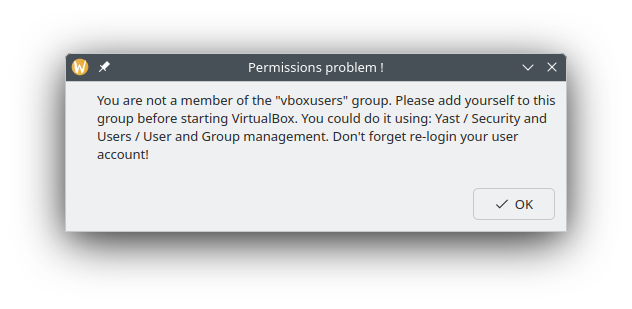
A moment ago, I installed VirtualBox on openSUSE Leap 16.0.
It was installed directly from the repo-oss repository.
The system offered me a non-existent solution, as stated in the error message.
I didn’t know whether to laugh or cry.

This comes through vbox-permissions_warning.diff in the VB package. You may want to open a bugreport (after you are finished laughing and/or crying) so that the diff gets rephrased. The file was added in year 2009 by a Novell dev/employee/maintainer.

In the meantime you can use Cockpit->Accounts to add your user to the vboxusers group.

1 Like

They should rather recommend a simple command line:

sudo usermod -aG vboxusers $USER

YaST is still there, but just compare the number of clicks and mental acrobatics to get there (and waiting until the users and groups are all read) against the command line.

1 Like

i used suse many decades ago, it had yast, yast was incredible back when kde was not that popular or had a control panel like it does not

right now the only usage i see from yast is install packages that i cant see in discover, other than that, it has menus that dont work or already replaced by kde, afik other des have replacements, yast was incredible 20 years ago, now, it is abandoned, incomplete and no longer needed

i see these changes as growing pains, because suse is old, but always evolving and still growing, so new scripts and programs will replace everything down the road as it always happens on all distros over the years and decades

it is a bit sad to see yast being removed, but, if i can do all it does via discover or via myrlin or other package managers with a gui, well, it was time to move on

1 Like