Hi. I’m trying to install OpenSUSE on an old laptop of mine, i need it for school books, and I can’t get the install started. I try to connect to network as it prompts me, DHCP configuration failed. I try selecting cd/dvd source, can’t find it. Ethernet, USB tethering, wifi, nothing works. Please help!
i386? Don’t you mean i586?
Where did you get your ISO from?
Welcome to the forum, by the way.
yeah, i586, basically x86. I got the ISO directly from the website, i got the Offline iso for i686
So you mean i686? These are all different microarchitectures with different levels of support, so it helps to know exactly what you are trying to install and on what.
32-bit Tumbleweed is still community supported, as long as you have a new enough CPU (needs SSE2), but it’s not tested as rigorously as 64-bit (it can’t be, because hardly anybody has the hardware for it) and as alluded to here, its future is not exactly certain.
What exactly are you trying to install it on?
yeah, the download said i686. the laptop is a toughbook cf18, pentium m 733 dothan, 1gb ram, intel pro wireless 2915
I’ve never had an m machine, but I tried looking up its instruction set and came across a note that to boot Linux on older ones than yours require an extra boot parmeter forcepae. I did note your Dothan 733 model supports SSE2.
I’d like to know more precisely where you got your .iso, what “the website” URL was. I tried to find a TW iso on https://download.opensuse.org/ports/i586/tumbleweed/iso/ labeled offline to no avail. Some Leap .isos do use that label.
From https://get.opensuse.org/tumbleweed/?type=server#download
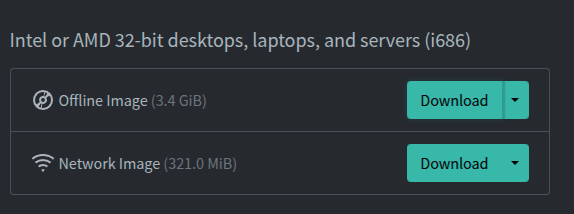
And the offline image is called
openSUSE-Tumbleweed-LegacyX86-DVD-i586-Snapshot20261020-Media.iso
whereas the network image is called
openSUSE-Tumbleweed-LegacyX86-NET-i586-Snapshot20261020-Media.iso
1 Like
it’s i686, i’m sure. also other linux distros work fine
i have the DVD release
just checked
https://download.opensuse.org/ports/i586/tumbleweed/iso/openSUSE-Tumbleweed-LegacyX86-DVD-i586-Current.iso is downloading now for me to try later on a P4…
Dell GX280 tower desktop with 2G RAM, 500G HDD with 2G+ swap and two TWs (and much more) already installed, one updated to 20261020 prior to booting installer. Created and formatted additional 6.4G EXT4 as target for installer booted to installed TW. .iso written to /dev/sdh USB3 stick. Additional boot parameters supplied, video=1440x900 ipv6.disable=1 net.ifnames=0. TW installation program v9.6, looks as if started via Grub Legacy Gfxboot. Appears to be YaST2 installer. BCM5751 gigabit NIC DHCP auto-configured to 192.168.xxx.xxx. Online repos OSS, Non-OSS & Update enabled. Generic desktop role selected. Expert partitioning selected to use the newly prepared /dev/sda31, to not format, and mount by LABEL. /dev/sda13 selected to mount on /home/. /dev/sda14 to mount on /usr/local/. Selected bootloader “not managed”. Detailed package selection grub* already de-selected. Deselect recommended packages and NetworkManager. Select systemd-networkd, nfs-kernel-server, less, hdparm, mc, nano, screen, rsync, etc. for installation. Deselecting various unwanted packages resulted in 5 pattern-base-* getting deselected, as well as zypper, which, among icewm and others, I added back. Installation refused to proceed without installing enough of selinux (virtually all).  Installation of ~1.5G of packages started at 20:29 -0400. @65% complete, 311,080 RAM free, 938,696 of 1,048,572 swap free. Reboot ready @20:38 -0400. 30% of 6.4G filesystem utilized. First boot to
multi-user.target complete @21:11 -0400.
# inxi -GSnaz --vs --za --egl --hostname
inxi 3.3.41-00 (2026-07-01)
System:
  Host: gx280 Kernel: 7.2.11-1-default arch: i686 bits: 32 compiler: gcc
    v: 16.2.1 clocksource: tsc avail: hpet,acpi_pm
    parameters: root=LABEL=<filter> ipv6.disable=1 net.ifnames=0 noresume
    consoleblank=0 mitigations=off
  Desktop: IceWM v: 4.1.0 vt: 7 dm: XDM Distro: openSUSE Tumbleweed 20261021
Graphics:
  Device-1: Intel 82915G/GV/910GL Integrated Graphics vendor: Dell
    driver: i915 v: kernel arch: Gen-3 process: Intel 130nm built: 2004-05
    ports: active: VGA-1 empty: none bus-ID: 00:02.0 chip-ID: 8086:2582
    class-ID: 0300
  Display: x11 server: X.Org v: 21.1.24 driver: X: loaded: modesetting
    dri: i915 gpu: i915 display-ID: :0 screens: 1
  Screen-1: 0 s-res: 1680x1050 s-dpi: 96 s-size: 444x277mm (17.48x10.91")
    s-diag: 523mm (20.6")
  Monitor-1: VGA-1 model: Dell P2213 serial: <filter> built: 2013 res:
    mode: 1680x1050 hz: 60 scale: 100% (1) dpi: 90 gamma: 1.2
    size: 473x296mm (18.62x11.65") diag: 558mm (22") ratio: 16:10 modes:
    max: 1680x1050 min: 720x400
  API: EGL v: 1.5 hw: drv: intel i915 platforms: device: 0 egl: 1.4
    drv: i915 device: 1 drv: swrast gbm: egl: 1.4 drv: i915 surfaceless:
    egl: 1.4 drv: i915 x11: egl: 1.4 drv: i915 inactive: wayland
  API: OpenGL v: 4.6 compat-v: 2.1 vendor: mesa v: 26.2.5 glx-v: 1.4
    direct-render: yes renderer: i915 (: 915G) device-ID: 8086:2582
    memory: 187.5 MiB unified: yes
  Info: Tools: api: eglinfo,glxinfo x11: xdriinfo, xdpyinfo, xrandr
Network:
  Device-1: Broadcom NetXtreme BCM5751 Gigabit Ethernet PCI Express
    vendor: Dell Optiplex GX280 driver: tg3 v: kernel pcie: gen: 1
    speed: 2.5 GT/s lanes: 1 port: N/A bus-ID: 02:00.0 chip-ID: 14e4:1677
    class-ID: 0200
  IF: eth0 state: up speed: 1000 Mbps duplex: full mac: <filter>
  Info: services: sshd,systemd-networkd,xinetd
# free
               total        used        free      shared  buff/cache   available
Mem:         2039152      487820     1037636       35056      844424     1551332
Swap:        2104476           0     2104476
# df /
Filesystem     1K-blocks    Used Available Use% Mounted on
/dev/sda31       6413344 1948449   4133075  33% /
#