Also post:
zypper se -si kernel
and
uname -a
It’s the default kernel.
S  | Name                        | Type    | Version             | Arch   | Repository
---+-----------------------------+---------+---------------------+--------+----------------
i+ | kernel-default              | package | 6.12.0-160000.5.1   | x86_64 | repo-oss (16.0)
i  | kernel-default-devel        | package | 6.12.0-160000.5.1   | x86_64 | repo-oss (16.0)
i  | kernel-default-extra        | package | 6.12.0-160000.5.1   | x86_64 | repo-oss (16.0)
i  | kernel-default-optional     | package | 6.12.0-160000.5.1   | x86_64 | repo-oss (16.0)
i  | kernel-devel                | package | 6.12.0-160000.5.1   | noarch | repo-oss (16.0)
i  | kernel-firmware-all         | package | 20250206-160000.3.2 | noarch | repo-oss (16.0)
i  | kernel-firmware-amdgpu      | package | 20250718-160000.1.2 | noarch | repo-oss (16.0)
i  | kernel-firmware-ath10k      | package | 20250206-160000.2.2 | noarch | repo-oss (16.0)
i  | kernel-firmware-ath11k      | package | 20250424-160000.2.2 | noarch | repo-oss (16.0)
i  | kernel-firmware-ath12k      | package | 20250523-160000.2.2 | noarch | repo-oss (16.0)
i  | kernel-firmware-atheros     | package | 20250206-160000.2.2 | noarch | repo-oss (16.0)
i  | kernel-firmware-bluetooth   | package | 20250714-160000.1.2 | noarch | repo-oss (16.0)
i  | kernel-firmware-bnx2        | package | 20250627-160000.2.2 | noarch | repo-oss (16.0)
i  | kernel-firmware-brcm        | package | 20250623-160000.2.2 | noarch | repo-oss (16.0)
i  | kernel-firmware-chelsio     | package | 20250627-160000.2.2 | noarch | repo-oss (16.0)
i  | kernel-firmware-dpaa2       | package | 20250206-160000.2.2 | noarch | repo-oss (16.0)
i  | kernel-firmware-i915        | package | 20250708-160000.2.2 | noarch | repo-oss (16.0)
i  | kernel-firmware-intel       | package | 20250718-160000.1.2 | noarch | repo-oss (16.0)
i  | kernel-firmware-iwlwifi     | package | 20250609-160000.2.2 | noarch | repo-oss (16.0)
i  | kernel-firmware-liquidio    | package | 20250206-160000.2.2 | noarch | repo-oss (16.0)
i  | kernel-firmware-marvell     | package | 20250206-160000.2.2 | noarch | repo-oss (16.0)
i  | kernel-firmware-media       | package | 20250717-160000.1.2 | noarch | repo-oss (16.0)
i  | kernel-firmware-mediatek    | package | 20250708-160000.2.2 | noarch | repo-oss (16.0)
i  | kernel-firmware-mellanox    | package | 20250717-160000.1.2 | noarch | repo-oss (16.0)
i  | kernel-firmware-mwifiex     | package | 20250206-160000.2.2 | noarch | repo-oss (16.0)
i  | kernel-firmware-network     | package | 20250717-160000.1.2 | noarch | repo-oss (16.0)
i  | kernel-firmware-nfp         | package | 20250206-160000.2.2 | noarch | repo-oss (16.0)
i  | kernel-firmware-nvidia      | package | 20250516-160000.2.2 | noarch | repo-oss (16.0)
i  | kernel-firmware-platform    | package | 20250717-160000.1.2 | noarch | repo-oss (16.0)
i  | kernel-firmware-prestera    | package | 20250206-160000.2.2 | noarch | repo-oss (16.0)
i  | kernel-firmware-qcom        | package | 20250714-160000.1.2 | noarch | repo-oss (16.0)
i  | kernel-firmware-qlogic      | package | 20250717-160000.1.2 | noarch | repo-oss (16.0)
i  | kernel-firmware-radeon      | package | 20250627-160000.2.2 | noarch | repo-oss (16.0)
i  | kernel-firmware-realtek     | package | 20250717-160000.1.2 | noarch | repo-oss (16.0)
i  | kernel-firmware-serial      | package | 20250717-160000.1.2 | noarch | repo-oss (16.0)
i  | kernel-firmware-sound       | package | 20250721-160000.1.2 | noarch | repo-oss (16.0)
i  | kernel-firmware-ti          | package | 20250206-160000.2.2 | noarch | repo-oss (16.0)
i  | kernel-firmware-ueagle      | package | 20250206-160000.2.2 | noarch | repo-oss (16.0)
i  | kernel-firmware-usb-network | package | 20250717-160000.1.2 | noarch | repo-oss (16.0)
i  | kernel-macros               | package | 6.12.0-160000.5.1   | noarch | repo-oss (16.0)

    Note: For an extended search including not yet activated remote resources please use 'zypper
    search-packages'.
srinivas@leaps:~> uname -a
Linux leaps 6.12.0-160000.5-default #1 SMP PREEMPT_DYNAMIC Wed Sep 10 15:26:25 UTC 2025 (3545bbd) x86_64 x86_64 x86_64 GNU/Linux
If there is no other solution, then i will reinstall leap, and install nvidia as root.
Try it with a login shell as I wrote above, before you reinstall…
1 Like
login shell didn’t worked. I don’t think reinstall will work either. driver install should not be this much trouble.
How do you install?
Have you checked the downloaded ISO with it checksum?
How do you write it to DVD/USB? Which program?
@hui, you going to make me dig out old hardware now 
@csrinivas did you do the Leap install with the Nvidia GPU present? I’m assuming your using the Nvidia GPU just for Prime Render Offload? My preference is to get the install done, then add hardware… Note I generally only use the run file.
I downloaded torrent from opensuse.org. I used to do checksum match, but not anymore. I used fedora media writer to write to USB stick. Installation was fine.
@malcolmlewis Yes. nvidia GPU is present, i use iGPU for installation, and switch to nvidia after drivers installed.
Last month. i installed leap RC, and installed nvidia open drivers from non-free repo. It worked fine. Then, modprobe, and persistenced were updated to new version, and from there this mismatch fiasco started. While driver components stay at 580.76, these two packages went 580.82 to 580.95.
@csrinivas it always seems there is a delay on new driver releases and the repositories the open driver from oss is a lot faster than getting other packages built and out to the repositories. One of the reasons I prefer the run file…
I don’t run Plasma or X11, I’m on GNOME and Wayland here…
I am on plasma and x11.
@csrinivas Hmmm, so all good here with similar hardware?
So did the install of Leap with the Nvidia and Intel iGPU being active device, on install I edited grub install and added nomodeset to boot as well.
Completed GNOME desktop install and rebooted, all good (and still using nomodeset).
Edited /etc/default/grub and added;
intel_iommu=on nvidia_drm.modeset=1 rd.driver.blacklist=nouveau fbdev=1
AND removed nomodeset…
Then ran update-bootloader
Modified my user groups;
usermod -a -G render username
usermod -a -G video username
Then zypper in libnvidia-egl-gbm1 libnvidia-egl-wayland1 Mesa-demo-egl inxi openSUSE-repos-Leap-NVIDIA
Then
zypper in nvidia-open-driver-G06-signed-kmp-default
dracut -f --regenerate-all
systemctl poweroff
Rebooted and in the system BIOS disabled the iGPU, swapped to the T400 GPU as primary.
Power cycled system and;
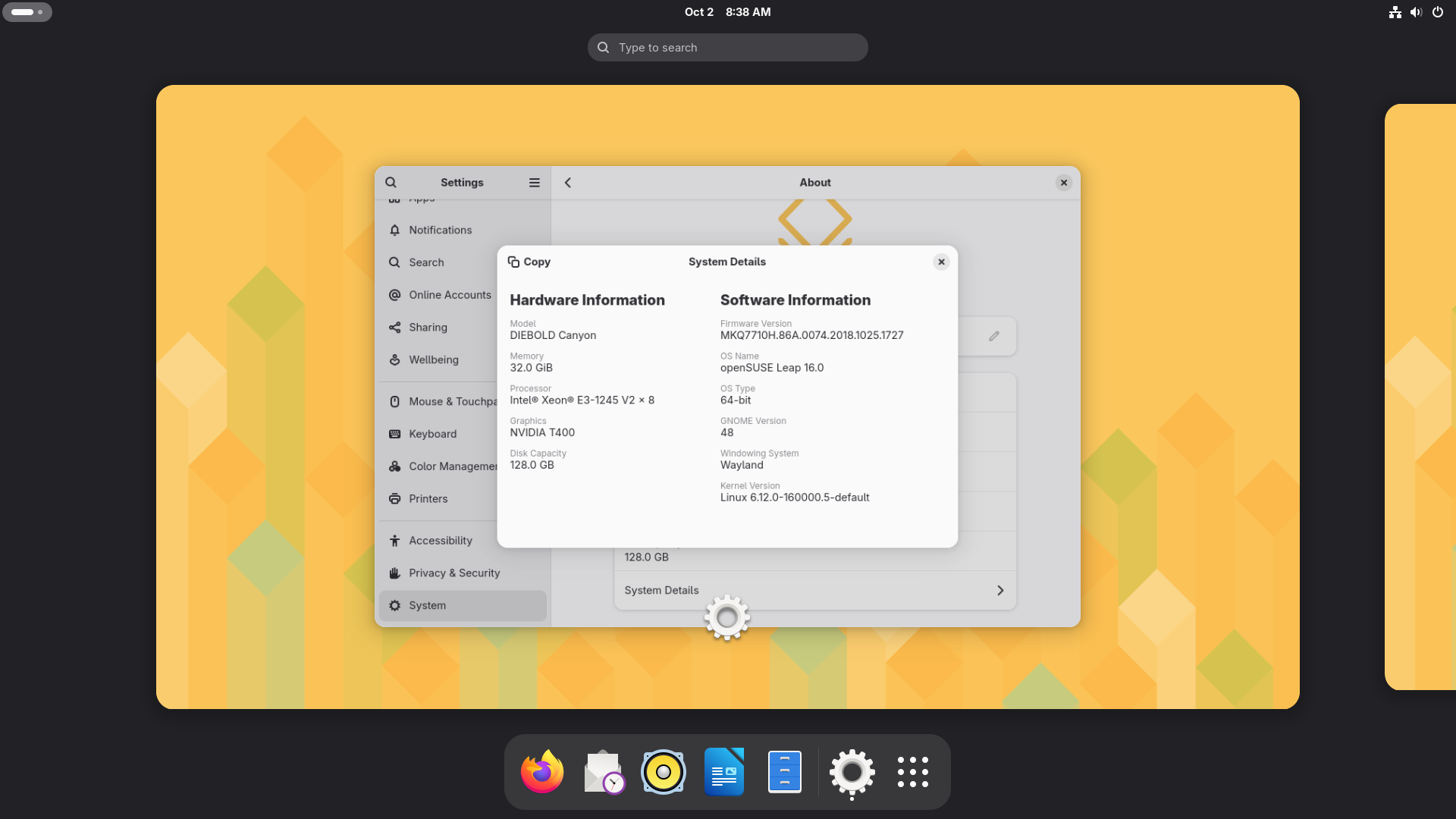
System:
  Kernel: 6.12.0-160000.5-default arch: x86_64 bits: 64 compiler: gcc
    v: 13.4.0 clocksource: tsc avail: hpet,acpi_pm
    parameters: BOOT_IMAGE=/boot/vmlinuz-6.12.0-160000.5-default
    root=UUID=7973e999-50a3-44bb-a15d-4c2c2d27b53d mitigations=auto quiet
    security=selinux selinux=1 intel_iommu=on nvidia_drm.modeset=1
    rd.driver.blacklist=nouveau fbdev=1
  Desktop: GNOME v: 48.3 tk: GTK v: 3.24.50 wm: gnome-shell
    tools: gsd-screensaver-proxy dm: GDM v: 48.0 Distro: openSUSE Leap 16.0
CPU:
  Info: model: Intel Xeon E3-1245 V2 bits: 64 type: MT MCP arch: Ivy Bridge
    level: v2 built: 2012-15 process: Intel 22nm family: 6 model-id: 0x3A (58)
    stepping: 9 microcode: 0x20
  Topology: cpus: 1x dies: 1 clusters: 4 cores: 4 threads: 8 tpc: 2
    smt: enabled cache: L1: 256 KiB desc: d-4x32 KiB; i-4x32 KiB L2: 1024 KiB
    desc: 4x256 KiB L3: 8 MiB desc: 1x8 MiB
  Speed (MHz): avg: 1600 min/max: 1600/3800 scaling: driver: intel_pstate
    governor: powersave cores: 1: 1600 2: 1600 3: 1600 4: 1600 5: 1600 6: 1600
    7: 1600 8: 1600 bogomips: 54274
  Flags: avx ht lm nx pae sse sse2 sse3 sse4_1 sse4_2 ssse3 vmx
  Vulnerabilities:
  Type: gather_data_sampling status: Not affected
  Type: indirect_target_selection status: Not affected
  Type: itlb_multihit status: KVM: Split huge pages
  Type: l1tf mitigation: PTE Inversion; VMX: conditional cache flushes, SMT
    vulnerable
  Type: mds status: Vulnerable: Clear CPU buffers attempted, no microcode;
    SMT vulnerable
  Type: meltdown mitigation: PTI
  Type: mmio_stale_data status: Unknown: No mitigations
  Type: reg_file_data_sampling status: Not affected
  Type: retbleed status: Not affected
  Type: spec_rstack_overflow status: Not affected
  Type: spec_store_bypass mitigation: Speculative Store Bypass disabled via
    prctl
  Type: spectre_v1 mitigation: usercopy/swapgs barriers and __user pointer
    sanitization
  Type: spectre_v2 mitigation: Retpolines; IBPB: conditional; IBRS_FW;
    STIBP: conditional; RSB filling; PBRSB-eIBRS: Not affected; BHI: Not
    affected
  Type: srbds status: Vulnerable: No microcode
  Type: tsa status: Not affected
  Type: tsx_async_abort status: Not affected
Graphics:
  Device-1: NVIDIA TU117GLM [Quadro T400 Mobile] driver: nvidia v: 580.76.05
    alternate: nouveau,nvidia_drm non-free: 550.xx+ status: current (as of
    2024-09; EOL~2026-12-xx) arch: Turing code: TUxxx process: TSMC 12nm FF
    built: 2018-2022 pcie: gen: 1 speed: 2.5 GT/s lanes: 16 link-max: gen: 3
    speed: 8 GT/s ports: active: none off: DP-1 empty: DP-2,DP-3
    bus-ID: 01:00.0 chip-ID: 10de:1fb2 class-ID: 0300
  Display: wayland server: Xwayland v: 24.1.6 compositor: gnome-shell
    driver: gpu: nv_platform,nvidia,nvidia-nvswitch display-ID: 0
  Monitor-1: DP-1 model: DT-156P-A1 serial: <filter> built: 2021
    res: 1920x1080 dpi: 142 gamma: 1.2 size: 344x194mm (13.54x7.64")
    diag: 395mm (15.5") ratio: 16:9 modes: max: 1920x1080 min: 640x480
  API: EGL v: 1.5 hw: drv: nvidia platforms: device: 0 drv: nvidia gbm:
    drv: nvidia surfaceless: drv: nvidia wayland: drv: nvidia x11: drv: nvidia
  API: OpenGL v: 4.6.0 vendor: nvidia v: 580.76.05 glx-v: 1.4
    direct-render: yes renderer: NVIDIA T400/PCIe/SSE2 memory: 1.95 GiB
    display-ID: :0.0

Thu Oct  2 08:34:36 2025
+-----------------------------------------------------------------------------------------+
| NVIDIA-SMI 580.76.05              Driver Version: 580.76.05      CUDA Version: 13.0     |
+-----------------------------------------+------------------------+----------------------+
| GPU  Name                 Persistence-M | Bus-Id          Disp.A | Volatile Uncorr. ECC |
| Fan  Temp   Perf          Pwr:Usage/Cap |           Memory-Usage | GPU-Util  Compute M. |
|                                         |                        |               MIG M. |
|=========================================+========================+======================|
|   0  NVIDIA T400                    On  |   00000000:01:00.0  On |                  N/A |
| 38%   34C    P8            N/A  /   31W |     254MiB /   2048MiB |      0%      Default |
|                                         |                        |                  N/A |
+-----------------------------------------+------------------------+----------------------+

+-----------------------------------------------------------------------------------------+
| Processes:                                                                              |
|  GPU   GI   CI              PID   Type   Process name                        GPU Memory |
|        ID   ID                                                               Usage      |
|=========================================================================================|
|    0   N/A  N/A            1906      G   /usr/bin/gnome-shell                    184MiB |
|    0   N/A  N/A            2208      G   /usr/bin/Xwayland                         3MiB |
|    0   N/A  N/A            2587    C+G   /usr/bin/kgx                             35MiB |
|    0   N/A  N/A            5810    C+G   /usr/bin/gnome-control-center            19MiB |
+-----------------------------------------------------------------------------------------+

modinfo nvidia | grep license
license:        Dual MIT/GPL
Also installed clinfo and that’s fine as well;
clinfo
Number of platforms                               1
  Platform Name                                   NVIDIA CUDA
  Platform Vendor                                 NVIDIA Corporation
  Platform Version                                OpenCL 3.0 CUDA 13.0.78
  Platform Profile                                FULL_PROFILE
.....
.....
ICD loader properties
  ICD loader Name                                 OpenCL ICD Loader
  ICD loader Vendor                               OCL Icd free software
  ICD loader Version                              2.3.4
  ICD loader Profile                              OpenCL 3.0
I guess I should add packages that are installed;
zypper se -si nvidia

S  | Name                                      | Type    | Version                               | Arch   | Repository
---+-------------------------------------------+---------+---------------------------------------+--------+---------------------
i  | kernel-firmware-nvidia                    | package | 20250516-160000.2.2                   | noarch | repo-oss (16.0)
i+ | libnvidia-egl-gbm1                        | package | 1.1.2-160000.3.2                      | x86_64 | repo-oss (16.0)
i+ | libnvidia-egl-wayland1                    | package | 1.1.20-lp160.51.1                     | x86_64 | repo-non-free (16.0)
i  | libnvidia-egl-x111                        | package | 1.0.3-lp160.21.1                      | x86_64 | repo-non-free (16.0)
i  | libnvidia-gpucomp                         | package | 580.76.05-lp160.39.1                  | x86_64 | repo-non-free (16.0)
i  | nvidia-common-G06                         | package | 580.76.05-lp160.39.1                  | x86_64 | repo-non-free (16.0)
i  | nvidia-compute-G06                        | package | 580.76.05-lp160.39.1                  | x86_64 | repo-non-free (16.0)
i  | nvidia-compute-utils-G06                  | package | 580.76.05-lp160.39.1                  | x86_64 | repo-non-free (16.0)
i  | nvidia-gl-G06                             | package | 580.76.05-lp160.39.1                  | x86_64 | repo-non-free (16.0)
i  | nvidia-modprobe                           | package | 580.95.05-lp160.19.1                  | x86_64 | repo-non-free (16.0)
i+ | nvidia-open-driver-G06-signed-kmp-default | package | 580.76.05_k6.12.0_160000.5-160000.1.3 | x86_64 | repo-oss (16.0)
i  | nvidia-persistenced                       | package | 580.95.05-lp160.2.1                   | x86_64 | repo-non-free (16.0)
i  | nvidia-userspace-meta-G06                 | package | 580.76.05-lp160.11.1                  | noarch | repo-non-free (16.0)
i  | nvidia-userspace-meta-G06                 | package | 580.76.05-lp160.11.1                  | noarch | repo-non-free (16.0)
i  | nvidia-video-G06                          | package | 580.76.05-lp160.39.1                  | x86_64 | repo-non-free (16.0)
i+ | openSUSE-repos-Leap-NVIDIA                | package | 20250714.a450212-lp160.2.1            | x86_64 | repo-oss (16.0)
Let me check this elaborate process 
Yes, with same hardware and couple of commands i had a Leap - nvidia system running nicely. along with iGPU. Same with fedora and arch.
Only Pop os 24.04 has PCI conflicts between nvidia and iGPU. I had to disable iGPU.
@csrinivas sounds like your good to go now?
so, this is the update. I did these steps, and now nvidia is working !
- disable iGPU, and run only nvidia GPU.
- add nomodeset to grub and boot the installer.
- do the installation, boot into leap
- zypper update
- zypper install openSUSE-repos-Leap-NVIDIA
- zypper install-new-recommends ( this installed other stuff, no nvidia)
- zypper in nvidia-open-driver-G06-signed-kmp-default ( meta is not usable )
driver is installed, and working. But still one issue.
current driver has mismatched packages. modprobe, and persistenced are at 580
95. But it is working. opencl, vulkan, all stuff.
Then i saw updates were available for rest of packages to update to 580.95
surprisingly after updating remaining packages to 580.95 , i got mismatch error.
I did a fresh install, and now running with mismatched packages. Now i want to lock the drivers from updating, before figuring out what is wrong. Can someone advice me how to do it?
rinivas@leaps:~> nvidia-smi
Fri Oct  3 15:22:06 2025
+-----------------------------------------------------------------------------------------+
| NVIDIA-SMI 580.76.05              Driver Version: 580.76.05      CUDA Version: 13.0     |
+-----------------------------------------+------------------------+----------------------+
| GPU  Name                 Persistence-M | Bus-Id          Disp.A | Volatile Uncorr. ECC |
| Fan  Temp   Perf          Pwr:Usage/Cap |           Memory-Usage | GPU-Util  Compute M. |
|                                         |                        |               MIG M. |
|=========================================+========================+======================|
|   0  NVIDIA GeForce RTX 5070        On  |   00000000:01:00.0  On |                  N/A |
|  0%   37C    P5              9W /  250W |     585MiB /  12227MiB |      0%      Default |
|                                         |                        |                  N/A |
+-----------------------------------------+------------------------+----------------------+

+-----------------------------------------------------------------------------------------+
| Processes:                                                                              |
|  GPU   GI   CI              PID   Type   Process name                        GPU Memory |
|        ID   ID                                                               Usage      |
|=========================================================================================|
|    0   N/A  N/A            1251      G   /usr/bin/Xorg.bin                       241MiB |
|    0   N/A  N/A            1390      G   /usr/bin/ksecretd                         3MiB |
|    0   N/A  N/A            1527      G   /usr/bin/ksmserver                        3MiB |
|    0   N/A  N/A            1530      G   /usr/bin/kded6                            3MiB |
|    0   N/A  N/A            1531      G   /usr/bin/kwin_x11                        13MiB |
|    0   N/A  N/A            1659      G   /usr/bin/plasmashell                     72MiB |
|    0   N/A  N/A            1697      G   /usr/bin/kaccess                          3MiB |
|    0   N/A  N/A            1700      G   ...it-kde-authentication-agent-1          3MiB |
|    0   N/A  N/A            1703      G   ...ibexec/xdg-desktop-portal-kde          3MiB |
|    0   N/A  N/A            1818      G   /usr/libexec/DiscoverNotifier             3MiB |
|    0   N/A  N/A            1832      G   /usr/bin/kalendarac                      31MiB |
|    0   N/A  N/A            2024      G   /usr/bin/konsole                          3MiB |
+-----------------------------------------------------------------------------------------+
srinivas@leaps:~> clinfo
Number of platforms                               1
  Platform Name                                   NVIDIA CUDA
  Platform Vendor                                 NVIDIA Corporation
  Platform Version                                OpenCL 3.0 CUDA 13.0.78
  Platform Profile                                FULL_PROFILE

  zypper se -ir 2
Loading repository data...
Reading installed packages...

S  | Name                      | Summary                                                             | Type
---+---------------------------+---------------------------------------------------------------------+--------
i  | libnvidia-egl-wayland1    | The EGLStream-based Wayland external platform                       | package
i  | libnvidia-egl-x111        | NVIDIA XLib and XCB EGL Platform Library                            | package
i  | libnvidia-gpucomp         | NVIDIA library for shader compilation (nvgpucomp)                   | package
i  | libOpenCL1                | OpenCL ICD Bindings                                                 | package
i  | nvidia-common-G06         | Common files for the NVIDIA driver packages                         | package
i  | nvidia-compute-G06        | NVIDIA driver for computing with GPGPU                              | package
i  | nvidia-compute-utils-G06  | NVIDIA driver tools for computing with GPGPU                        | package
i  | nvidia-gl-G06             | NVIDIA OpenGL libraries for OpenGL acceleration                     | package
i  | nvidia-modprobe           | NVIDIA kernel module loader                                         | package
i  | nvidia-persistenced       | A daemon to maintain persistent software state in the NVIDIA driver | package
i  | nvidia-userspace-meta-G06 | Meta package to autoselect NVIDIA userspace packages                | package
i  | nvidia-video-G06          | NVIDIA graphics driver for GeForce 700 series and newer             | package
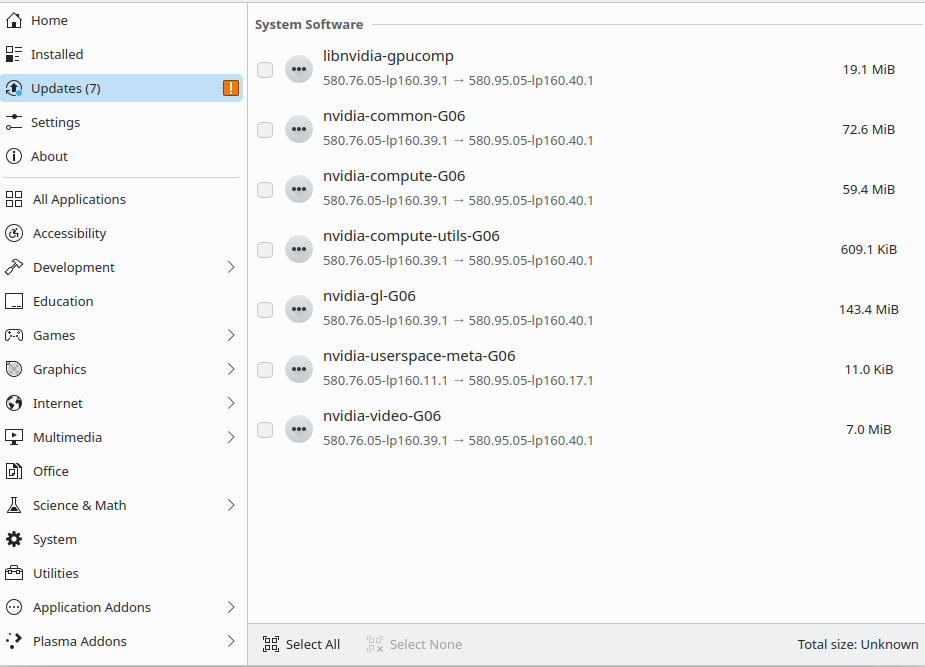
Do not use Discover. Use Myrlyn instead.
As Malcolm tried to explain, the open kernel module (nvidia-open-driver-G06-signed-kmp-default) always lacks behind the version of the other packages from Nvidia.
Open Myrlyn and type nvidia into the search field (set Search Mode to “Contains” instead of “Auto”. Rightclick on the packages and choose “Protect-do not modify” for
nvidia-common-G06
nvidia-compute-G06
nvidia-compute-utils-G06
nvidia-gl-G06
nvidia-modprobe
nvidia-persistenced
nvidia-userspace-meta-G06
nvidia-video-G06
When there is an update available for nvidia-open-driver-G06-signed-kmp-default to version 580.95, remove the package locks and perform the full upgrade.
A small tip: when showing installed packages, use -the -s option. That means zypper se -sir 2 instead of zypper se -ir 2
See the difference.
Kind of useless output:
ich@laptopneu:~> zypper se -ir 4
Repository-Daten werden geladen...
Installierte Pakete werden gelesen...

S  | Name                          | Summary                                                               | Type
---+-------------------------------+-----------------------------------------------------------------------+------
i+ | libnvidia-egl-gbm1            | The GBM EGL external platform library                                 | Paket
i+ | libnvidia-egl-gbm1-32bit      | The GBM EGL external platform library                                 | Paket
i+ | libnvidia-egl-wayland1        | The EGLStream-based Wayland external platform                         | Paket
i+ | libnvidia-egl-wayland1-32bit  | The EGLStream-based Wayland external platform                         | Paket
i+ | libnvidia-egl-x111            | NVIDIA XLib and XCB EGL Platform Library                              | Paket
i+ | libnvidia-egl-x111-32bit      | NVIDIA XLib and XCB EGL Platform Library                              | Paket
i  | libnvidia-gpucomp             | NVIDIA library for shader compilation (nvgpucomp)                     | Paket
i  | libnvidia-gpucomp-32bit       | NVIDIA library for shader compilation (nvgpucomp)                     | Paket
i+ | nvidia-common-G06             | Common files for the NVIDIA driver packages                           | Paket
i+ | nvidia-compute-G06            | NVIDIA driver for computing with GPGPU                                | Paket
i+ | nvidia-compute-G06-32bit      | 32bit NVIDIA driver for computing with GPGPU                          | Paket
i+ | nvidia-compute-utils-G06      | NVIDIA driver tools for computing with GPGPU                          | Paket
i+ | nvidia-driver-G06-kmp-default | NVIDIA graphics driver kernel module for GeForce 700 series and newer | Paket
i+ | nvidia-gl-G06                 | NVIDIA OpenGL libraries for OpenGL acceleration                       | Paket
i+ | nvidia-gl-G06-32bit           | 32bit NVIDIA OpenGL libraries for OpenGL acceleration                 | Paket
i+ | nvidia-libXNVCtrl             | Library providing the NV-CONTROL API                                  | Paket
i+ | nvidia-modprobe               | NVIDIA kernel module loader                                           | Paket
i+ | nvidia-persistenced           | A daemon to maintain persistent software state in the NVIDIA driver   | Paket
i+ | nvidia-settings               | Configure the NVIDIA graphics driver                                  | Paket
i+ | nvidia-video-G06              | NVIDIA graphics driver for GeForce 700 series and newer               | Paket
i+ | nvidia-video-G06-32bit        | 32bit NVIDIA graphics driver for GeForce 700 series and newer         | Paket
ich@laptopneu:~>
Usefull output:
ich@laptopneu:~> zypper se -sir 4
Repository-Daten werden geladen...
Installierte Pakete werden gelesen...

S  | Name                          | Type  | Version                  | Arch   | Repository
---+-------------------------------+-------+--------------------------+--------+-----------
i+ | libnvidia-egl-gbm1            | Paket | 1.1.2-7.15               | x86_64 | NVIDIA
i+ | libnvidia-egl-gbm1-32bit      | Paket | 1.1.2-7.10               | x86_64 | NVIDIA
i+ | libnvidia-egl-wayland1        | Paket | 1.1.20-52.1              | x86_64 | NVIDIA
i+ | libnvidia-egl-wayland1-32bit  | Paket | 1.1.20-52.1              | x86_64 | NVIDIA
i+ | libnvidia-egl-x111            | Paket | 1.0.3-21.2               | x86_64 | NVIDIA
i+ | libnvidia-egl-x111-32bit      | Paket | 1.0.3-21.2               | x86_64 | NVIDIA
i  | libnvidia-gpucomp             | Paket | 580.95.05-40.1           | x86_64 | NVIDIA
i  | libnvidia-gpucomp-32bit       | Paket | 580.95.05-40.1           | x86_64 | NVIDIA
i+ | nvidia-common-G06             | Paket | 580.95.05-40.1           | x86_64 | NVIDIA
i+ | nvidia-compute-G06            | Paket | 580.95.05-40.1           | x86_64 | NVIDIA
i+ | nvidia-compute-G06-32bit      | Paket | 580.95.05-40.1           | x86_64 | NVIDIA
i+ | nvidia-compute-utils-G06      | Paket | 580.95.05-40.1           | x86_64 | NVIDIA
i+ | nvidia-driver-G06-kmp-default | Paket | 580.95.05_k6.16.8_1-40.1 | x86_64 | NVIDIA
i+ | nvidia-gl-G06                 | Paket | 580.95.05-40.1           | x86_64 | NVIDIA
i+ | nvidia-gl-G06-32bit           | Paket | 580.95.05-40.1           | x86_64 | NVIDIA
i+ | nvidia-libXNVCtrl             | Paket | 580.95.05-45.1           | x86_64 | NVIDIA
i+ | nvidia-modprobe               | Paket | 580.95.05-19.1           | x86_64 | NVIDIA
i+ | nvidia-persistenced           | Paket | 580.95.05-2.1            | x86_64 | NVIDIA
i+ | nvidia-settings               | Paket | 580.95.05-45.1           | x86_64 | NVIDIA
i+ | nvidia-video-G06              | Paket | 580.95.05-40.1           | x86_64 | NVIDIA
i+ | nvidia-video-G06-32bit        | Paket | 580.95.05-40.1           | x86_64 | NVIDIA
ich@laptopneu:~>
The package versions are often the most important information. The -s option will show them.
1 Like
Thanks. I will do that.
I used myrlyn a lot today, and liked it. I don’t use discover at all. But it notified an update, so i tried it.
-sir option is great.
I still wonder, with modprobe and persistenced already at 580.95, i updated the rest to same version, but still got mismatch.
Yes, this is because nvidia-open-driver-G06-signed-kmp-default is still at 580.76 (not yet available from openSUSE in the actual version) and you try to update the rest of the Nvidia packages to 580.95. The kmp package nvidia-open-driver-G06-signed-kmp-default needs to match the versions from nvidia-common-G06, nvidia-compute-G06, nvidia-gl-G06. If not, you will have a missmatch.
On Leap it takes much, much more time until nvidia-open-driver-G06-signed-kmp-default has the same version as the rest of the Nvidia packages. This is due to the more strict and extensive QA and build processes for a stable release like Leap (which take more time). On Tumbleweed you don’t have such issues.
1 Like