Then what could it be? Do you know any solutions?
Well, what can I do now?
What could be what? The title of this topic says “secure boot issue”, but so far you provided zero evidence of some issues related to Secure Boot. You also never show any errors that made you think of secure boot.
If the question is - “why nvidia is blacklisted” - start with finding out what configuration file does it and whether it belongs to some package.
grep -r nvidia /etc/modprobe.d /usr/lib/modprobe.d
My bad, when I looked at some forums on why I couldn’t load nvidia drivers with secure boot, people were saying I had to register kernel or sth. My main question is, how can I load nvidia drivers with secure boot.
/usr/lib/modprobe.d/50-blacklist-fb.conf:# blacklist nvidiafb
/usr/lib/modprobe.d/09-nvidia-modprobe-bbswitch-G04.conf:blacklist nvidia
/usr/lib/modprobe.d/09-nvidia-modprobe-bbswitch-G04.conf:blacklist nvidia-drm
/usr/lib/modprobe.d/09-nvidia-modprobe-bbswitch-G04.conf:blacklist nvidia-modeset
/usr/lib/modprobe.d/09-nvidia-modprobe-bbswitch-G04.conf:options nvidia-drm modeset=1
/usr/lib/modprobe.d/09-nvidia-modprobe-pm-G05.conf:options nvidia NVreg_DynamicPowerManagement=0x01
/usr/lib/modprobe.d/50-nvidia-default.conf.rpmsave:options nvidia NVreg_DeviceFileUID=0 NVreg_DeviceFileGID=483 NVreg_DeviceFileMode=0660
/usr/lib/modprobe.d/50-nvidia-default.conf.rpmsave:options nvidia-drm modeset=1
/usr/lib/modprobe.d/50-nvidia-default.conf.rpmsave:install nvidia PATH=$PATH:/bin:/usr/bin; if /sbin/modprobe --ignore-install nvidia; then   if /sbin/modprobe nvidia_uvm; then     if [ ! -c /dev/nvidia-uvm ]; then       mknod -m 660 /dev/nvidia-uvm c $(cat /proc/devices | while read major device; do if [ "$device" = "nvidia-uvm" ]; then echo $major; break; fi ; done) 0;        chown :video /dev/nvidia-uvm;     fi;     if [ ! -c /dev/nvidia-uvm-tools ]; then       mknod -m 660 /dev/nvidia-uvm-tools c $(cat /proc/devices | while read major device; do if [ "$device" = "nvidia-uvm" ]; then echo $major; break; fi ; done) 1;       chown :video /dev/nvidia-uvm-tools;     fi;   fi;   if [ ! -c /dev/nvidiactl ]; then     mknod -m 660 /dev/nvidiactl c 195 255;     chown :video /dev/nvidiactl;   fi;   devid=-1;   for dev in $(ls -d /sys/bus/pci/devices/*); do      vendorid=$(cat $dev/vendor);     if [ "$vendorid" = "0x10de" ]; then       class=$(cat $dev/class);       classid=${class%%00};       if [ "$classid" = "0x0300" -o "$classid" = "0x0302" ]; then          devid=$((devid+1));         if [ ! -L /run/udev/static_node-tags/uaccess/nvidia${devid} ]; then            ln -snf /dev/nvidia${devid} /run/udev/static_node-tags/uaccess/nvidia${devid};         fi;         if [ ! -c /dev/nvidia${devid} ]; then            mknod -m 660 /dev/nvidia${devid} c 195 ${devid};            chown :video /dev/nvidia${devid};         fi;       fi;     fi;   done;   /sbin/modprobe nvidia_drm;   if [ ! -c /dev/nvidia-modeset ]; then     mknod -m 660 /dev/nvidia-modeset c 195 254;     chown :video /dev/nvidia-modeset;   fi; fi
/usr/lib/modprobe.d/50-nvidia-default.conf:options nvidia NVreg_DeviceFileUID=0 NVreg_DeviceFileGID=483 NVreg_DeviceFileMode=0660 NVreg_PreserveVideoMemoryAllocations=1
/usr/lib/modprobe.d/50-nvidia-default.conf:options nvidia-drm modeset=1 fbdev=1
/usr/lib/modprobe.d/50-nvidia-default.conf:install nvidia PATH=$PATH:/bin:/usr/bin; if /sbin/modprobe --ignore-install nvidia; then   if /sbin/modprobe nvidia_uvm; then     if [ ! -c /dev/nvidia-uvm ]; then       mknod -m 660 /dev/nvidia-uvm c $(cat /proc/devices | while read major device; do if [ "$device" = "nvidia-uvm" ]; then echo $major; break; fi ; done) 0;        chown :video /dev/nvidia-uvm;     fi;     if [ ! -c /dev/nvidia-uvm-tools ]; then       mknod -m 660 /dev/nvidia-uvm-tools c $(cat /proc/devices | while read major device; do if [ "$device" = "nvidia-uvm" ]; then echo $major; break; fi ; done) 1;       chown :video /dev/nvidia-uvm-tools;     fi;   fi;   if [ ! -c /dev/nvidiactl ]; then     mknod -m 660 /dev/nvidiactl c 195 255;     chown :video /dev/nvidiactl;   fi;   devid=-1;   for dev in $(ls -d /sys/bus/pci/devices/*); do      vendorid=$(cat $dev/vendor);     if [ "$vendorid" = "0x10de" ]; then       class=$(cat $dev/class);       classid=${class%%00};       if [ "$classid" = "0x0300" -o "$classid" = "0x0302" ]; then          devid=$((devid+1));         if [ ! -L /run/udev/static_node-tags/uaccess/nvidia${devid} ]; then            ln -snf /dev/nvidia${devid} /run/udev/static_node-tags/uaccess/nvidia${devid};         fi;         if [ ! -c /dev/nvidia${devid} ]; then            mknod -m 660 /dev/nvidia${devid} c 195 ${devid};            chown :video /dev/nvidia${devid};         fi;       fi;     fi;   done;   /sbin/modprobe nvidia_drm;   if [ ! -c /dev/nvidia-modeset ]; then     mknod -m 660 /dev/nvidia-modeset c 195 254;     chown :video /dev/nvidia-modeset;   fi; fi
Sorry, I am not familiar enough with bbswitch or suse-prime, so hopefully someone else can chime in.
@exalted remove the bbswitch packages that are installed and lock so they don’t get re-installed. Then run dracut -f --regenerate-all and reboot.
sudo zypper rm bbswitch
Reading installed packages...
'bbswitch' not found in package names. Trying capabilities.
No provider of 'bbswitch' found.
Resolving package dependencies...
Nothing to do.
dr_exalted@2400-1A00-B020:~> sudo zypper al bbswitch
Specified lock has been successfully added.
Is this how to remove bbswitch?
You should have started with finding out what package owns this file.
rpm -qf /usr/lib/modprobe.d/09-nvidia-modprobe-bbswitch-G04.conf
suse-prime-0.8.15-1.3.noarch
So this is what I got, what should I do after finding the package?
I removed the package and dracut -f --regenerate-all ran this command like you said. What should I do next?
@exalted So what is the output from;
cat /proc/cmdline

inxi -Gxxz

modprobe -c | grep nvidia
So what is your end use for this system?
sudo cat /proc/cmdline
[sudo] password for root:
BOOT_IMAGE=/boot/vmlinuz-6.8.7-1-default root=UUID=82a34792-fcb0-4375-b3a6-ffe17e3fc14d splash=silent quiet security=apparmor mitigations=auto
dr_exalted@2400-1A00-B020:~> inxi -Gxxz
Graphics:
  Device-1: Intel AlderLake-S GT1 vendor: Gigabyte driver: i915 v: kernel
    ports: active: none empty: DP-1, DP-2, DP-3, HDMI-A-1, HDMI-A-2, HDMI-A-3
    bus-ID: 00:02.0 chip-ID: 8086:4680
  Device-2: NVIDIA AD104 [GeForce RTX 4070] vendor: Gigabyte driver: N/A
    arch: Lovelace pcie: speed: 16 GT/s lanes: 16 bus-ID: 01:00.0
    chip-ID: 10de:2786
  Display: x11 server: X.Org v: 21.1.12 with: Xwayland v: 23.2.6
    compositor: kwin_x11 driver: X: loaded: modesetting,vesa unloaded: fbdev
    failed: nvidia alternate: intel,nouveau,nv dri: iris gpu: i915
    display-ID: :0 screens: 1
  Screen-1: 0 s-res: 1920x1080 s-dpi: 96
  Monitor-1: Unknown-1 mapped: None-1 res: 1920x1080 size: N/A
  API: EGL v: 1.5 platforms: device: 0 drv: iris device: 1 drv: swrast gbm:
    drv: kms_swrast surfaceless: drv: iris x11: drv: swrast inactive: wayland
  API: OpenGL v: 4.6 compat-v: 4.5 vendor: mesa v: 24.0.5 glx-v: 1.4
    direct-render: yes renderer: llvmpipe (LLVM 18.1.4 256 bits)
    device-ID: ffffffff:ffffffff
  API: Vulkan v: 1.3.280 surfaces: xcb,xlib device: 0 type: integrated-gpu
    driver: N/A device-ID: 8086:4680
dr_exalted@2400-1A00-B020:~> modprobe -c | grep nvidia
modprobe: command not found
Basically everything, games, works, etc. I got bored of windows and now trying to make this my propriety OS.
@exalted You need to be root user for the modprobe command…
Can you also show the output from;
zypper lr -dE

zypper se -i nvidia
https://paste.opensuse.org/pastes/738d5072194b
https://paste.opensuse.org/pastes/445f6c7131fb
https://paste.opensuse.org/pastes/0bd5afff92f1
@exalted So it’s using the intel gpu and no driver for the nvidia gpu. Can you check the directories and show the files present;
ls  /etc/X11/

ls /etc/X11/xorg.conf.d/
ls  /etc/X11/
xdm  xinit  xorg.conf.d  xorg.conf.install
ls /etc/X11/xorg.conf.d/
00-keyboard.conf
@exalted What model laptop is this system? Are there any BIOS settings about the iGPU and dGPU?
Can you try at the grub menu, press e to edit, then arrow down to the line starting with linux/linuxefi, press end and add nosimplefb=0 and then press F10 to boot and the post the output from inxi -Gxxz again.
This is custom build pc.
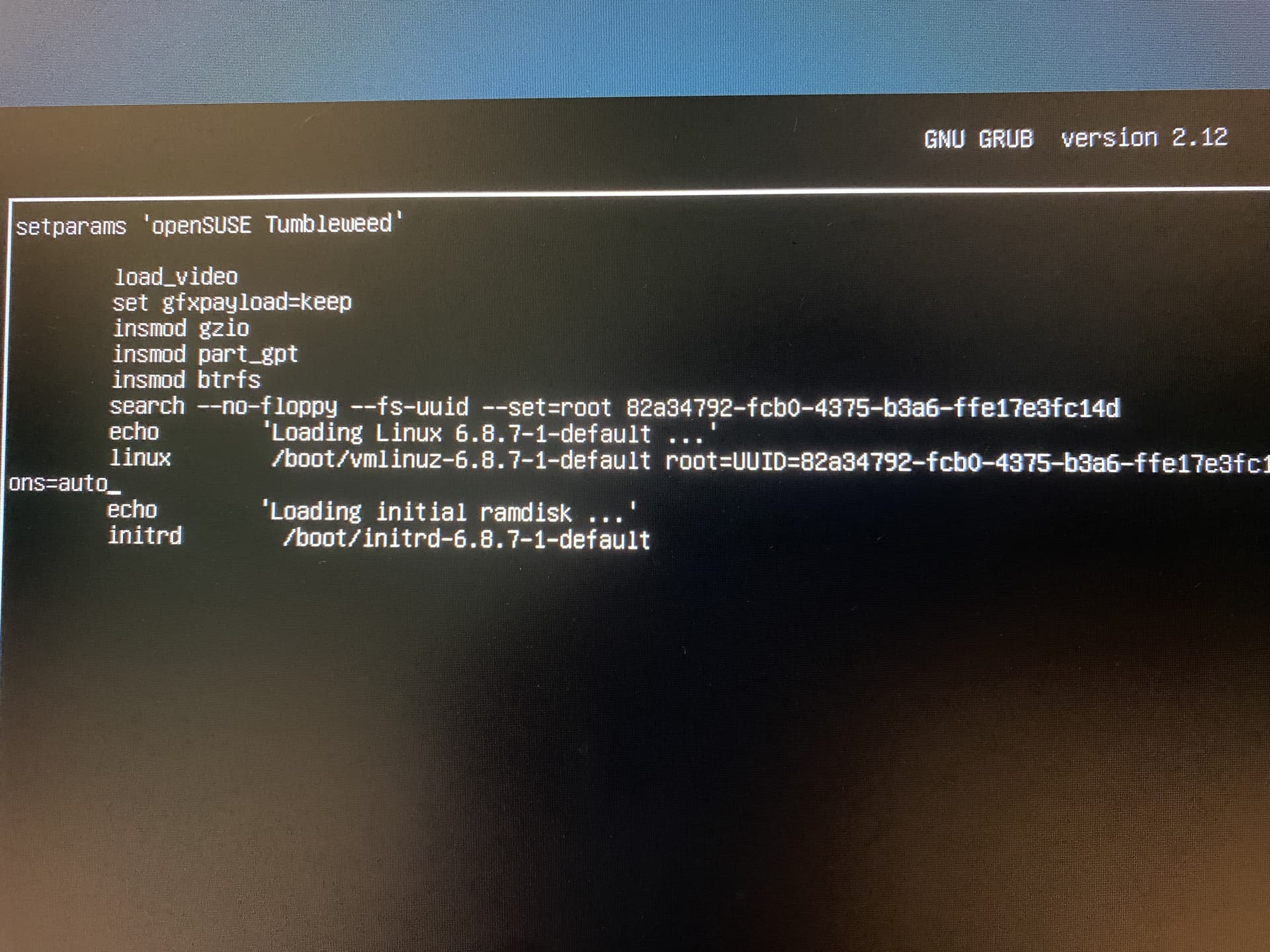
So, this is what I see after “press e to edit” I don’t see “linux/linux/efi” like you mentioned.
Third line from bottom reads
linux /boot/vmlinuz-......
1 Like
inxi -Gxxz
Graphics:
  Device-1: Intel AlderLake-S GT1 vendor: Gigabyte driver: i915 v: kernel
    ports: active: none empty: DP-1, DP-2, DP-3, HDMI-A-1, HDMI-A-2, HDMI-A-3
    bus-ID: 00:02.0 chip-ID: 8086:4680
  Device-2: NVIDIA AD104 [GeForce RTX 4070] vendor: Gigabyte driver: N/A
    arch: Lovelace pcie: speed: 16 GT/s lanes: 16 bus-ID: 01:00.0
    chip-ID: 10de:2786
  Display: x11 server: X.Org v: 21.1.12 with: Xwayland v: 23.2.6
    compositor: kwin_x11 driver: X: loaded: modesetting,vesa unloaded: fbdev
    failed: nvidia alternate: intel,nouveau,nv dri: iris gpu: i915
    display-ID: :0 screens: 1
  Screen-1: 0 s-res: 1920x1080 s-dpi: 96
  Monitor-1: Unknown-1 mapped: None-1 res: 1920x1080 size: N/A
  API: EGL v: 1.5 platforms: device: 0 drv: iris device: 1 drv: swrast gbm:
    drv: kms_swrast surfaceless: drv: iris x11: drv: swrast inactive: wayland
  API: OpenGL v: 4.6 compat-v: 4.5 vendor: mesa v: 24.0.5 glx-v: 1.4
    direct-render: yes renderer: llvmpipe (LLVM 18.1.4 256 bits)
    device-ID: ffffffff:ffffffff
  API: Vulkan v: 1.3.280 surfaces: xcb,xlib device: 0 type: integrated-gpu
    driver: N/A device-ID: 8086:4680