Hi everyone. I downloaded and installed NetBeans from the NetBeans website, then I installed OpenJDK with zypper, and then verified it with
home:~ # zypper search jdk | grep ^[-Si] S | Name | Summary | Type ---+--------------------------+------------------------------------+-------- i+ | java-25-openjdk | OpenJDK 25 Runtime Environment | package i | java-25-openjdk-headless | OpenJDK 25 Runtime Environment | package
NetBeans started up without any problems, but when I tried to make a test project, it complained that it couldn’t find the JDK. I had a quick look around the internet for how to tell NetBeans where my JDK is, but when I opened the window to tell it were the JDK is, it looked as if it was already pointing to (or close to) the right place and, even if it wasn’t, I didn’t see any way to select the right directory to change the setting.
Here’s a screenshot of it pointing to presumably not quite the right place.
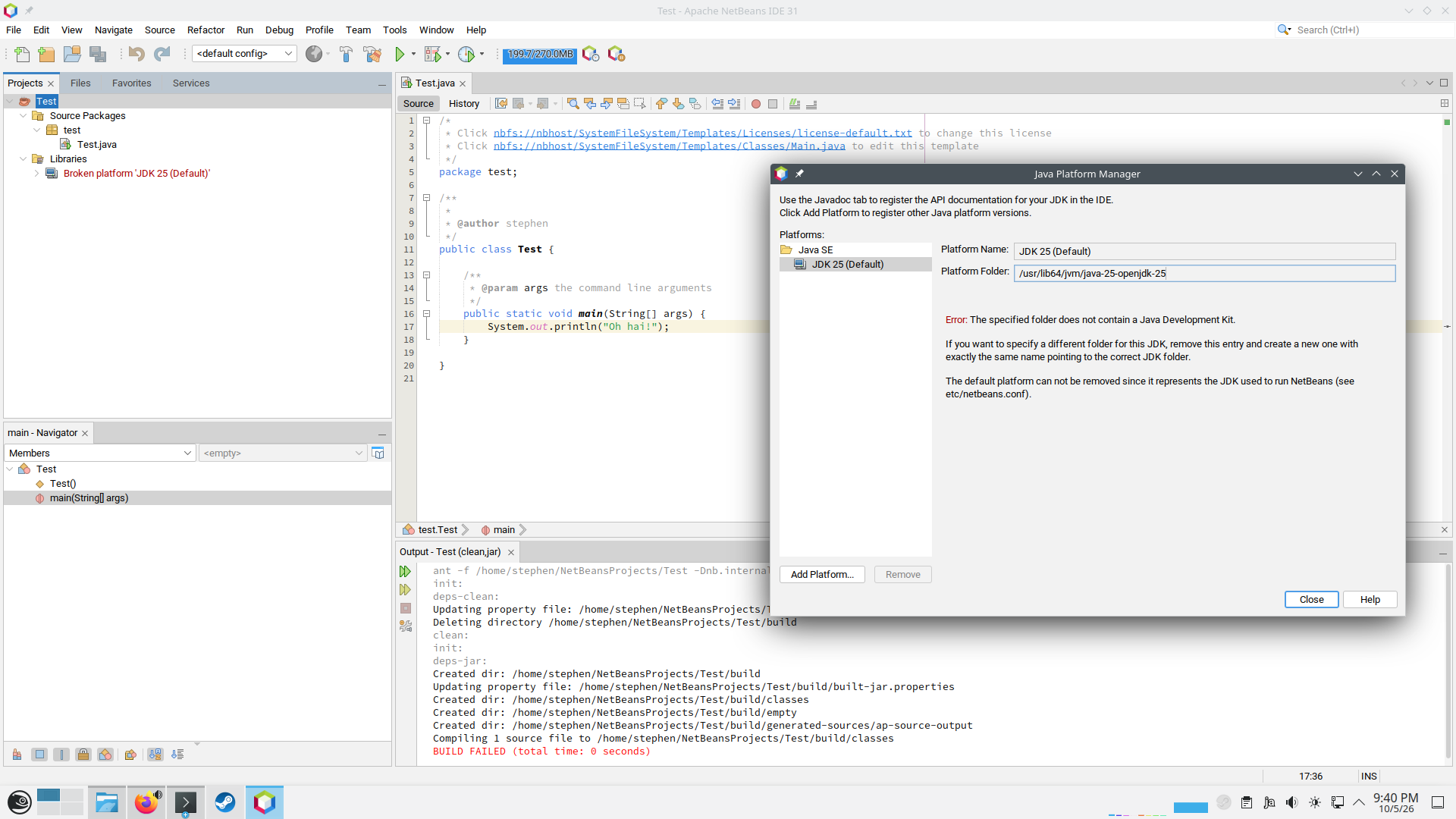
I remember the last time I had to do this I was done in about 3 clicks, but it doesn’t seem to want to know, this time. Does anyone know why it can’t find the JDK?