@norrin so it’s not grub2-efi, grub2-bls was an interim solution before the switch to systemd-boot…
Still think sdbootutil commands are used for that…
@norrin so it’s not grub2-efi, grub2-bls was an interim solution before the switch to systemd-boot…
Still think sdbootutil commands are used for that…
Tried again to install grub with chroot but there is always something missing.
The rescue-cd was a good hint.
Thanks.
BTW:
Could it be that it is not only a bootloader-issue but that i killed my opensuse-installation?
I browsed in the fileexplorer of the live-system and the whole folderstructur seems ok, but i do not really find my data (nextcloud for example).
I used an unencrypted btrfs.
Switch back to grub2-efi, see https://forums.opensuse.org/t/kernel-backups-in-boot-efi/192374/3
@norrin Just a note, you do need to do this in a chroot environment…
Yes, i learned this…
Fortunately you told me about the rescue-opensuse-xfce-cd.
At the beginning i typed all that stuff (the mounts and binds) by hand from the notebook to the pc.

Now i can do some copy&paste-shortcuts.
I guess i will try “shim” first like in this link you posted before.
The link helped (a little).
nrickert seems to be kind of expert for this.
the
mount -a
in chroot helped with the missing stuff before.
I did
shim-install
and it “worked”, but only with adding a second UEFI:opensuse-secureboot-non-nx-entry in the UEFI and a new microsoft-entry in the grub-menu.
localhost:/ # efibootmgr -v
BootCurrent: 0003
Timeout: 1 seconds
BootOrder: 0001,0000,0002,0003,0004
Boot0000* opensuse-secureboot-non-nx	HD(1,GPT,83cbdae3-6771-4694-8f43-b2abcaf24850,0x800,0x32000)/File(\EFI\opensuse\shim.non-nx.efi)
      dp: 04 01 2a 00 01 00 00 00 00 08 00 00 00 00 00 00 00 20 03 00 00 00 00 00 e3 da cb 83 71 67 94 46 8f 43 b2 ab ca f2 48 50 02 02 / 04 04 40 00 5c 00 45 00 46 00 49 00 5c 00 6f 00 70 00 65 00 6e 00 73 00 75 00 73 00 65 00 5c 00 73 00 68 00 69 00 6d 00 2e 00 6e 00 6f 00 6e 00 2d 00 6e 00 78 00 2e 00 65 00 66 00 69 00 00 00 / 7f ff 04 00
Boot0001* opensuse-secureboot	HD(1,GPT,83cbdae3-6771-4694-8f43-b2abcaf24850,0x800,0x32000)/File(\EFI\opensuse\shim.efi)
      dp: 04 01 2a 00 01 00 00 00 00 08 00 00 00 00 00 00 00 20 03 00 00 00 00 00 e3 da cb 83 71 67 94 46 8f 43 b2 ab ca f2 48 50 02 02 / 04 04 32 00 5c 00 45 00 46 00 49 00 5c 00 6f 00 70 00 65 00 6e 00 73 00 75 00 73 00 65 00 5c 00 73 00 68 00 69 00 6d 00 2e 00 65 00 66 00 69 00 00 00 / 7f ff 04 00
Boot0002* Windows Boot Manager	HD(1,GPT,83cbdae3-6771-4694-8f43-b2abcaf24850,0x800,0x32000)/File(\EFI\Microsoft\Boot\bootmgfw.efi)57494e444f5753000100000088000000780000004200430044004f0042004a004500430054003d007b00390064006500610038003600320063002d0035006300640064002d0034006500370030002d0061006300630031002d006600330032006200330034003400640034003700390035007d00000007050100000010000000040000007fff0400
      dp: 04 01 2a 00 01 00 00 00 00 08 00 00 00 00 00 00 00 20 03 00 00 00 00 00 e3 da cb 83 71 67 94 46 8f 43 b2 ab ca f2 48 50 02 02 / 04 04 46 00 5c 00 45 00 46 00 49 00 5c 00 4d 00 69 00 63 00 72 00 6f 00 73 00 6f 00 66 00 74 00 5c 00 42 00 6f 00 6f 00 74 00 5c 00 62 00 6f 00 6f 00 74 00 6d 00 67 00 66 00 77 00 2e 00 65 00 66 00 69 00 00 00 / 7f ff 04 00
    data: 57 49 4e 44 4f 57 53 00 01 00 00 00 88 00 00 00 78 00 00 00 42 00 43 00 44 00 4f 00 42 00 4a 00 45 00 43 00 54 00 3d 00 7b 00 39 00 64 00 65 00 61 00 38 00 36 00 32 00 63 00 2d 00 35 00 63 00 64 00 64 00 2d 00 34 00 65 00 37 00 30 00 2d 00 61 00 63 00 63 00 31 00 2d 00 66 00 33 00 32 00 62 00 33 00 34 00 34 00 64 00 34 00 37 00 39 00 35 00 7d 00 00 00 07 05 01 00 00 00 10 00 00 00 04 00 00 00 7f ff 04 00
Boot0003  UEFI: VendorCoProductCode 2.00, Partition 2PciRoot(0x0)/Pci(0x8,0x3)/Pci(0x0,0x0)/USB(1,0)/HD(2,GPT,36323032-3630-4330-b032-303831333533,0x18fed4,0xa000)0000424f
      dp: 02 01 0c 00 d0 41 03 0a 00 00 00 00 / 01 01 06 00 03 08 / 01 01 06 00 00 00 / 03 05 06 00 01 00 / 04 01 2a 00 02 00 00 00 d4 fe 18 00 00 00 00 00 00 a0 00 00 00 00 00 00 32 30 32 36 30 36 30 43 b0 32 30 38 31 33 35 33 02 02 / 7f ff 04 00
    data: 00 00 42 4f
Boot0004  UEFI: Memorex TD Classic 003C 1.02, Partition 1	PciRoot(0x0)/Pci(0x8,0x3)/Pci(0x0,0x0)/USB(0,0)/HD(1,MBR,0xe98468d,0x3f,0x7afc1)0000424f
      dp: 02 01 0c 00 d0 41 03 0a 00 00 00 00 / 01 01 06 00 03 08 / 01 01 06 00 00 00 / 03 05 06 00 00 00 / 04 01 2a 00 01 00 00 00 3f 00 00 00 00 00 00 00 c1 af 07 00 00 00 00 00 8d 46 98 0e 00 00 00 00 00 00 00 00 00 00 00 00 01 01 / 7f ff 04 00
    data: 00 00 42 4f
localhost:/ #
localhost:/ # update-bootloader --reinit
+ sdbootutil install
invalid numeric value null

efi_distro_dir=opensuse
efi_order=0001,0000,0002,0003,0004
efi_entry.num=0001
efi_entry.file=EFI/opensuse/shim.efi
efi_entry.name=opensuse-secureboot
localhost:/ # shim-install --removable
copying /usr/share/efi/x86_64/grub.efi to /boot/efi/EFI/boot/grub.efi
Installing for x86_64-efi platform.
Installation finished. No error reported.
localhost:/ #
Does this help in any way?
Not really. I’ve had some experience with it, but I do not consider myself to be an expert on grub.
You are probably still configured for “grub-bls”.
Try editing “/etc/sysconfig/bootloader”.
Then set
LOADER_TYPE="grub2-efi"
You might then need:
zypper install grub2 grub2-x86_64-efi
That will probably give a conflict, with a choice to uninstall (remove) packages related to grub-bls.
After that is done, try again with:
update-bootloader --reinit
Note that I have never attempted a switch from grub-bls to grub2-efi, so I don’t know if it will work. And yes, you will have to attempt those steps in a chroot environment if you cannot directly boot into your system.
I do not really believe that ("being no expert)… 
It looks a little bit better.
In the UEFI:
The UEFI-opensuse-no-nx-entry disappeared and there is only one opensuse-entry left.
Unfortunately there is only the lost Microsoft-entry (and the UEFI-firmware-entry) in the grub menu.
I also did
grub2-install --target=x86_64-efi --bootloader-id=opensuse --efi-directory=/boot/efi
with no changes.
kernel-install says i am still on “BLS”, but i guess this is wrong.
ocalhost:/ # efibootmgr -v
BootCurrent: 0003
Timeout: 1 seconds
BootOrder: 0000,0002,0003,0004
Boot0000* opensuse	HD(1,GPT,83cbdae3-6771-4694-8f43-b2abcaf24850,0x800,0x32000)/File(\EFI\opensuse\grubx64.efi)
      dp: 04 01 2a 00 01 00 00 00 00 08 00 00 00 00 00 00 00 20 03 00 00 00 00 00 e3 da cb 83 71 67 94 46 8f 43 b2 ab ca f2 48 50 02 02 / 04 04 38 00 5c 00 45 00 46 00 49 00 5c 00 6f 00 70 00 65 00 6e 00 73 00 75 00 73 00 65 00 5c 00 67 00 72 00 75 00 62 00 78 00 36 00 34 00 2e 00 65 00 66 00 69 00 00 00 / 7f ff 04 00
Boot0002* Windows Boot Manager	HD(1,GPT,83cbdae3-6771-4694-8f43-b2abcaf24850,0x800,0x32000)/File(\EFI\Microsoft\Boot\bootmgfw.efi)57494e444f5753000100000088000000780000004200430044004f0042004a004500430054003d007b00390064006500610038003600320063002d0035006300640064002d0034006500370030002d0061006300630031002d006600330032006200330034003400640034003700390035007d00000007050100000010000000040000007fff0400
      dp: 04 01 2a 00 01 00 00 00 00 08 00 00 00 00 00 00 00 20 03 00 00 00 00 00 e3 da cb 83 71 67 94 46 8f 43 b2 ab ca f2 48 50 02 02 / 04 04 46 00 5c 00 45 00 46 00 49 00 5c 00 4d 00 69 00 63 00 72 00 6f 00 73 00 6f 00 66 00 74 00 5c 00 42 00 6f 00 6f 00 74 00 5c 00 62 00 6f 00 6f 00 74 00 6d 00 67 00 66 00 77 00 2e 00 65 00 66 00 69 00 00 00 / 7f ff 04 00
    data: 57 49 4e 44 4f 57 53 00 01 00 00 00 88 00 00 00 78 00 00 00 42 00 43 00 44 00 4f 00 42 00 4a 00 45 00 43 00 54 00 3d 00 7b 00 39 00 64 00 65 00 61 00 38 00 36 00 32 00 63 00 2d 00 35 00 63 00 64 00 64 00 2d 00 34 00 65 00 37 00 30 00 2d 00 61 00 63 00 63 00 31 00 2d 00 66 00 33 00 32 00 62 00 33 00 34 00 34 00 64 00 34 00 37 00 39 00 35 00 7d 00 00 00 07 05 01 00 00 00 10 00 00 00 04 00 00 00 7f ff 04 00
Boot0003  UEFI: VendorCoProductCode 2.00, Partition 2	PciRoot(0x0)/Pci(0x8,0x3)/Pci(0x0,0x0)/USB(1,0)/HD(2,GPT,36323032-3630-4330-b032-303831333533,0x18fed4,0xa000)0000424f
      dp: 02 01 0c 00 d0 41 03 0a 00 00 00 00 / 01 01 06 00 03 08 / 01 01 06 00 00 00 / 03 05 06 00 01 00 / 04 01 2a 00 02 00 00 00 d4 fe 18 00 00 00 00 00 00 a0 00 00 00 00 00 00 32 30 32 36 30 36 30 43 b0 32 30 38 31 33 35 33 02 02 / 7f ff 04 00
    data: 00 00 42 4f
Boot0004  UEFI: Memorex TD Classic 003C 1.02, Partition 1	PciRoot(0x0)/Pci(0x8,0x3)/Pci(0x0,0x0)/USB(0,0)/HD(1,MBR,0xe98468d,0x3f,0x7afc1)0000424f
      dp: 02 01 0c 00 d0 41 03 0a 00 00 00 00 / 01 01 06 00 03 08 / 01 01 06 00 00 00 / 03 05 06 00 00 00 / 04 01 2a 00 01 00 00 00 3f 00 00 00 00 00 00 00 c1 af 07 00 00 00 00 00 8d 46 98 0e 00 00 00 00 00 00 00 00 00 00 00 00 01 01 / 7f ff 04 00
    data: 00 00 42 4f
localhost:/ # kernel-install
        Machine ID: e321c18b277243408>
 Kernel Image Type: pe
            Layout: bls
The problem seems to be that grub does not find the opensuse-tw-installation:
localhost:/ # grub2-mkconfig -o /boot/grub2/grub.cfg
Generating grub configuration file ...
Found theme: /boot/grub2/themes/openSUSE/theme.txt
Warning: os-prober will be executed to detect other bootable partitions.
Its output will be used to detect bootable binaries on them and create new boot entries.
1169.027621 | DM multipath kernel driver not loaded
Found Windows Boot Manager on /dev/nvme0n1p1@/EFI/Microsoft/Boot/bootmgfw.efi
Adding boot menu entry for UEFI Firmware Settings ...
done
localhost:/ #
Solved it!
It needed a
zypper in -f kernel-default
grub did not find it, because it was missing.
BTW:
The command above said that there is only BLS- and systemd-boot on the system, so i guess i will change that back.
THANKS for your support!
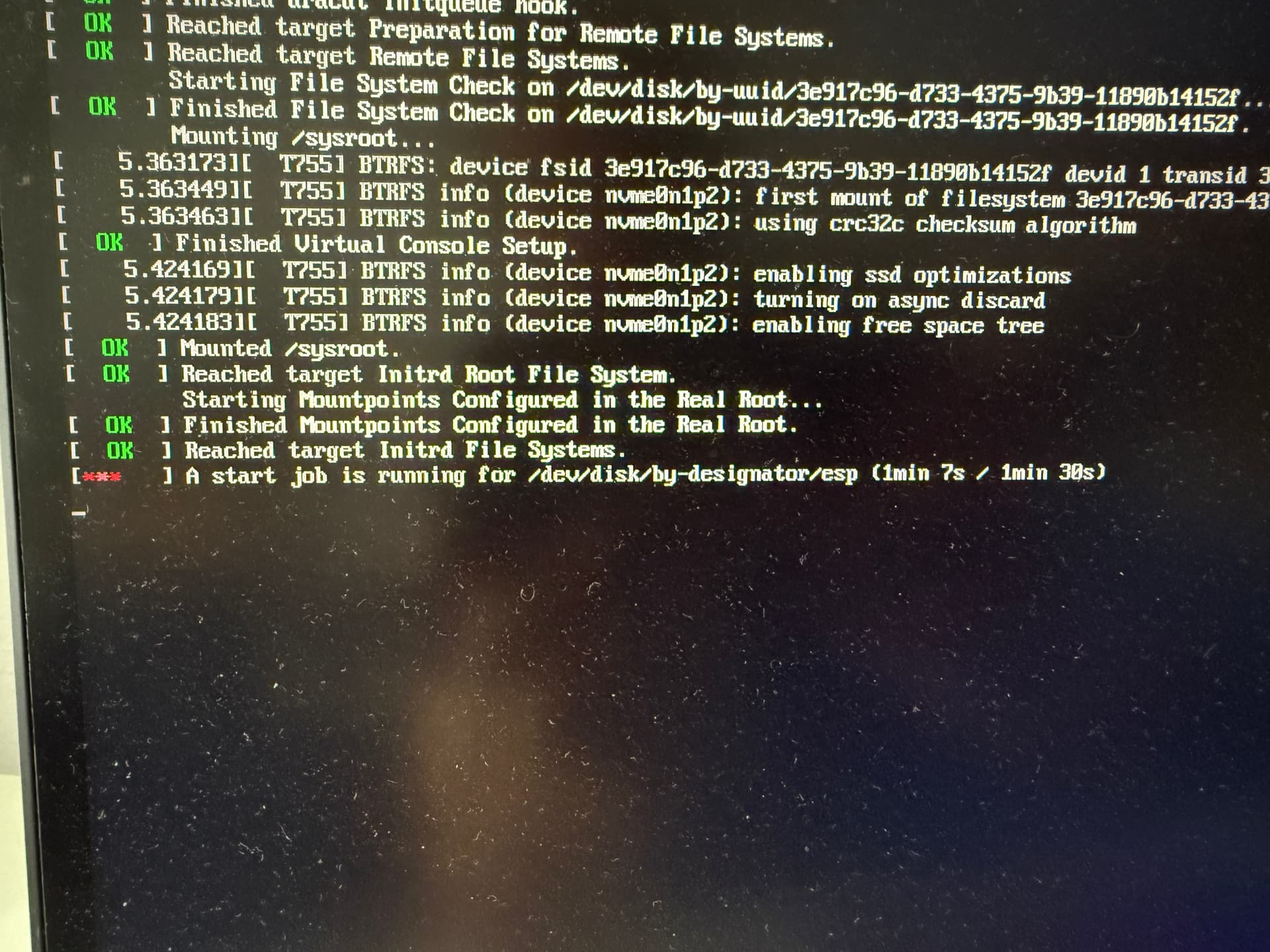
It works but when booting the pc is waiting 1:30min at
a start job is running for /dev/disk/by-designator/esp
there is only the opensuse-entry left
norrin@linux:~> sudo efibootmgr
[sudo] Passwort für root:
BootCurrent: 0005
Timeout: 1 seconds
BootOrder: 0005
Boot0005* opensuse-secureboot HD(1,GPT,83cbdae3-6771-4694-8f43-b2abcaf24850,0x800,0x32000)/File(\EFI\opensuse\shim.efi)
norrin@linux:~>
the uuids in the fstab are correct.
Any ideas?
You probably saw that in your native language, and translated to English for this post. But I don’t see any “/dev/disk/by-designator”. Instead, I see “/dev/disk/by-label” as the most likely correct translation.
Did you resize and reformat your EFI partition in all of the steps that you did? If so, you probably failed to give it the label ESP.
No i did not do anything with the partition - too afraid.
I did not ranslate anything. It is really the name (see photo; sorry for the dirty screen)
Perhaps this recent post might be relevant:
This topic was automatically closed 7 days after the last reply. New replies are no longer allowed.