Leap 16: HP 1020 USB not printing after system update

Yesterday I updated to Leap 16. After the update, my HP 1020 printer stopped working and won’t print anymore. The printer is connected via USB. I tried reconfiguring it using hp-setup -i , but the printer is not detected.

Here are the command outputs:

lsusb | grep -i hp

Bus 003 Device 006: ID 03f0:2b17 HP, Inc LaserJet 1020
hp-setup -i


HP Linux Imaging and Printing System (ver. 3.26.4)

Printer/Fax Setup Utility ver. 9.0


Copyright (c) 2001-18 HP Development Company, LP

This software comes with ABSOLUTELY NO WARRANTY.

This is free software, and you are welcome to distribute it

under certain conditions. See COPYING file for more details.


(Note: Defaults for each question are maked with a '*'. Press <enter> to accept the default.)


--------------------------------

| SELECT CONNECTION (I/O) TYPE |

--------------------------------


 Num       Connection  Description                                                

           Type                                                                   

 --------  ----------  ----------------------------------------------------------

 0*        usb         Universal Serial Bus (USB)                                 

 1         net         Network/Ethernet/Wireless (direct connection or JetDirect)


Enter number 0...1 for connection type (q=quit, enter=usb*) ? 0 

Have you tried cups to change the printers URL or add a new Printer?

Does hp-setup work if you use sudo? If so, then the user likely needs adding the lp group first (for r/w access to USB connected devices).

Also, check that ipp-usb is not installed, as that might inhibit the HP utility from working.

Also, with the printer connected and turned on run
sudo lpinfo -v

I installed ipp-usb , but it didn’t change anything.

Only once it showed:

sudo lpinfo -v
[sudo] hasło użytkownika root: 
network beh
network http
network lpd
network ipp
network socket
network ipps
network https
network smb
direct usb://Unknown/Printer?serial=0.0
direct hp
direct hpfax


Now it shows this:

sudo lpinfo -v
network beh
network lpd
network http
network https
network socket
network ipps
network ipp
network smb


>hp-setup -i

HP Linux Imaging and Printing System (ver. 3.26.4)
Printer/Fax Setup Utility ver. 9.0

Copyright (c) 2001-18 HP Development Company, LP
This software comes with ABSOLUTELY NO WARRANTY.
This is free software, and you are welcome to distribute it
under certain conditions. See COPYING file for more details.

(Note: Defaults for each question are maked with a '*'. Press <enter> to accept the default.)


--------------------------------
| SELECT CONNECTION (I/O) TYPE |
--------------------------------

  Num       Connection  Description                                               
            Type                                                                  
  --------  ----------  ----------------------------------------------------------
  0*        usb         Universal Serial Bus (USB)                                
  1         net         Network/Ethernet/Wireless (direct connection or JetDirect)

Enter number 0...1 for connection type (q=quit, enter=usb*) ? 0

Using connection type: usb

error: No device selected/specified or that supports this functionality.

No, make sure it is NOT installed.

Is CUPS active?
sudo systemctl status cups.service

Further to the above, show us which groups the user is a member of via the groups command in a terminal.

Also do
hp-probe -busb
sudo hp-probe -busb

Please show all requested output.

Below are the logs. Under Windows, the printer works fine. Besides, up until the update, there were no problems with it on openSUSE either.

sudo systemctl status cups.service
● cups.service - CUPS Scheduler
     Loaded: loaded (/usr/lib/systemd/system/cups.service; enabled; preset: enabled)
     Active: active (running) since Tue 2026-11-03 08:41:14 CET; 3min 23s ago
 Invocation: 5338ca0833054759b2345ac144243115
TriggeredBy: ● cups.socket
             ● cups.path
       Docs: man:cupsd(8)
   Main PID: 1108 (cupsd)
     Status: "Scheduler is running..."
      Tasks: 2 (limit: 9120)
        CPU: 573ms
     CGroup: /system.slice/system-cups.slice/cups.service
             ├─1108 /usr/sbin/cupsd -l
             └─2756 /usr/lib/cups/notifier/dbus dbus://

lis 03 08:41:14 localhost.localdomain systemd[1]: Starting CUPS Scheduler...
lis 03 08:41:14 localhost.localdomain systemd[1]: Started CUPS Scheduler.
lis 03 08:43:05 localhost.localdomain hp[2760]: io/hpmud/musb.c 153: unable get_string_descriptor -7: Resource temporarily unavailab>
lis 03 08:43:05 localhost.localdomain hp[2760]: io/hpmud/musb.c 606: invalid product id string ret=-7
lis 03 08:43:05 localhost.localdomain hp[2760]: io/hpmud/musb.c 1152: unable to open hp:/usb/HP_LaserJet_1020?serial=JL1XPPS
lis 03 08:43:05 localhost.localdomain hp[2760]: prnt/backend/hp.c 824: ERROR: open device failed stat=12: hp:/usb/HP_LaserJet_1020?s>

krysia@localhost:~> hp-probe -busb
/usr/bin/hp-probe:45: SyntaxWarning: invalid escape sequence '\*'
  ("", "<bus>: cups, usb\*, net, bt, fw, par (\*default) (Note: bt and fw not supported in this release.)", "option", False),
/usr/bin/hp-probe:49: SyntaxWarning: invalid escape sequence '\*'
  ("", "<filter list>: comma separated list of one or more of: scan, pcard, fax, copy, or none\*. (\*none is the default)", "option", False),

HP Linux Imaging and Printing System (ver. 3.26.4)
Printer Discovery Utility ver. 4.1

Copyright (c) 2001-18 HP Development Company, LP
This software comes with ABSOLUTELY NO WARRANTY.
This is free software, and you are welcome to distribute it
under certain conditions. See COPYING file for more details.


--------------------
| DEVICE DISCOVERY |
--------------------

warning: No devices found on the 'usb' bus. If this isn't the result you are expecting,
warning: check to make sure your devices are properly connected and powered on.

Done.
krysia@localhost:~> sudo hp-probe -busb
/usr/bin/hp-probe:45: SyntaxWarning: invalid escape sequence '\*'
  ("", "<bus>: cups, usb\*, net, bt, fw, par (\*default) (Note: bt and fw not supported in this release.)", "option", False),
/usr/bin/hp-probe:49: SyntaxWarning: invalid escape sequence '\*'
  ("", "<filter list>: comma separated list of one or more of: scan, pcard, fax, copy, or none\*. (\*none is the default)", "option", False),
warning: hp-probe should not be run as root/superuser.

HP Linux Imaging and Printing System (ver. 3.26.4)
Printer Discovery Utility ver. 4.1

Copyright (c) 2001-18 HP Development Company, LP
This software comes with ABSOLUTELY NO WARRANTY.
This is free software, and you are welcome to distribute it
under certain conditions. See COPYING file for more details.


--------------------
| DEVICE DISCOVERY |
--------------------

warning: No devices found on the 'usb' bus. If this isn't the result you are expecting,
warning: check to make sure your devices are properly connected and powered on.

Done.
krysia@localhost:~> lsusb | grep -i hp
Bus 003 Device 006: ID 03f0:2b17 HP, Inc LaserJet 1020
krysia@localhost:~> sudo lpinfo -v
network beh
network lpd
network socket
network https
network ipps
network http
network ipp
network smb
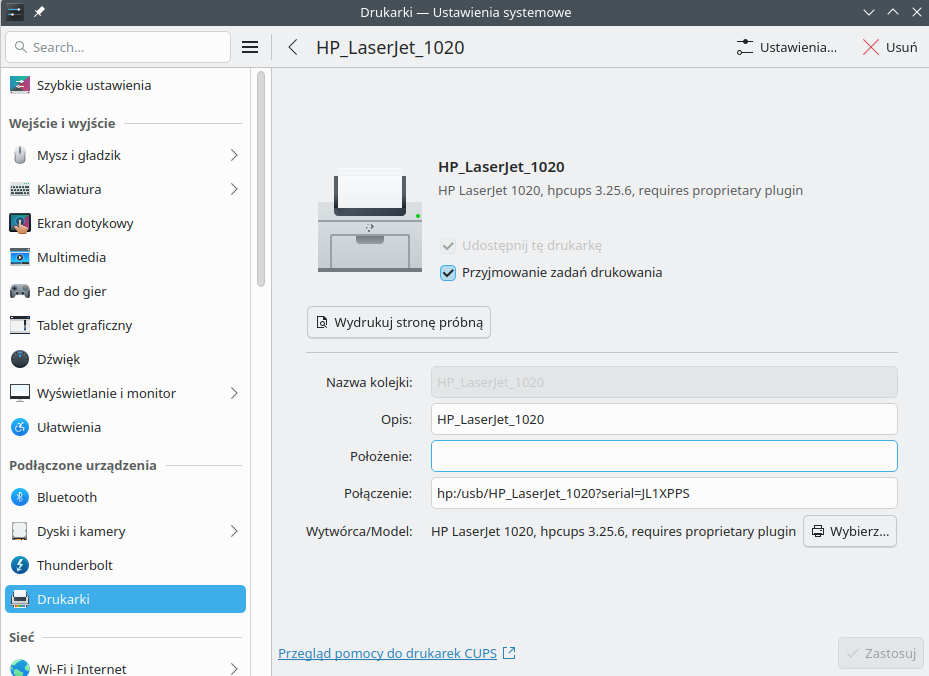
Did you make sure ipp-usb is uninstalled?

Yes :slight_smile:

zypper search ipp-usb
Refreshing service 'NVIDIA'.
Refreshing service 'openSUSE'.
Loading repository data...
Reading installed packages...

S  | Name    | Summary                                                         | Type
---+---------+-----------------------------------------------------------------+--------
   | ipp-usb | HTTP reverse proxy, backed by IPP-over-USB connection to device | package

    Note: For an extended search including not yet activated remote resources please use 'zypper
    search-packages'.

Ok, show
ls -l /dev/bus/usb/*/*

ls -l /dev/bus/usb/*/*
crw-rw-r--. 1 root root 189,   0 Nov  3 09:09 /dev/bus/usb/001/001
crw-rw-r--. 1 root root 189,   1 Nov  3 09:09 /dev/bus/usb/001/002
crw-rw-r--. 1 root root 189, 128 Nov  3 09:09 /dev/bus/usb/002/001
crw-rw-r--. 1 root root 189, 129 Nov  3 09:09 /dev/bus/usb/002/002
crw-rw-r--. 1 root root 189, 256 Nov  3 09:09 /dev/bus/usb/003/001
crw-rw-r--. 1 root root 189, 257 Nov  3 09:09 /dev/bus/usb/003/002
crw-rw-r--. 1 root root 189, 258 Nov  3 09:09 /dev/bus/usb/003/003
crw-rw-r--. 1 root root 189, 259 Nov  3 09:09 /dev/bus/usb/003/004
crw-rw-r--. 1 root root 189, 260 Nov  3 09:09 /dev/bus/usb/003/005
crw-rw-r--+ 1 root lp   189, 262 Nov  3 09:23 /dev/bus/usb/003/007
crw-rw-r--. 1 root root 189, 384 Nov  3 09:09 /dev/bus/usb/004/001

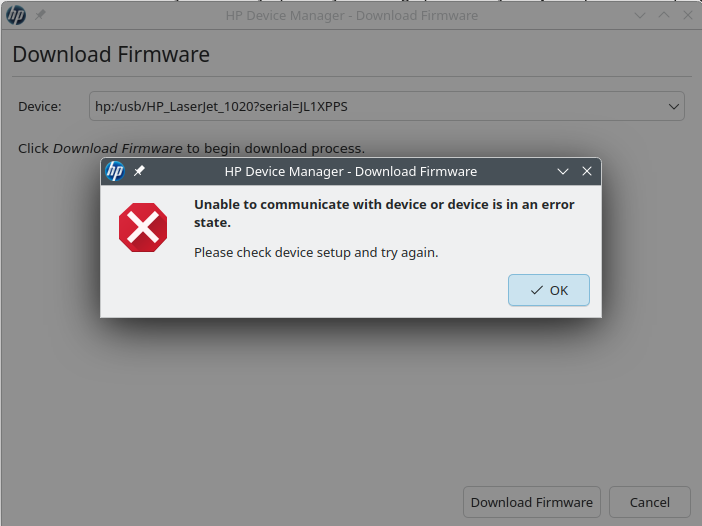
I tried to upload the firmware:

hp-firmware

HP Linux Imaging and Printing System (ver. 3.26.4)
Firmware Download Utility ver. 2.4

Copyright (c) 2001-18 HP Development Company, LP
This software comes with ABSOLUTELY NO WARRANTY.
This is free software, and you are welcome to distribute it
under certain conditions. See COPYING file for more details.

QStandardPaths: runtime directory '/run/user/1000' is not owned by UID 0, but a directory permissions 0700 owned by UID 1000 GID 100
error:  Unable to communicate with device or device is in an error state.  Please check device setup and try again. 

It is strange. Please show

ls -l /usr/lib/cups/backend/usb
sudo /usr/lib/cups/backend/usb

I don’t have access to that PC right now. As soon as I do, I’ll send over the logs. I’m wondering if it might be a USB issue. Sometimes the computer takes a long time to boot up, and the mouse and keyboard don’t work. It might be on its last legs, it’s definitely not the newest machine :frowning:

It could well be, given the CUPS USB backend didn’t enumerate it as expected.

ls -l /usr/lib/cups/backend/usb
-rwxr--r--. 1 root root 39016 09-14 12:06 /usr/lib/cups/backend/usb
krysia@localhost:~> sudo /usr/lib/cups/backend/usb
[sudo] hasło użytkownika root: 
DEBUG: Loading USB quirks from "/usr/share/cups/usb".
DEBUG: Loaded 219 quirks.
DEBUG: list_devices
DEBUG: libusb_get_device_list=11
DEBUG2: Printer found with device ID:  Device URI: usb://Unknown/Printer?serial=0.0
direct usb://Unknown/Printer?serial=0.0 "Unknown" "Unknown" "" ""

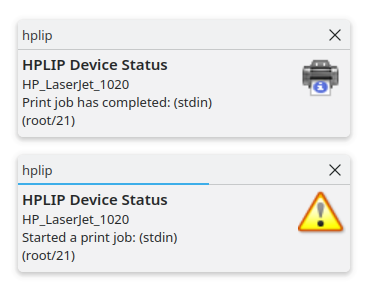
The printer isn’t printing, and I’m getting these error messages:

OK, so that shows the CUPS USB backend is working and detecting the printer. However, it isn’t identifying it as expected.

One possibility is that the printer hasn’t received its firmware. The HP LaserJet 1020 needs its firmware uploaded by the host after power-on before it becomes fully operational.

Check whether the HP firmware is present on the system…

ls -l /usr/share/hplip/data/firmware/

If the firmware file is present, we can investigate why it isn’t being uploaded successfully.

Run hp-plugin -ito download the HP firmware (if missing). Follow the interactive prompts to read and accept the license agreement so it can download and install the proprietary plugin.

Power-cycle the printer. (Turn off the physical power switch on the LaserJet 1020, wait about 5 seconds, and turn it back on.)

Explicitly push the firmware with hp-firmware. Any errors?

Post the output of sudo /usr/lib/cups/backend/usb afterwards. Is the printer properly recognised now?