If the boot fails on 6.18 kernel with amdgpu.dc=0 command my system won’t just boot and my monitor will just show “No Signal”. That’s why I can’t go to TTY
How can I do this?
Ok, just wanted to make certain that is the case.
1 Like
When power on the machine enter BIOS setup not certain which keypress initiates this on your machine (possibly F1, F10, ESC etc). Take a look at some of the configuration options. Doubtful it will correct the issue but worth a try? I would consider filing a bug report with openSUSE Bugzilla. Someone else may have better advice though.
1 Like
In case you have not tried the following yet. Try loading the Desktop Environment using Wayland instead of X11 and see if it helps. I see in Post #3 inxi -GSaz output shows Display: x11 .
1 Like
Bit late, but I had amdgpu panics when first upgrading to 6.18 kernel. 
Fixed by adding amdgpu.gpu_recovery=1 amdgpu.ppfeaturemask=0xfff73fff to GRUB_CMDLINE_LINUX_DEFAULT parameter in /etc/default/grub and running update-bootloader followed by reboot. 
1 Like
Can I do this? ? sudo update-bootloader --add-option amdgpu.gpu_recovery=1 amdgpu.ppfeaturemask=0xfff73fff then sudo update-bootloader --config . Since there’s no grub file on me /etc/default . And the final result will be look like this: amdgpu.gpu_recovery=1 amdgpu.ppfeaturemask=0xfff73fff amdgpu.dc=0
That should work, verify by running cat /proc/cmdline after reboot! 
Unfortunately the command you brought up didn’t work for me. Still stuck at ‘No Signal’ but there’s something new show up. Before my screen goes to black there’s new other line show up but I didn’t see it complete since it was so fast. It said: “You using amdoverdrive please report a bug etc” I’m not really sure if this what it said but it something like that.
I had a look at you two logs, diffed them and one thing is clear, you seems to have an encrypted home partition (or another encrypted partition in fstab that is encrypted) and for the problematic case you did/can not enter the password and therefore the boot “hangs”.
If I understand it correct, amdgpu.dc=1 should be the default so in the sense the not working log with amdgpu.dc=0 is not that interesting. Do you know why you tried with amdgpu.dc=0?
Anyway I’m using long-term kernel right now and everything is working fine
Would be good that have also a boot log for this long-term kernel.
1 Like
Yup I have encrypted partition that is home, root, and swap. And the reason why I can’t enter my password is because there are no display show as the video I sent
Yup should be the default and the reason why I use amdgpu.dc=0 is because that’s the only command that works on my setup. That command makes my second monitor work and the amdgpu.dc=1 does not.
yup here’s the log of long-term kernel:
Please try another keyboard if possible.
Dec 19 10:06:00 localhost kernel: input: Micro-Star INT'L CO.,LTD MSI GK30 Gaming Keyboard Consumer Control as /devices/pci0000:00/0000:00:01.3/0000:01:00.0/usb1/1-6/1-6:1.1/0003:0DB0:0B30.0006/input/input6
[3.446184][ T6721 usbhid 1-5:1.2: couldn't find a input interrupt endpoint
That usbhid error has been prompting me since 6.0 been released and ever since that error never gone away and I me already change keyboard 3x since 6.0 kernel released
What are your thoughts about lines 454-458 here > openSUSE Paste
Did diff this lst log (left) with your 6.18 problematic amdgpu.dc=0 log (right) and see:
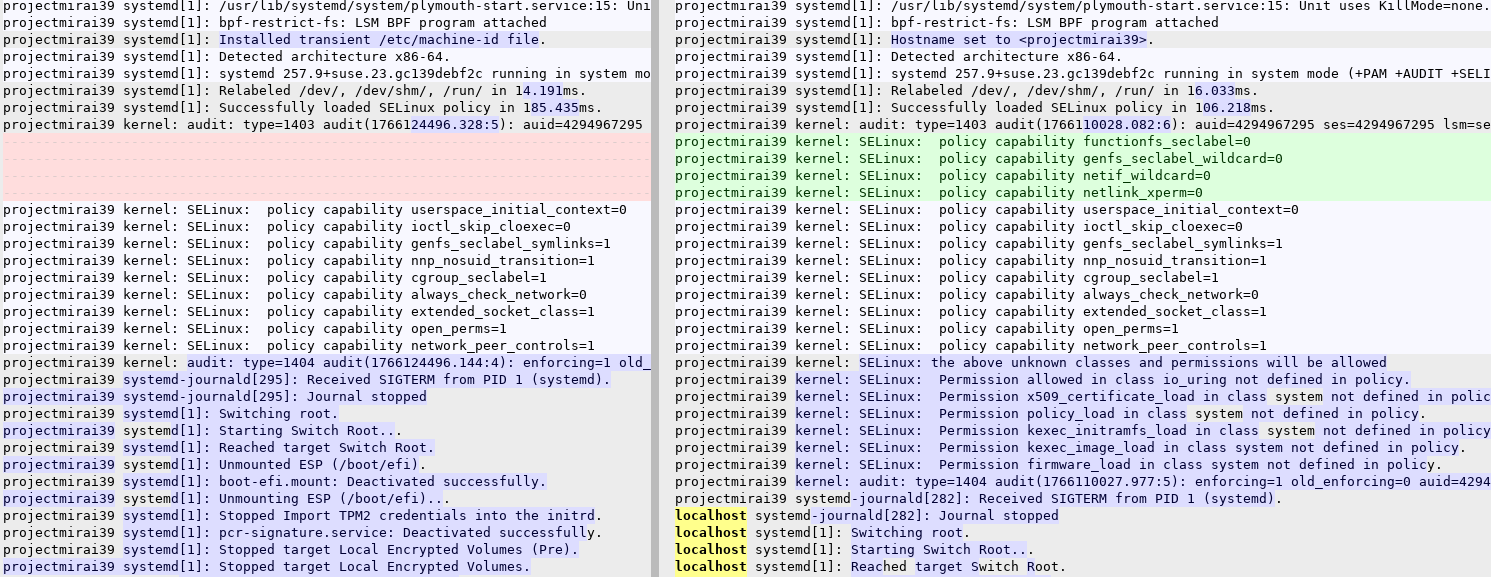
Two things that if find remarkable:
- For 6.18 the machine starts with the name localhost (earlier in the log there is No hostname configured, using default hostname.) and only after plymouth did finish the hostname is updated to projectmirai39.
- SELinux policies have changed. Not up-to-speed with SELinux but could “Permission firmware_load in class system not defined in policy” cause problems?
On the problem:

For 6.18 there are no AMDGPU Display Connectors detected…
2 Likes
Speaking of 6.18, has it become the new kernel-longterm?
@shishimaru that is an question for another topic.
I still had the diff open and had a better look:

So for 6.18 the DCE ip block is missing and that seems to be important as it is the Radeon R* Graphics APU
https://www.kernel.org/doc/html/v6.2/gpu/amdgpu/driver-misc.html
But also for the LTS kernel there are amdgpu problems:
Kernel RIP with amdgpu_gem_va_ioctl in it
kernel: ------------[ cut here ]------------
kernel: WARNING: CPU: 0 PID: 3072 at drivers/gpu/drm/ttm/ttm_bo.c:252 ttm_bo_release+0x298/0x2f0 [ttm]
kernel: Modules linked in: rfcomm snd_seq_dummy snd_hrtimer snd_seq af_packet nft_fib_inet nft_fib_ipv4 nft_fib_ipv6 nft_fib nft_reject_inet nf_reject_ipv4 nf_reject_ipv6 nft_reject nft_ct nft_chain_nat ip6table_nat ip6table_mangle ip6table_raw ip6table_security iptable_nat nf_nat nf_conntrack nf_defrag_ipv6 nf_defrag_ipv4 iptable_mangle iptable_raw iptable_security ip6table_filter ip6_tables qrtr cmac algif_hash algif_skcipher af_alg bnep nf_tables nfnetlink iptable_filter msr binfmt_misc xfs snd_hda_codec_realtek intel_rapl_msr snd_hda_codec_generic amd_atl snd_hda_scodec_component intel_rapl_common snd_hda_codec_hdmi snd_hda_intel snd_usb_audio snd_intel_dspcfg snd_usbmidi_lib snd_intel_sdw_acpi snd_ump edac_mce_amd snd_hda_codec btusb snd_rawmidi snd_hda_core kvm_amd btrtl snd_seq_device snd_hwdep btintel snd_pcm r8169 btbcm ee1004 kvm snd_timer realtek btmtk i2c_piix4 snd mdio_devres irqbypass wmi_bmof k10temp bluetooth mc i2c_smbus soundcore pcspkr libphy rfkill joydev gpio_amdpt tiny_power_button
kernel: gpio_generic button nvme_fabrics loop nvme_keyring fuse efi_pstore configfs ip_tables x_tables dm_crypt essiv authenc trusted asn1_encoder tee amdgpu nls_iso8859_1 nls_cp437 crct10dif_pclmul uas crc32_pclmul vfat usb_storage hid_generic usbhid fat video polyval_clmulni ahci amdxcp polyval_generic libahci i2c_algo_bit ghash_clmulni_intel drm_ttm_helper libata sha512_ssse3 ttm sd_mod sha256_ssse3 drm_exec scsi_dh_emc sha1_ssse3 gpu_sched scsi_dh_rdac aesni_intel drm_suballoc_helper scsi_dh_alua nvme gf128mul drm_buddy xhci_pci sg crypto_simd nvme_core drm_display_helper xhci_hcd scsi_mod cryptd nvme_auth cec ccp sp5100_tco scsi_common usbcore rc_core wmi btrfs blake2b_generic libcrc32c crc32c_intel xor raid6_pq dm_mod efivarfs dmi_sysfs
kernel: CPU: 0 UID: 0 PID: 3072 Comm: Xorg.bin Not tainted 6.12.62-1-longterm #1 openSUSE Tumbleweed c7670a4305452146d1d08d50d6b518d80029af3d
kernel: Hardware name: To Be Filled By O.E.M. B450M Steel Legend/B450M Steel Legend, BIOS P4.60 10/20/2022
kernel: RIP: 0010:ttm_bo_release+0x298/0x2f0 [ttm]
kernel: Code: 75 6c 48 8b b5 40 08 00 00 8b bd e0 00 00 00 48 83 c4 40 48 8d 53 30 5b 5d 41 5c 41 5d e9 40 d1 74 dc 48 89 ef e9 50 fe ff ff <0f> 0b 48 83 7b 20 00 0f 84 91 fd ff ff 0f 0b e9 8a fd ff ff c7 43
kernel: RSP: 0018:ffffd2db40cbba40 EFLAGS: 00010202
kernel: RAX: 0000000000000001 RBX: ffff8bb1017f51c0 RCX: 0000000000000001
kernel: RDX: ffff8bb1017f51c0 RSI: ffffffff9efb2548 RDI: ffff8bb1017f51c0
kernel: RBP: ffff8bb10436cb00 R08: 0000000000000000 R09: ffff8bb17a75e580
kernel: R10: ffffd2db40cbb970 R11: ffffd2db40cbb968 R12: ffff8bb17a75e580
kernel: R13: ffff8bb10023ac20 R14: ffff8bb10436ca80 R15: 0000000000000000
kernel: FS: 00007f477cc729c0(0000) GS:ffff8bb42ec00000(0000) knlGS:0000000000000000
kernel: CS: 0010 DS: 0000 ES: 0000 CR0: 0000000080050033
kernel: CR2: 00007f559a369020 CR3: 0000000113802000 CR4: 0000000000350ef0
kernel: Call Trace:
kernel:
kernel: ? rcutree_enqueue+0x20/0x120
kernel: ? __pfx_i_callback+0x10/0x10
kernel: ? srso_return_thunk+0x5/0x5f
kernel: ? __call_rcu_common.constprop.0+0xbf/0x880
kernel: drm_gem_dmabuf_release+0x49/0x70
kernel: dma_buf_release+0x3e/0x90
kernel: __dentry_kill+0x8d/0x190
kernel: dput+0xeb/0x1c0
kernel: ? srso_return_thunk+0x5/0x5f
kernel: __fput+0x12d/0x2a0
kernel: task_work_run+0x5d/0x90
kernel: syscall_exit_to_user_mode+0x1bc/0x1c0
kernel: do_syscall_64+0x87/0x160
kernel: ? srso_return_thunk+0x5/0x5f
kernel: ? amdgpu_vm_clear_freed+0x1aa/0x2a0 [amdgpu 3288584918fe2b3e3ec2dc3f9c84b5814f2fd2d4]
kernel: ? srso_return_thunk+0x5/0x5f
kernel: ? amdgpu_vm_update_pdes+0x84/0x230 [amdgpu 3288584918fe2b3e3ec2dc3f9c84b5814f2fd2d4]
kernel: ? srso_return_thunk+0x5/0x5f
kernel: ? drm_exec_fini+0x1b/0x60 [drm_exec 9a63a919a919f16d21164c79a1395204e17fdce7]
kernel: ? srso_return_thunk+0x5/0x5f
kernel: ? amdgpu_gem_va_ioctl+0x14b/0x480 [amdgpu 3288584918fe2b3e3ec2dc3f9c84b5814f2fd2d4]
kernel: ? __pfx_amdgpu_gem_va_ioctl+0x10/0x10 [amdgpu 3288584918fe2b3e3ec2dc3f9c84b5814f2fd2d4]
kernel: ? srso_return_thunk+0x5/0x5f
kernel: ? drm_ioctl_kernel+0xa8/0x100
kernel: ? srso_return_thunk+0x5/0x5f
kernel: ? srso_return_thunk+0x5/0x5f
kernel: ? drm_ioctl+0x294/0x500
kernel: ? __pfx_amdgpu_gem_va_ioctl+0x10/0x10 [amdgpu 3288584918fe2b3e3ec2dc3f9c84b5814f2fd2d4]
kernel: ? srso_return_thunk+0x5/0x5f
kernel: ? __pm_runtime_suspend+0x6a/0xd0
kernel: ? srso_return_thunk+0x5/0x5f
kernel: ? amdgpu_drm_ioctl+0x6c/0x80 [amdgpu 3288584918fe2b3e3ec2dc3f9c84b5814f2fd2d4]
kernel: ? srso_return_thunk+0x5/0x5f
kernel: ? __x64_sys_ioctl+0xac/0xd0
kernel: ? srso_return_thunk+0x5/0x5f
kernel: ? syscall_exit_to_user_mode+0x37/0x1c0
kernel: ? srso_return_thunk+0x5/0x5f
kernel: ? do_syscall_64+0x87/0x160
kernel: ? srso_return_thunk+0x5/0x5f
kernel: ? do_syscall_64+0x87/0x160
kernel: ? srso_return_thunk+0x5/0x5f
kernel: ? do_syscall_64+0x87/0x160
kernel: ? srso_return_thunk+0x5/0x5f
kernel: ? arch_exit_to_user_mode_prepare.isra.0+0xb8/0xd0
kernel: ? srso_return_thunk+0x5/0x5f
kernel: ? irqentry_exit_to_user_mode+0x2c/0x1c0
kernel: entry_SYSCALL_64_after_hwframe+0x76/0x7e
kernel: RIP: 0033:0x7f477c11c3ff
kernel: Code: 00 48 89 44 24 18 31 c0 48 8d 44 24 60 c7 04 24 10 00 00 00 48 89 44 24 08 48 8d 44 24 20 48 89 44 24 10 b8 10 00 00 00 0f 05 <89> c2 3d 00 f0 ff ff 77 18 48 8b 44 24 18 64 48 2b 04 25 28 00 00
kernel: RSP: 002b:00007ffdced48310 EFLAGS: 00000246 ORIG_RAX: 0000000000000010
kernel: RAX: 0000000000000000 RBX: 0000558bae1b6470 RCX: 00007f477c11c3ff
kernel: RDX: 00007ffdced483a0 RSI: 0000000040086409 RDI: 0000000000000010
kernel: RBP: 00007ffdced483a0 R08: 0000558bae132830 R09: 0000000000000000
kernel: R10: 0000000000000003 R11: 0000000000000246 R12: 0000000040086409
kernel: R13: 0000000000000010 R14: 0000000000000000 R15: 0000558bad2a5df0
kernel:
kernel: —[ end trace 0000000000000000 ]—
/tmp/dumps/assert_20251219143048_34.dmp
assert_20251219143048_34.dmp[22914]: Uploading dump (out-of-process)
/tmp/dumps/assert_20251219143049_37.dmp
assert_20251219143049_37.dmp[22917]: Uploading dump (out-of-process)
assert_20251219143048_34.dmp[22914]: Finished uploading minidump (out-of-process): success = yes
assert_20251219143048_34.dmp[22914]: response: CrashID=bp-339da5df-ef9a-4302-ac8d-9b5e72251218
assert_20251219143048_34.dmp[22914]: file ‘’/tmp/dumps/assert_20251219143048_34.dmp’‘, upload yes: ‘‘CrashID=bp-339da5df-ef9a-4302-ac8d-9b5e72251218’’
assert_20251219143049_37.dmp[22917]: Finished uploading minidump (out-of-process): success = yes
assert_20251219143049_37.dmp[22917]: response: CrashID=bp-56cd5117-39d4-43d2-bce7-fd27e2251218
assert_20251219143049_37.dmp[22917]: file ‘’/tmp/dumps/assert_20251219143049_37.dmp’', upload yes: ‘‘CrashID=bp-56cd5117-39d4-43d2-bce7-fd27e2251218’’
and as side-observation, there is a non-amdgpu IPsec problem:
setroubleshoot[25085]: SELinux is preventing bwrap from mounton access on the directory /tmp. For complete SELinux messages run: sealert -l 64e07ac0-29b0-4362-80b7-672ba25d7d99
@projectmirai39: Would be good to try booting with selinux=0 although I see no indication the amdgpu driver has problems with this.
For the rest, the logs show clear problems with the amdgpu driver and already needing ampgpu.dc=0 is not a good thing. I think the only way to get that resolved is by the amdgpu developers.y
1 Like
@marel What you have said in the posts of this thread are informative and educational for me. I apologize for creating mumbo jumbo prior (in this thread) to real computer science of logs and facts which you present. Thank you for helping me also learn.
1 Like
First of all thank you so much sir! I really thank you so much for your precious time looking at me logs and understanding my problem (and my broken English as well). I guess this issue of mine is really deep and is way beyond my knowledge. I can only provide logs and thanks for looking at my problem, sir. And I guess this would get resolve at upcoming kernel 6.19 and amd devs notice the problem. Thank you again, sir, and everyone who help me on this problem.
For a bug tracker for the amdgpu driver see:
This issue seems close:
It would be good to know the precise card, inxi gave:
Ellesmere [Radeon RX 470/480/570/570X/580/580X/590]
But which one precise.
I see there was a big amdgpu update going over from 6.17 to 6.18: