Try it with an Installation ISO from openSUSE?
Otherwise doubleclick on the loop0p1?
Or paste an picture what you mean.
Try it with an Installation ISO from openSUSE?
Otherwise doubleclick on the loop0p1?
Or paste an picture what you mean.
@Sauerland :
Tried with 4 ISOs:
openSUSE NET installer
Proxmox VE
Acronis True Image boot ISO
Slitaz-rolling
Results:
Only the first two worked as expected, like in your 2nd screenshot from here; the other two showed nothing at all in the “Places” left panel of your screenshot after mounting, nothing to click on.
Stuff in common I found between ISOs:
The first 2 working ones have two partitions as shown by “lsblk” output; probably one partition is the ESP one, but Mount only mounts the data partition by default.
The other non-working ones only have 1 single partition, the data one.
By using the mounting service described in OP, which does nothing more than using “fuseiso” and “fusermount -u”, it also mounts only the data partitions, but Acronis and Slitaz ISOs do work in this one.
Now this is far more confusing…
…Anything else? Or bug report?
Mount slitaz and see in ~/virtual-drives/
fuseiso on /home/stephan/virtual-drives/1 type fuse.fuseiso (rw,nosuid,nodev,relatime,user_id=1000,group_id=100)
Oops this was because of mounting with AcetoneISO.
Its also an Programm to mount an ISO.
I do not know where it is mounted.
Its not mounted, only a loop0 device is added:
Sep 01 17:57:04 linux64 thunar-volman[17220]: tvm_block_device_added: non-removable device ignored
Sep 01 17:57:04 linux64 udisksd[2141]: Set up loop device /dev/loop0 (backed by /home/stephan/Downloads/slitaz-rolling/slitaz-rolling.iso)
Sep 01 17:57:04 linux64 thunar-volman[17227]: tvm_block_device_added: non-removable device ignored
Now you could mount it:
linux64:/home/stephan # mount /dev/loop0 /home/stephan/Öffentlich/
mount: /home/stephan/Öffentlich: WARNUNG: die Quelle ist schreibgeschützt und wird daher im Nur-Lese-Modus eingehängt.
linux64:/home/stephan # ls -al /home/stephan/Öffentlich/
insgesamt 26
drwxr-xr-x   4 root    root   2048 27. Aug 02:54 .
drwxr-xr-x 137 stephan users 12288  1. Sep 17:49 ..
drwxr-xr-x   4 root    root   2048 27. Aug 02:54 boot
drwxr-xr-x   3 root    root   2048 27. Aug 02:54 EFI
-rw-r--r--   1 root    root   4922 27. Aug 02:54 index.html
-rw-r--r--   1 root    root   1711 27. Aug 02:54 md5sum
-rw-r--r--   1 root    root    811 27. Aug 02:54 README
linux64:/home/stephan #
Then what a coincidence, we found a non-obvious failure in KDE’s dolphin-plugins.
It should mount all ISOs equally, not just some.
It should not be necessary to use root’s mount command.
Do you think bugzilla would be willing to listen?
I do not know.
Because the other ISOs are mounting…
Turns that it’s not just dolphin-plugins, but seemingly same situation in the other DEs; just tried in GNOME and XFCE…
On those the right-click options “{,Un}Mount” are there out of the box without installing additional packages.
But the results were the exact same for Acronis and Slitaz ISOs.
Manually mounting the Slitaz ISO on loop0p1 device with root mount surprisingly gave only its ESP, since it only has an EFI directory; so in the end they all do have 2 partitions…
I researched a bit more, and seemingly all file browser default mounting options on all DEs are just based on udisks2 usage, which seems to often try mounting the ESP partition instead of data one (depending on the ISO in question), and ESPs by default are never automatically mounted. Udisks2 also has the annoying detail of generating /dev/loop[0-7] devices for free which are not removed after unmounting ISO stuff, but only after rebooting system.
Would someone else here be able to recreate all this stuff by chance?
If successful, could someone elaborate a bit more on this?
Thanks.
@F_style Run fdisk -l <some_device/some_iso_image to see what’s what…
For example;
fdisk -l SUSE-MicroOS-5.2-DVD-x86_64-Beta2-Media1.iso

Disk SUSE-MicroOS-5.2-DVD-x86_64-Beta2-Media1.iso: 1.49 GiB, 1600126976 bytes, 3125248 sectors
Units: sectors of 1 * 512 = 512 bytes
Sector size (logical/physical): 512 bytes / 512 bytes
I/O size (minimum/optimal): 512 bytes / 512 bytes
Disklabel type: dos
Disk identifier: 0x273b3e6b

Device                                        Boot Start     End Sectors  Size Id Type
SUSE-MicroOS-5.2-DVD-x86_64-Beta2-Media1.iso1        756    7811    7056  3.4M ef EFI (FAT-12/16/32)
SUSE-MicroOS-5.2-DVD-x86_64-Beta2-Media1.iso2 *     7812 3125247 3117436  1.5G 17 Hidden HPFS/NTFS

fdisk -l Win11_22H2_English_x64v1.iso

Disk Win11_22H2_English_x64v1.iso: 5.18 GiB, 5557432320 bytes, 10854360 sectors
Units: sectors of 1 * 512 = 512 bytes
Sector size (logical/physical): 512 bytes / 512 bytes
I/O size (minimum/optimal): 512 bytes / 512 bytes

fdisk -l openSUSE-Tumbleweed-DVD-x86_64-Snapshot20220426-Media.iso

Disk openSUSE-Tumbleweed-DVD-x86_64-Snapshot20220426-Media.iso: 4.33 GiB, 4652531712 bytes, 9086976 sectors
Units: sectors of 1 * 512 = 512 bytes
Sector size (logical/physical): 512 bytes / 512 bytes
I/O size (minimum/optimal): 512 bytes / 512 bytes
Disklabel type: dos
Disk identifier: 0x7b50593e

Device                                                     Boot Start     End Sectors  Size Id Type
openSUSE-Tumbleweed-DVD-x86_64-Snapshot20220426-Media.iso1       3316   10371    7056  3.4M ef EFI
openSUSE-Tumbleweed-DVD-x86_64-Snapshot20220426-Media.iso2 *    10372 9086975 9076604  4.3G 17 Hidd
It does not matter how many partitions they have. What matters is whether these images have iso9660 filesystem on them (or in general any filesystem).
Show the actual output, otherwise only wild guesses are possible.
Outputs:
test1@localhost:~/Downloads/isos>file *.iso
Acronis2021.iso:                                    DOS/MBR boot sector; partition 1 : ID=0xef, active, start-CHS (0x0,3,44), end-CHS (0x39,254,63), startsector 232, 925384 sectors
openSUSE-Leap-15.5-NET-x86_64-Build491.1-Media.iso: DOS/MBR boot sector; partition 1 : ID=0xef, start-CHS (0x0,8,21), end-CHS (0x3,44,32), startsector 276, 7308 sectors; partition 2 : ID=0x17, active, start-CHS (0x3,45,1), end-CHS (0xca,63,32), startsector 7584, 408160 sectors
proxmox-ve_8.0-2.iso:                               DOS/MBR boot sector; GRand Unified Bootloader, stage1 version 0x79, boot drive 0xbb, stage2 address 0x8e70, 1st sector stage2 0xb8db31c3, stage2 segment 0x201; partition 1 : ID=0xee, start-CHS (0x0,0,2), end-CHS (0x3f4,41,16), startsector 1, 2332975 sectors, extended partition table (last)
slitaz-rolling.iso:                                 DOS/MBR boot sector; partition 1 : ID=0xee, start-CHS (0x0,0,1), end-CHS (0x3ff,254,63), startsector 1, 110383 sectors
test1@localhost:~/Downloads/isos>
test1@localhost:~/Downloads/isos>
test1@localhost:~/Downloads/isos>sudo fdisk -l *.iso
Password:
Disk Acronis2021.iso: 689.88 MiB, 723386368 bytes, 1412864 sectors
Units: sectors of 1 * 512 = 512 bytes
Sector size (logical/physical): 512 bytes / 512 bytes
I/O size (minimum/optimal): 512 bytes / 512 bytes
Disklabel type: dos
Disk identifier: 0x00000000

Device           Boot Start    End Sectors   Size Id Type
Acronis2021.iso1 *      232 925615  925384 451.8M ef EFI (FAT-12/16/32)


Disk openSUSE-Leap-15.5-NET-x86_64-Build491.1-Media.iso: 203 MiB, 212860928 bytes, 415744 sectors
Units: sectors of 1 * 512 = 512 bytes
Sector size (logical/physical): 512 bytes / 512 bytes
I/O size (minimum/optimal): 512 bytes / 512 bytes
Disklabel type: dos
Disk identifier: 0x39123cc7

Device                                              Boot Start    End Sectors   Size Id Type
openSUSE-Leap-15.5-NET-x86_64-Build491.1-Media.iso1        276   7583    7308   3.6M ef EFI (FAT-12/16/32)
openSUSE-Leap-15.5-NET-x86_64-Build491.1-Media.iso2 *     7584 415743  408160 199.3M 17 Hidden HPFS/NTFS


Disk proxmox-ve_8.0-2.iso: 1.11 GiB, 1194483712 bytes, 2332976 sectors
Units: sectors of 1 * 512 = 512 bytes
Sector size (logical/physical): 512 bytes / 512 bytes
I/O size (minimum/optimal): 512 bytes / 512 bytes
Disklabel type: gpt
Disk identifier: FAC4EBFB-765E-49F7-B938-5E2444334221

Device                  Start     End Sectors  Size Type
proxmox-ve_8.0-2.iso1      64     511     448  224K Microsoft basic data
proxmox-ve_8.0-2.iso2     512    6271    5760  2.8M EFI System
proxmox-ve_8.0-2.iso3    6272 2332327 2326056  1.1G Apple HFS/HFS+
proxmox-ve_8.0-2.iso4 2332328 2332927     600  300K Microsoft basic data
The backup GPT table is not on the end of the device.


Disk slitaz-rolling.iso: 53.9 MiB, 56516608 bytes, 110384 sectors
Units: sectors of 1 * 512 = 512 bytes
Sector size (logical/physical): 512 bytes / 512 bytes
I/O size (minimum/optimal): 512 bytes / 512 bytes
Disklabel type: gpt
Disk identifier: C9EC3C1D-126F-A65D-A4D9-78AAE7E52D3C

Device              Start    End Sectors  Size Type
slitaz-rolling.iso1   428 109355  108928 53.2M EFI System
test1@localhost:~/Downloads/isos>
More useful would be output of lsblk -f or/and blkid to show detected filesystems.
Mounted only openSUSE and Slitaz ISOs:
test1@localhost:~>lsblk -f
NAME            FSTYPE      FSVER            LABEL                            UUID                                   FSAVAIL FSUSE% MOUNTPOINTS
loop0           iso9660     Joliet Extension openSUSE-Leap-15.5-NET-x86_64491 2023-05-23-15-09-13-95
├─loop0p1       vfat        FAT16                                             22D5-F49A
└─loop0p2       iso9660     Joliet Extension openSUSE-Leap-15.5-NET-x86_64491 2023-05-23-15-09-13-61
loop1           iso9660                      SliTaz core-4in1                 2023-08-27-00-54-12-00
└─loop1p1       vfat        FAT16            SLITAZ BOOT
sda
├─sda1          vfat        FAT32                                             7AA4-BBF3                                 506M     1% /boot/efi
└─sda2          LVM2_member LVM2 001                                          rq4wg1-xs72-6s6T-ajsV-J5LZ-kofj-JLA1LS
  ├─system-root ext4        1.0                                               609f4865-dacc-4285-b209-d6996ff4911c     16.8G    38% /
  ├─system-swap swap        1                                                 113209d7-50c8-44c1-ba19-5b0ab31385a6                  [SWAP]
  └─system-home ext4        1.0                                               c59d2b3e-04ec-4c48-b473-c8ea6e81cac9    169.4G     2% /home
sr0
test1@localhost:~>
test1@localhost:~>
test1@localhost:~>sudo blkid
Password:
/dev/loop1p1: SEC_TYPE="msdos" LABEL_FATBOOT="SLITAZ BOOT" LABEL="SLITAZ BOOT" BLOCK_SIZE="512" TYPE="vfat" PARTLABEL="EFI System Partition" PARTUUID="cde6a7e8-869f-ad7d-34b1-547f084a96ba"
/dev/mapper/system-swap: UUID="113209d7-50c8-44c1-ba19-5b0ab31385a6" TYPE="swap"
/dev/mapper/system-home: UUID="c59d2b3e-04ec-4c48-b473-c8ea6e81cac9" BLOCK_SIZE="4096" TYPE="ext4"
/dev/loop0p1: SEC_TYPE="msdos" UUID="22D5-F49A" BLOCK_SIZE="512" TYPE="vfat" PARTUUID="39123cc7-01"
/dev/loop0p2: BLOCK_SIZE="2048" UUID="2023-05-23-15-09-13-61" LABEL="openSUSE-Leap-15.5-NET-x86_64491" TYPE="iso9660" PARTUUID="39123cc7-02"
/dev/mapper/system-root: UUID="609f4865-dacc-4285-b209-d6996ff4911c" BLOCK_SIZE="4096" TYPE="ext4"
/dev/sda2: UUID="rq4wg1-xs72-6s6T-ajsV-J5LZ-kofj-JLA1LS" TYPE="LVM2_member" PARTUUID="8d571a84-ba18-464f-b84e-a6ccf52080c5"
/dev/sda1: UUID="7AA4-BBF3" BLOCK_SIZE="512" TYPE="vfat" PARTUUID="7992c377-43e1-4fe0-93fc-ab64b28429c9"
test1@localhost:~>
test1@localhost:~>
Did you look which device gets mounted with openSUSE ISO? On KDE the actual mounted device is partition 2 (/dev/loo0p2). So I suspect the reason nothing is mounted with the second ISO is the lack of partition covering “full device”. Actually, udisks refuses to mount /dev/loop0 for openSUSE ISO.
I also doubt mounting full SLITAZ image is useful. Judging by the size of the image and the ESP, all data is in ESP anyway and will not be visible when you mount image as ISO (it will appear empty).
@arvidjaar
As I mentioned back here:
So, for openSUSE ISO, the device mounted by Dolphin is of course loop0p2; loop0p1 would forcibly need root’s mount command.
Regarding Slitaz on /dev/loop1p1:
localhost:/home/test1/Downloads/isos # mount /dev/loop1p1 new && ls -lah new
mount: /home/test1/Downloads/isos/new: WARNING: source write-protected, mounted read-only.
total 8.0K
drwxr-xr-x 3 root  root  2.0K dic 31  1969 .
drwxr-xr-x 3 test1 users 4.0K sep  6 16:00 ..
drwxr-xr-x 3 root  root  2.0K ago 26 18:54 EFI
localhost:/home/test1/Downloads/isos #
localhost:/home/test1/Downloads/isos # ls -lah new/EFI
total 6.0K
drwxr-xr-x 3 root root 2.0K ago 26 18:54 .
drwxr-xr-x 3 root root 2.0K dic 31  1969 ..
drwxr-xr-x 2 root root 2.0K ago 26 18:54 boot
localhost:/home/test1/Downloads/isos #
localhost:/home/test1/Downloads/isos # ls -lah new/EFI/boot
total 54M
drwxr-xr-x 2 root root 2.0K ago 26 18:54 .
drwxr-xr-x 3 root root 2.0K ago 26 18:54 ..
-rwxr-xr-x 1 root root 3.8M jul 14  2022 bootia32.efi
-rwxr-xr-x 1 root root  146 ago 26 18:54 linux.cmdline
-rwxr-xr-x 1 root root  17M ago 26 18:54 rootfs1.gz
-rwxr-xr-x 1 root root  12M ago 26 18:53 rootfs2.gz
-rwxr-xr-x 1 root root  12M ago 26 18:53 rootfs3.gz
-rwxr-xr-x 1 root root 9.1M ago 26 18:52 rootfs4.gz
localhost:/home/test1/Downloads/isos #
localhost:/home/test1/Downloads/isos # umount new
localhost:/home/test1/Downloads/isos #
localhost:/home/test1/Downloads/isos # mount slitaz-rolling.iso new && ls -lah new
mount: /home/test1/Downloads/isos/new: WARNING: source write-protected, mounted read-only.
total 18K
drwxr-xr-x 4 root  root  2.0K ago 26 18:54 .
drwxr-xr-x 3 test1 users 4.0K sep  6 15:40 ..
drwxr-xr-x 4 root  root  2.0K ago 26 18:54 boot
drwxr-xr-x 3 root  root  2.0K ago 26 18:54 EFI
-rw-r--r-- 1 root  root  4.9K ago 26 18:54 index.html
-rw-r--r-- 1 root  root  1.7K ago 26 18:54 md5sum
-rw-r--r-- 1 root  root   811 ago 26 18:54 README
localhost:/home/test1/Downloads/isos #
localhost:/home/test1/Downloads/isos # ls -lah new/EFI
total 54M
drwxr-xr-x 3 root root 2.0K ago 26 18:54 .
drwxr-xr-x 4 root root 2.0K ago 26 18:54 ..
drwxr-xr-x 2 root root 2.0K ago 26 18:54 boot
-rw-r--r-- 1 root root  54M ago 26 18:54 esp.img
localhost:/home/test1/Downloads/isos #
localhost:/home/test1/Downloads/isos # ls -lah new/EFI/boot
total 54M
drwxr-xr-x 2 root root 2.0K ago 26 18:54 .
drwxr-xr-x 3 root root 2.0K ago 26 18:54 ..
-rw-r--r-- 3 root root 3.8M jul 14  2022 bootia32.efi
-rw-r--r-- 1 root root  146 ago 26 18:54 linux.cmdline
-rw-r--r-- 2 root root  17M ago 26 18:54 rootfs1.gz
-rw-r--r-- 2 root root  12M ago 26 18:53 rootfs2.gz
-rw-r--r-- 2 root root  12M ago 26 18:53 rootfs3.gz
-rw-r--r-- 2 root root 9.1M ago 26 18:52 rootfs4.gz
localhost:/home/test1/Downloads/isos #
localhost:/home/test1/Downloads/isos # umount new
localhost:/home/test1/Downloads/isos #
Fuseiso/fuser tools have no problems in mounting Slitaz ISO…
You probably misunderstand what happens. The second partition on openSUSE images is mounted by accident, not intentionally.
The mount action from doplhin-plugins does not mount anything. It creates loop device via udisks, fetches UUID of the filesystem on this device and asks KDE removable devices manager to mount filesystem with this UUID.
udisks does not support mounting of block device with partitions (technically, such block device will not have Filesystem interface). But openSUSE ISO images are hybrid images and have partition which spans the whole device, so KDE finds partition with this UUID and mounts it.
Other images you showed are not hybrid, so udisks does not export mountable block device with needed UUID and nothing is mounted.
IMNSHO it is a bug in dolphin-plugins. If user asks to mount ISO image, this action should setup ISO image, not hard drive image. udisks has option to skip partition scan on loop device (D-Bus API has it since 10 years at least; udisksctl just gained it a couple of weeks ago, so the following example is using locally compiled binary):
user@uefi:~/udisks2> ./usr/bin/udisksctl loop-setup --no-partition-scan --read-only --file ../openSUSE-Leap-15.5-NET-x86_64-Build491.1-Media.iso
Mapped file ../openSUSE-Leap-15.5-NET-x86_64-Build491.1-Media.iso as /dev/loop0.
user@uefi:~/udisks2> lsblk -f
NAME FSTYPE FSVER LABEL                            UUID                                 FSAVAIL FSUSE% MOUNTPOINTS
loop0
     iso966 Jolie openSUSE-Leap-15.5-NET-x86_64491 2023-05-23-15-09-13-95                     0   100% /run/media/user/openSUSE-Leap-15.5-NET-x86_64491
So KDE automatically mounted /dev/loop0 when it appeared and Dolphin shows the correct icon:
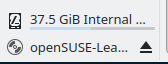
Sorry, I do not understand what those commands are supposed to prove.
I have no idea what this means either. They mount ISO? They mount partition 1 on this “ISO”?
And again, what does it prove? I can also mount ISO using plain mount. How is it related to the behavior of dolphin-plugins?
Is it worth to tell bugzilla about this, or will this be ignored as always?
Regarding the other stuff, I just wanted to compare mount and fuseiso with dolphin-plugins, but you already explained it’s a bug in dolphin-plugins… Thanks.
Do not confuse packagers with developers. It is not a packaging bug. If you want to report it, report where it belongs - upstream.
Ok, thanks very much sir.
Then, to finalize once and for all, a brief offtopic doubt regarding bug reporting,
This one
https://bugzilla.opensuse.org/show_bug.cgi?id=1214475
was utterly ignored; but I did search and found that “package updater” component is not part of XFCE desktop in that case, so reporting to upstream XFCE was not right anyways.
Package updater is certainly from openSUSE side, so why was it regarded as not valid?
@arvidjaar :
Forgot to mention:
In that case it would not be just reporting to KDE, but either to all upstream desktop environments, udisks2 itself, or openSUSE’s bugzilla indeed?
Because I also mentioned that it’s not just dolphin-plugins in KDE, but also file browsers in the other desktop environments (namely XFCE and GNOME). All of them base this functionality on udisks2.