How long have you been testing Leap 16 alpha??
How has it worked for you?
Are you using KDE or GNOME, something else?
It is in a vortual machine inside of Parallels on my Mac. As usual with SUSE, Parallels Tools will not install. It is just a test, so not a lot ofd use yet. I have a LEAP 15.6 box that I was thinking of upgrading since boot SSD died. KDE
I installed 16.0 Alpha on a VirtualBox guest machine.
Guest Additions compile but do not install,
Rustdesk cannot run due to missing library
Every AppImage I have tried has failed to execute.
The installer has so few choices - I use MATE desktop and had to install without KDE and Gnome and then use myrlyn to install C C++ and MATE desktop.
It took a while to figure out how to avoid BTRFS and get EXT4 for the root partition.
I will see if anyone has succeeded in getting the VIrtualBox Guest Additions to load.
Too frustrating to use with the mouse pointer out of sync with the display.
The ISO image also need to have the VirtualBox guest additions as it too has issues with VirtualBox.
My 2 Cents.
@larryr … commenting on your comments 
I installed 16.0 Alpha on a VirtualBox guest machine.
Me too, running with KDE Plasma v6.2.2 for the desktop
Guest Additions compile but do not install,
Hmmm. Complie? Are you referring to the Guest Additions ISO?
I downloaded the ISO from here:
“Index of http://download.virtualbox.org/virtualbox/7.1.4”
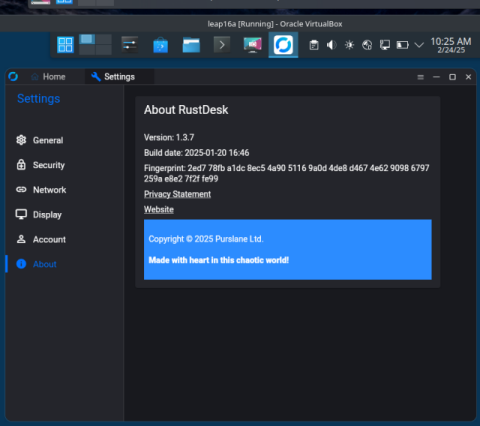
Rustdesk cannot run due to missing library
I don’s use Rustdesk, but I tested by installing it as a Flatpak (via Discover).
Works fine here … see screenshot below
Every AppImage I have tried has failed to execute.
No probs here … yet
The installer has so few choices
I agree … the Agama installer has very sparse configuration options.
It’s kind of like, “okay, you have choice A or B or C … that’s all”
It took a while to figure out how to avoid BTRFS and get EXT4 for the root partition.
I just left the filesystem type as BTRFS … usually, I partition / to be as BTRFS, then a separate /home as XFS. But this is just a “testing the next version”, so not important for specialized partitioning / filesystem for me.
Too frustrating to use with the mouse pointer out of sync with the display.
No issue here with the mouse pointer. It seemlessly moves from the Leap 15.6 desktop (the host) and into the Leap 16 vm guest window, and stays in sync.
Rustdesk running as Flatpak:
Hi All, understand that this is a third party product, so perhaps you need to look on their forums, bug reports etc?
I really don’t understand why you all don’t use the really supported version of libvirt/qemu etc… a very painless experience, I use the flatpak client to connect from any system to virtual machines, cockpit supports it etc?
@malcolmlewis wrote:
Hi All, understand that this is a third party product
I assume you’re referring to VirtualBox?
I really don’t understand why you all don’t use the really supported version of libvirt/qemu etc… a very painless experience
Well, for me, it’s simple - I’m a long-timer user of VBox. As a software engineer for about 40 years, we’ve always used it on various Host machines (*nix, Windows, etc) with various Guest machines. For me, it’s just a “i’ve always used it and know it” (painless for us). It was also nice to be able to download “ready to run Guest” images and be on the road in minutes - or easily share Guest images with other team members.
I could pursue libvert | QEMU (among others), but honestly, I retired about four years ago, so I’m less inspired | motivated to “learn something new” 
@myswtest I could say the same for GNOME vs Plasma  Although I do dabble with Hyplrand as a desktop environment.
I just see the numerous threads on what seems never ending issues with VirtualBox, but as you say use what works for you… 
I love the ease of VirtualBox - the cut and paste between host and guests.
The automatic attach of USB devices when I want them.
It is so easy to roll back changes and add and remove memory and devices.
The utilities to support VDI are amazing.
Hard to quit using something that I have had no issues with since 2004.
I too am retired and hate to learn new stuff.
I, too, like Sheldon Cooper, hate change for the sake of change.
If it aint broke, don’t mess with it.
I keep about 65 older folks (some in their 80’s) working some in Linux (openSUSE 15.6) and some in Windows 11.
The windows users are all upset that Office 365 menus are changing again. I have had to go in and remove copilot from their menus. It is bad enough that I have to set their fonts to 20 point for them to be able to read the screens and then they get mad at me because it all does not fit in the screen any more.
I have the same problem but I use a 43" Samsung TV for my monitor at 1920x1080 and I can see the smaller fonts with no problem.
I have tries many things and 7.1.2, 7.1.4 and 7.1.6 VirtualBox Guest Additions - none will load into the kernel.
I copied /usr/lib64/libxdo.so.3 from Tumbleweed into Leap16 and got Rustdesk to work.
Also no wine in Leap16.0-Alpha
7.1.4 and guest Additions are working here without problems.
With plasma/wayland and plasma/X11
Host Leap 15.6 with Virtualbox 7.1.4 from openSUSE OSS Repo(OSS -Update)
There is no openSUSE virtualbox in myrlyn - I have 7.1.6 host and it works fine for guest with 7.1.6 Guest Additions in:
Fedora
Tumbleweed
Leap 15.6
Ubuntu
Kali
Mint
Slowroll
Windows XP
Windows 10
Windows 11
but not for Leap 16.0-Alpha.
Still says unable to load kernel modules.
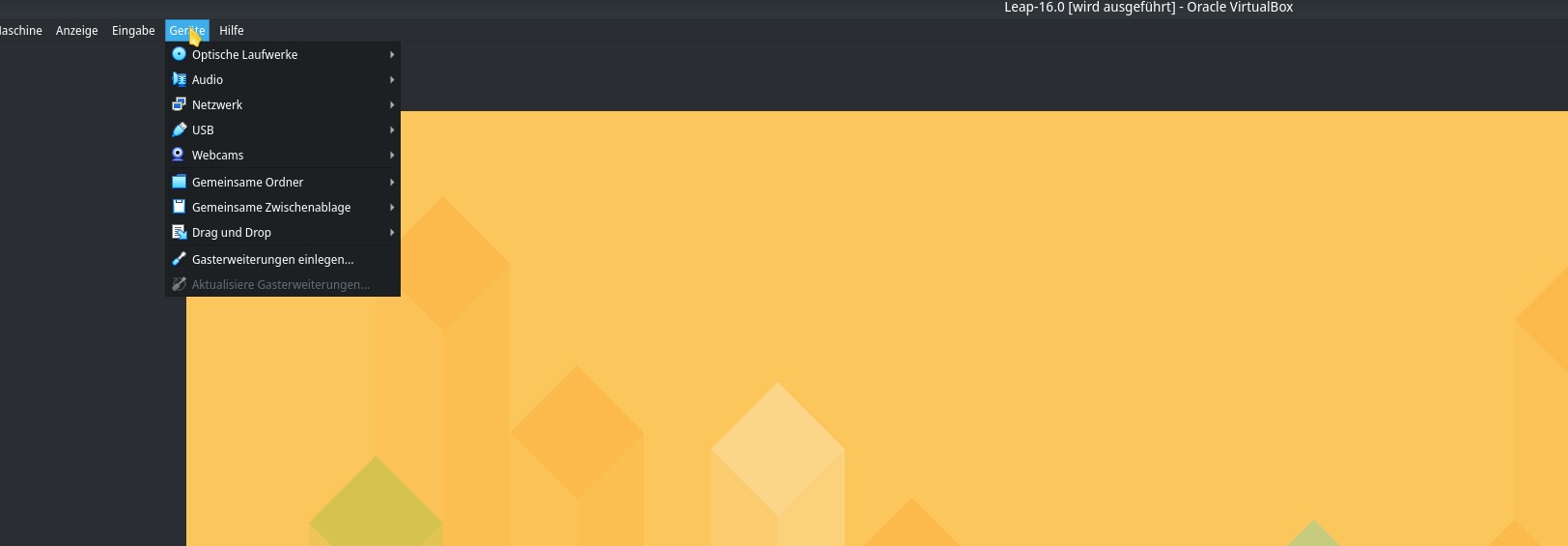
You can inside it to the CD in the Virtualbox Devices-Menu of the Leap 16.0 Guest.
Insert Guest Additions (in German Gasterweiterungen einlegen).
I am using the CD VirtualBox Guest Additions ISO.
It compiles clean - It will not install into the kernel.
Error Code 6 in the dmesg.