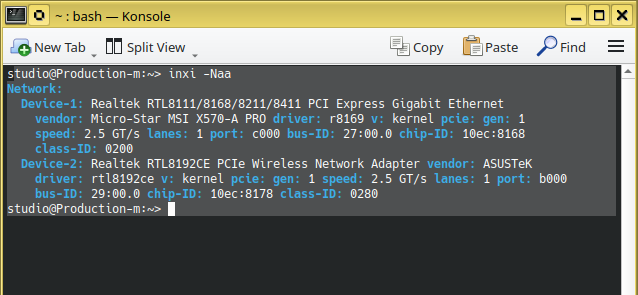
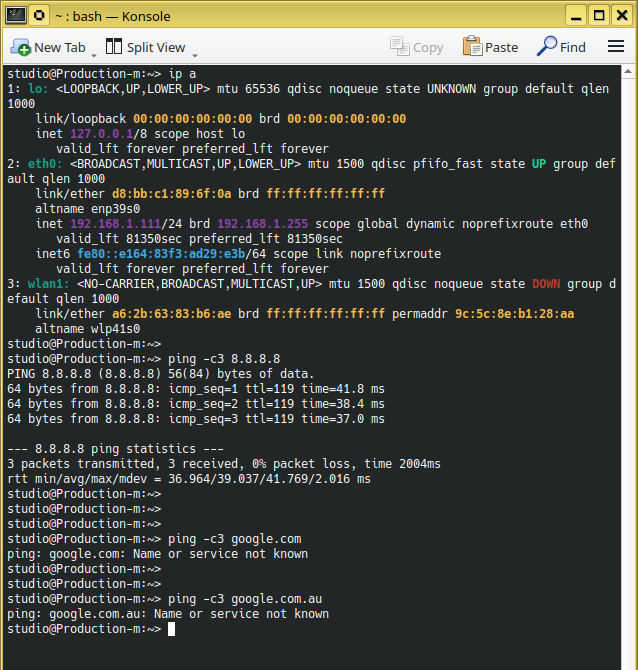
Ping to IP address works, so you are online. But name resolution doesn’t work. I’d say you have an issue with the nameserver setting. Are you using network manager? In that case
nmcli device show wlan1
might give a hint. Also, please post
cat /etc/resolv.conf
You may wish to compare it to the machine which does not have these issues.
BTW, please use the code tags </> including the command and the result rather than screenshots.
studio@Production-m:~>
studio@Production-m:~> nmcli device show eth0
GENERAL.DEVICE:                         eth0
GENERAL.TYPE:                           ethernet
GENERAL.HWADDR:                         D8:BB:C1:89:6F:0A
GENERAL.MTU:                            1500
GENERAL.STATE:                          100 (connected)
GENERAL.CONNECTION:                     eth0
GENERAL.CON-PATH:                       /org/freedesktop/NetworkManager/ActiveConnecti>
WIRED-PROPERTIES.CARRIER:               on
IP4.ADDRESS[1]:                         192.168.1.111/24
IP4.GATEWAY:                            192.168.1.1
IP4.ROUTE[1]:                           dst = 192.168.1.0/24, nh = 0.0.0.0, mt = 100
IP4.ROUTE[2]:                           dst = 0.0.0.0/0, nh = 192.168.1.1, mt = 20100
IP4.DNS[1]:                             192.168.1.1
IP6.ADDRESS[1]:                         fe80::e164:83f3:ad29:e3b/64
IP6.GATEWAY:                            --
IP6.ROUTE[1]:                           dst = fe80::/64, nh = ::, mt = 1024
lines 1-16/16 (END)


studio@Production-m:~>
studio@Production-m:~> cat /etc/resolv.conf
### /etc/resolv.conf is a symlink to /run/netconfig/resolv.conf
### autogenerated by netconfig!
#
# Before you change this file manually, consider to define the
# static DNS configuration using the following variables in the
# /etc/sysconfig/network/config file:
#     NETCONFIG_DNS_STATIC_SEARCHLIST
#     NETCONFIG_DNS_STATIC_SERVERS
#     NETCONFIG_DNS_FORWARDER
# or disable DNS configuration updates via netconfig by setting:
#     NETCONFIG_DNS_POLICY=''
#
# See also the netconfig(8) manual page and other documentation.
#
### Call "netconfig update -f" to force adjusting of /etc/resolv.conf.
nameserver 192.168.1.1
studio@Production-m:~>
studio@Production-m:~>
I recently started to use “1Password” and have not synchronised both machines. All the passwords are sitting on the production machine. So, you can imagen my predicament ! I had to get a new password for this forum …
…before that , I surfed the net re this issue . Everything pointed to a dns issue. … anyway
#
# /etc/nsswitch.conf
#
# An example Name Service Switch config file. This file should be
# sorted with the most-used services at the beginning.
#
# Valid databases are: aliases, ethers, group, gshadow, hosts,
# initgroups, netgroup, networks, passwd, protocols, publickey,
# rpc, services, and shadow.
#
# Valid service provider entries include (in alphabetical order):
#
#	compat			Use /etc files plus *_compat pseudo-db
#	db			Use the pre-processed /var/db files
#	dns			Use DNS (Domain Name Service)
#	files			Use the local files in /etc
#	hesiod			Use Hesiod (DNS) for user lookups
#	nis			Use NIS (NIS version 2), also called YP
#	nisplus			Use NIS+ (NIS version 3)
#
# See `info libc 'NSS Basics'` for more information.
#
# Commonly used alternative service providers (may need installation):
#
#	ldap			Use LDAP directory server
#	myhostname		Use systemd host names
#	mymachines		Use systemd machine names
#	mdns*, mdns*_minimal	Use Avahi mDNS/DNS-SD
#	resolve			Use systemd resolved resolver
#	sss			Use System Security Services Daemon (sssd)
#	systemd			Use systemd for dynamic user option
#	winbind			Use Samba winbind support
#	wins			Use Samba wins support
#	wrapper			Use wrapper module for testing
#
# Notes:
#
# 'sssd' performs its own 'files'-based caching, so it should generally
# come before 'files'.
#
# WARNING: Running nscd with a secondary caching service like sssd may
# 	   lead to unexpected behaviour, especially with how long
# 	   entries are cached.
#
# Installation instructions:
#
# To use 'db', install the appropriate package(s) (provide 'makedb' and
# libnss_db.so.*), and place the 'db' in front of 'files' for entries
# you want to be looked up first in the databases, like this:
#
# passwd:    db files
# shadow:    db files
# group:     db files

passwd:		compat
group:		compat
shadow:		compat
# Allow initgroups to default to the setting for group.
# initgroups:	compat

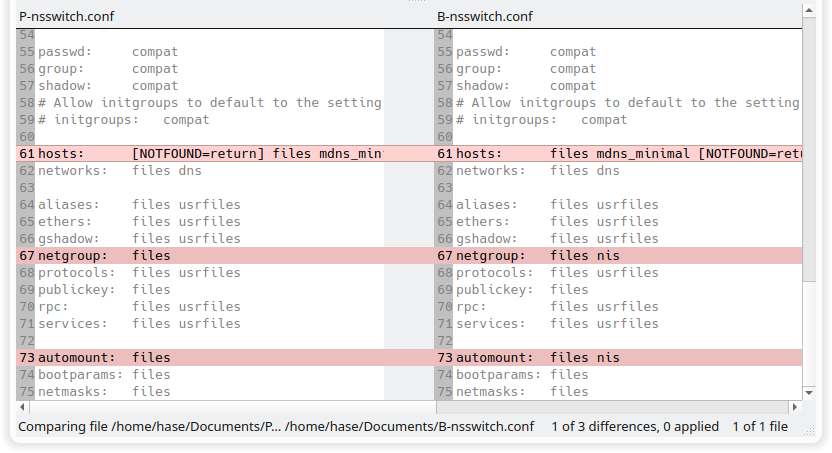
hosts:  	[NOTFOUND=return] files mdns_minimal dns
networks:	files dns

aliases:	files usrfiles
ethers:		files usrfiles
gshadow:	files usrfiles
netgroup:	files
protocols:	files usrfiles
publickey:	files
rpc:		files usrfiles
services:	files usrfiles

automount:	files
bootparams:	files
netmasks:	files
Does the warning points to something ??
#
# WARNING: Running nscd with a secondary caching service like sssd may
# 	   lead to unexpected behaviour, especially with how long
# 	   entries are cached.
#
Looking at clous on the net , there was a reference to /etc/resolv.conf.
Viewing the file
### /etc/resolv.conf is a symlink to /run/netconfig/resolv.conf
### autogenerated by netconfig!
#
# Before you change this file manually, consider to define the
# static DNS configuration using the following variables in the
# /etc/sysconfig/network/config file:
#     NETCONFIG_DNS_STATIC_SEARCHLIST
#     NETCONFIG_DNS_STATIC_SERVERS
#     NETCONFIG_DNS_FORWARDER
# or disable DNS configuration updates via netconfig by setting:
#     NETCONFIG_DNS_POLICY=''
#
# See also the netconfig(8) manual page and other documentation.
#
### Call "netconfig update -f" to force adjusting of /etc/resolv.conf.
**Nameserver 192.168.1.1**

The nameserver entry was 192.168.1.1   ??!!!??  I thought that is an internal address ??
The file “/etc/nsswitch.conf” gives the order of lookup for various naming services. When “[NOTFOUND=return]” is too early in the hosts list, then the naming services will give up before finding the name you are looking up. Your change fixed that.