Sorry, I tend to forget that Leap does not enable persistent journal by default and users cannot access run-time journals (at least in the systemd version that is used on Leap).
Yep. You can do this.
When I switched from filezilla to dolphin some days ago I did the following:
- Verified
sftplogin:
karl@erlangen:~> sftp sftp://mistelberger.net@ssh.mistelberger.net
mistelberger.net@ssh.mistelberger.net's password:
Connected to ssh.mistelberger.net.
sftp> bye
karl@erlangen:~>
- Invoked dolphin:
dolphin sftp://mistelberger.net@ssh.mistelberger.net
A window popped up asking for the credentials. I entered the password and dolphin readily opened the remote folder (as did sftp before).
- Created an entry on the left pane of dolphin and stored the password in kwallet.
As always your mileage may vary.
Yes, I have an entry in the left panel that I use, but the password is not stored in Kwallet.
Usually, for example when I connect an encrypted external disk, the password dialog has a checkbox “remember password”. I check this and the password is saved in Kwallet. The next time I connect to this disk, the password dialog appears with the password prefilled:
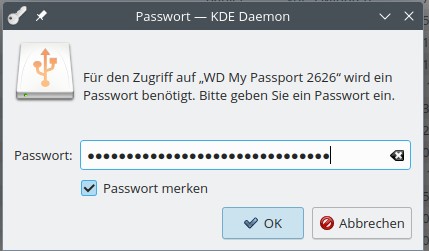
But when I connect to this sftp-address dolphins password dialog does not have this checkbox and I cannot chose to save it:
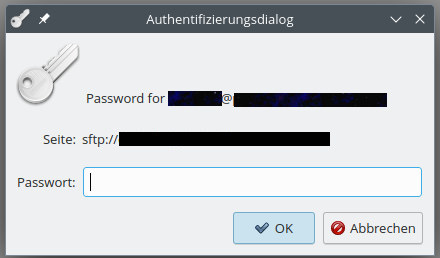
I don’t know why and I haven’t found a setting in dolphin to have this password saved in Kwallet, too. However, dolphin somehow remembers the connection until I reboot. So usually I only have to type it once a day.
It would be nice if it could save it to Kwallet, but I don’t know how to achieve that and so I just live with it 
As I already said, SSH has multiple authentication methods. kio_sftp only stores passwords that were used with password authentication. Passwords can also be requested interactively using keyboard-interactive which is normally the preferred method.
debug1: Authentications that can continue: publickey,password,keyboard-interactive
debug1: Next authentication method: publickey
debug1: Trying private key: /home/andrei/.ssh/id_rsa
debug1: Trying private key: /home/andrei/.ssh/id_ecdsa
debug1: Trying private key: /home/andrei/.ssh/id_ecdsa_sk
debug1: Trying private key: /home/andrei/.ssh/id_ed25519
debug1: Trying private key: /home/andrei/.ssh/id_ed25519_sk
debug1: Trying private key: /home/andrei/.ssh/id_xmss
debug1: Trying private key: /home/andrei/.ssh/id_dsa
debug1: Next authentication method: keyboard-interactive
(andrei@localhost) Password:
Which is why I wanted to see the debug log of your kio_sftp session where we would see what authentication method was actually used.
There is no setting to do it for your secret key password or keyboard-interactive password. You may consider submitting upstream feature request.
You are free to fight for enlightenment. But is that really what you want to do? If so, try sftp <your url> and post both the command and the resulting output as I did above. You may obfuscate url-related information but don’t edit any details. By the way I am not shy to post this information as everybody readily figures out what’s related to mistelberger.net.
This bug is also present in Tumbleweed and not limited to ssh/sftp. webdav connections also suffer from it.
I would be great to finally find Dolphin’s secret password storage for failed kio connections. Because it is not in kwallet.
There is no “secret password storage”:
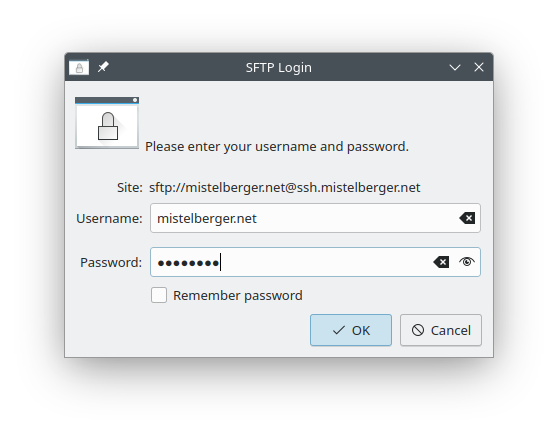
Upon checking “Remember password” kwallet pops up:
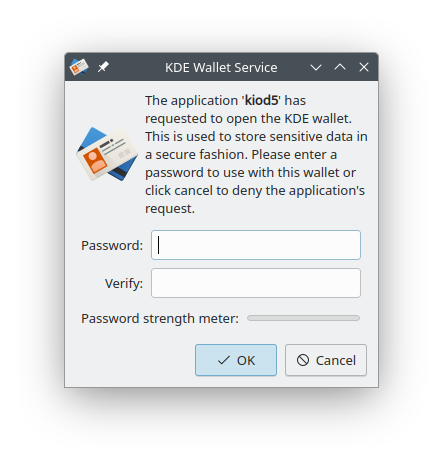
Credentials are stored in Wallet manager:
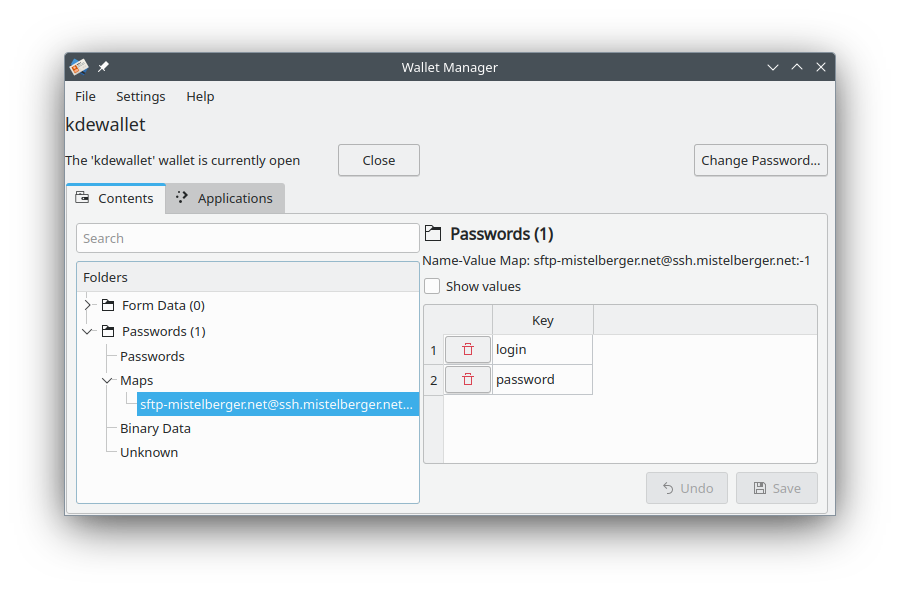
Users may move the password to trash and start again.
That’s not correct. Even if you delete the entry in the kwallet, dolphin does not ask again. And we do not know why. There is nothing in .config, or the kwallet refering to the server address.
There are numerous forum posts about this but never a solution. The users always only say they got it resolved by a clean reinstall. This goes back for decades.
Some examples:
You already fail to acknowledge the bug here on a smb connection: How to make Dolphin to access SMB share again?
KDE Bug, which they say was resolved in 2011 (!) with similar description: 209764 – dolphin can neither remember well nor forget the network places' passwords
Manjaro Forum without a clear solution: Dolphin: The file or folder smb://sharename does not exist - Network - Manjaro Linux Forum
Here is a debug log: openSUSE Paste
ServerA is not saved in kwallet, but had some wrong password entered into the dialog several months ago.
ServerB works as intended.
P.S: Even when I manually enter the correct user name and password into the wallet as Map for webdavs-ServerUserA@ServerA.tld:-1-ServerA Realm dolphin would not take it from there.
Sorry, forgot to mention kiod5 remembers the credentials: How to clear dolphin password after failed sftp login? - #18 by karlmistelberger
I always confront my claims with reality. It takes precedence over user claims. I verified the behaviour described in post #18. Remove the credentials from kwallet and terminate kiod5. Dolphin will ask for a new password.
Created a Places entry in dolphin with “Label: FRITZ!Box 7530 AV / Location: smb://fritz.box/FRITZ.NAS”. This entry exhibits the same behaviour as “Label: ssh.mistelberger.net / Location sftp://mistelberger.net@ssh.mistelberger.net”. Again reality supersedes user claim.
If you managed to obtain debug logs, you may consider providing debug logs I requested earlier.
You must live in your own reality distortion field. There are multiple statements from me and from the original poster that these passwords are not in the wallet. Thus they cannot be deleted from there.
Your own system and failure to reproduce it are not relevant for “reality”. According to your descriptions you didn’t even try to reproduce it accordingly. Try to enter a WRONG password and let the connection fail. Delete it afterwards and tell me if you still get the chance to re-enter for a correct one.
1 Like
https://paste.opensuse.org/pastes/e5a738b077c8
Are you not able to click the link or what do you expect to find which is not in the logs I already provided?
Here is another datapoint from my reality: I revoked application access permissions for kiod5 in kwalletmanager and rebooted the system. Then I started dolphin and tried to access ServerA.tld. Same behavior: kf.kio.workers.http: Couldn't connect, oopsie!. Then I accessed ServerB.tld and only at this point the query to open the wallet and grant kiod5 access permissions pops up. So dolphin did non even ask for credentials for ServerA in the wallet.
I wrote a week ago How to clear dolphin password after failed sftp login? - #4 by karlmistelberger
Running e.g. dolphin sftp://mistelberger.net@ssh.mistelberger.net always succeeds on infamous host erlangen. Whenever I enter a wrong password I am asked to retry.
The same holds today for “dolphin smb://fritz.box/FRITZ.NAS”. I am prompted again and again until I enter the valid password.
I quit dolphin, open Wallet Manager and delete the credentials. Then I save the changes and quit Wallet Manager.
When invoking again dolphin will readily open //fritz.box/FRITZ.NAS without asking for the credentials.
I quit dolphin and terminate kiod5. I repeat and make sure it’s really dead:
karl@erlangen:~> killall kiod5
karl@erlangen:~> killall kiod5
kiod5: Kein Prozess gefunden
karl@erlangen:~>
I open dolphin which asks for the credentials. When entering a wrong password I am prompted again and again until I enter the correct password.
It doesn’t matter whether I specify smb://fritz.box/FRITZ.NAS on the command line or I use the Place in the left pane of dolphin.
That’s the reality on infamous host erlangen. 
Operating System: openSUSE Tumbleweed 20231130
KDE Plasma Version: 5.27.9
KDE Frameworks Version: 5.112.0
Qt Version: 5.15.11
Kernel Version: 6.6.3-1-default (64-bit)
Graphics Platform: X11
Processors: 16 × AMD Ryzen 7 5700G with Radeon Graphics
Memory: 30,7 GiB of RAM
Graphics Processor: AMD Radeon Graphics
Leap 15.5 exhibits the same behaviour as Tumbleweed.
I am. This topic is about SFTP connection, so I am afraid I do not see how debug log from HTTP connection can be of any use.
And I am telling you from my first comment in this thread that this bug is not confined to sftp but to other kio connection types as well: smb and http at least, possibly more.