Does the printer’s built-in web UI offer any faxing function itself?
@deano_ferrari
There is a web UI, but only for configuration of the printer.
Until now I did not find a way to send a FAX via that UI.
Ok, thanks for checking.
The basic problem about the PPD files is that there are two versions of Printer Drivers (Linux Packages) at the Kyrocera Web-Download-Page:
KyoceraLinuxPackages-20240311.tar.gz with kyodialog-9.2-0.x86_64.rpm
KyoceraLinuxPackages-20240521.tar.gz with kyodialog-9.4-0.x86_64.rpm
9.4 appears to be an update of 9.2. But that’s not true at all.
They may only be used exclusively.
An update from 9.2 to 9.4 failed.
Only 9.2 contails files for my printer.
Version 9.2 contains only a few PPD files,
while version 9.4 contains the corresponding PPD files for a large number of Kyocera printers.
At first glance, there are no overlaps.
My bad luck was that I found version 9.4 and installed it.
However, this version isn’t compatible with my printer.
Kyocera didn’t make a mistake there. I simply shouldn’t have continued searching.
Now I’m trying to properly integrate the printer into CUPS.
There are differences between my host (Leap156) and the VM (Debian).
Leap doesn’t offer an IPPS printer.
I’m still looking.
Stay with using that version if you want to use the vendor printer drivers. However, as I already pointed out earlier, they offer no help with respect to fax functionality, so you could stick with the “auto-discovered” driverless (IPP Everywhere) protocol.
By the way, Debian knows something about faxing.
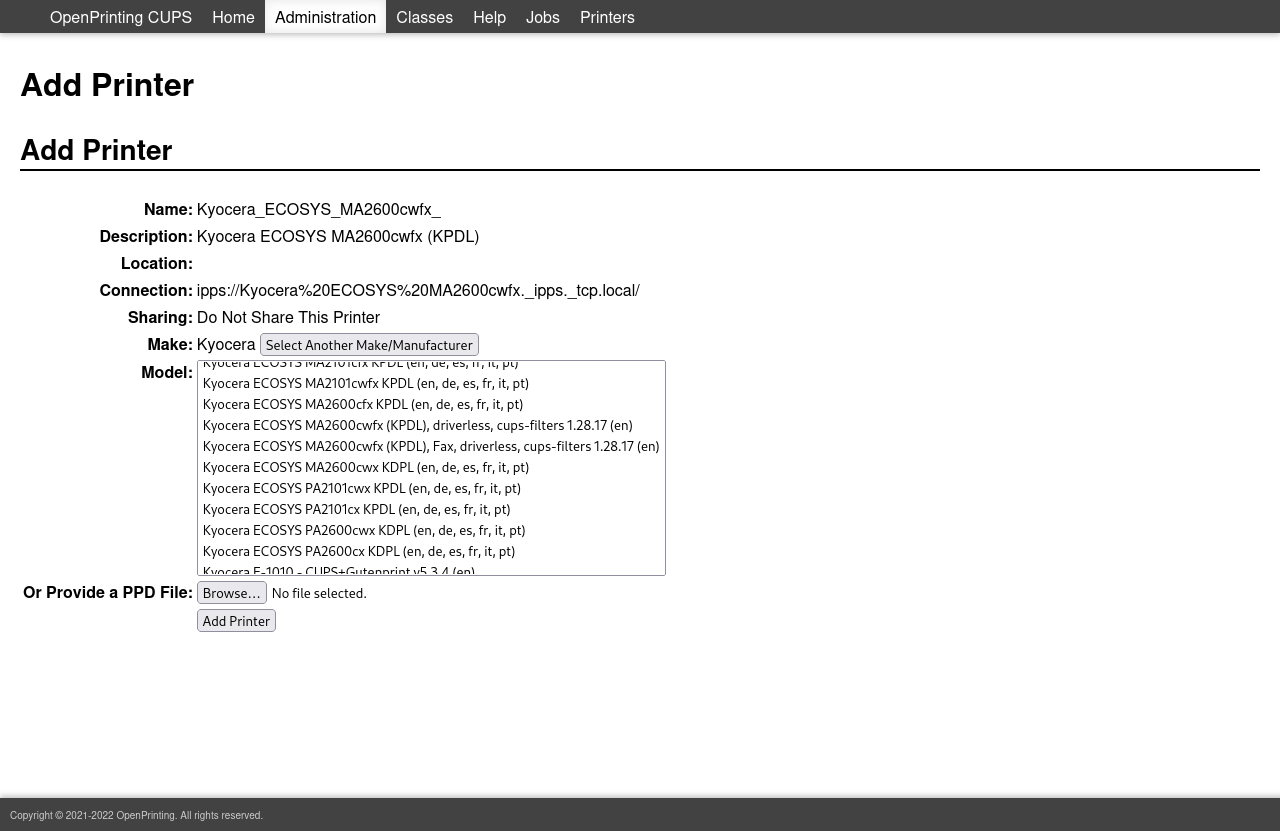
That’s not offered in Leap156
I’m trying to find the cause.
For IPP Everywhere, no explicit configuration is required at all, but if you want to manually configure using the IPPS protocol, you would choose “Generic” > “IPP Everywhere”. BTW, I assume that you’re uing the CUP web UI to do this?
That is an interesting find re the “Kycoera Fax driverless” entry.
Compare the Avahi discovery results between Debian and Leap…
avahi-browse -art | grep -i kyocera
How else can I install the printer?
Some people use the KDE (or equivalent Gnome) desktop utility. I’ve always preferred the CUPS web UI as you 're using. Anyway, likely different CUPS version in use with respect to Debian and Leap. You could verify that for yourself.
FWIW, I’m using the printing repo. You could do the same
https://download.opensuse.org/repositories/Printing/16.0/
Add the repo then upgrade CUPS accordingly.
The output is very large. (~ 65 lines, ~10k characters)
Which parts are interesting to compare?
Just try to identify the snippet relating to the Kyocera discovery. It should show you the fax device as well (in the Debian case at least)?
That snippet is as long as I wrote it. 
OK, I’ll try.
This topic was automatically closed 30 days after the last reply. New replies are no longer allowed.